Traefik instead of NGINX for a growing Docker Compose stack
With eight services in a Docker Compose stack, nginx.conf becomes a maintenance burden. Traefik reads service configuration directly from Docker labels, terminates TLS automatically through ACME and needs no separate configuration file. Why I switched and what the configuration looks like.
Contents
- The problem with a growing stack
- What Traefik does differently
- Local development configuration
- Production configuration
- What IP-level rate limit middleware provides
- What changes in daily work
- All articles in the series
The problem with a growing stack
Local Insight runs in Docker Compose. The project started with four services. Today there are eight: backend, frontend, Zitadel, Zitadel Login UI, MinIO, Redis, Qdrant and soon Postgres. Each new service that needs external access requires its own NGINX server block in nginx.conf.
That sounds minor, but it becomes a real problem when several people work on the stack or the configuration changes frequently. Configuration lives separately from the service. Adding a service to docker-compose.yml also requires opening and editing nginx.conf. The two files drift apart.
Then there is TLS. NGINX does not manage its own certificate. That needs a Certbot sidecar, a cron renewal script and a volume structure for certificate files. This is manageable in production, but it is additional infrastructure to maintain.
I tried Traefik and stayed with it.
What Traefik does differently
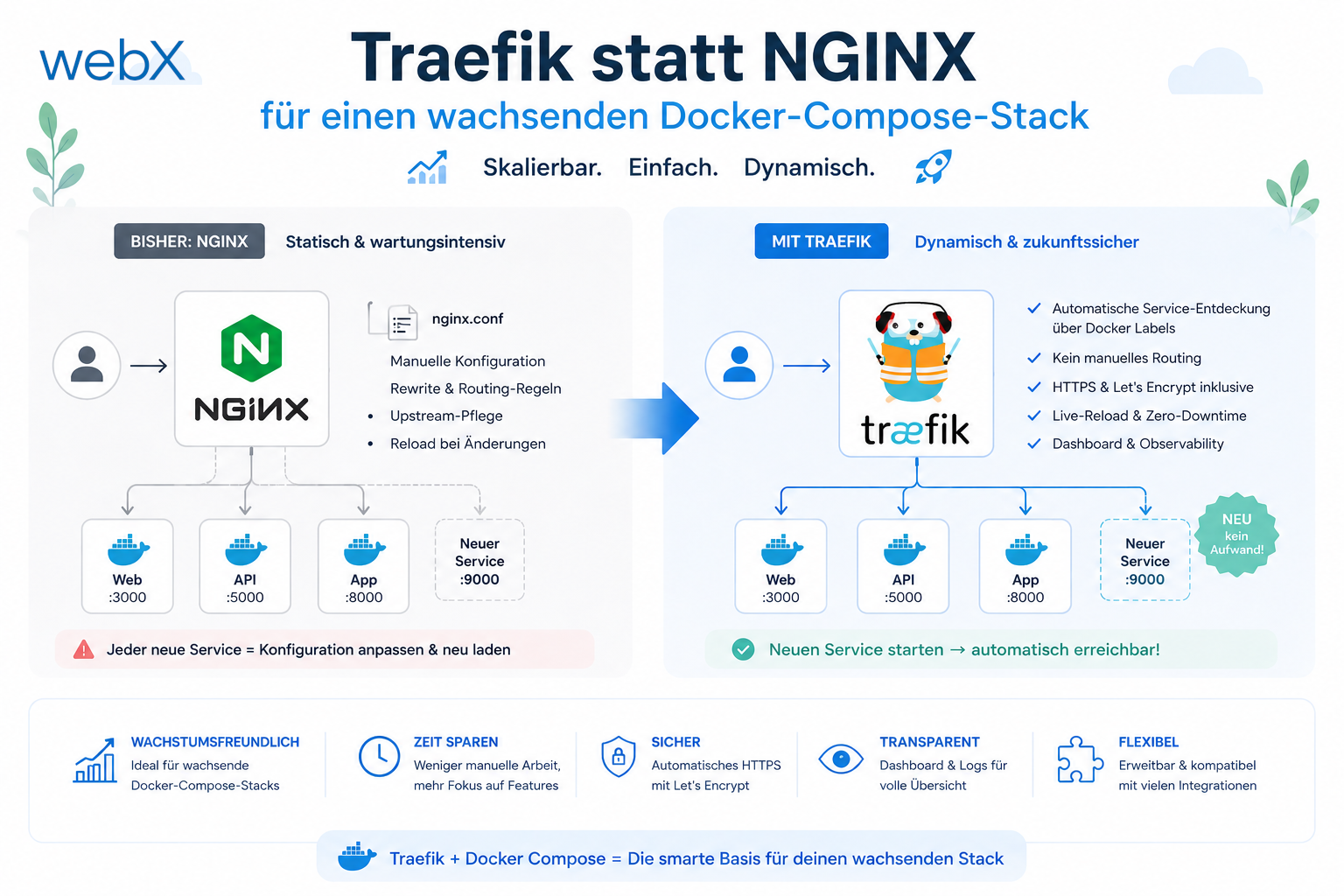
Traefik is a cloud-native reverse proxy built for dynamic container environments. The decisive difference from NGINX is that Traefik configures itself from Docker labels on services.
When I add a service to docker-compose.yml and give it labels, Traefik immediately knows how it should be reached, which port it uses and whether it should run behind a middleware stack. No separate configuration file and no proxy restart.
A comparison for this specific setup:
| Factor | Traefik | NGINX |
|---|---|---|
| Service configuration | Labels in the Compose file | Separate server block in nginx.conf |
| Automatic TLS | Built in through ACME/Let’s Encrypt | Certbot sidecar and cron renewal |
| Rate limiting | Middleware as a label | Separate limit_req_zone block |
| Dashboard | Built in, shows all routes live | Not available |
| Configuration maintenance | Labels live with the service | Separate file grows with the service count |
NGINX is the right choice when one service needs maximum control. For a growing stack, Traefik is the better decision.
Local development configuration
Locally, Traefik runs without TLS. Its dashboard is available on port 8085 and shows all discovered routes, middleware and service health states.
The Traefik service in docker-compose.override.yml:
traefik:
  image: traefik:v3.3
  command:
    # Enable Docker provider, do not expose containers by default
    - '--providers.docker=true'
    - '--providers.docker.exposedbydefault=false'
    - '--entrypoints.web.address=:80'
    # Enable API dashboard for local development
    - '--api.dashboard=true'
    - '--api.insecure=true'
  ports:
    - '80:80'
    - '8085:8080'
  volumes:
    # Read-only access to Docker socket for label discovery
    - '/var/run/docker.sock:/var/run/docker.sock:ro'
  networks:
    - app-network
Labels on the backend service:
backend:
  labels:
    - 'traefik.enable=true'
    - 'traefik.http.routers.backend.rule=Host(`api.localhost`)'
    - 'traefik.http.routers.backend.entrypoints=web'
    - 'traefik.http.services.backend.loadbalancer.server.port=3000'
    # IP-level rate limit: 60 requests/min, burst 20
    - 'traefik.http.middlewares.backend-ratelimit.ratelimit.average=60'
    - 'traefik.http.middlewares.backend-ratelimit.ratelimit.burst=20'
    - 'traefik.http.routers.backend.middlewares=backend-ratelimit'
exposedbydefault=false matters. Traefik ignores services without a traefik.enable=true label. Otherwise, every new container on the network would be routed automatically.
Production configuration
Production adds HTTPS and automatic certificate management. Traefik communicates directly with the Let’s Encrypt API through ACME and stores certificates in a Docker volume.
traefik:
  image: traefik:v3.3
  command:
    - '--providers.docker=true'
    - '--providers.docker.exposedbydefault=false'
    # HTTP entry point redirects to HTTPS
    - '--entrypoints.web.address=:80'
    - '--entrypoints.web.http.redirections.entrypoint.to=websecure'
    - '--entrypoints.web.http.redirections.entrypoint.scheme=https'
    - '--entrypoints.websecure.address=:443'
    # ACME/Let's Encrypt TLS resolver
    - '--certificatesresolvers.letsencrypt.acme.email=${ACME_EMAIL}'
    - '--certificatesresolvers.letsencrypt.acme.storage=/letsencrypt/acme.json'
    - '--certificatesresolvers.letsencrypt.acme.tlschallenge=true'
  ports:
    - '80:80'
    - '443:443'
  volumes:
    - '/var/run/docker.sock:/var/run/docker.sock:ro'
    # Persistent volume for TLS certificates
    - 'letsencrypt_data:/letsencrypt'
  networks:
    - app-network
The backend service receives HTTPS labels in production:
backend:
  # No direct port binding. Traefik is the only entry point
  ports: []
  labels:
    - 'traefik.enable=true'
    - 'traefik.http.routers.backend.rule=Host(`${BACKEND_DOMAIN}`)'
    - 'traefik.http.routers.backend.entrypoints=websecure'
    - 'traefik.http.routers.backend.tls.certresolver=letsencrypt'
    - 'traefik.http.services.backend.loadbalancer.server.port=3000'
ports: [] on the backend service removes the direct host binding. The Node.js process is externally accessible only through Traefik.
What IP-level rate limit middleware provides
Traefik’s ratelimit middleware limits requests per IP address before they reach Node.js. With average=60 and burst=20, that means 60 requests per minute with short burst capacity.
This is Layer 1. It stops bots and simple DDoS attempts at proxy level without consuming a single JavaScript event loop tick.
What this layer cannot provide is per-user limits. Traefik has no access to decoded JWT contents. Two users behind one IP share the same IP limit. That is correct for network-level abuse protection, but insufficient for account-level quota enforcement.
Layer 2 handles that. I describe it in the next article.
What changes in daily work
The dashboard at localhost:8085 shows discovered routes, active middleware and service health live. When a service receives labels and Traefik reloads, the route appears in the dashboard within seconds.
To configure a production domain, I add two labels to the service. Traefik asks Let’s Encrypt for a certificate, receives it and enables HTTPS for the domain. No Certbot, no cron job and no manually created certificate-file volume.
This is the main benefit I notice in practice: minimal cognitive overhead for every new route.
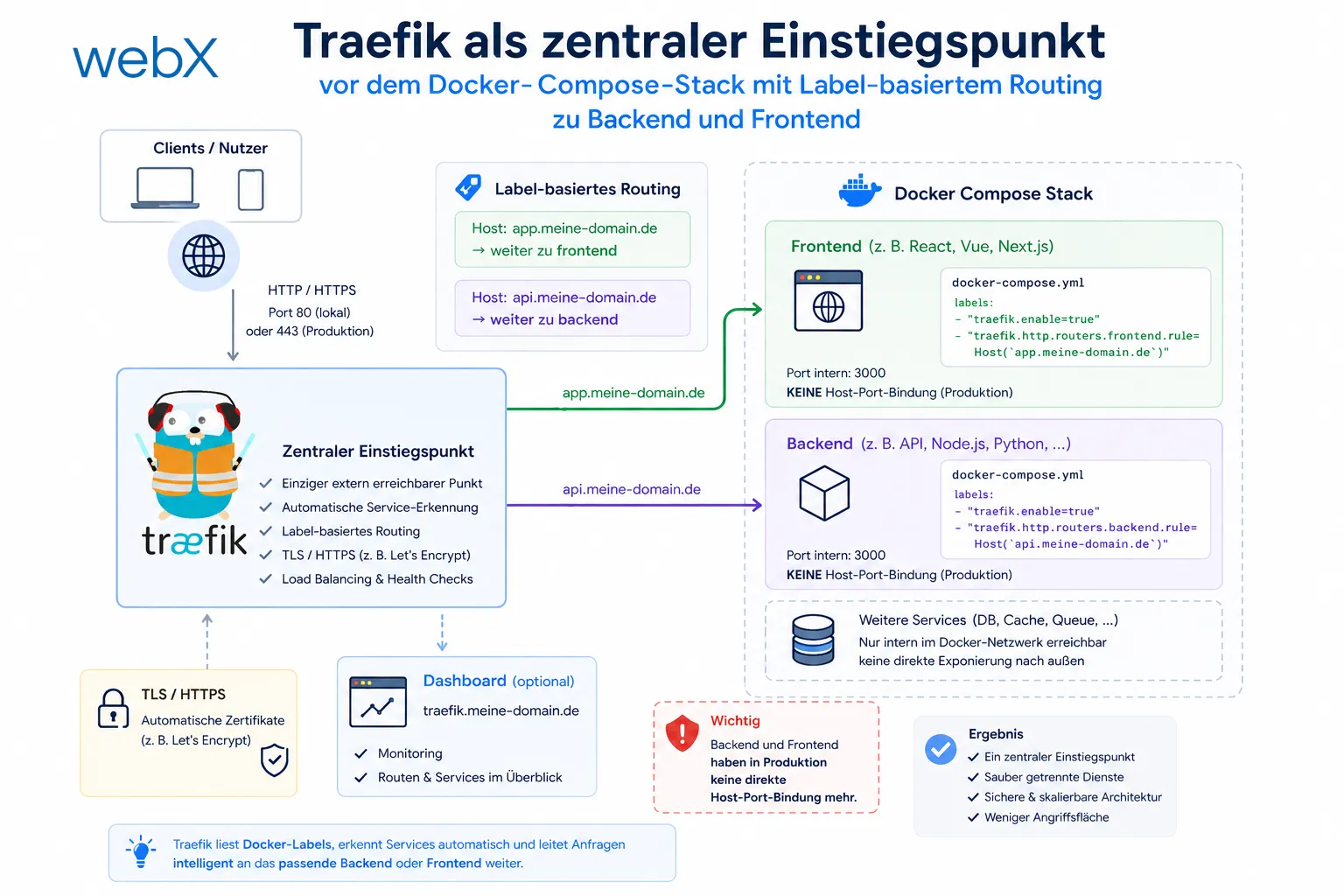
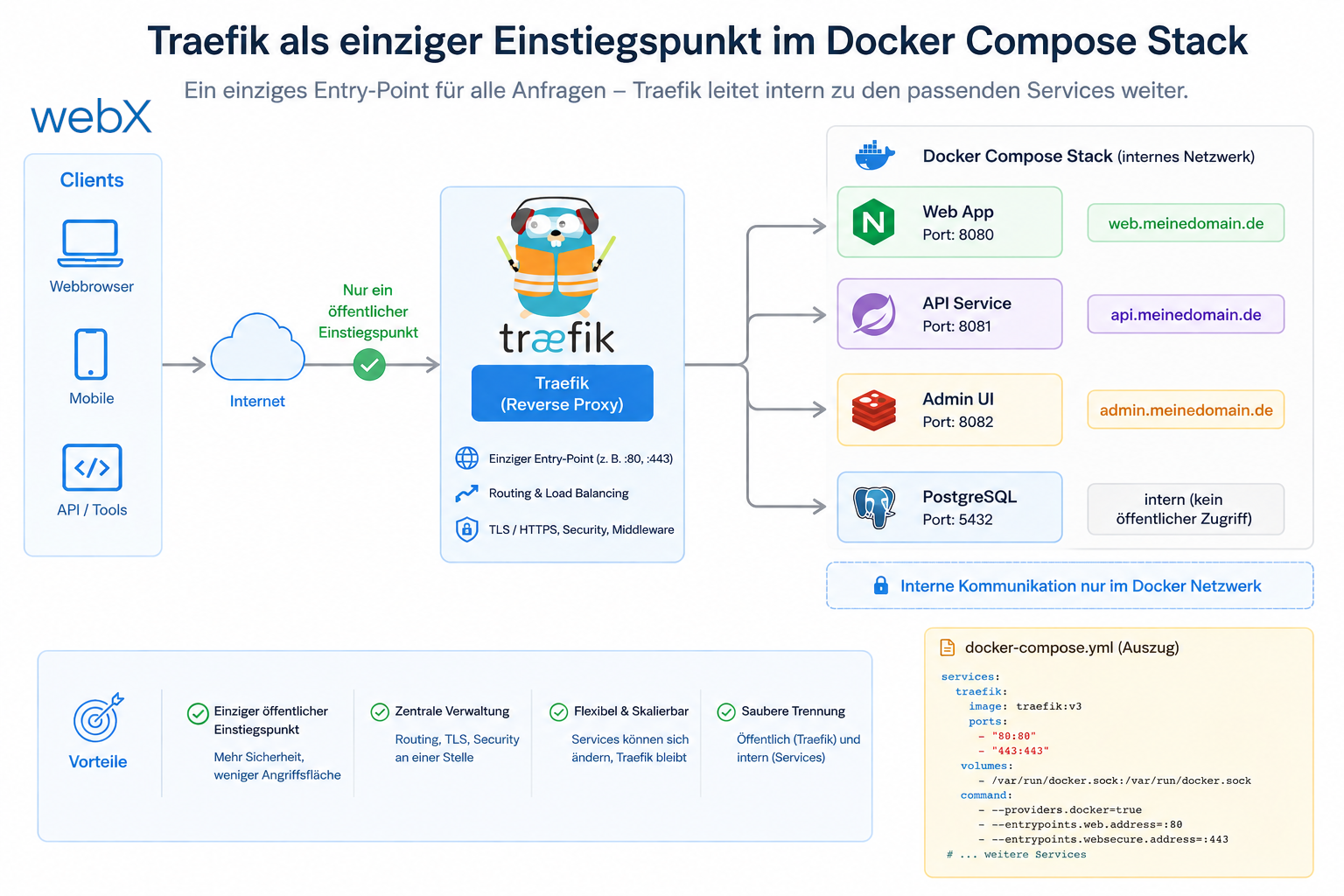
The diagram shows Traefik as the stack’s only external entry point. HTTP requests arrive on port 80 locally or 443 in production. Traefik reads the services’ Docker labels and forwards requests accordingly. Backend and frontend no longer have direct host-port bindings in production. The original diagram retains its German labels.
All articles in the series
- Vision and system overview: Chrome Extension, RAG architecture and project background: Read article
- Building a RAG system: Qdrant, embeddings and cosine similarity in TypeScript: Read article
- AI provider abstraction: Ollama vs. OpenAI, interface design and no vendor lock-in: Read article
- Chrome Extension MV3: Three isolated runtime contexts, message passing and Strategy Pattern: Read article
- Docker Compose strategy: The override pattern, from local development to Azure: Read article
- Ollama locally vs. Docker: The decision and its consequences: Read article
- Ollama auto-pull entrypoint: Automated model setup at container startup: Read article
- tsconfig and Vite:
Node16vs.bundler, and why Vite has its own rules: Read article - Load complete Instagram captions with MutationObserver: Read article
- Chrome Extension foundation with health indicator and retry queue: Read article
- Phase 2 features: Shadow DOM overlay, Tailwind v4 and duplicate detection: Read article
- Race condition in platform detection: How a UI event breaks Instagram detection: Read article
- Extracting PostId in two Instagram layouts: querySelector vs. ancestor traversal: Read article
- Capture a complete Instagram carousel with MutationObserver: Lazy loading, observer-before-click and timeout fallback: Read article
- Notes and tags when saving screenshots: Read article
- Instagram keyboard shortcuts block Chrome Extension input: Read article
- Lowercase normalization and duplicate detection in tag input: Read article
- Zitadel Login V2 in Docker Compose with three hidden errors: Read article
- PKCE OAuth in a Chrome MV3 extension: Read article
- React frontend with react-oidc-context and Zitadel: Read article
- Vite build-time environment variables in Docker: Read article
- Event-driven ingestion with BullMQ and Redis: Read article
- MinIO instead of Azurite: S3-compatible object storage locally and on Hetzner: Read article
- access_token, id_token and the Userinfo endpoint: Which belongs where: Read article
- Qdrant multi-tenancy with one collection per user: Read article
- When backend and frontend know different types: Read article
- Removing Zitadel bootstrap: Host header bug and manual setup: Read article
- Backend code review with six problems fixed before launch: Read article
- Traefik instead of NGINX: Reverse proxy for a growing Docker Compose stack: (this article)
- Two-layer rate limiting: Traefik and express-rate-limit with Redis: Read article
- Implementing GDPR Article 17 correctly: Promise.allSettled and export batching: Read article
- Embedding model lock-in: Why mxbai-embed-large is a permanent production decision: Read article
- Docker volumes in production: Named volumes, bind mounts and the Hetzner volume approach: Read article
- Two vulnerabilities before launch: Redis without authentication and an exposed Qdrant admin port: Read article
- Traefik as the single entry point in the Docker Compose stack: Read article
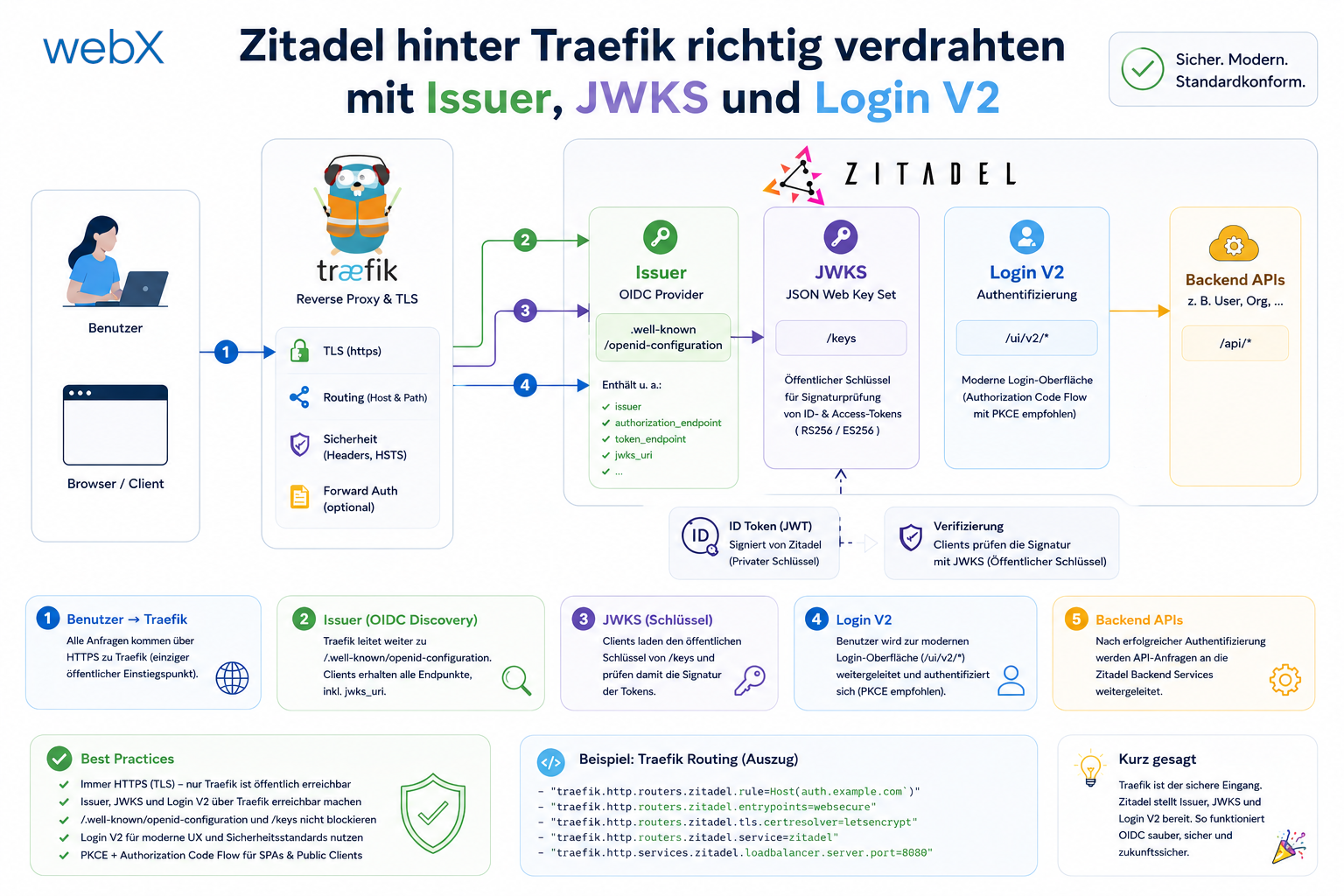
- Connecting Zitadel behind Traefik with issuer, JWKS and Login V2: Read article
- Fixing the frontend when the nginx healthcheck fails on localhost: Read article
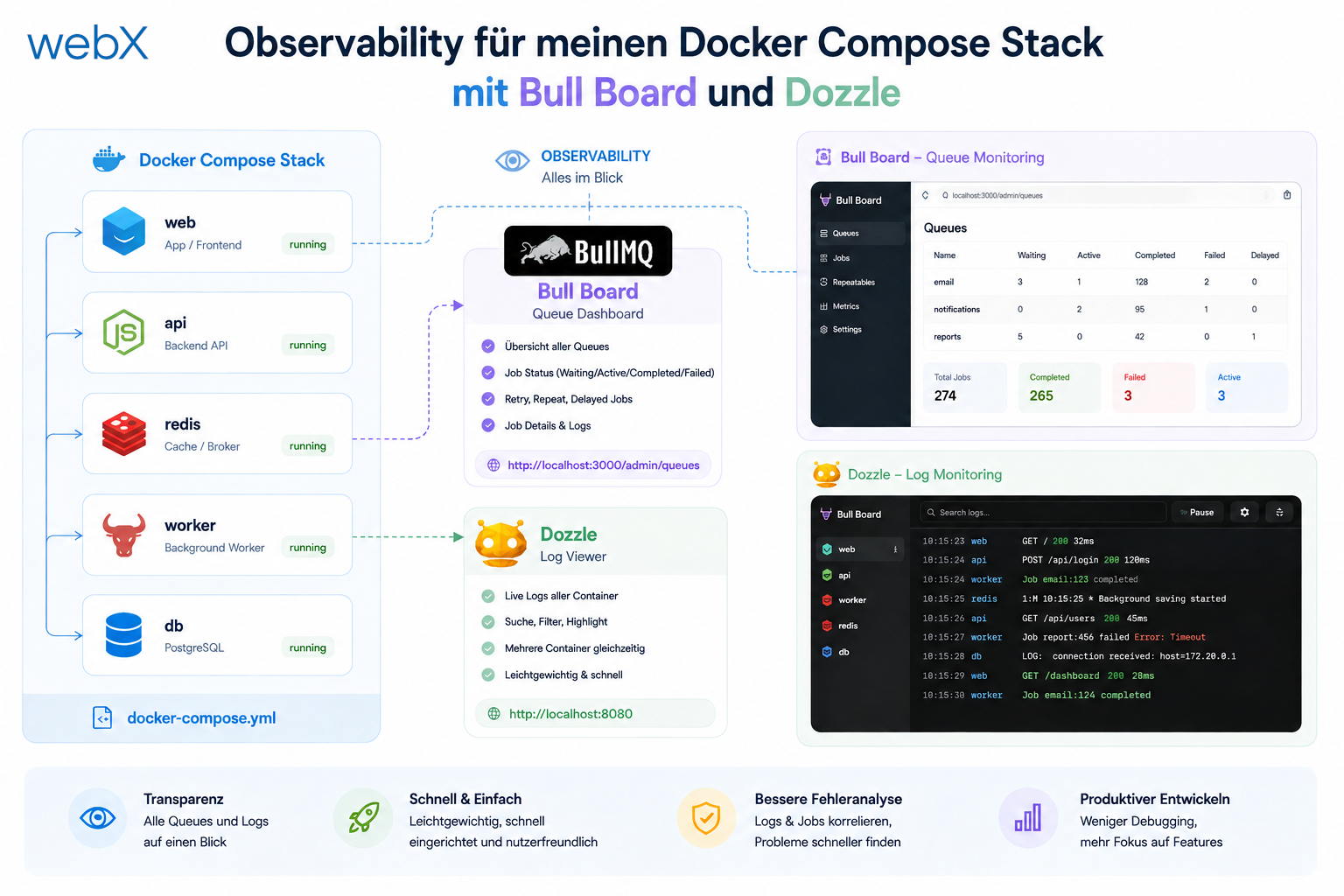
- Observability for my Docker Compose stack with Bull Board and Dozzle: Read article
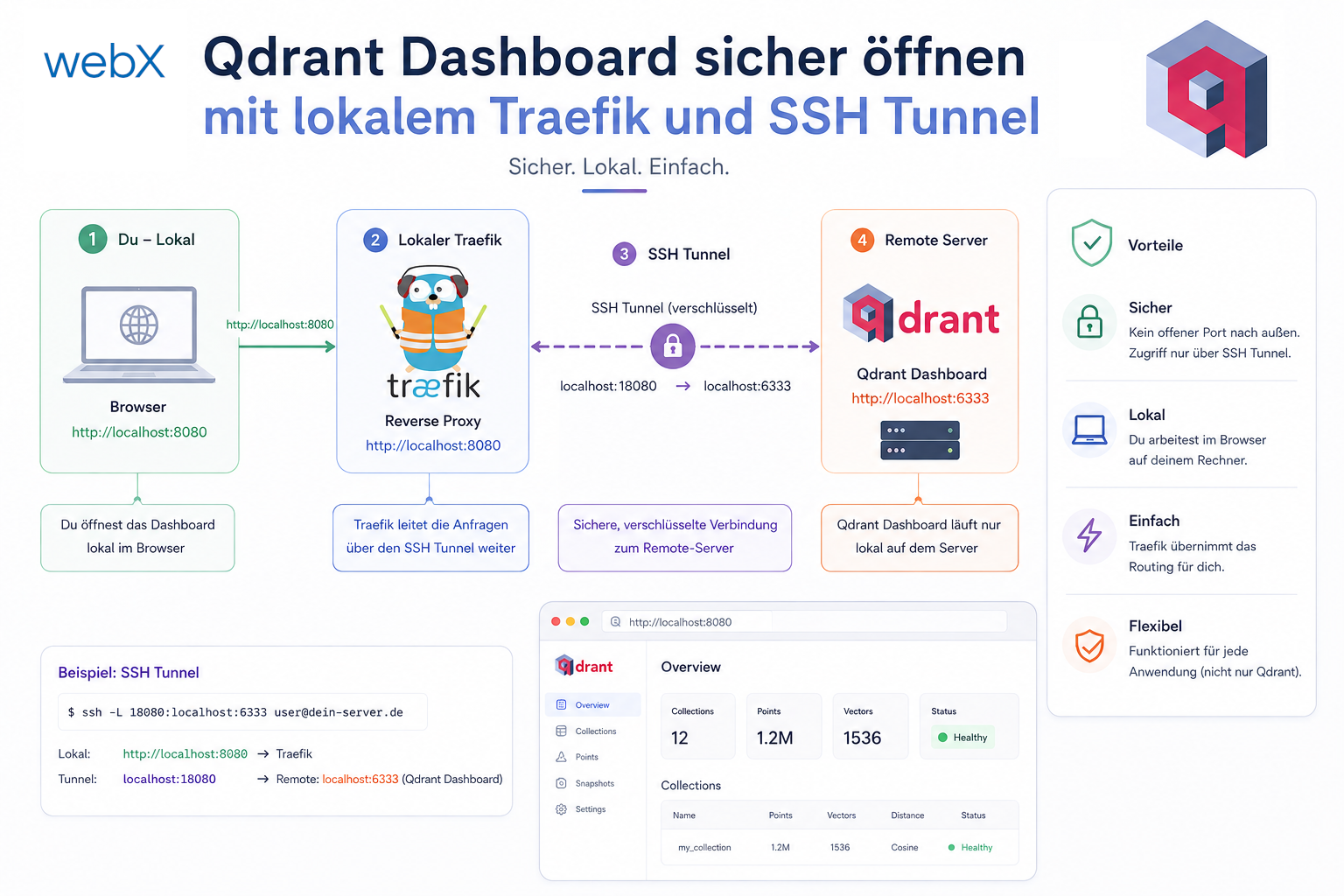
- Open the Qdrant dashboard securely with local Traefik and an SSH tunnel: Read article
- Diagnosis of chunking failures despite tokenization: Read article
- Why I set the chunk size to 1500 tokens: Read article
- Splitting the embedding workflow into clear steps: Read article
- Bringing chunking, storage and search back together: Read article
- Capture Intake as a separate module, less orchestration in the Express endpoint: Read article
Are you building a similar multi-service stack and considering how to handle routing and TLS cleanly? Let us assess it together.