Instagram keyboard shortcuts block Chrome Extension input
Type "n" in a Chrome Extension text field and Instagram suddenly opens a panel. That is no coincidence. A look at event bubbling, document-level listeners and why stopPropagation() in the right place solves it.
Contents
- The problem
- Why this happens
- The original implementation
- The solution
- Why input handlers alone are not enough
- Stop keyup and keypress too
- No cleanup needed
- The general pattern
- All articles in the series
The problem
The overlay from the article on notes and tags in the capture overlay is ready. Note input, tag chips, keyboard UX. Everything implemented.
During the first real test on Instagram, I want to enter a tag. I press “n”. Instagram opens a panel. The overlay stays open, but focus is gone. The letter “n” never reaches the input field.
The same happens with “j”, “l” and other letters. Instagram has global keyboard shortcuts. And the extension does not intercept them.
Why this happens
Browser keyboard events follow a path. A keydown event originates on the element with focus. It then travels upward through the DOM tree. This is called event bubbling.
At the end of the path, the event reaches document. Instagram listens there.
Instagram registers its shortcut handlers with document.addEventListener("keydown", handler). The handler checks which key was pressed: “n” opens notifications, “j”/“k” scrolls through the feed, and “l” likes the current post.
The extension’s input field is in the Shadow DOM. I describe how I built this Shadow DOM isolation for the overlay in Phase 2. Shadow DOM isolates styles, not events. keydown events bubble out of the Shadow DOM and still reach document.
Input (Shadow DOM)
  Shadow Root
    Host Element (<div>)
      <html>
        document (Instagram's keydown handler waits here)
As long as the event reaches document, Instagram sees it.
The original implementation
The overlay had its keyboard handler on document:
const onKey = (e: KeyboardEvent) => {
  if (e.key === 'Escape') {
    dismiss(false);
    return;
  }
  if (e.key === 'Enter' && e.ctrlKey) {
    dismiss(true);
    return;
  }
  // ...
};
document.addEventListener('keydown', onKey);
That works for the extension’s own logic. But the handler is at the same level as Instagram’s handler. Both receive the event. Their order is not guaranteed.
The solution
The keyboard handler does not belong on document. It belongs on the overlay’s backdrop element, a <div> directly in the Shadow Root that covers the overlay’s entire visible area.
backdrop.addEventListener('keydown', (e: KeyboardEvent) => {
  e.stopPropagation(); // Instagram does not see this event
  if (e.key === 'Escape') {
    dismiss(false);
    return;
  }
  if (e.key === 'Enter' && e.ctrlKey) {
    dismiss(true);
    return;
  }
  if (e.key === 'Enter' && !e.ctrlKey) {
    const focused = shadow.activeElement;
    const isInputFocused = focused instanceof HTMLInputElement || focused instanceof HTMLTextAreaElement;
    if (!isInputFocused) dismiss(true);
  }
});
e.stopPropagation() stops bubbling at this point. The event no longer leaves the overlay element. It never reaches document. Instagram’s handler does not see it.
Why input handlers alone are not enough
The naive approach: add stopPropagation() to the input handlers. Done.
noteInput.addEventListener('keydown', (e) => {
  if (e.key === 'Enter') {
    e.preventDefault();
    e.stopPropagation(); // stops "Enter", but what about "n", "j", "l"?
    tagInput.focus();
  }
});
That stops only the keys I explicitly handle. “n”, “j”, “l” and every other letter have no if branch in the input handler. They keep propagating.
The backdrop handler with stopPropagation() as its first statement intercepts all keys, without exception. Not a single letter reaches document anymore.
backdrop.addEventListener('keydown', (e: KeyboardEvent) => {
  e.stopPropagation(); // this single call protects all inputs in the overlay
  // ...
});
Stop keyup and keypress too
keydown is the most common phase for shortcuts. But better safe than sorry. keyup and keypress are also stopped:
backdrop.addEventListener('keyup', (e) => e.stopPropagation());
backdrop.addEventListener('keypress', (e) => e.stopPropagation());
That prevents Instagram from intercepting other phases of the same event.
No cleanup needed
With the old approach, dismiss() needed a cleanup line:
const dismiss = (confirmed: boolean) => {
  document.removeEventListener('keydown', onKey); // manual cleanup
  host.remove();
  // ...
};
The backdrop handler does not need this. When host.remove() removes the Shadow Host from the DOM, all attached event listeners disappear with it automatically. The browser garbage-collects them.
Less cleanup logic, fewer sources of error.
The general pattern
This pattern occurs wherever an extension injects UI into an existing page.
The page, whether Instagram, Twitter, YouTube or another site, uses document-level listeners for keyboard shortcuts. The extension injects an overlay or widget. The user interacts with the widget. The page still sees the keystrokes.
The solution is always the same: stopPropagation() on the injected UI’s root element, as early as possible in the event handler.
// Generic pattern for injected extension UI
overlayRoot.addEventListener('keydown', (e) => {
  e.stopPropagation(); // host page does not see this keypress
  // custom logic
});
Shadow DOM helps with styles. It does not help with events. stopPropagation() helps with events.
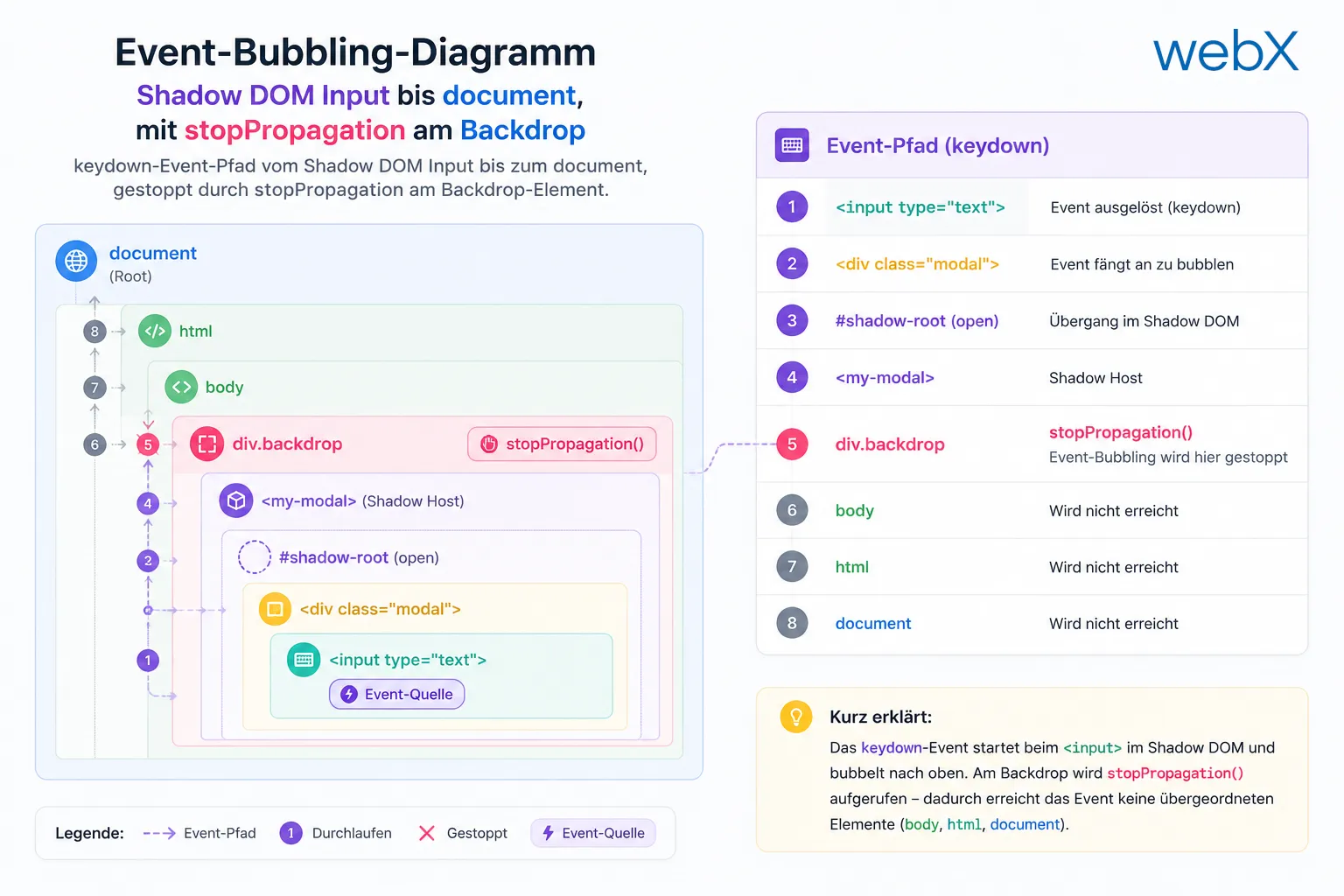
Figure: The keydown event path from the Shadow DOM input to document, stopped by stopPropagation at the backdrop element. The original illustration retains its German labels.
The diagram shows the path of a keydown event from the Shadow DOM to document. Without intervention, it reaches Instagram’s handler. With stopPropagation() at the backdrop, its journey ends there.
All articles in the series
- Vision and system overview: Chrome Extension, RAG architecture and project background: Read article
- Building a RAG system: Qdrant, embeddings and cosine similarity in TypeScript: Read article
- AI provider abstraction: Ollama vs. OpenAI, interface design and no vendor lock-in: Read article
- Chrome Extension MV3: Three isolated runtime contexts, message passing and Strategy Pattern: Read article
- Docker Compose strategy: The override pattern, from local development to Azure: Read article
- Ollama locally vs. Docker: The decision and its consequences: Read article
- Ollama auto-pull entrypoint: Automated model setup at container startup: Read article
- tsconfig and Vite:
Node16vs.bundler, and why Vite has its own rules: Read article - Load complete Instagram captions with MutationObserver: Read article
- Chrome Extension foundation with health indicator and retry queue: Read article
- Phase 2 features: Shadow DOM overlay, Tailwind v4 and duplicate detection: Read article
- Race condition in platform detection: How a UI event breaks Instagram detection: Read article
- Extracting PostId in two Instagram layouts: querySelector vs. ancestor traversal: Read article
- Capture a complete Instagram carousel with MutationObserver: Lazy loading, observer-before-click and timeout fallback: Read article
- Notes and tags when saving screenshots: Read article
- Instagram keyboard shortcuts block Chrome Extension input: (this article)
- Lowercase normalization and duplicate detection in tag input: Read article
- Zitadel Login V2 in Docker Compose with three hidden errors: Read article
- PKCE OAuth in a Chrome MV3 extension: Read article
- React frontend with react-oidc-context and Zitadel: Read article
- Vite build-time environment variables in Docker: Read article
- Event-driven ingestion with BullMQ and Redis: Read article
- MinIO instead of Azurite: S3-compatible object storage locally and on Hetzner: Read article
- access_token, id_token and the Userinfo endpoint: Which belongs where: Read article
- Qdrant multi-tenancy with one collection per user: Read article
- When backend and frontend know different types: Read article
- Removing Zitadel bootstrap: Host header bug and manual setup: Read article
- Backend code review with six problems fixed before launch: Read article
- Traefik instead of NGINX: Reverse proxy for a growing Docker Compose stack: Read article
- Two-layer rate limiting: Traefik and express-rate-limit with Redis: Read article
- Implementing GDPR Article 17 correctly: Promise.allSettled and export batching: Read article
- Embedding model lock-in: Why mxbai-embed-large is a permanent production decision: Read article
- Docker volumes in production: Named volumes, bind mounts and the Hetzner volume approach: Read article
- Two vulnerabilities before launch: Redis without authentication and an exposed Qdrant admin port: Read article
- Traefik as the single entry point in the Docker Compose stack: Read article
- Connecting Zitadel behind Traefik with issuer, JWKS and Login V2: Read article
- Fixing the frontend when the nginx healthcheck fails on localhost: Read article
- Observability for my Docker Compose stack with Bull Board and Dozzle: Read article
- Open the Qdrant dashboard securely with local Traefik and an SSH tunnel: Read article
- Diagnosis of chunking failures despite tokenization: Read article
- Why I set the chunk size to 1500 tokens: Read article
- Splitting the embedding workflow into clear steps: Read article
- Bringing chunking, storage and search back together: Read article
- Capture Intake as a separate module, less orchestration in the Express endpoint: Read article
Building a data capture system based on browser extensions with complex DOM interactions? Let us assess it together.