From a screenshot extension to an AI memory engine with RAG, Qdrant and Ollama
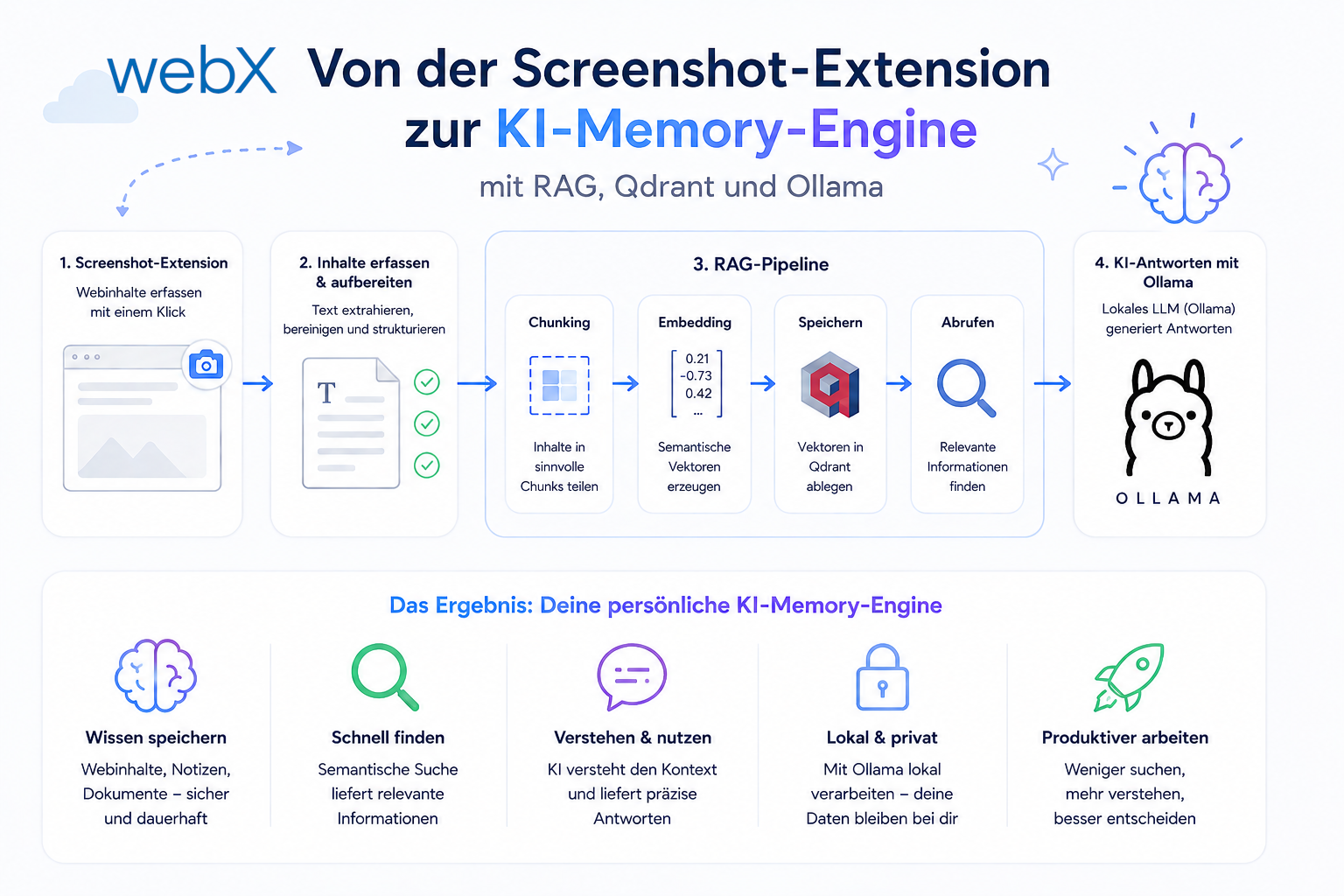
A Chrome Extension for Instagram metadata was the starting point. It grew into a complete RAG system built on Qdrant, Ollama and TypeScript that runs locally, is cloud-ready and enables semantic search across captured social media data.
Contents
- The problem with capture-only tools
- RAG as the solution
- The ecosystem at a glance
- Why this project is going into production
- What did not work immediately
- All articles in the series
The problem with capture-only tools
I had built a Chrome MV3 extension for a client. It does exactly what it should: hover over an element, press Ctrl+Q, and a screenshot is taken, cropped and sent to a backend. With Instagram metadata. With DPR scaling. With platform-specific payload strategies.
Technically clean. Functionally solid. But with a clear gap.
The problem was not the extension itself. It was what happened afterward. The data arrives in a backend, but it cannot be searched there. No analyst can ask, “Which accounts posted Home & Living products most frequently in the last 30 days?” or “Which caption structures perform best on fashion accounts?”
That was the technical limitation of my capture workflow at the time. It could capture content but did not yet provide semantic search across the stored data. This observation concerns my project, not a market analysis of other capture tools.
RAG as the solution
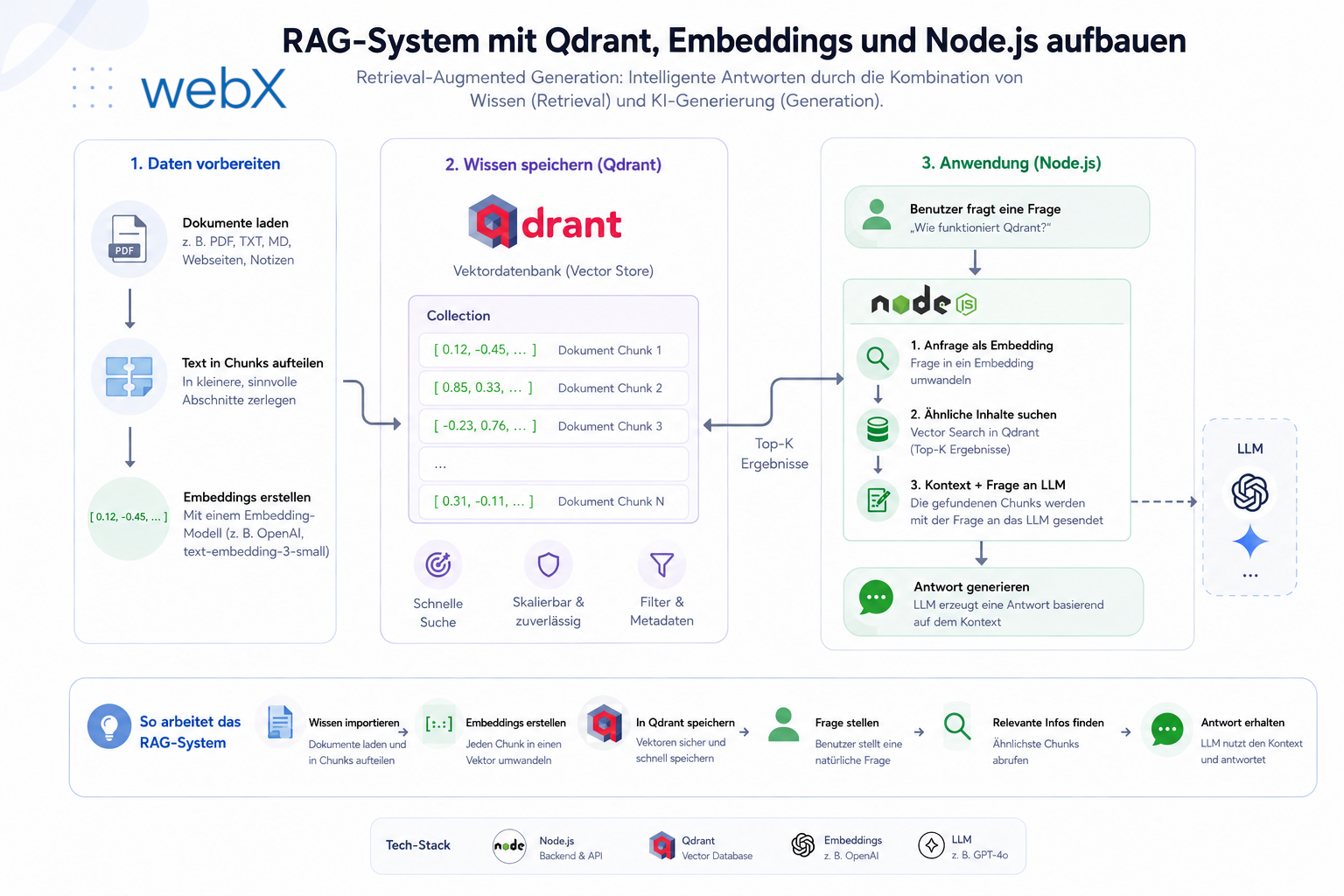
What was missing was not better capture logic. It was a Retrieval-Augmented Generation (RAG) engine. A system that:
- Converts text and metadata into semantic vectors, or embeddings
- Stores these vectors in a database that understands similarity
- Finds the most relevant entries for a natural-language query
- Uses a large language model to generate a coherent answer from them
In 2026, RAG is no longer experimental technology. The components are production-ready, well documented and can run entirely locally, without cloud dependencies or ongoing costs.
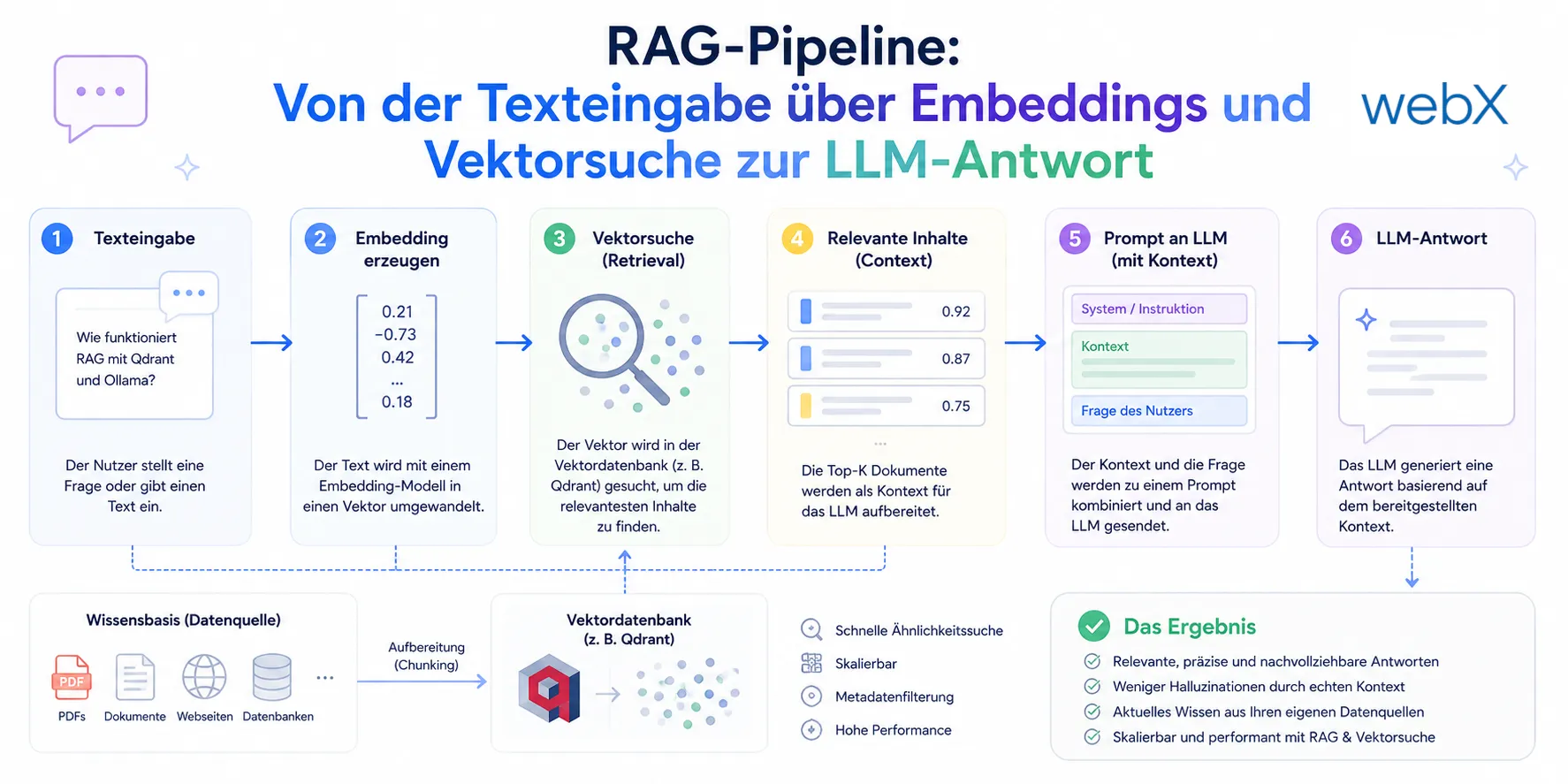 Figure: The six steps of a RAG system. Incoming text is converted into a vector, Qdrant is searched for similar entries and the result is passed as context to the language model, which produces an understandable answer. The original illustration retains its German labels.
The ecosystem at a glance
I call the resulting system Local Insight: a complete memory stack built on five components.
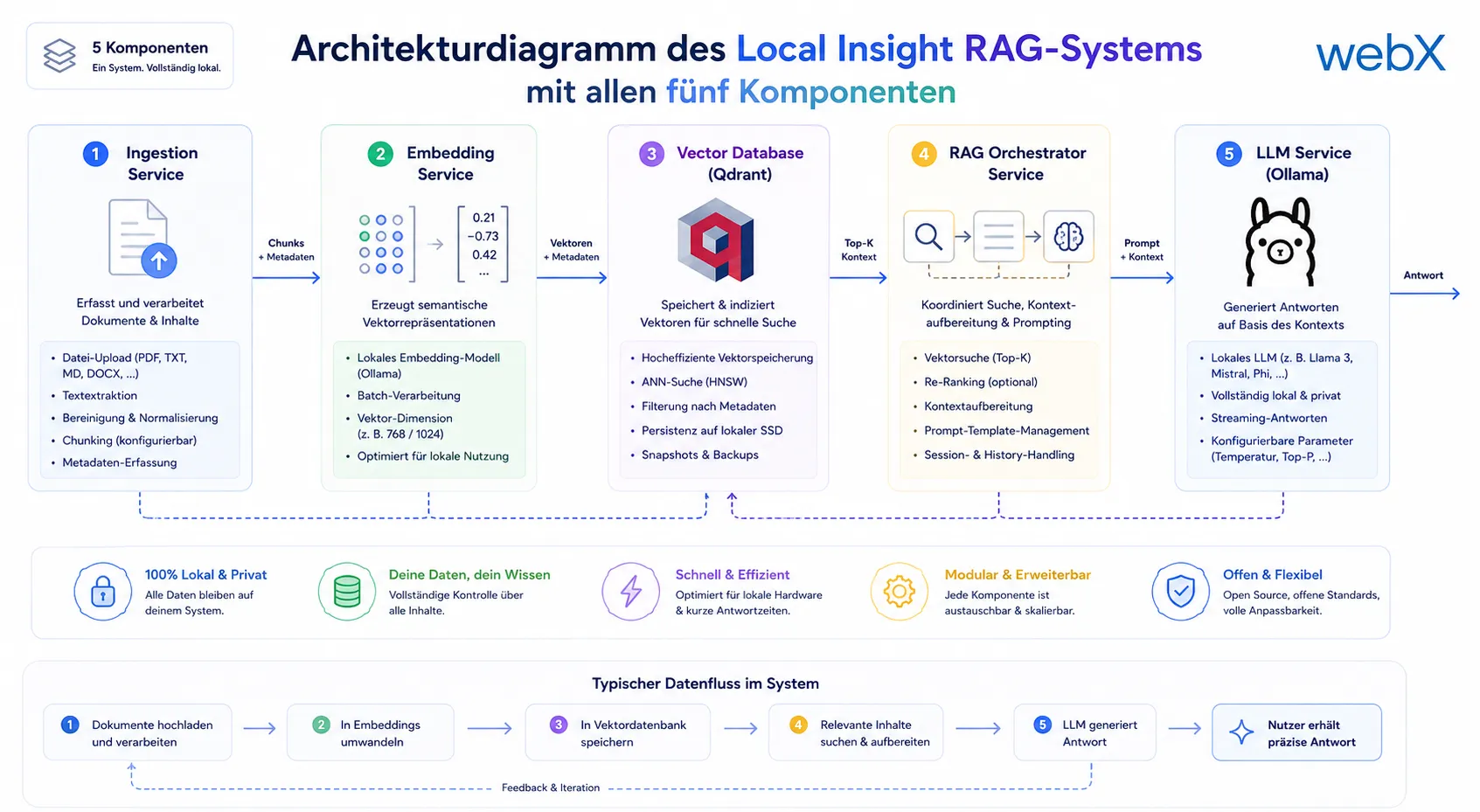 Figure: All five components of the Local Insight RAG system working together. Ingestion processes content, the embedding model generates vectors and Qdrant stores them semantically. The retriever supplies relevant context to Ollama, which generates the final answer locally. The original diagram retains its German labels.
1. Chrome MV3 extension (TypeScript, Vite, @crxjs) The extension gained a configurable endpoint. It now communicates with the RAG backend rather than a simple file-upload endpoint. My article on Chrome Extension MV3 architecture explains how its three isolated runtime contexts communicate cleanly.
2. Node.js/Express backend (TypeScript) The central component. It receives the screenshot payload, extracts embeddable text from the Instagram metadata, generates a 768-dimensional vector through the AI provider abstraction and writes everything to Qdrant.
3. Qdrant (vector database, Docker) Qdrant is a database specifically optimized for vectors. Cosine similarity is available out of the box, and performance stays stable even with tens of thousands of stored points. No external service and no cloud dependency. My article on the vector database and RAG system setup shows the complete setup with Qdrant and embeddings.
4. AI provider (local Ollama or OpenAI) An abstraction layer through an AIProvider interface separates provider selection from route handlers. An environment variable selects local nomic-embed-text through Ollama or text-embedding-3-small through OpenAI. Switching between these embedding models still requires re-embedding existing data. Equal vector sizes do not make their vector spaces compatible. My article on AI provider abstraction explains the boundaries and shows the interface.
5. React dashboard (Vite, Tailwind, shadcn/ui) The search interface. Natural-language input, an AI-generated answer and visual result cards with screenshot thumbnails and metadata.
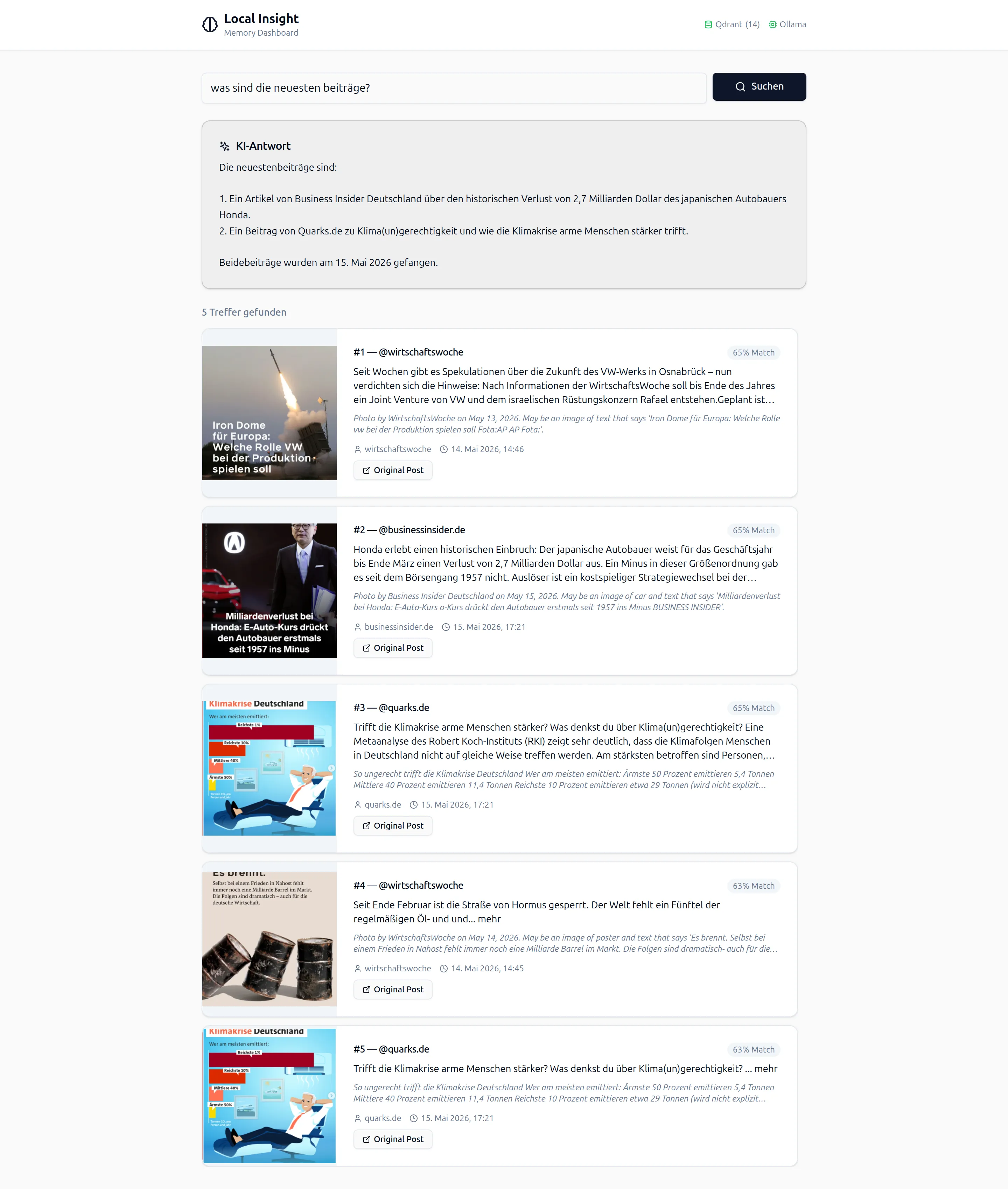 Figure: The React dashboard in practice. An analyst enters a question, the system searches the stored Instagram data semantically and returns a structured answer with the most relevant matches. The original screenshot retains its German interface.
Why this project is going into production
The starting point was a client project in open source intelligence and early risk detection. I developed a Chrome Extension that lets analysts capture Instagram posts directly in the browser and send their metadata to a backend in a structured form.
While building the extension, a question arose almost naturally. What actually happens to the collected data? It arrives in the backend, but it cannot be searched, compared or analyzed there.
The RAG system is my own answer. It is not a client project. It is a system I am planning myself based on this experience and will put into production in the near future. The Chrome Extension is the data source. The RAG system provides the intelligence behind it.
Building a RAG system for real analyst workflows teaches more than the theory of vector databases, embedding models and LLM inference. That experience feeds directly into projects that need semantic search or AI-assisted data analysis.
What did not work immediately
The path to a functioning RAG system is as instructive as the result.
Problem 1 with tsconfig.json and Vite The extension used "module": "Node16", which is correct for Node.js projects but does not work with Vite as the bundler. Vite expects "moduleResolution": "bundler". The result was nine TypeScript errors at once, all caused by missing .js extensions in imports. My article on the tsconfig moduleResolution error with Vite shows how this configuration conflict arises and how to fix it in two minutes.
Problem 2 with unreachable Ollama The first docker-compose up immediately returned Ollama is not reachable. Ollama was referenced in the configuration, but ran neither locally nor as a container. The decision to containerize Ollama entirely in Docker changed the complete deployment strategy. My article on choosing between local Ollama and Docker explains the tradeoff.
Problem 3 with a manual setup step after every start After the first successful startup, the system worked. But it still needed a manual docker exec step to load the Ollama model. That friction could not be ignored. My article on the Ollama auto-pull entrypoint shows how this problem became an automated entrypoint setup.
I later moved capture acceptance into a dedicated Capture Intake module. It keeps persistence, queue handoff and rollback together.
All articles in the series
- Vision and system overview: Chrome Extension, RAG architecture and project background: (this article)
- Building a RAG system: Qdrant, embeddings and cosine similarity in TypeScript: Read article
- AI provider abstraction: Ollama vs. OpenAI, interface design and no vendor lock-in: Read article
- Chrome Extension MV3: Three isolated runtime contexts, message passing and Strategy Pattern: Read article
- Docker Compose strategy: The override pattern, from local development to Azure: Read article
- Ollama locally vs. Docker: The decision and its consequences: Read article
- Ollama auto-pull entrypoint: Automated model setup at container startup: Read article
- tsconfig and Vite:
Node16vs.bundler, and why Vite has its own rules: Read article - Load complete Instagram captions with MutationObserver: Read article
- Chrome Extension foundation with health indicator and retry queue: Read article
- Phase 2 features: Shadow DOM overlay, Tailwind v4 and duplicate detection: Read article
- Race condition in platform detection: How a UI event breaks Instagram detection: Read article
- Extracting PostId in two Instagram layouts: querySelector vs. ancestor traversal: Read article
- Capture a complete Instagram carousel with MutationObserver: Lazy loading, observer-before-click and timeout fallback: Read article
- Notes and tags when saving screenshots: Read article
- Instagram keyboard shortcuts block Chrome Extension input: Read article
- Lowercase normalization and duplicate detection in tag input: Read article
- Zitadel Login V2 in Docker Compose with three hidden errors: Read article
- PKCE OAuth in a Chrome MV3 extension: Read article
- React frontend with react-oidc-context and Zitadel: Read article
- Vite build-time environment variables in Docker: Read article
- Event-driven ingestion with BullMQ and Redis: Read article
- MinIO instead of Azurite: S3-compatible object storage locally and on Hetzner: Read article
- access_token, id_token and the Userinfo endpoint: Which belongs where: Read article
- Qdrant multi-tenancy with one collection per user: Read article
- When backend and frontend know different types: Read article
- Removing Zitadel bootstrap: Host header bug and manual setup: Read article
- Backend code review with six problems fixed before launch: Read article
- Traefik instead of NGINX: Reverse proxy for a growing Docker Compose stack: Read article
- Two-layer rate limiting: Traefik and express-rate-limit with Redis: Read article
- Implementing GDPR Article 17 correctly: Promise.allSettled and export batching: Read article
- Embedding model lock-in: Why mxbai-embed-large is a permanent production decision: Read article
- Docker volumes in production: Named volumes, bind mounts and the Hetzner volume approach: Read article
- Two vulnerabilities before launch: Redis without authentication and an exposed Qdrant admin port: Read article
- Traefik as the single entry point in the Docker Compose stack: Read article
- Connecting Zitadel behind Traefik with issuer, JWKS and Login V2: Read article
- Fixing the frontend when the nginx healthcheck fails on localhost: Read article
- Observability for my Docker Compose stack with Bull Board and Dozzle: Read article
- Open the Qdrant dashboard securely with local Traefik and an SSH tunnel: Read article
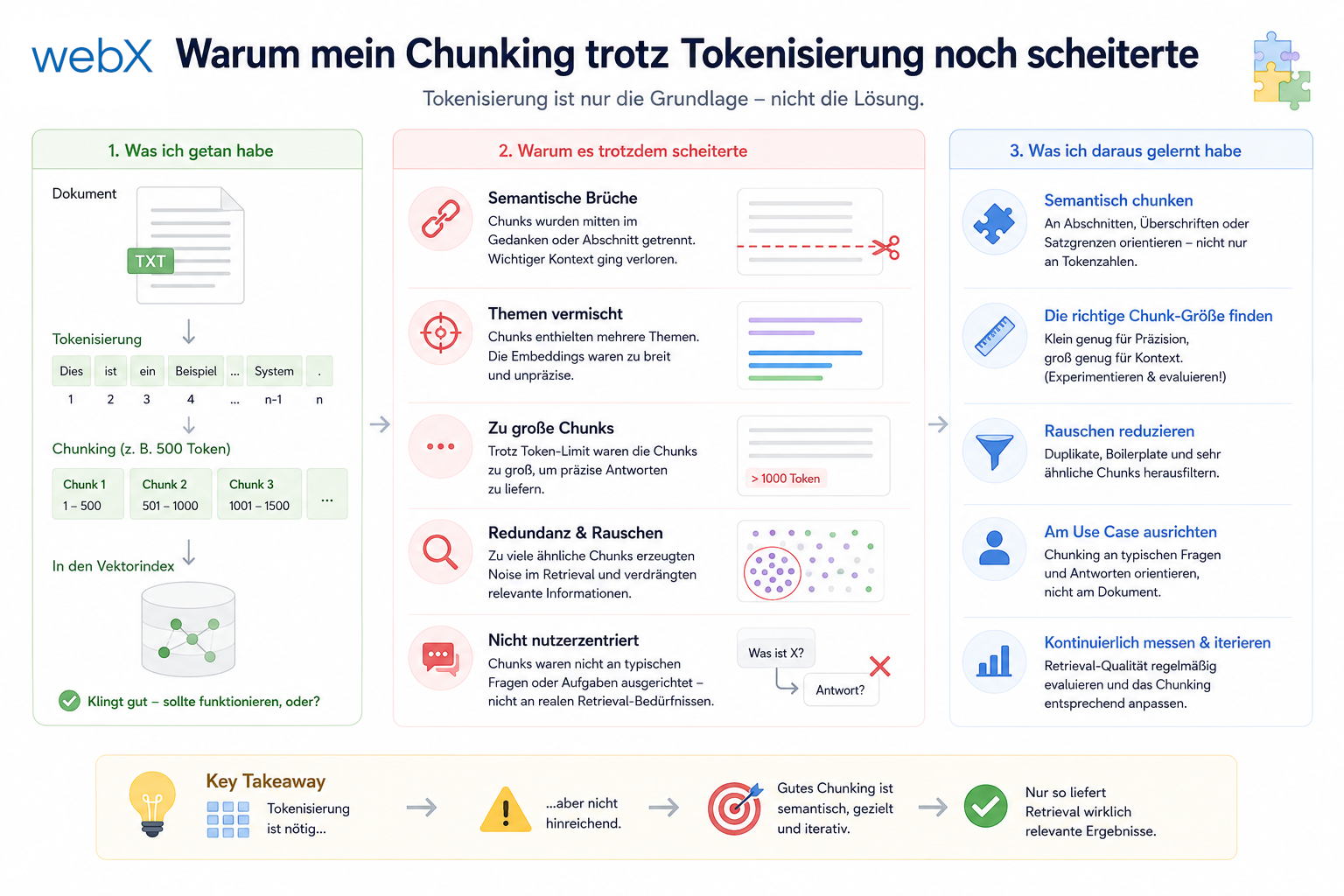
- Diagnosis of chunking failures despite tokenization: Read article
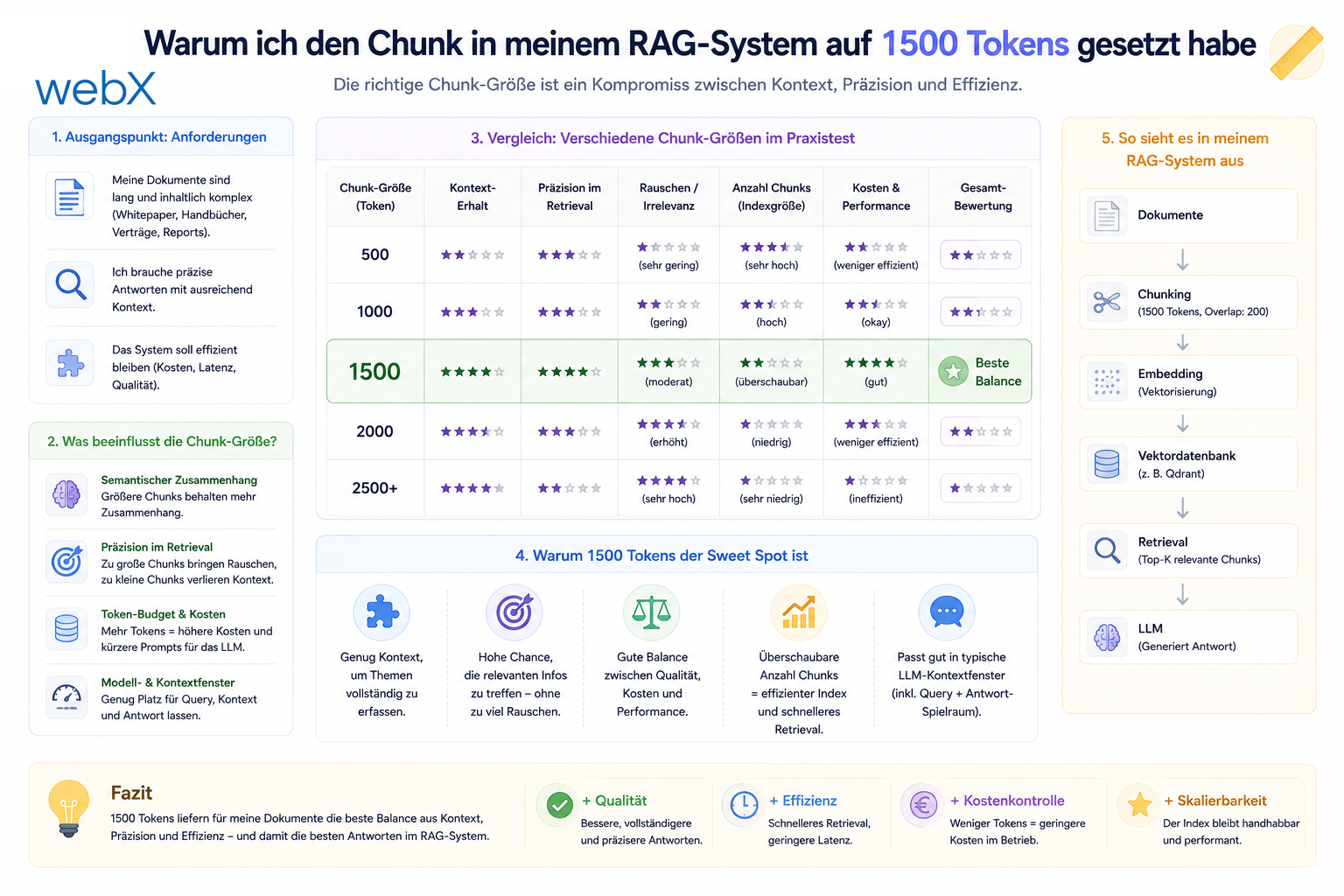
- Why I set the chunk size to 1500 tokens: Read article
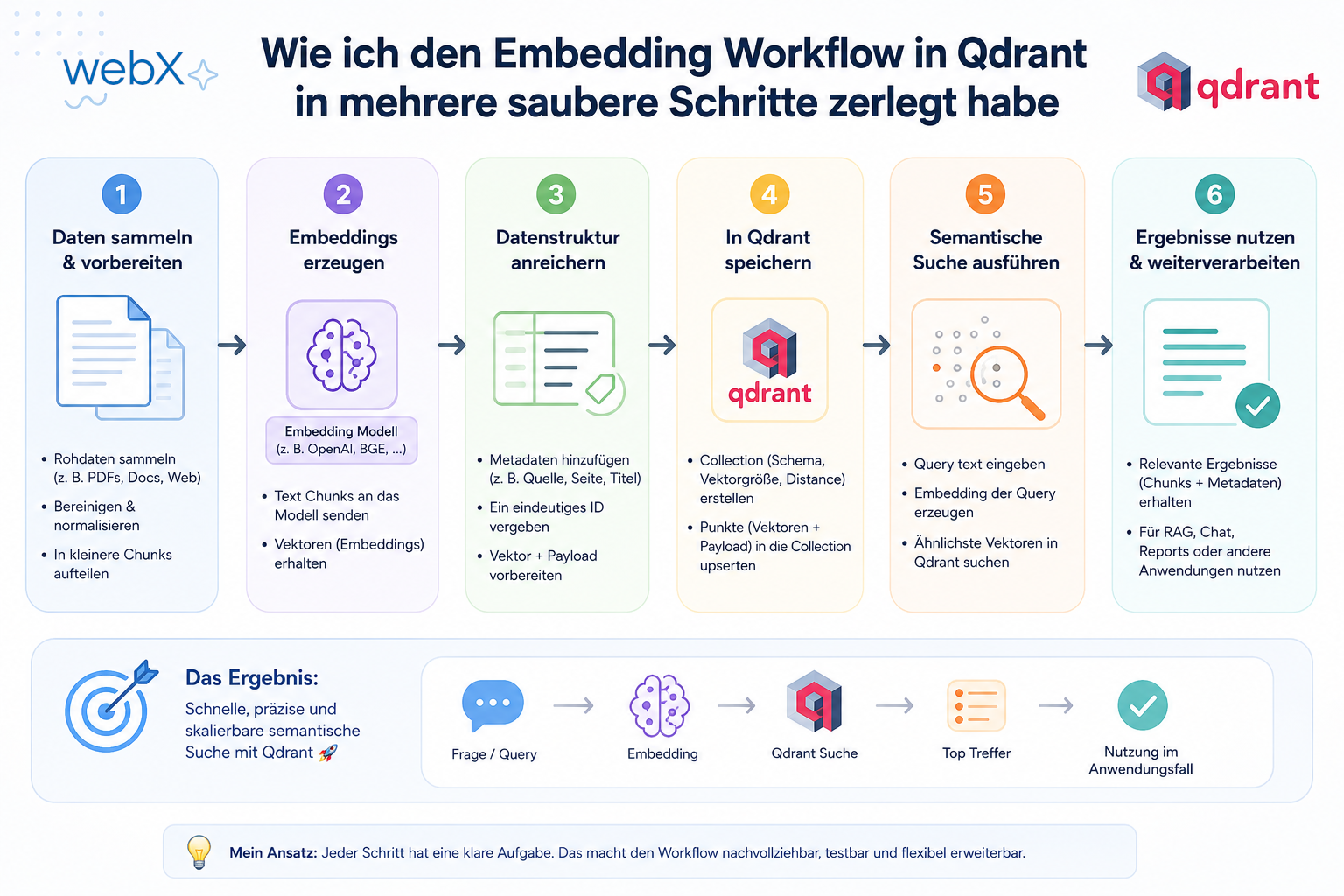
- Splitting the embedding workflow into clear steps: Read article
- Bringing chunking, storage and search back together: Read article
- Capture Intake as a separate module, less orchestration in the Express endpoint: Read article
Are you working on a Power Pages portal and considering whether semantic search or AI-assisted document retrieval would help your users? Let us assess it together.