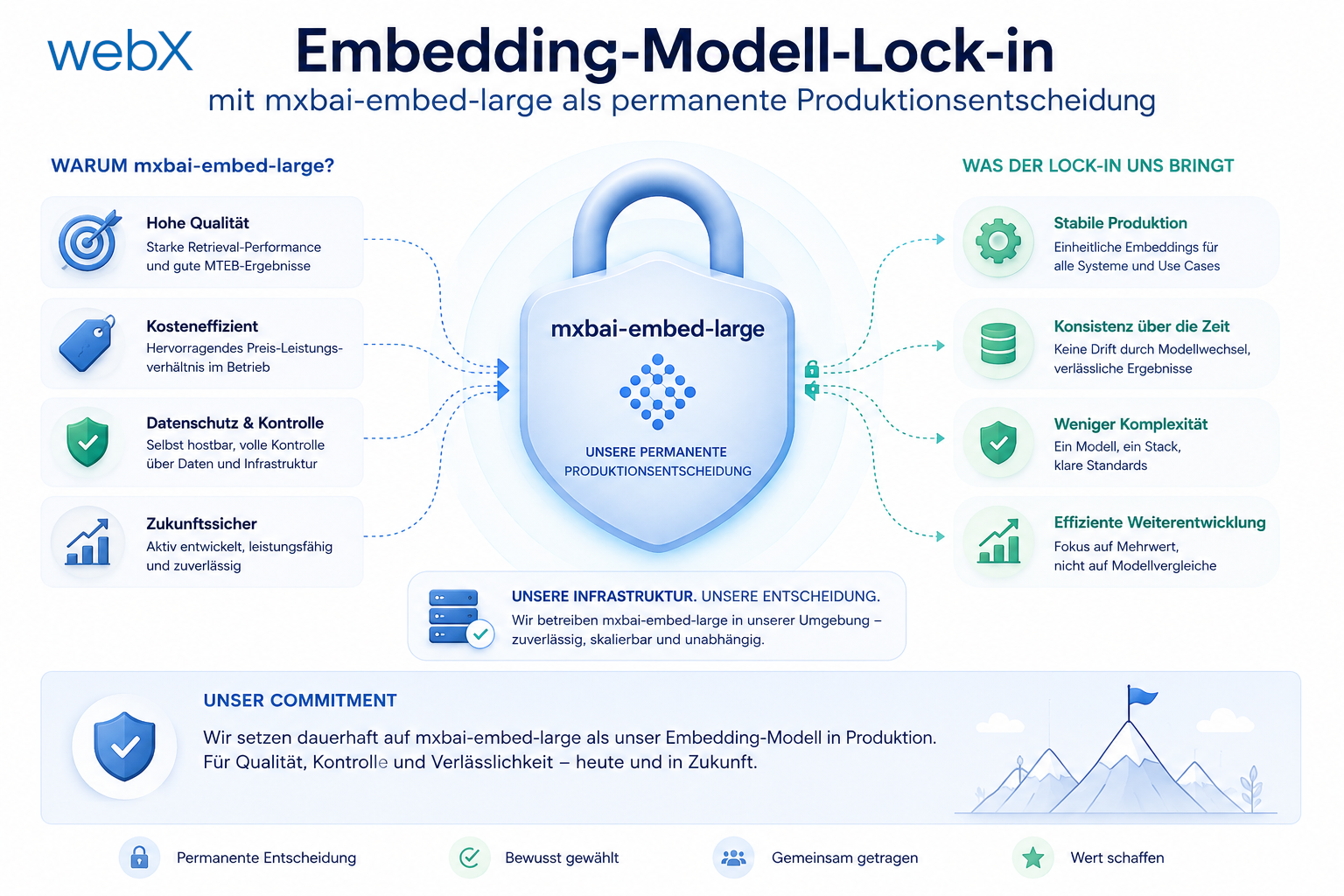
Embedding model lock-in with mxbai-embed-large as a permanent production decision
I do not treat the choice of embedding model as an interchangeable environment variable. In Qdrant, it becomes part of every collection. Using different vector spaces locally and in production creates an expensive future migration.
Contents
- The problem with the embedding model
- 768 or 1024 dimensions?
- Why use the same model locally and in production
- The decision for mxbai-embed-large
- VECTOR_SIZE is immutable
- embeddingModelVersion in the payload
- Local development and the model download
- All articles in the series
The problem with the embedding model
At the beginning, I nearly made the same mistake as many teams building their first RAG system: the embedding model looks like an interchangeable environment variable in the configuration. In reality, it is a schema decision.
As soon as I write the first vector to Qdrant, I define a specific vector space. That space belongs not only to the dimensionality, but also to the model’s geometry. If I use model X today and model Y tomorrow, not only the numerical values change, but also the semantic meaning of every single coordinate.
That is exactly why a later switch is not a small change. If I switch to a different embedding model, I have to re-embed all existing texts. This is true even when both models happen to output the same vector size. Two 1024-dimensional models do not automatically share the same space. Mixing them would silently degrade search. That is dangerous precisely because the error does not appear as a crash, but as gradually worsening relevance.
768 or 1024 dimensions?
In my case, the content is usually short: Instagram captions, notes, tags and sometimes alt text. It often falls roughly between 50 and 300 tokens. Technically, 768 dimensions are very often sufficient for that. nomic-embed-text is therefore not a bad model.
Nevertheless, 1024 is the more robust production decision for me. The gain is not magical quality, but better semantic discrimination once texts become longer, denser or linguistically less tidy. Particularly with mixed content from captions, user notes and metadata, I would rather have a little more room than too little.
mxbai-embed-large is a very good candidate for that. The model has long ranked highly in open benchmarks such as MTEB and is consistently strong among freely available embedding models that can run locally. At the same time, its vector size remains 1024, which is still very manageable for Qdrant and typical RAG workloads.
1536 dimensions, for example the OpenAI default for text-embedding-3-small, are also possible. But I see no compelling added value for this project. For short content, the jump from 1024 to 1536 is smaller than the operational disadvantage of wanting to introduce a different production model later.
The real point is the embedding contract. Both mxbai-embed-large and mistral-embed use 1024 dimensions, but their vector spaces are not interchangeable. Equal vector size satisfies only the collection’s size requirement, not semantic compatibility. Switching to mistral-embed therefore requires re-embedding and separate storage for the new vectors before changing query traffic. Qdrant’s embedding-model migration guide describes this controlled switch.
Why use the same model locally and in production
This is where the actual lock-in emerges. If I work locally with nomic-embed-text and use mistral-embed in production, there are effectively two separate worlds. Both can populate Qdrant, but their collections are not compatible.
In the current backend, I can see directly how early this decision takes effect:
// backend/src/services/providers/ollama-provider.ts
constructor() {
  this.client = new Ollama({
    host: process.env.OLLAMA_URL || "http://localhost:11434",
  });
  this.embeddingModel = process.env.EMBEDDING_MODEL || "nomic-embed-text";
  this.generationModel = process.env.GENERATION_MODEL || "llama3.2";
}
The model is set in the provider, the worker generates embeddings from it and stores them directly in Qdrant. There is no neutral intermediate state. If I write locally with a different model than I later use in production, I have to send every already-stored user dataset through the new model again during the switch.
The scale grows quickly. 1000 users with 500 captures each mean 500000 re-embeddings. With a cloud API, that is 500000 additional calls that create no new business value. I am only paying to repair an early model inconsistency.
That is exactly the migration job I never want to build. Using the same model locally and in production eliminates this entire class of problem.
The decision for mxbai-embed-large
For me, the cleanest decision is therefore to settle on 1024 early in the configuration and use the same embedding path locally and later in production.
# docker-compose.yml
environment:
  - EMBEDDING_MODEL=mxbai-embed-large
  - VECTOR_SIZE=1024
That is more than a convenient default. VECTOR_SIZE=1024 becomes a production constant. I would treat this number exactly like a database schema: documented, deliberately chosen and never silently changed after the first production write.
I would state that explicitly in the example configuration:
# VECTOR_SIZE is immutable after the first write to Qdrant.
# Changing this value requires recreating every user collection
# and re-embedding all stored data.
VECTOR_SIZE=1024
This makes it immediately clear to everyone that this is not a harmless optimization, but an irreversible infrastructure decision.
VECTOR_SIZE is immutable
The actual Qdrant code shows why I choose that word so firmly:
// backend/src/services/qdrant.ts
const VECTOR_SIZE = parseInt(process.env.VECTOR_SIZE ?? '768', 10);

export async function ensureCollection(userId: string): Promise<void> {
  const name = getCollectionName(userId);
  try {
    await client.getCollection(name);
  } catch {
    await client.createCollection(name, {
      vectors: { size: VECTOR_SIZE, distance: 'Cosine' },
    });
  }
}
The collection receives its vector size when it is created. After that, the size is fixed. If I later change VECTOR_SIZE from 768 to 1024, no silent upgrade takes place. Existing collections remain at 768. New collections are created with 1024. From that moment, I have a mixed inventory that is difficult to manage cleanly in operation.
Upserts make the situation even more critical. A 1024-dimensional vector does not fit into a 768-dimensional collection. Eventually, I get an error, but by then the actual cause arose much earlier: a seemingly harmless change to an environment variable.
That is why I consider explicit documentation mandatory. Anyone changing VECTOR_SIZE must know that this is a migration project, not configuration maintenance.
embeddingModelVersion in the payload
Even if I settle on a model properly today, I want to be prepared for a future emergency. That is exactly why I would add a small metadata field: embeddingModelVersion: "mxbai-embed-large-v1".
The current payload type does not yet include this field:
// backend/src/types.ts
export type QdrantPayload =
  | (Omit<InstagramAnalysisPayload, 'image'> & {
      image: StoredImage;
      embeddingText: string;
    })
  | (Omit<GenericWebPagePayload, 'image'> & {
      image: StoredImage;
      embeddingText: string;
    });
I would store the model version right there. The cost is minimal: one additional field per point. The benefit in an emergency is considerable. If I eventually have to migrate, I can immediately filter which points were still written with mxbai-embed-large-v1 and which already come from a later generation.
That does not make migrations cheap. But it makes them manageable.
Local development and the model download
In practice, choosing mxbai-embed-large initially means only a slightly larger download:
# Pull the embedding model once into the local Ollama store
ollama pull mxbai-embed-large
The model is approximately 670 MB. nomic-embed-text is closer to 274 MB. That difference is real, but it occurs only once. Afterward, the model is on the local disk and immediately available on every restart.
If I keep the automatic pull in the container, I would use the same name there:
# ollama/entrypoint.sh
MODELS=("mxbai-embed-large" "llama3.2")
For me, that is a very good trade-off. I pay for a slightly larger download once and, in the best case, avoid a complete re-embedding migration when local development and production come together.
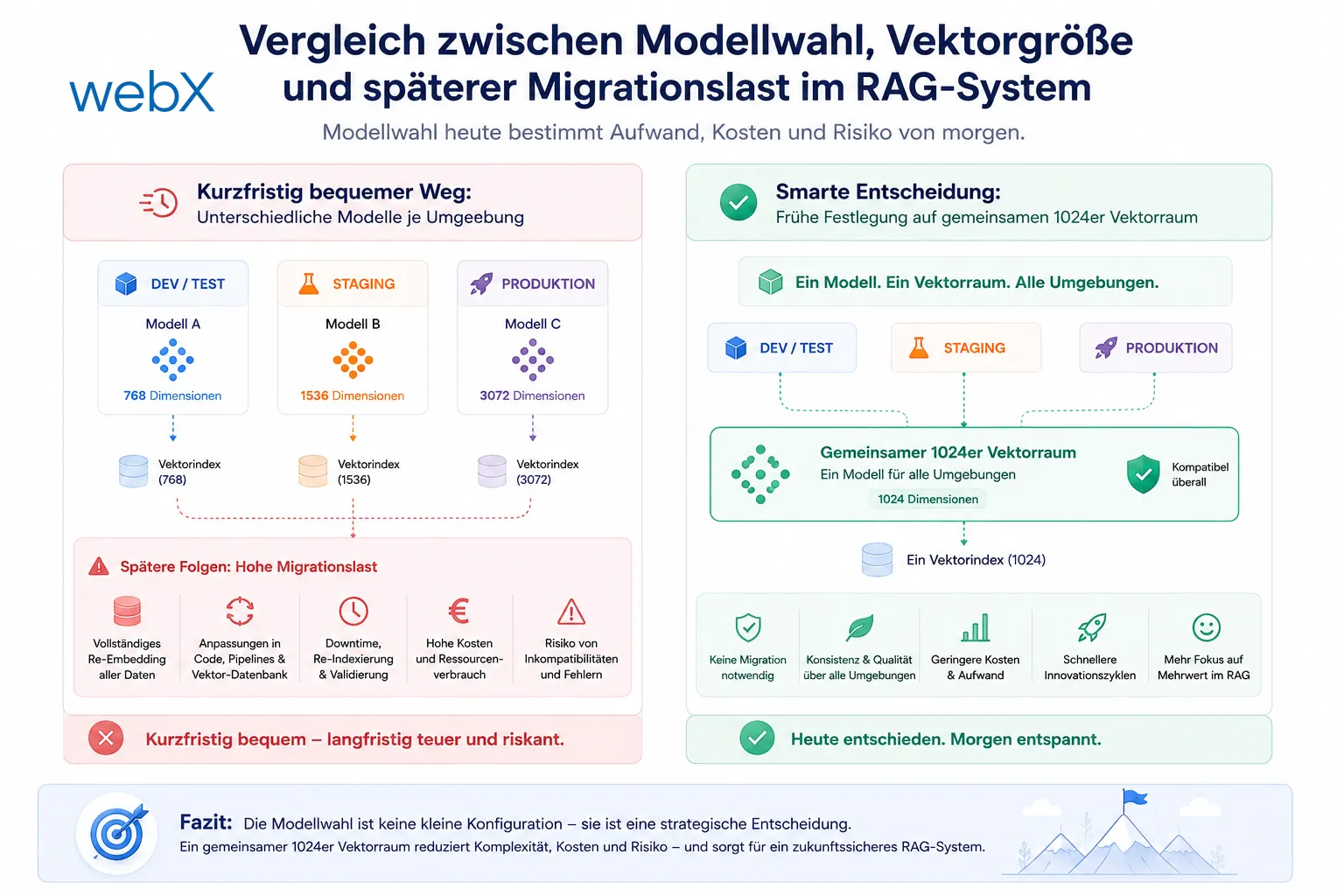
The graphic shows why I do not see model choice as a minor configuration detail. On the left is the convenient short-term approach with different models per environment. On the right is the early commitment to a shared 1024-dimensional vector space that avoids later migrations. The original graphic retains its German labels.
That is why I want to treat the embedding model as an infrastructure contract as early as possible. Not because every later change would be impossible, but because it becomes expensive, slow and risky from the first stored user record onward.
All articles in the series
- Vision and system overview: Chrome Extension, RAG architecture and project background: Read article
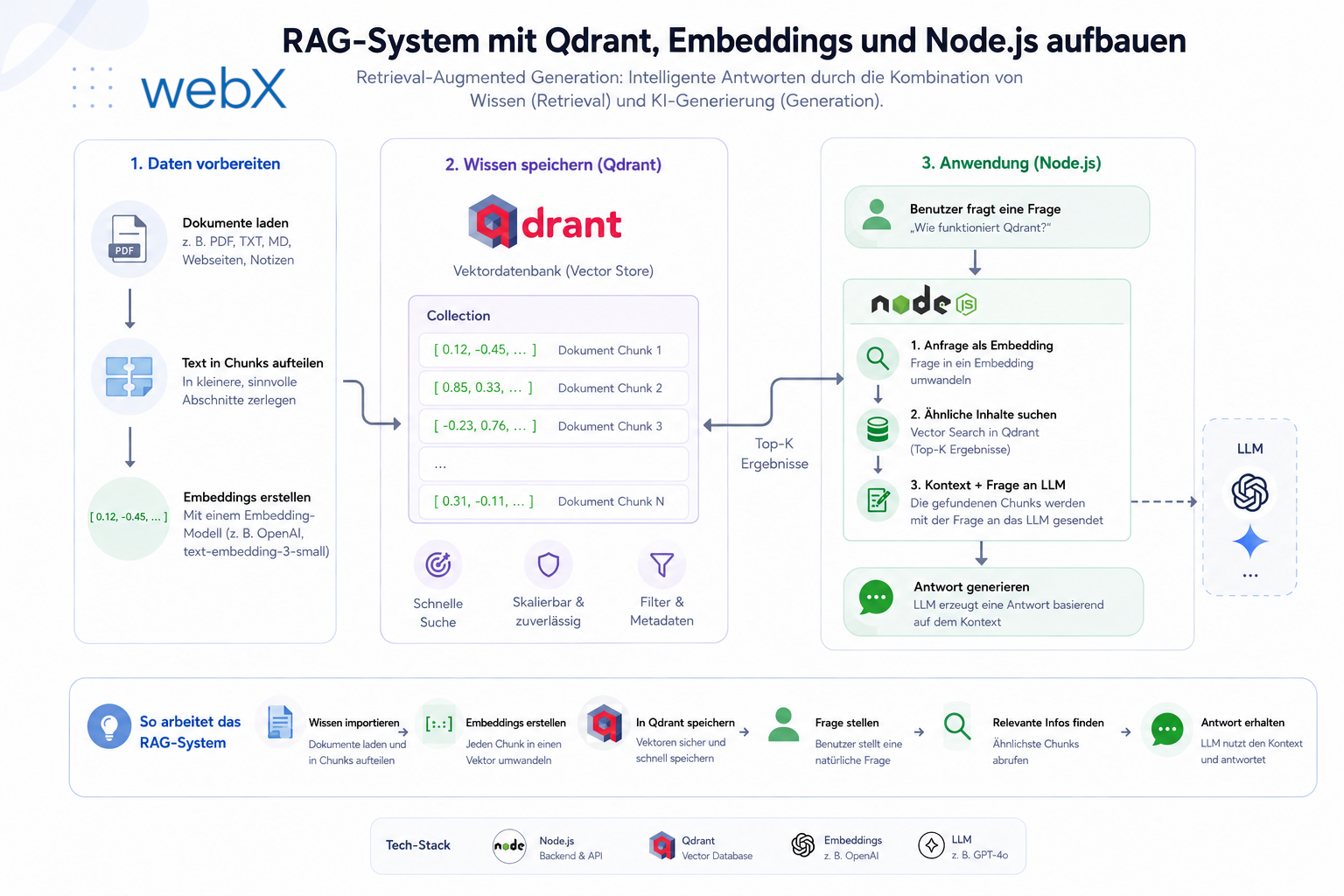
- Building a RAG system: Qdrant, embeddings and cosine similarity in TypeScript: Read article
- AI provider abstraction: Ollama vs. OpenAI, interface design and no vendor lock-in: Read article
- Chrome Extension MV3: Three isolated runtime contexts, message passing and Strategy Pattern: Read article
- Docker Compose strategy: The override pattern, from local development to Azure: Read article
- Ollama locally vs. Docker: The decision and its consequences: Read article
- Ollama auto-pull entrypoint: Automated model setup at container startup: Read article
- tsconfig and Vite:
Node16vs.bundler, and why Vite has its own rules: Read article - Load complete Instagram captions with MutationObserver: Read article
- Chrome Extension foundation with health indicator and retry queue: Read article
- Phase 2 features: Shadow DOM overlay, Tailwind v4 and duplicate detection: Read article
- Race condition in platform detection: How a UI event breaks Instagram detection: Read article
- Extracting PostId in two Instagram layouts: querySelector vs. ancestor traversal: Read article
- Capture a complete Instagram carousel with MutationObserver: Lazy loading, observer-before-click and timeout fallback: Read article
- Notes and tags when saving screenshots: Read article
- Instagram keyboard shortcuts block Chrome Extension input: Read article
- Lowercase normalization and duplicate detection in tag input: Read article
- Zitadel Login V2 in Docker Compose with three hidden errors: Read article
- PKCE OAuth in a Chrome MV3 extension: Read article
- React frontend with react-oidc-context and Zitadel: Read article
- Vite build-time environment variables in Docker: Read article
- Event-driven ingestion with BullMQ and Redis: Read article
- MinIO instead of Azurite: S3-compatible object storage locally and on Hetzner: Read article
- access_token, id_token and the Userinfo endpoint: Which belongs where: Read article
- Qdrant multi-tenancy with one collection per user: Read article
- When backend and frontend know different types: Read article
- Removing Zitadel bootstrap: Host header bug and manual setup: Read article
- Backend code review with six problems fixed before launch: Read article
- Traefik instead of NGINX: Reverse proxy for a growing Docker Compose stack: Read article
- Two-layer rate limiting: Traefik and express-rate-limit with Redis: Read article
- Implementing GDPR Article 17 correctly: Promise.allSettled and export batching: Read article
- Embedding model lock-in: Why mxbai-embed-large is a permanent production decision: (this article)
- Docker volumes in production: Named volumes, bind mounts and the Hetzner volume approach: Read article
- Two vulnerabilities before launch: Redis without authentication and an exposed Qdrant admin port: Read article
- Traefik as the single entry point in the Docker Compose stack: Read article
- Connecting Zitadel behind Traefik with issuer, JWKS and Login V2: Read article
- Fixing the frontend when the nginx healthcheck fails on localhost: Read article
- Observability for my Docker Compose stack with Bull Board and Dozzle: Read article
- Open the Qdrant dashboard securely with local Traefik and an SSH tunnel: Read article
- Diagnosis of chunking failures despite tokenization: Read article
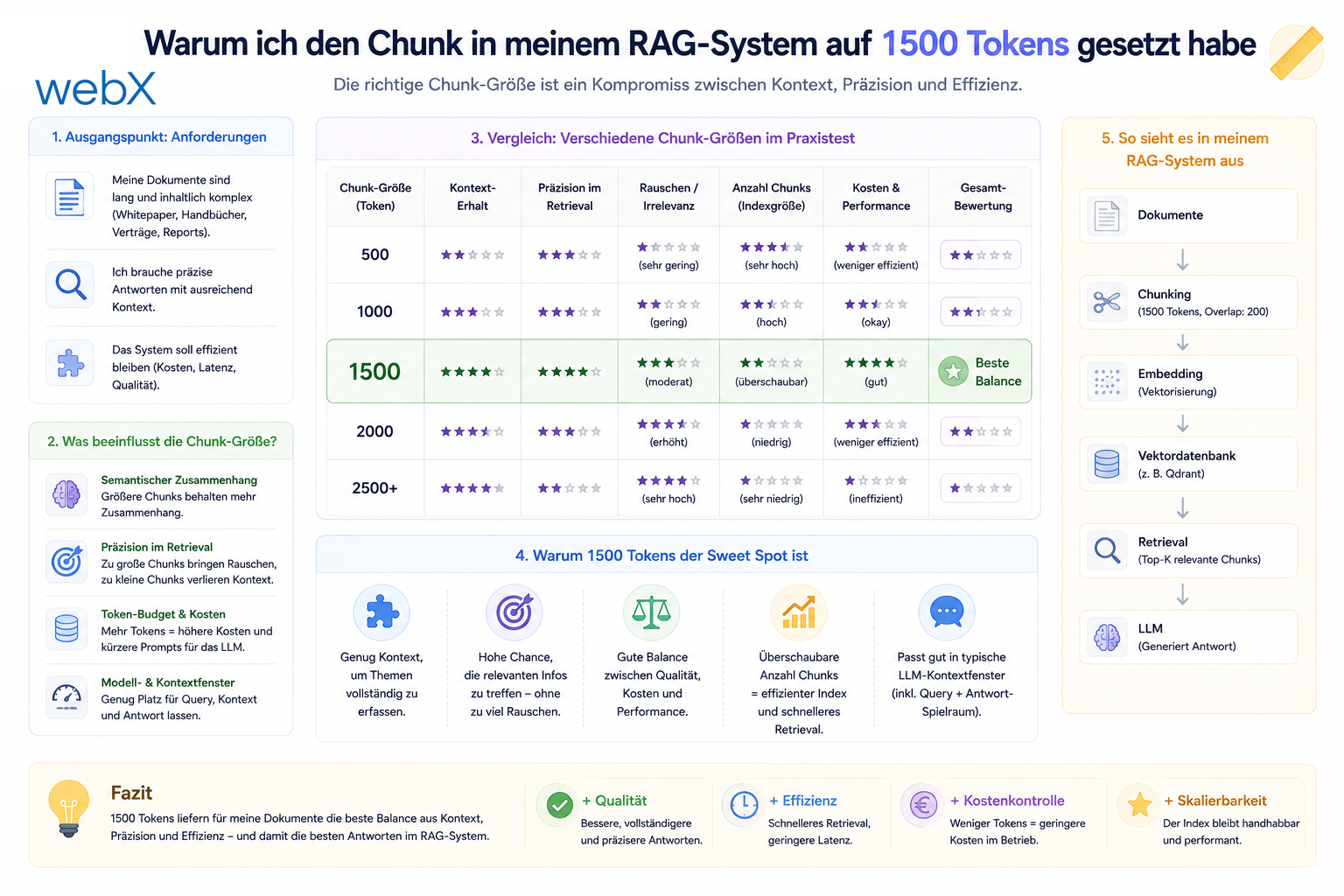
- Why I set the chunk size to 1500 tokens: Read article
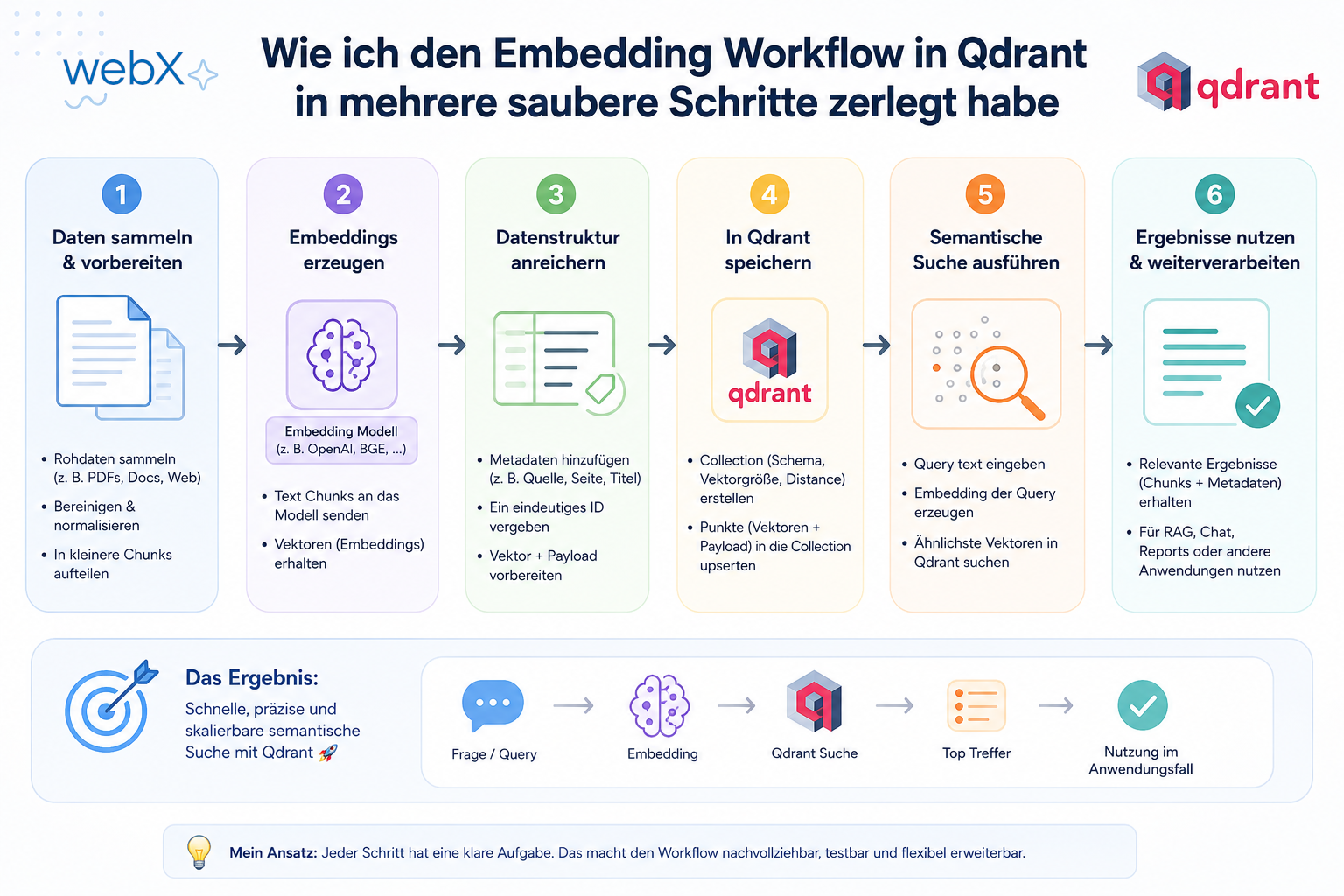
- Splitting the embedding workflow into clear steps: Read article
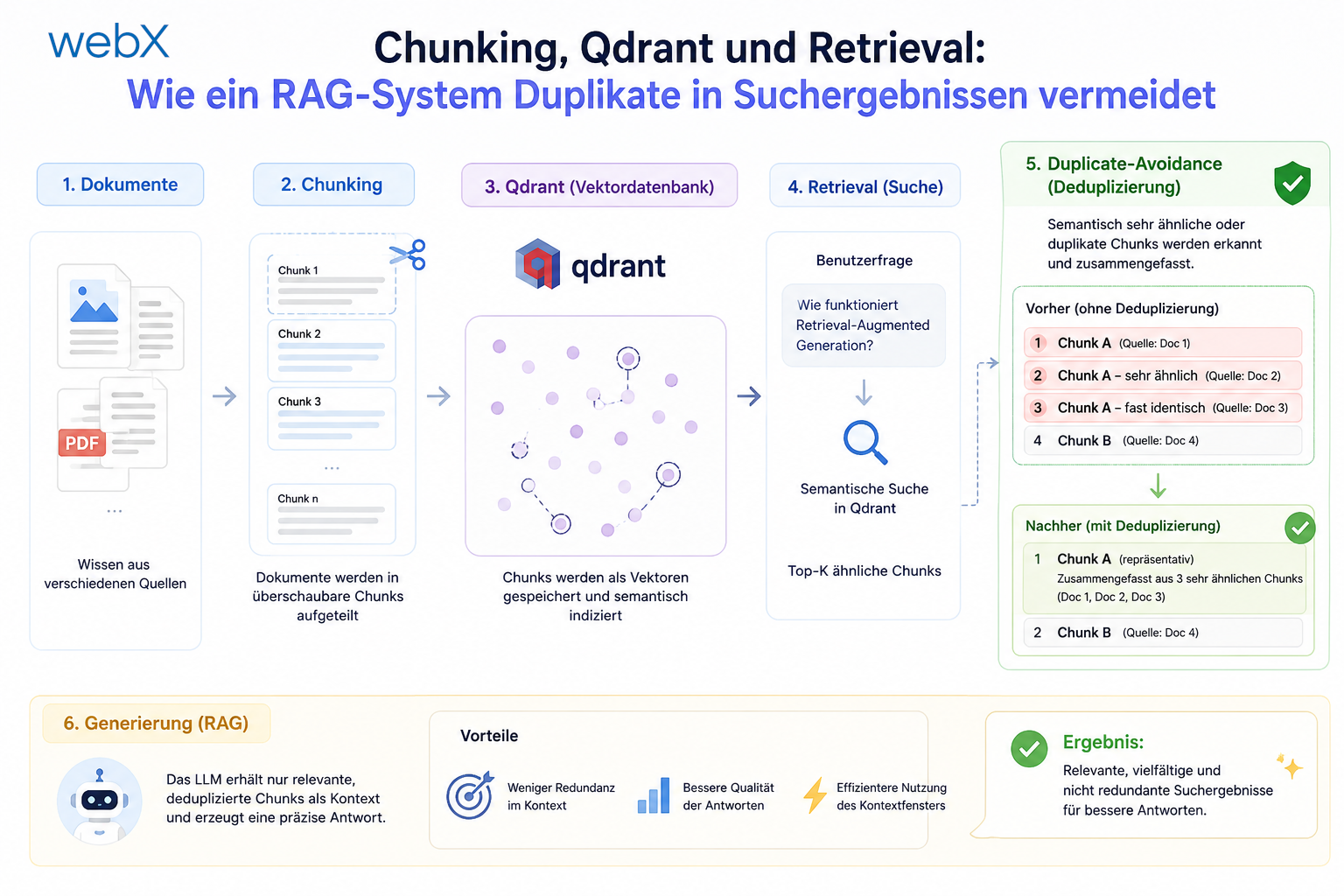
- Bringing chunking, storage and search back together: Read article
- Capture Intake as a separate module, less orchestration in the Express endpoint: Read article
Working on a similar system and considering which decisions fit your project? Let us assess it together.