Lowercase normalization and duplicate detection in tag input with a chip animation
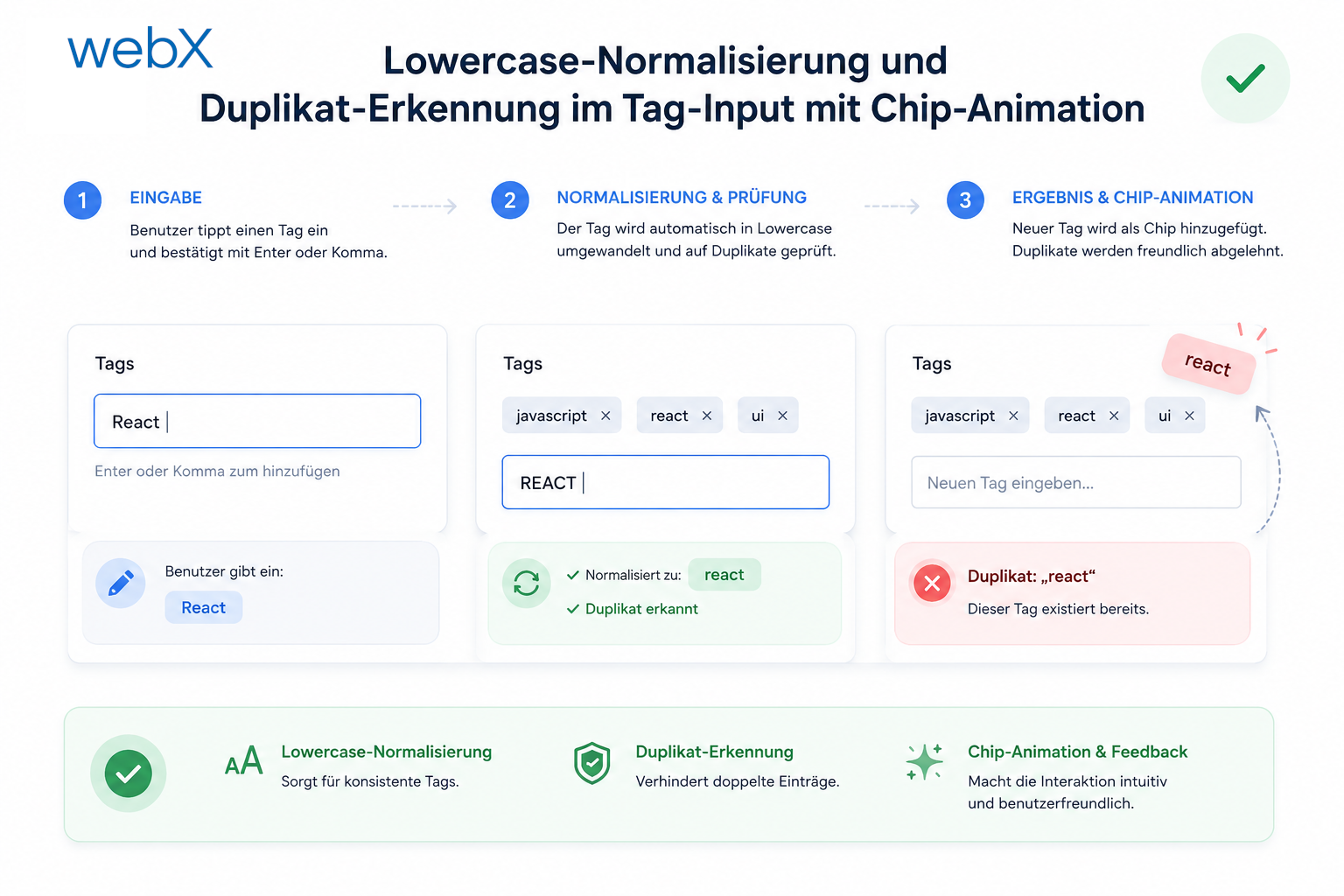
Tags in a vector database need consistency. "Rolex" and "rolex" are different tokens, and both enter the embedding. A toLowerCase() call and an animated chip response to duplicates solve this without UI friction.
Contents
- Why normalization matters
- Normalization
- The duplicate problem
- The duplicate check
- The UX problem with silent rejection
- The chip pulse animation
- querySelector inside the Shadow DOM
- The complete commitTagInput
- All articles in the series
Why normalization matters
Tags go directly into the embedding text. My article on Qdrant, embeddings and building the RAG system explains how the backend turns this into a vector. The backend concatenates all fields into a string and then converts it into a vector.
const parts = [
  channel ?? '',
  caption ?? '',
  altTexts.join(' '),
  note ?? '',
  tags.join(' '), // Tags are embedded directly
].filter(Boolean);
The embedding model does not understand tags as an abstract concept. It sees text tokens. For most tokenizers, “Python” and “python” are different tokens, or at least activate different embedding dimensions. Two posts with the same conceptual tag end up at slightly different positions in vector space when spelling is inconsistent.
This affects search. If a user searches for “python” while half the posts store the tag as “Python”, the match rate is worse than necessary.
The solution is straightforward: .toLowerCase() in commitTagInput(). My article on notes and tags in the capture overlay describes the foundation for commitTagInput().
Normalization
Before:
const commitTagInput = () => {
  const val = tagInput.value.replace(/,/g, '').trim();
  if (val) {
    currentTags.push(val);
    // ...
  }
};
After:
const commitTagInput = () => {
  const val = tagInput.value.replace(/,/g, '').trim().toLowerCase();
  if (!val) return;
  // ...
};
One method call. The effect is tangible. Whether a user enters “React”, “REACT” or “react”, the array and Qdrant point always contain “react”.
The duplicate problem
Lowercase normalization introduces a new problem. “React” and “react” are treated as equal. Good for consistency. But what happens when a user enters the same tag twice?
Without duplicate detection, both enter the array:
currentTags = ['react', 'typescript', 'react']; // unwantedThe embedding contains “react” twice. The Qdrant point has incorrect weighting. The interface shows two identical chips side by side, signaling that something is wrong.
The duplicate check
The check is minimal:
const commitTagInput = () => {
  const val = tagInput.value.replace(/,/g, '').trim().toLowerCase();
  if (!val) return;

  if (currentTags.includes(val)) {
    // duplicate: skip
    tagInput.value = '';
    return;
  }

  currentTags.push(val);
  tagInput.value = '';
  renderChips();
};
Array.includes() on an array of typically 5 to 15 tags is O(n). That is entirely sufficient. A Map or Set would be overengineering for this use case.
The UX problem with silent rejection
The code above clears the input without feedback. From the user’s perspective, they type “react”, press Enter and the input clears, but no new chip appears. Why? They cannot tell.
Silent rejection is poor UX design. The user does not understand what happened.
Which signal is clear without being disruptive?
An error message would be excessive. A red border around the input would point to the wrong element. The input is not broken, and the tag already exists.
The correct signal is a reaction from the existing chip for that tag. It communicates, “I am already here.”
The chip pulse animation
The chip receives a class for 450ms that triggers a short color animation:
@keyframes chipPulse {
  0% {
    background: #ede9fe;
    color: #4f46e5;
  }
  35% {
    background: #fca5a5;
    color: #dc2626;
    transform: scale(1.06);
  }
  100% {
    background: #ede9fe;
    color: #4f46e5;
    transform: scale(1);
  }
}

.chip-duplicate {
  animation: chipPulse 0.45s ease;
}
The chip briefly flashes red and grows slightly, then returns to its normal color. The user immediately sees that the tag already exists. The animation is fast enough not to annoy, but clear enough to notice.
The class is removed after the animation so that the next duplicate can trigger it again:
if (currentTags.includes(val)) {
  tagInput.value = '';

  const idx = currentTags.indexOf(val);
  const chips = Array.from(tagsBox.querySelectorAll<HTMLElement>('.chip'));
  const dupChip = chips[idx];

  if (dupChip) {
    dupChip.classList.add('chip-duplicate');
    dupChip.addEventListener('animationend', () => dupChip.classList.remove('chip-duplicate'), { once: true });
  }
  return;
}
{ once: true } matters. Without it, every duplicate attempt would add another listener to the same chip. After five duplicate attempts on one tag, five listeners would all fire on the next animationend. With { once: true }, the listener removes itself after its first invocation.
querySelector inside the Shadow DOM
Finding chips through tagsBox.querySelectorAll(".chip") matters. It searches inside the shadow root, not the entire document. document.querySelectorAll(".chip") would find nothing because the Shadow DOM is separated from the outer DOM.
// Correct: search within the shadow root
const chips = Array.from(tagsBox.querySelectorAll<HTMLElement>('.chip'));
The chip index matches its index in currentTags because renderChips() creates both in the same order. chips[idx] is therefore the chip for currentTags[idx].
The complete commitTagInput
const commitTagInput = () => {
  const val = tagInput.value.replace(/,/g, '').trim().toLowerCase();
  if (!val) return;

  if (currentTags.includes(val)) {
    tagInput.value = '';
    const idx = currentTags.indexOf(val);
    const chips = Array.from(tagsBox.querySelectorAll<HTMLElement>('.chip'));
    const dupChip = chips[idx];
    if (dupChip) {
      dupChip.classList.add('chip-duplicate');
      dupChip.addEventListener('animationend', () => dupChip.classList.remove('chip-duplicate'), { once: true });
    }
    return;
  }

  currentTags.push(val);
  tagInput.value = '';
  renderChips();
};
Two responsibilities in one function: normalization and duplicate protection. This is coherent because both serve the same goal, a consistent tag array without surprises.
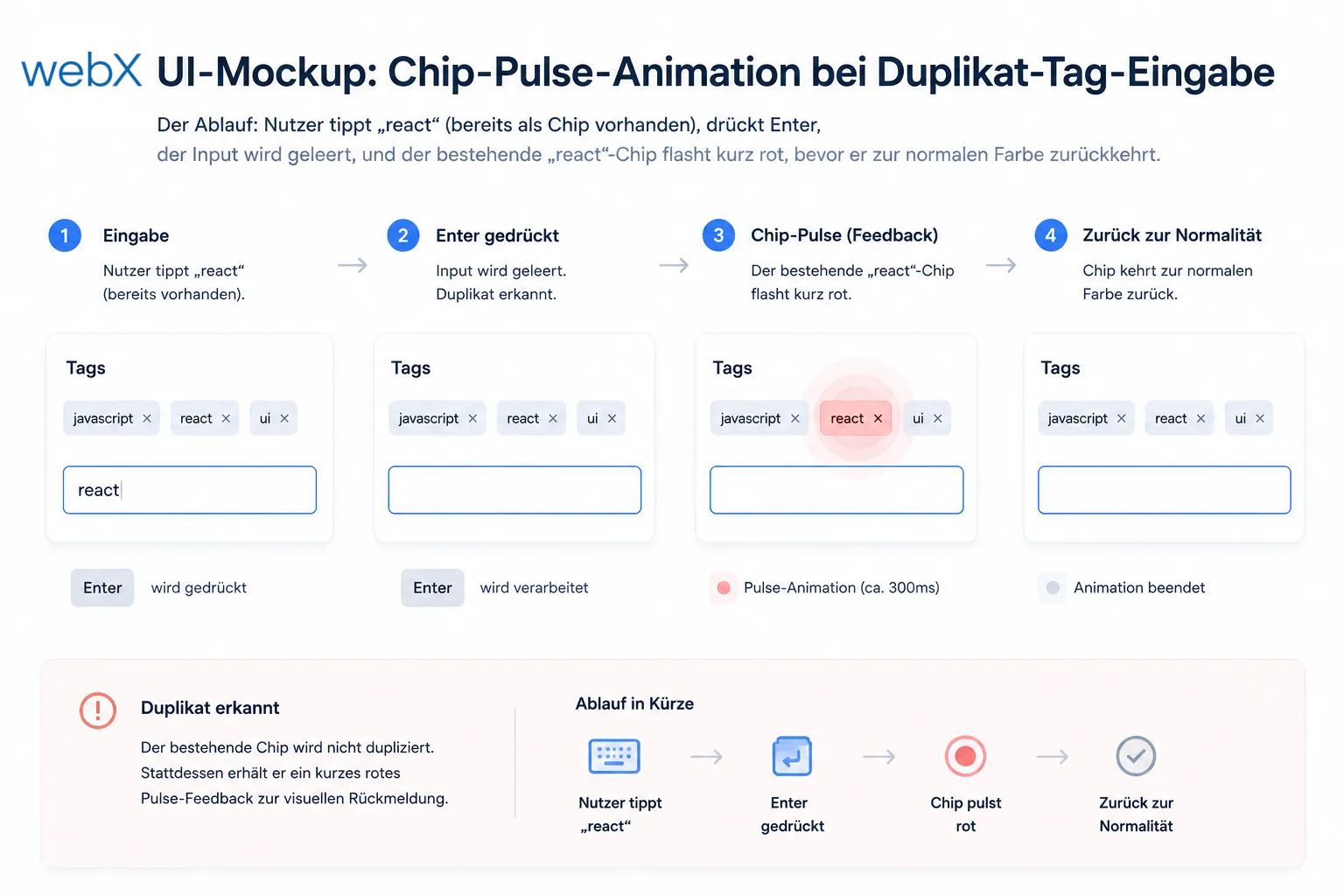 Figure: The duplicate-input sequence. The user types “react”, which already exists as a chip, and presses Enter. The input clears, and the existing “react” chip briefly flashes red before returning to its normal color. The original mockup retains its German text.
All articles in the series
- Vision and system overview: Chrome Extension, RAG architecture and project background: Read article
- Building a RAG system: Qdrant, embeddings and cosine similarity in TypeScript: Read article
- AI provider abstraction: Ollama vs. OpenAI, interface design and no vendor lock-in: Read article
- Chrome Extension MV3: Three isolated runtime contexts, message passing and Strategy Pattern: Read article
- Docker Compose strategy: The override pattern, from local development to Azure: Read article
- Ollama locally vs. Docker: The decision and its consequences: Read article
- Ollama auto-pull entrypoint: Automated model setup at container startup: Read article
- tsconfig and Vite:
Node16vs.bundler, and why Vite has its own rules: Read article - Load complete Instagram captions with MutationObserver: Read article
- Chrome Extension foundation with health indicator and retry queue: Read article
- Phase 2 features: Shadow DOM overlay, Tailwind v4 and duplicate detection: Read article
- Race condition in platform detection: How a UI event breaks Instagram detection: Read article
- Extracting PostId in two Instagram layouts: querySelector vs. ancestor traversal: Read article
- Capture a complete Instagram carousel with MutationObserver: Lazy loading, observer-before-click and timeout fallback: Read article
- Notes and tags when saving screenshots: Read article
- Instagram keyboard shortcuts block Chrome Extension input: Read article
- Lowercase normalization and duplicate detection in tag input: (this article)
- Zitadel Login V2 in Docker Compose with three hidden errors: Read article
- PKCE OAuth in a Chrome MV3 extension: Read article
- React frontend with react-oidc-context and Zitadel: Read article
- Vite build-time environment variables in Docker: Read article
- Event-driven ingestion with BullMQ and Redis: Read article
- MinIO instead of Azurite: S3-compatible object storage locally and on Hetzner: Read article
- access_token, id_token and the Userinfo endpoint: Which belongs where: Read article
- Qdrant multi-tenancy with one collection per user: Read article
- When backend and frontend know different types: Read article
- Removing Zitadel bootstrap: Host header bug and manual setup: Read article
- Backend code review with six problems fixed before launch: Read article
- Traefik instead of NGINX: Reverse proxy for a growing Docker Compose stack: Read article
- Two-layer rate limiting: Traefik and express-rate-limit with Redis: Read article
- Implementing GDPR Article 17 correctly: Promise.allSettled and export batching: Read article
- Embedding model lock-in: Why mxbai-embed-large is a permanent production decision: Read article
- Docker volumes in production: Named volumes, bind mounts and the Hetzner volume approach: Read article
- Two vulnerabilities before launch: Redis without authentication and an exposed Qdrant admin port: Read article
- Traefik as the single entry point in the Docker Compose stack: Read article
- Connecting Zitadel behind Traefik with issuer, JWKS and Login V2: Read article
- Fixing the frontend when the nginx healthcheck fails on localhost: Read article
- Observability for my Docker Compose stack with Bull Board and Dozzle: Read article
- Open the Qdrant dashboard securely with local Traefik and an SSH tunnel: Read article
- Diagnosis of chunking failures despite tokenization: Read article
- Why I set the chunk size to 1500 tokens: Read article
- Splitting the embedding workflow into clear steps: Read article
- Bringing chunking, storage and search back together: Read article
- Capture Intake as a separate module, less orchestration in the Express endpoint: Read article
Are you building a browser-extension data capture system with complex DOM interactions? Let us assess it together.