
Inconsistent user interface
The Power Pages portal lacked consistent design and interaction logic compared with the main TYPO3 domain.
Limited editing options
Editing energy consumption one record at a time was time-consuming and error-prone. No batch features were available.
Complex data structures
Dynamics 365 data had to be processed according to category, reporting period, property and user role.
Lack of transparency
No insight into user behaviour, errors or optimisation opportunities. No monitoring was available.
Legacy code complexity
Existing files with more than 3,000 lines of code, without structure or documentation, required a clean rebuild.
Diverse user roles
Different stakeholders, including tenants, ECE employees and centre managers, required role-based security concepts.
ECE portal with React.
Enterprise portal for Green Lease consumption reporting with React and Excel integration.
Full end-to-end technical responsibility for extending an existing retailer portal, from analysis and user-story creation to production implementation for international retailers.
On this page
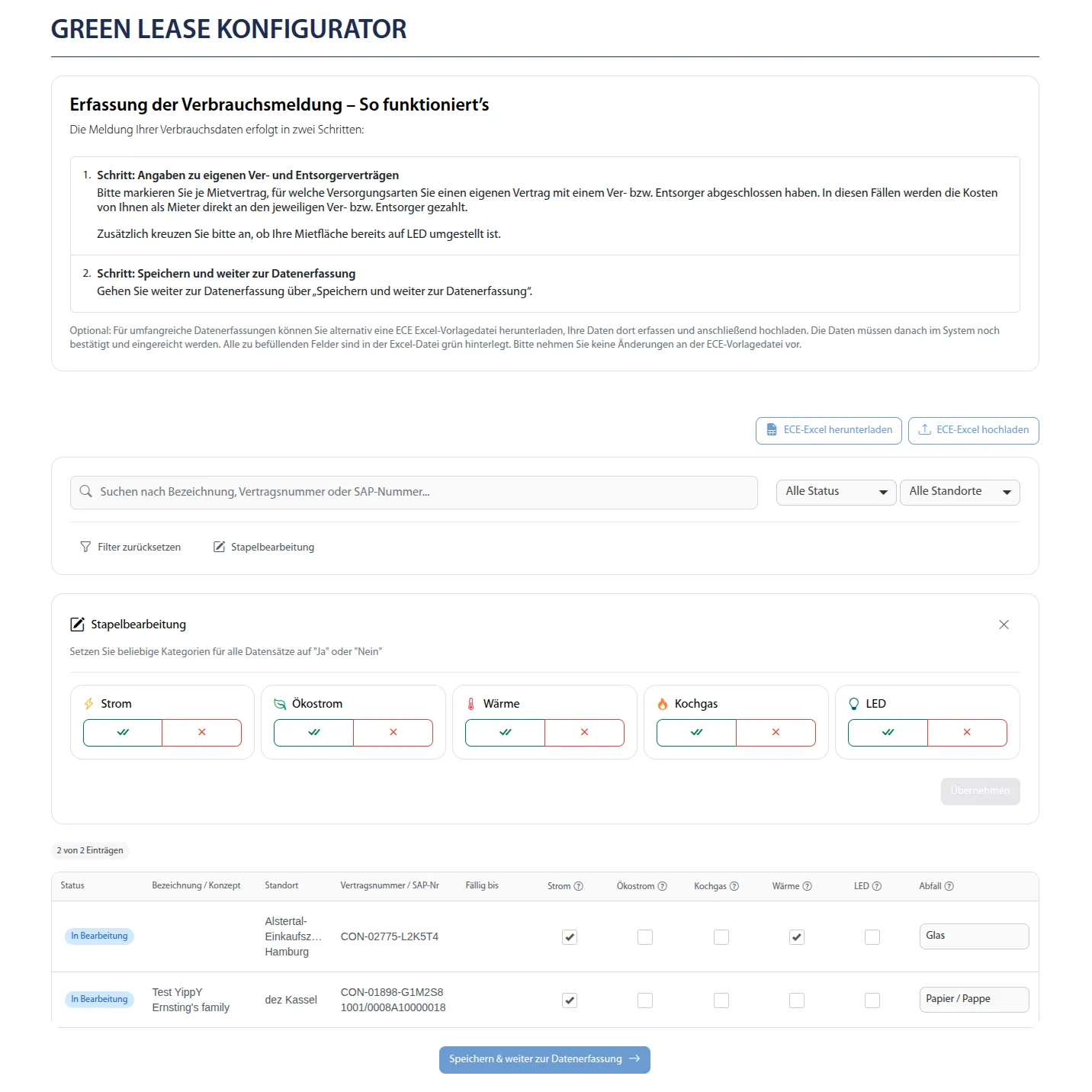
The challenge
Make complex reporting and decision processes usable, scalable and traceable for international tenants.
React in Power Pages
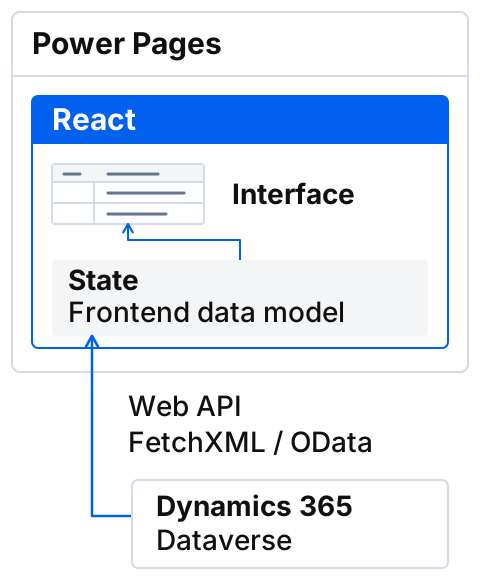
Hybrid architecture for flexibility within the existing Microsoft Power Pages platform.
Modern frontend architecture on an enterprise platform
Frontend framework integration
A complete ReactJS application as a custom module within Power Pages, delivering modern single-page application interaction with platform integration.
Multi-source data integration
Data is loaded from Dynamics 365 through Web API, FetchXML and OData, transformed into a dedicated frontend data model and processed efficiently.
State management and performance
Efficient state management for complex data structures, with client-side filtering, sorting and validation.
Core features
Comprehensive recording and validation of energy and waste consumption for international retailers.
Tabular data entry
Clear tables with more than ten consumption categories and status-dependent logic.
Enterprise data management
Complete search, filter and sorting features with unique dropdown values for high data quality across large datasets.
Multi-row batch editing
Edit multiple records and columns simultaneously with automatic rule validation and visual confirmation.
Seven-language support
Full internationalisation with more than 1,000 translation entries for all UI elements and business processes.
Excel integration
Bulk import and export of consumption data with structured Excel templates, Power Automate and client-side ExcelJS integration.
Intelligent data validation
Real-time comparison with previous-year values warns about unusual deviations without blocking legitimate entries.
Excel integration
Hybrid workflows with Power Automate and ReactJS for structured bulk editing.
Bulk import and export with Excel
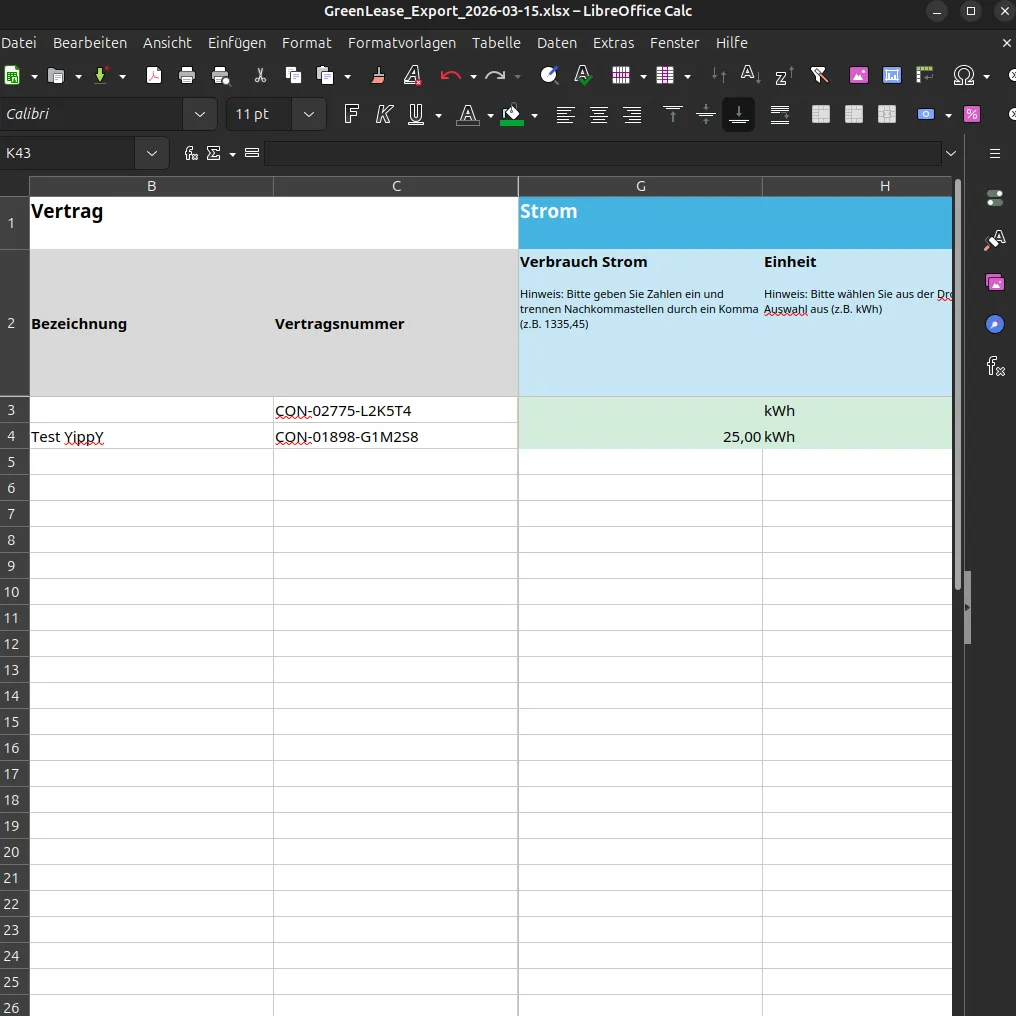
Structured Excel template
Excel files designed from business requirements and generated programmatically with ExcelJS, including validation, dropdowns, number and date formats, and multilingual support.
Server-side processing
Power Automate flows for automated processing of uploaded Excel files, with validation and data writeback.
Download and upload workflows
Seamless exchange between the web portal and Excel, with automatic data transfer, error handling and clear user guidance.
Excel templates
Professional spreadsheet features for error-free offline and bulk data entry.
Data validation
Dropdown lists for categories, number-format validation for consumption values and date validation for reporting periods.
Conditional formatting
Automatic highlighting of required fields, error markers for invalid values and visual status indicators.
Frozen columns and rows
Headers remain visible while scrolling, helping users navigate large datasets.
Formulas and calculations
Automatic totals, average calculations and threshold validation directly in Excel.
Multilingual column headers
All column names, validation messages and dropdown values are available in seven languages.
Pre-filled data
Templates already contain property data, tenant information and historical values for faster data entry.
Excel workflow
Detailed implementation of Excel integration with ReactJS, ExcelJS and Power Automate.
ExcelJS for complex formatting
Recreated the business Excel template programmatically with ExcelJS: formatted cells, data validation, conditional formatting and frozen columns.
Multilingual content management
Central management of all text for Power Pages, ReactJS and Excel templates, with unique keys and fallback logic.
Client-side and server-side validation
Required fields, data types, permitted values and business-specific rules are validated at both levels.
Data transformation and mapping
Bidirectional transformation between the Excel structure and the Dynamics 365 data model, with error handling.

UI components
Embedding the Syncfusion React component library as a reusable UI layer in Power Pages.
Enterprise UI components for professional data entry
Documentation analysis and embedding
Analysis of the Syncfusion documentation and clean embedding of the React library in the existing Power Pages architecture.
Core data-management components
Grid, button, dropdown and checkbox components for structured data entry and editing.
Reusable wrapper architecture
Custom wrapper components supply tables and forms with data consistently.
Data management
Efficient bulk editing of large datasets with search, filter and batch features.
Fast navigation and bulk editing
Advanced search and filter features
Full-text search, column-based filters and sorting provide fast access to relevant records in large datasets.
Intelligent dropdown filters
Columns with dropdown filters show only unique values from the dataset and prevent typing errors.
Multi-row batch editing
Simultaneous status changes for multiple records and columns, with automatic rule validation.
Validation pipeline
Automatic plausibility checks against previous-year values with prioritised user guidance.
FetchXML queries with a security context
Two parallel Dataverse queries across consumption reports and contracts, filtered by user, load relevant previous-year values.
JSON embedded in the document
Optimised JSON is provided in the HTML and is available to the React application at startup without additional API calls.
Fast lookup structure
Previous-year values are grouped into a nested Map structure at startup, enabling immediate real-time validation.
Dynamic thresholds
Tolerance thresholds, such as plus or minus 30 percent, are configured centrally and differentiated by report type.
Data transformation and deduplication
The integration layer removes duplicates, normalises data structures and builds compact JSON with all required fields.
Error handling and fallbacks
Robust error handling for missing previous-year values, FetchXML errors and JSON parsing issues.
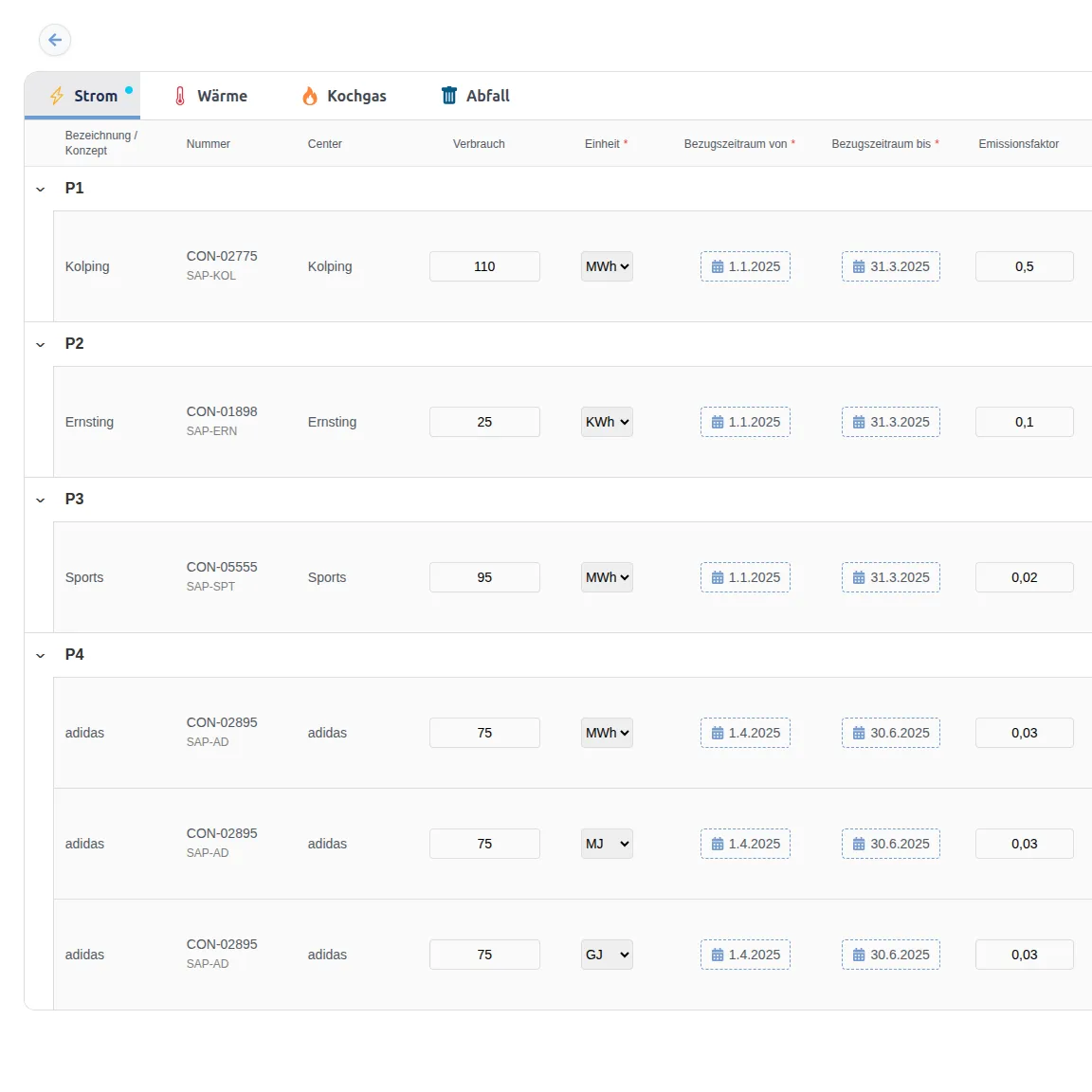
Context-dependent tab navigation
Tab navigation across four consumption categories for electricity, heating, cooking gas and waste, depending on data availability.
Visual error indicators
Tabs with validation errors are highlighted, making it possible to navigate directly to incorrect records.
Prioritised user guidance
Navigation guides users through categories with errors first and returns to the regular order after correction.
Live validation demo
Automatic navigation to categories with errors, with visual indicators and real-time data validation.
Project delivery
End-to-end technical responsibility, from concept and architecture to deployment.
User stories in Azure DevOps
Analysed, wrote and documented more than 30 user stories and 80 tasks in Azure DevOps.
Frontend architecture and implementation
Full responsibility for ReactJS architecture, component design, state management and performance optimisation.
Design creation and implementation
Created the Figma designs and implemented them precisely with responsive layouts and consistent interaction logic.
Data modelling and business logic
Designed and implemented the frontend data model and complex business rules for validation and status transitions.
API and flow integration
Connected Dynamics 365 Web APIs, FetchXML queries, OData endpoints and Power Automate flows for all data operations.
Deployment management
Responsibility for deployments from development to test, plus coordination with Power Pages architects for production releases.
Legacy code modernisation
Completely rebuilt more than 10,000 lines of legacy code, with comprehensive technical documentation of all interfaces and flows.
Stakeholder communication
Regular coordination with the product owner, business teams and Power Pages architects to clarify business and technical constraints.
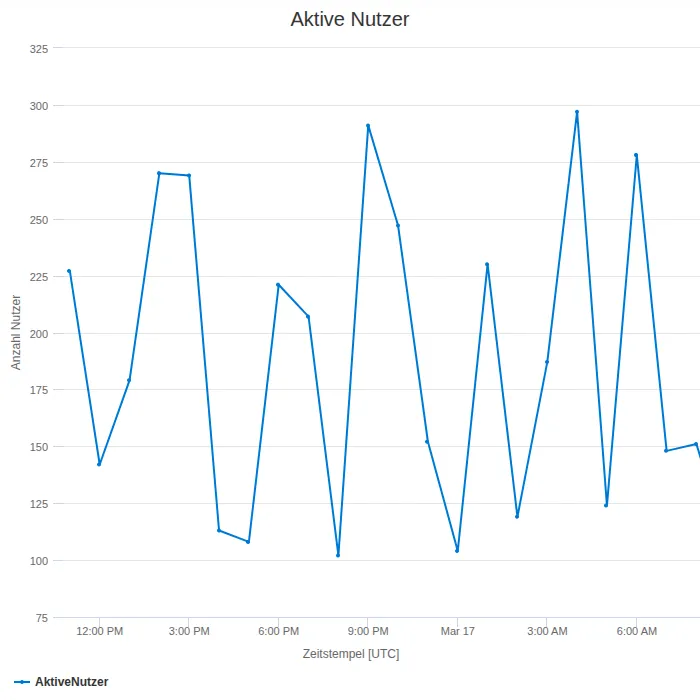
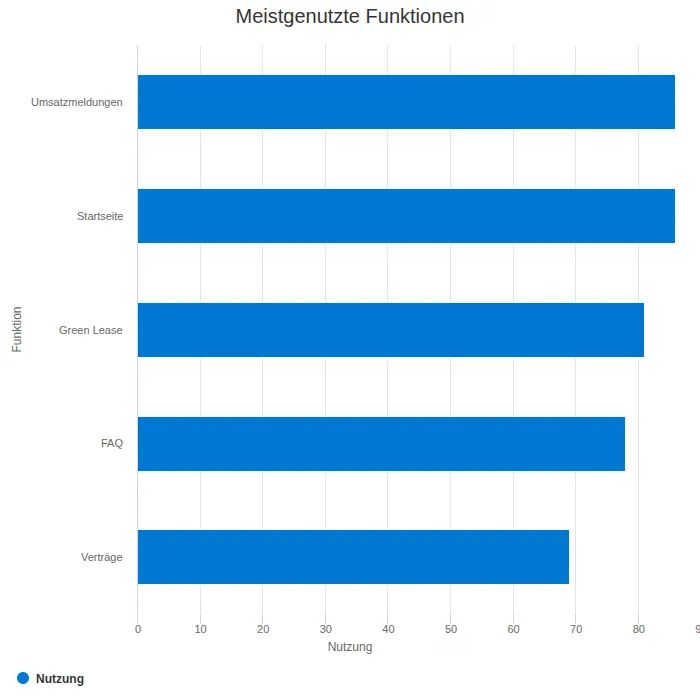
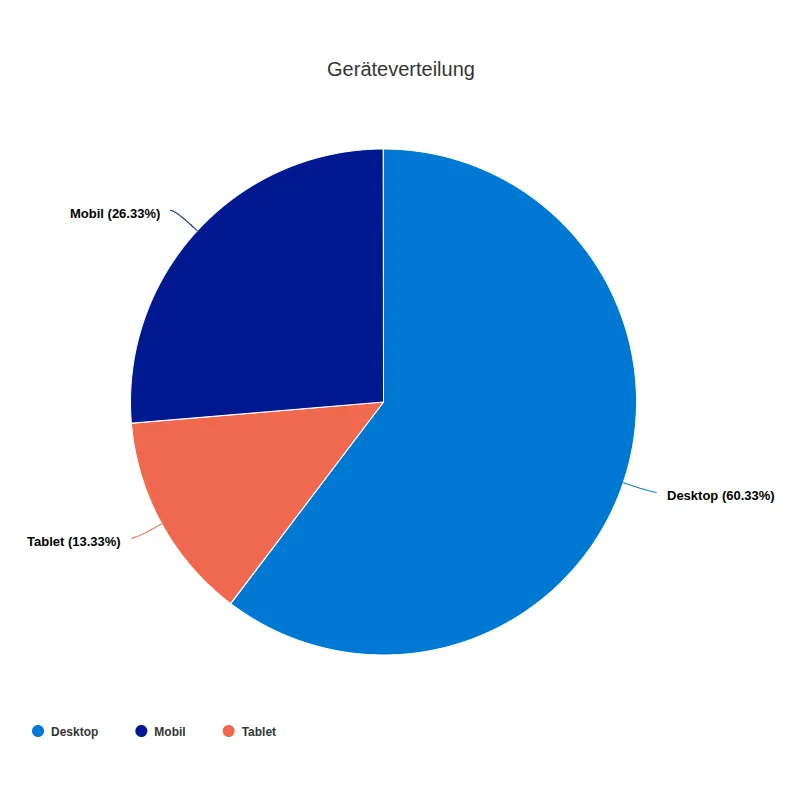
Monitoring and analytics
Planned monitoring concept with Application Insights for data-driven optimisation.
User-behaviour tracking
Capture click paths, feature usage and interaction patterns to identify optimisation opportunities.
Performance monitoring
Monitor load times, API response times and client-side metrics for continuous improvement.
Error tracking and alerting
Automatic capture of client and server errors with contextual information for fast problem resolution.
Technologies
Platforms, frameworks and tools used for the enterprise portal.
ReactJS
Frontend framework for interactive UI components.
Syncfusion React
Enterprise UI component library for grids, dropdowns, buttons and checkboxes.
TypeScript
Type-safe JavaScript for maintainable code.
ExcelJS
Library for programmatic Excel generation and processing.
Dynamics 365
Backend data store and business logic engine.
Power Pages
Low-code platform providing hosting and security infrastructure.
Power Automate
Workflow engine for server-side data processing.
Azure DevOps
Project, release and code management platform.
Figma
Design prototyping and UI/UX specifications.
Internationalisation
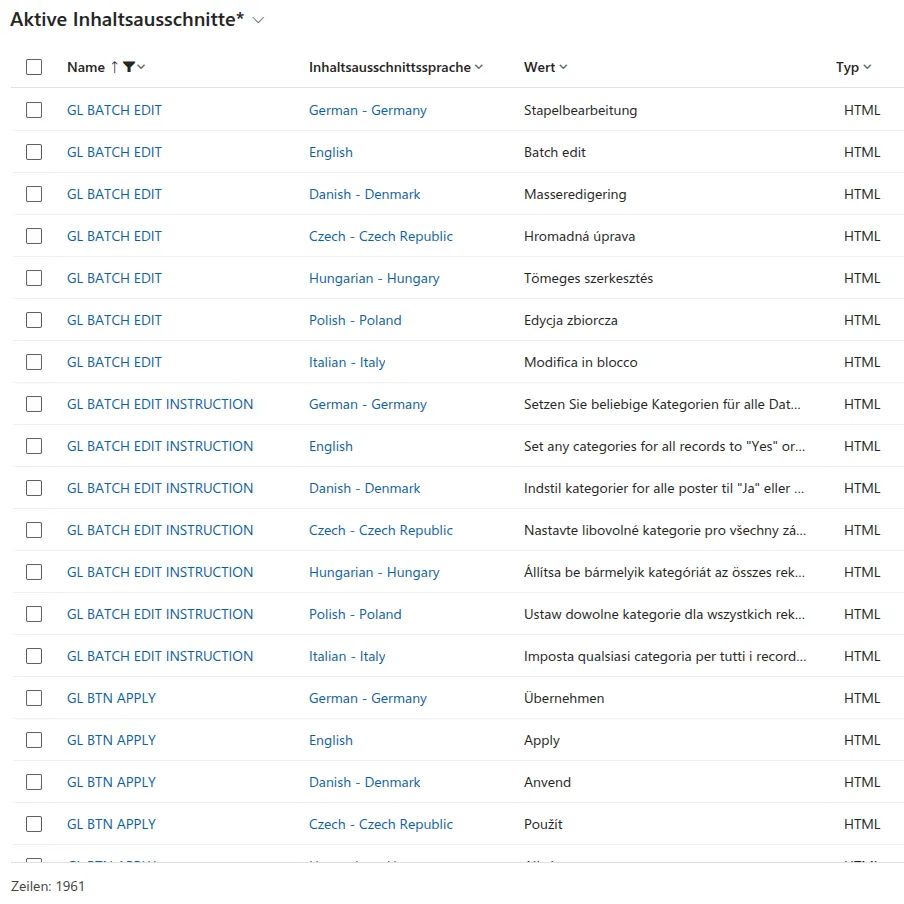
Seven-language support with more than 1,000 Content Snippets.
Application Insights
Monitoring and telemetry concept for usage analysis.
Git and Azure Repos
Version control and structured code reviews.
Multilingual content
Seven-language support with more than 1,000 centrally managed translation entries.
Complete localisation for international use
Central content management
All translation entries are managed centrally in Power Pages as Content Snippets and referenced through unique keys.
React i18n connection
Seamless embedding of Power Pages translations in ReactJS components, with fallback logic and dynamic language switching.
Consistent multilingual content
More than 1,000 content snippets for the interface, Excel templates, error messages, tooltips and process descriptions.
Business value
Measurable improvements in data-entry effort, data quality and extensibility.
Significantly more efficient reporting
Search, filter and batch features alongside Excel workflows reduce manual effort when recording energy and waste consumption.
High user acceptance
A modern UI, clear interaction logic and intuitive operation generate positive feedback from international tenants.
Scalable architecture
The ReactJS component structure enables rapid extensions for new energy categories and business processes.
Improved data quality
Intelligent validation against previous-year values proactively reduces input errors and enables reliable consumption analysis.
Data-driven optimisation
The prepared monitoring concept provides transparency into usage and portal optimisation opportunities.
Lower error rate
Dropdown filters with unique values, automatic validation and structured Excel templates minimise input errors.
Another ECE case study
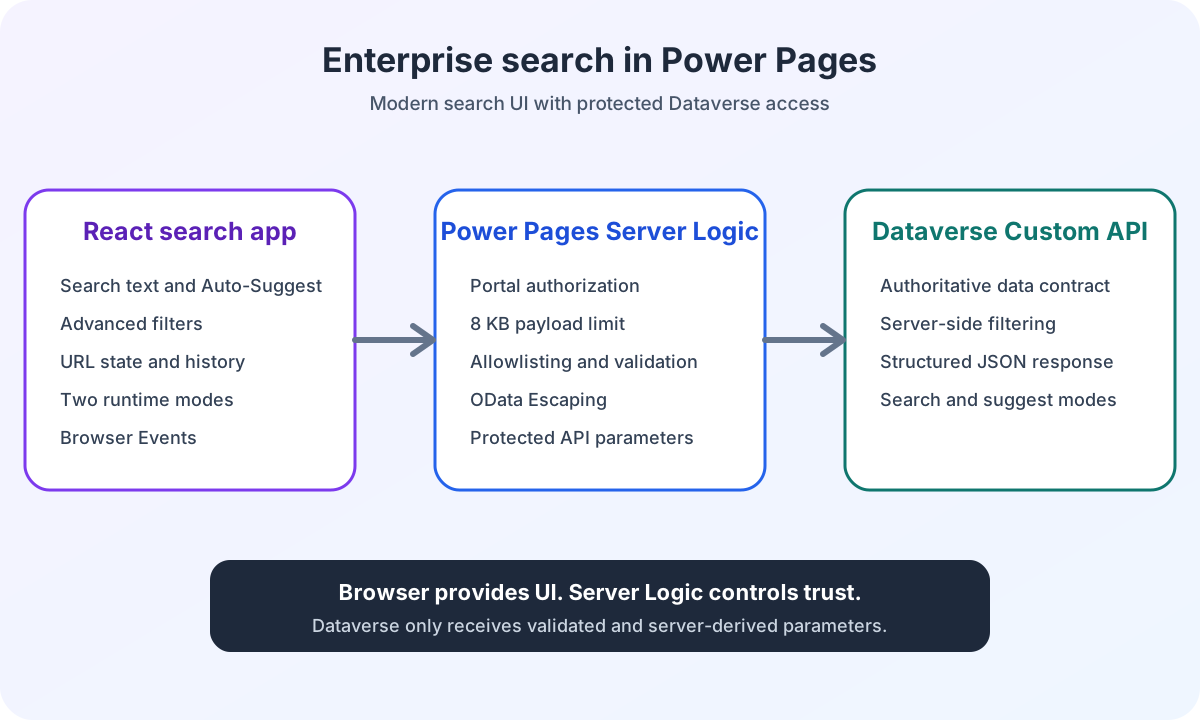
A standalone search application with React, Server Logic and Dataverse Custom API in the same portal environment.
Repeated pro-code delivery for the same portal environment
Complex search logic
Auto-suggest, combinable filters, URL state and browser history for a modern search experience.
Protected Dataverse connection
Power Pages Server Logic validates browser input and controls calls to the Dataverse Custom API.
Planning a similar portal?
Describe your workflow. Together, we will identify the right next step.
Discuss your workflow