
Many combinable search dimensions
Search text, spaces, location types, levels and metrics had to be processed together.
Large structured JSON datasets
The Dataverse Custom API returns complex property, level, feature and space data as a filtered response.
Restorable search state
Filters had to remain consistent across URLs, browser reloads and back/forward navigation.
Untrusted browser input
Manipulated URL parameters or request bodies must not produce unchecked Custom API parameters.
Multiple page types
The landing page and results page needed the same application with different navigation behaviour.
Decoupled results rendering
Other components needed to consume search responses without being part of the same React application.
Enterprise search in Power Pages.
ECE case study: React, Power Pages Server Logic and Dataverse Custom API.
This case study presents an implemented Power Pages enterprise search for complex location and rental-space data. React controls filters, auto-suggest and URL state, while Server Logic validates authorisation and input.
On this page
Project requirements
What were the requirements for the Power Pages enterprise search? The interface had to offer more than full-text search without moving security decisions into the browser.
Search benefits
What the Power Pages enterprise search delivers for locations and spaces: it combines location and rental-space criteria, shareable URLs and server-validated access.
Narrow down locations and spaces
Search text, space size, location types and supported metrics can be combined in a single search.
Continue your research
Valid filters remain in the URL. Reloading or using browser navigation restores the search state.
Control access on the server
React manages interaction. Power Pages Server Logic validates input and portal users before controlled parameters reach Dataverse.
Search in action
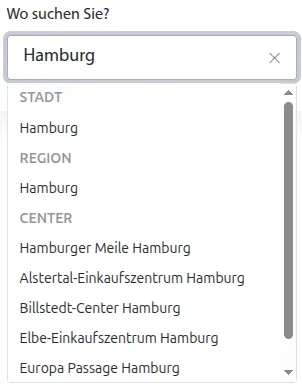
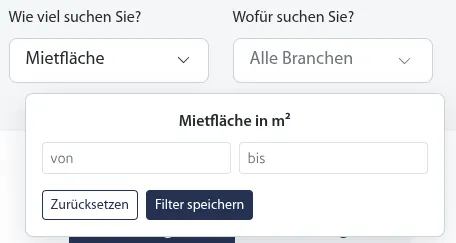
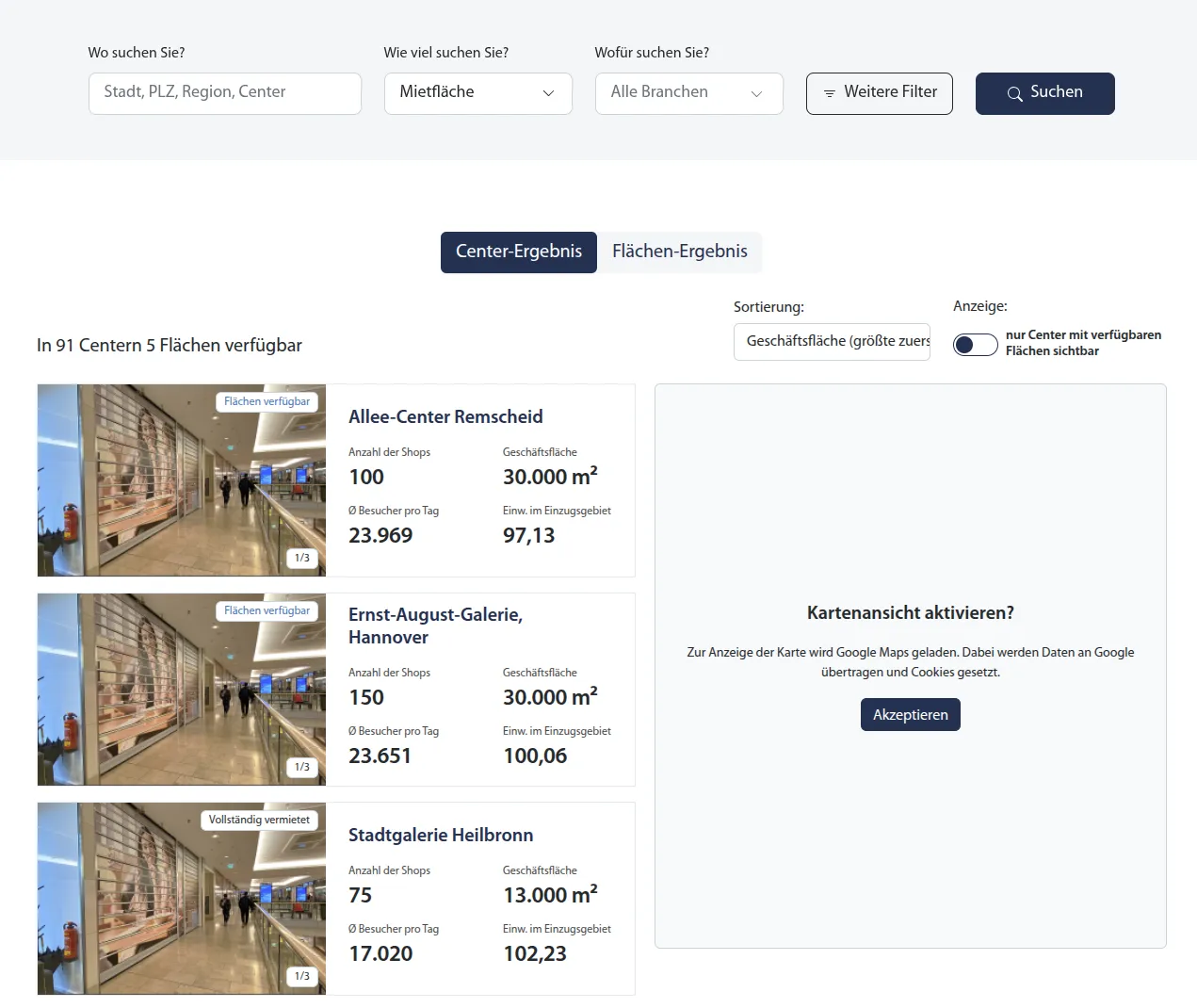
From input to search results: the screenshots show the documented development state, including suggestions from the Dataverse Custom API, a rental-space quick filter, an advanced filter dialog and separate results for shopping centres and spaces.
Auto-suggest from the Dataverse Custom API
Suggestions by type
Entering "hamburg" displays suggestions for city, region and shopping centre.
Select without immediately searching
Selecting a suggestion applies the value but does not start a search.
Responses and error states
The deep dive explains debounce, stale responses and technical errors.
Narrow down search filters for shopping centres and spaces
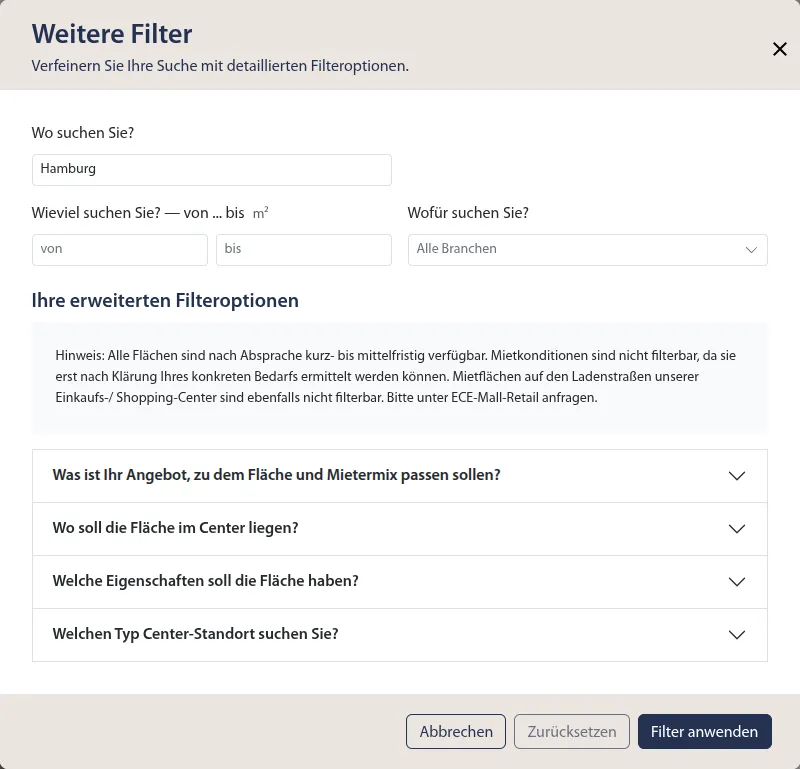
Criteria in the filter dialog
The dialog shows search text, rental-space range and additional filter groups.
Search text and rental spaces
Search terms and rental-space ranges can be narrowed down together.
Filter logic in detail
The deep dive explains search-filter validation and the construction of controlled OData parameters.
Review shopping-centre and space results
Shopping centres and spaces appear separately. Google Maps displays locations after consent.
Architecture decision
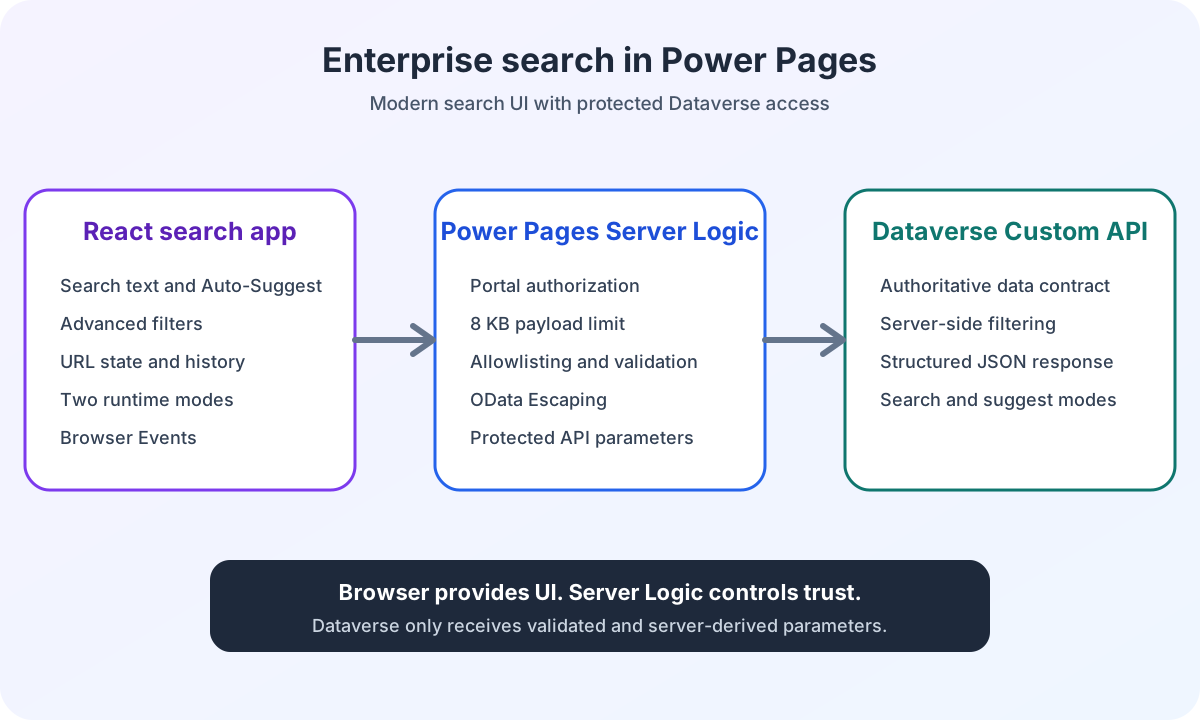
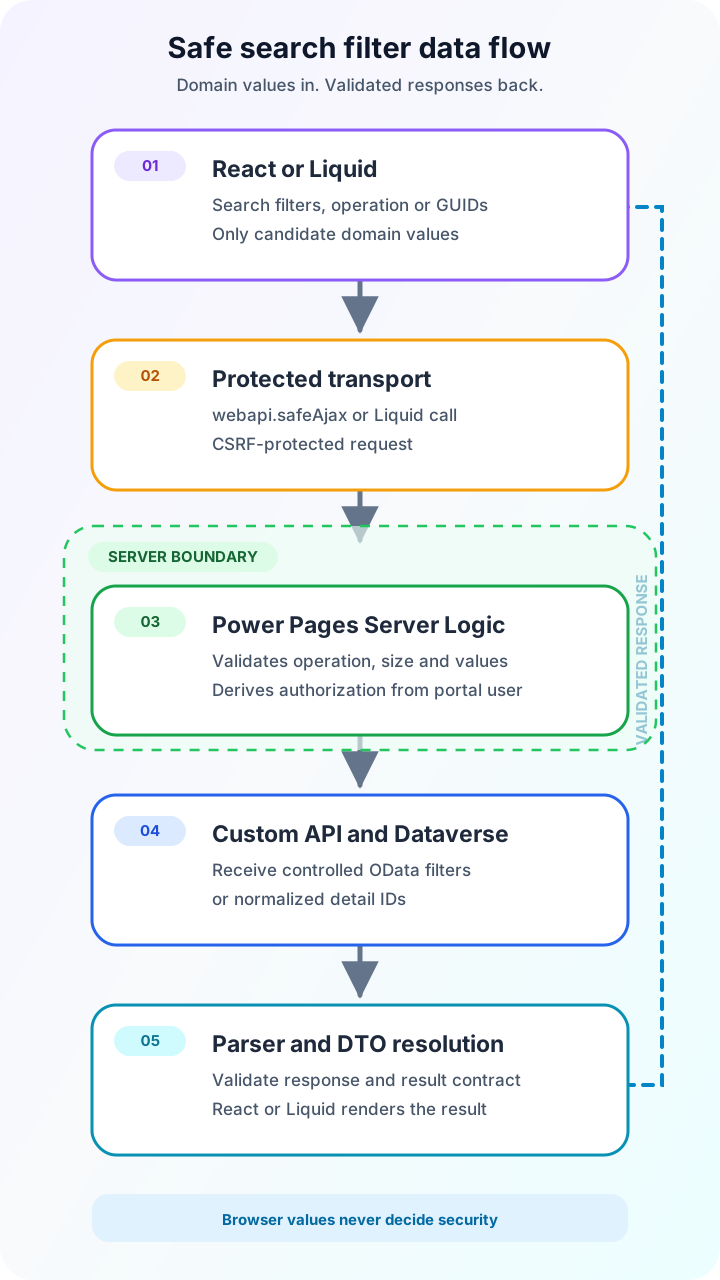
React handles interaction. Server Logic controls trust. The solution separates interaction, search state, authorisation and Dataverse access into clearly bounded responsibilities.
Clear boundaries instead of direct Dataverse queries
Isolated React application
The search module is embedded as a standalone bundle in Power Pages Web Templates and configured through JSON.
Typed application layers
Controller, service, repository, transport and parser separate UI behaviour from three server operations and their response contracts.
Enforced server boundary
Power Pages Server Logic validates the operation, payload, value ranges, catalogue values and portal user before every API call.
Protected Dataverse contract
The Custom API receives only server-derived authorisation and controlled parameters for search, suggestions and detail retrieval.
Browser behaviour
How does React control filters, auto-suggest and URL state in Power Pages? Eight coordinated mechanisms keep interaction, browser history and result events in sync.
Auto-Suggest
Suggestions start at 3 to 100 characters after 300 milliseconds. Sequence protection discards stale responses. Selecting a suggestion does not start a search.
Advanced filters
Spaces, location types and metrics can be filtered together. Industries are managed through the portal configuration.
URL as search state
Valid filters remain shareable. Invalid partial values are removed, while unrelated query parameters are preserved.
Browser history
New searches use pushState. Cleanup uses replaceState. popstate re-reads the filters and starts exactly one search.
Two runtime modes
Landing pages navigate to the results page. Results pages update the URL and search results.
Browser events
portal:search-changed reports accepted state. portal:search-results follows only after successful transport and parser validation.
GUID detail search
Shopping centres and spaces are validated by GUID, entity type and language, then delivered to Liquid as a resolved DTO.
Favourites batch
One request processes 1 to 50 GUIDs of a single entity type and separates results, missing IDs and invalid IDs.
Enforced security boundary
Browser input is not treated as authoritative. Power Pages Server Logic repeats validation independently of the frontend and controls every call to the Custom API.
Server-side authorisation
Server Logic derives authorisation from Server.User. A browser value cannot override this decision.
Bounded request body
JSON requests exceeding 8,192 UTF-8 bytes are rejected before an API call.
Allowlisting and value ranges
Only search, suggest and getPortalCatalogDetails are allowed. Filter values are validated against known ranges and catalogues.
OData escaping
Strings are handled correctly before server-side filters are constructed.
CSRF protection
The React application uses webapi.safeAjax and the Power Pages anti-forgery mechanism.
Errors remain errors
Backend, transport and parser errors are not presented as successful empty result lists.
Secure data flow
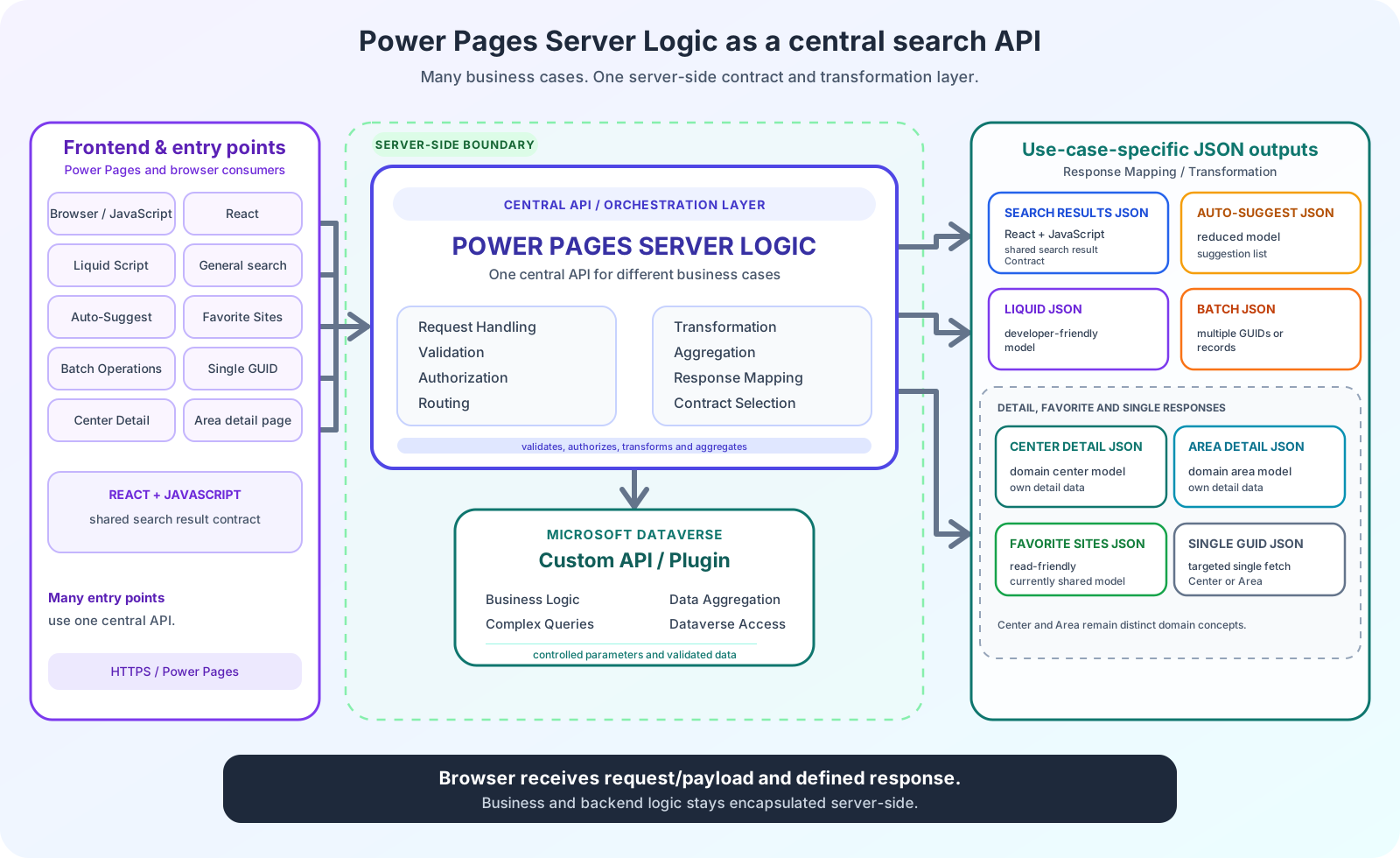
How do search filters reach Dataverse securely from React? Five controlled steps from the browser request to the resolved response.
Create the contract
React or Liquid creates a request for search, suggestions, a detail or a favourites batch.
Send securely
webapi.safeAjax sends the request to Power Pages Server Logic.
Validate on the server
Server Logic checks the operation, the 8,192 UTF-8-byte limit, value ranges, catalogue values, GUIDs and portal user.
Call the Custom API
Only validated search filters or normalised detail and favourites IDs reach Dataverse.
Resolve the response
Parsers and DTO resolution deliver search results, details or ordered batch results with visible partial errors.
Consent Management
How does the Power Pages portal control external services after consent? The portal connects consentmanager to a consent service registry. Application Insights and Google Maps load their SDKs after consent. Google Maps displays locations in the React application and through a Web Template on a detail page.
Shared consent status
consentmanager supplies the decision to the registry. Its browser contract reports consent status, not whether a service is already running.
Explore the consent architectureApplication Insights after consent
The implemented adapter loads the SDK after approval and shuts down the telemetry instance on withdrawal. While an SDK download is already in progress, a page view may still be sent before shutdown.
Explore Application Insights consent
Technical deep dives
Eleven articles document architecture, contracts, security boundaries, search state, configuration, detail retrieval and favourites retrieval.
Overall architecture and data flow
The hub follows a search from the Power Pages Web Template through React and Server Logic to the validated Dataverse response.
Open the architecture seriesModular React host
The first deep dive shows how a central host and JSON configuration control the same React bundle on multiple Power Pages sites.
Explore the host contractServer Logic as the security boundary
The security article shows how request size, the operation allowlist, server-side authorisation and OData construction are controlled before the Dataverse API.
Explore the security boundaryTyped end-to-end contracts
The interface article follows requests and responses through the controller, service, repository, Power Pages transport and runtime parser.
Explore the interfacesURL state and browser history
The URL article shows how landing navigation, query serialisation, pushState, replaceState and popstate form a shareable search state.
Explore the URL lifecycleDecoupled result consumers
The event article shows how state changes and validated responses are distributed through separate CustomEvents to JavaScript, jQuery and React.
Explore the event contractsRobust auto-suggest
The auto-suggest article covers debounce, request sequences, separate server operations, grouped suggestions and clear states for empty results and technical errors.
Explore auto-suggestFilter sanitization and OData
The deep dive explains search-filter validation. Server Logic generates controlled objectfilter, areafilter and levelfilter parameters from those filters.
Explore the filter contractEditable industry configuration
The configuration article shows how a shared Web Template supplies stable industry IDs to JavaScript and React, while each runtime and Server Logic validates independently.
Explore the configuration contractGUID detail search with Liquid
The detail article shows how GUID, entity type and language are validated, Dataverse responses are resolved and three Liquid result states are rendered.
Explore detail searchFavourites as a GUID batch
The favourites article documents 1 to 50 IDs, normalisation, deduplication, stable ordering and separate lists for missing and invalid IDs.
Explore the favourites batch
Technical responsibility
Responsibility for Power Pages, React and Dataverse, from business logic and security boundaries to documentation.
Search and filter design
Translate business search dimensions into a usable filter model and traceable URL parameters.
Frontend architecture
React components, state management, controllers, services, transport and typed result contracts.
Power Pages integration
Web Templates, runtime configuration, webapi.safeAjax, Server Logic, Liquid detail calls and browser events.
Security and API design
Payload limits, operation allowlists, authorisation, OData filters, GUID contracts and the Dataverse Custom API.
Documentation
Architecture, configuration, event contracts, the sanitization matrix and change procedures.
Maintainable extension
Clear catalogue ownership and defined steps for new filters, industries and result consumers.
Frequently asked questions
Concise answers about architecture, security and the implemented retrieval operations.
How is the Power Pages enterprise search structured?
A Power Pages Web Template starts the React widget. React manages interaction, filters and URL state. Server Logic validates requests and authorisation. The Dataverse Custom API processes only controlled search, suggestion and detail parameters.
Why does React not handle authorisation?
React runs in the browser and can be modified or bypassed. Server Logic therefore derives authorisation from the current portal user. Values from the URL, form or request body are never treated as authoritative security decisions.
How does Server Logic protect Dataverse access?
Server Logic permits only three known operations, limits JSON requests to 8,192 UTF-8 bytes, validates value ranges and catalogue values, and constructs controlled OData parameters. Errors remain visible and are not presented as successful empty lists.
How do detail search and favourites work?
Detail search validates the GUID, entity type and language and delivers a resolved DTO to Liquid. The favourites batch processes 1 to 50 GUIDs of a single entity type and separates results, IDs that were not found and invalid IDs.
Another ECE case study
The enterprise search is a standalone application within the same Power Pages environment.
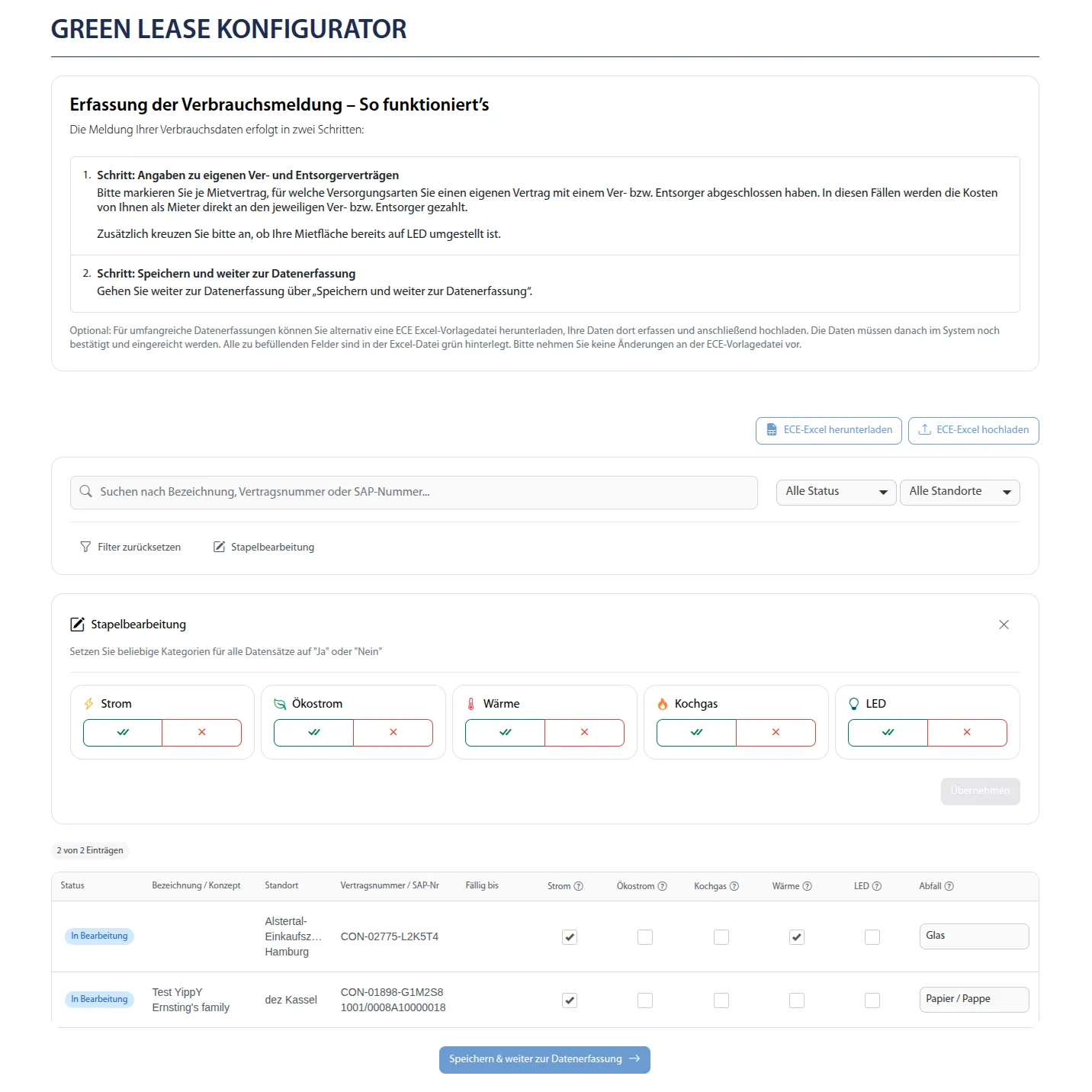
Multilingual consumption-reporting portal with React and Excel
Repeated responsibility
Both case studies demonstrate complex frontend and integration work within the same enterprise platform.
A different business process
The consumption-reporting portal focuses on data entry, Excel workflows, validation and seven languages.
Does your portal need search?
Describe your workflow. Together, we will identify the right next step.
Discuss your workflow