Power Pages auto-suggest with React, debounce and requests
Power Pages auto-suggest with React uses debounce, request sequences and clear UI states to prevent stale responses and unnecessary search requests.
Contents
- Why is auto-suggest in Power Pages more than a dropdown?
- How do 3 characters and a 300-millisecond debounce work?
- How does a sequence number protect React auto-suggest from old responses?
- Which UI states does auto-suggest need in Power Pages?
- How do the search field and filter modal share the same auto-suggest component?
- Why are Suggest and Search separate Power Pages operations?
- Why does Power Pages Server Logic remain the Suggest boundary?
- How does Power Pages prioritize direct auto-suggest matches?
- How does auto-suggest separate deduplication and labels?
- How does React validate every auto-suggest suggestion?
- Why does selecting a suggestion not trigger a search?
- Why does free text remain valid in Power Pages auto-suggest?
- How does Syncfusion update auto-suggest before paint?
- What does this Power Pages auto-suggest architecture not promise?
- Power Pages auto-suggest experience from the enterprise project
Why is auto-suggest in Power Pages more than a dropdown?
A search field with suggestions initially looks like a small feature.
A list appears after three characters. You select an entry. The text ends up in the field.
The difficult work happens between these visible steps.
What happens if you keep typing quickly while a request is already running? How does the interface distinguish a successful empty list from a technical error? Can a selection navigate immediately? And what data may the browser pass to Dataverse in the first place?
I therefore treat auto-suggest as a separate flow. It has its own UI state, server operation and response parser.
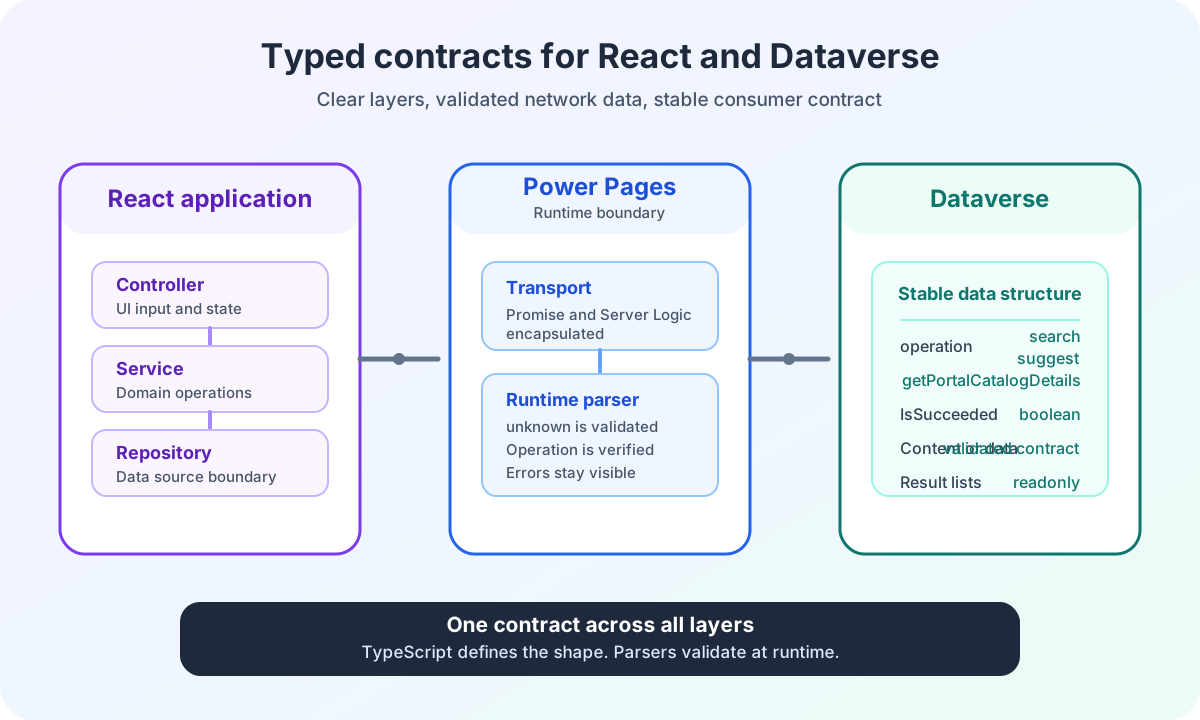
The Power Pages enterprise search architecture overview shows the complete data flow between React, Power Pages Server Logic and Dataverse.
How do 3 characters and a 300-millisecond debounce work?
The hook uses three fixed limits:
const SUGGESTION_DEBOUNCE_MS = 300;
const MIN_SUGGESTION_LENGTH = 3;
const MAX_SUGGESTION_LENGTH = 100;
I trim the input before every decision.
Text with two visible characters and additional spaces therefore remains too short. Text with more than 100 trimmed characters does not start a suggestion request either.
In both cases, the hook clears existing suggestions and sets the state to idle.
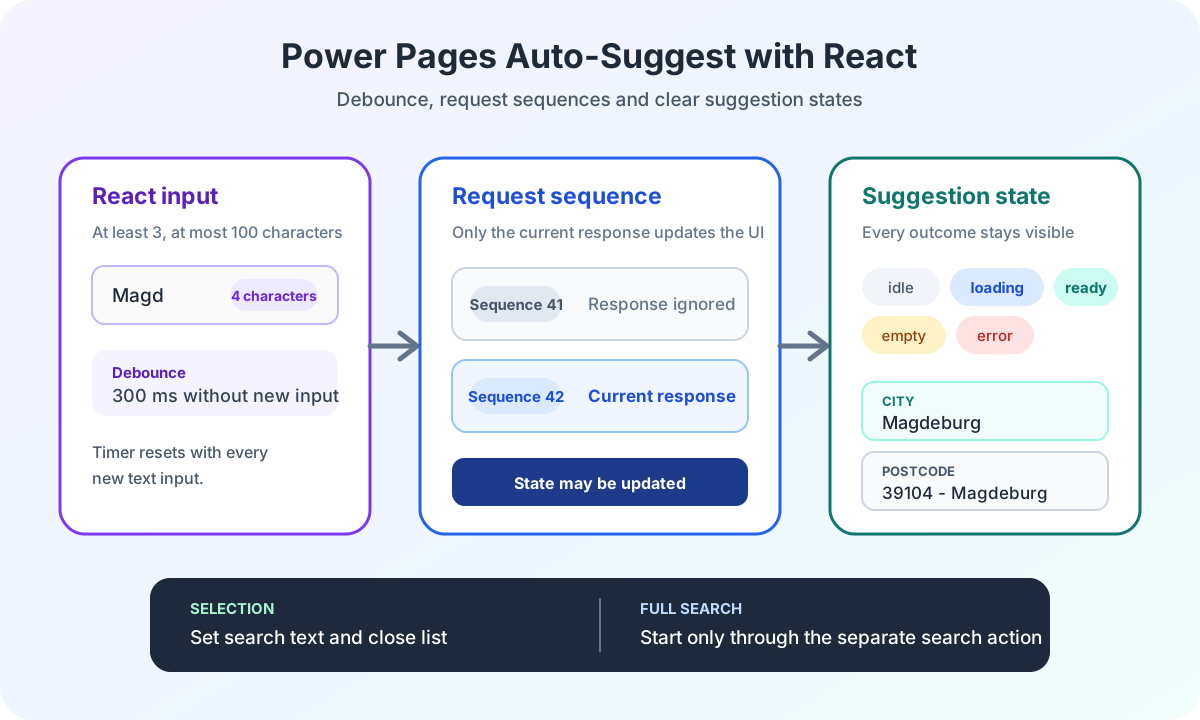
Something different happens from three to 100 characters. The existing list is cleared immediately. The state changes to loading immediately. Only after 300 milliseconds without newer input does the hook call the controller.
function requestSuggestions(value: string): void {
  const normalizedValue = value.trim();

  clearCurrentTimer();

  if (normalizedValue.length < 3 || normalizedValue.length > 100) {
    setSuggestions([]);
    setStatus('idle');
    return;
  }

  setSuggestions([]);
  setStatus('loading');

  timer.current = setTimeout(() => {
    void controller.fetchSuggestions(normalizedValue);
  }, 300);
}
This excerpt is reduced for the article. The production sequence check follows in the next step.
Debouncing prevents unnecessary starts during rapid input. It does not cancel network requests.
Trimmed input | Immediate state | Suggestion list | Request |
|---|---|---|---|
Fewer than 3 characters | idle | Cleared | No request |
3 to 100 characters | loading | Cleared before new results | Starts after 300 milliseconds without new input |
More than 100 characters | idle | Cleared | No request |
How does a sequence number protect React auto-suggest from old responses?
Debouncing only handles the time before the request.
If a request has already been sent and you change the text, that HTTP request continues. The current implementation uses neither AbortController nor a transport cancellation function.
Instead, I prevent an old response from overwriting the new state.
const requestSequence = { current: 0 };

function requestSuggestions(value: string): void {
  const normalizedValue = value.trim();
  const sequence = requestSequence.current + 1;
  requestSequence.current = sequence;

  clearCurrentTimer();

  if (normalizedValue.length < 3 || normalizedValue.length > 100) {
    setSuggestions([]);
    setStatus('idle');
    return;
  }

  setSuggestions([]);
  setStatus('loading');

  timer.current = setTimeout(() => {
    void controller.fetchSuggestions(normalizedValue).then(
      (nextSuggestions) => {
        if (requestSequence.current !== sequence) {
          return;
        }

        setSuggestions(nextSuggestions);
        setStatus(nextSuggestions.length > 0 ? 'ready' : 'empty');
      },
      () => {
        if (requestSequence.current !== sequence) {
          return;
        }

        setSuggestions([]);
        setStatus('error');
      }
    );
  }, 300);
}
Every new input increments the sequence number. The same happens on selection and when the hook unmounts.
If an older response arrives later, its local sequence no longer matches the current value. The hook ignores both the result and any error.
This protects the visible list from race conditions. It does not retroactively reduce the load of a request that has already been sent.
Which UI states does auto-suggest need in Power Pages?
I do not use a single Boolean such as isLoading.
The suggestion flow has five states:
type SearchSuggestionStatus = 'idle' | 'loading' | 'ready' | 'empty' | 'error';State | Meaning | Visible response |
|---|---|---|
idle | No valid input, selection completed or state cleared | No suggestion message |
loading | Debounce is running or a request is active | Loading suggestions |
ready | At least one validated suggestion is available | Grouped suggestion list |
empty | The request succeeded but returned no matches | No matching suggestions found |
error | Transport, Server Logic, Custom API or parser reports an error | Suggestions could not be loaded |
The visible text distinguishes these situations:
const NO_RECORDS_TEMPLATES = {
  loading: 'Loading suggestions ...',
  error: 'Suggestions could not be loaded.',
  empty: 'No matching suggestions found.',
} as const;
An empty result is not a technical error. A technical error is not an empty result list.
Both states remain limited to the suggestion area. You can still submit free text.
How do the search field and filter modal share the same auto-suggest component?
SearchInput is used in two places.
In the main search field, onChange writes directly to the applied search text:
<SearchInput
  value={filters.searchText}
  onChange={(value) => {
    setAppliedFilter('searchText', value);
  }}
/>
The text therefore belongs to the visible form state. A complete search still starts only through the search button.
In the advanced filter modal, the same component writes only to the draft:
<SearchInput
  value={draftFilters.searchText}
  onChange={(value) => {
    onDraftChange('searchText', value);
  }}
  placeholder="City, postal code, region, location"
/>
A selection in the modal does not apply other draft filters. It neither closes the modal nor submits a search.
Only the action to apply filters transfers the entire draft to the applied state. Cancel discards the changes.
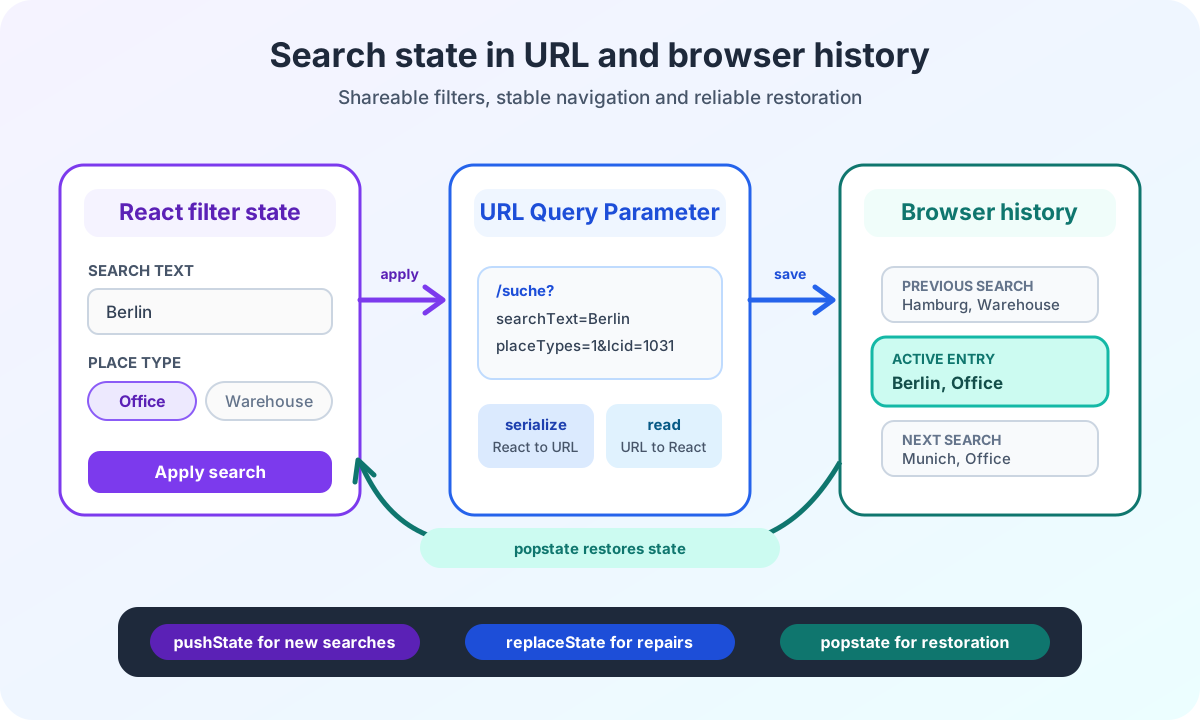
The suggestion flow remains identical in both widget modes. The article on URL state and browser history explains why only the later submit distinguishes navigation from a URL update.
Why are Suggest and Search separate Power Pages operations?
Auto-suggest uses the same Power Pages Server Logic endpoint as the complete search. Its request contract is nevertheless smaller.
type SupportedLcid = 1031 | 1033;

interface SuggestServerLogicRequest {
  readonly operation: 'suggest';
  readonly lcid: SupportedLcid;
  readonly searchText: string;
}

interface SearchServerLogicRequest {
  readonly operation: 'search';
  readonly lcid: SupportedLcid;
  readonly searchText?: string;
  readonly filters?: Readonly<Record<string, unknown>>;
}
The controller trims the text and again blocks values outside the length of three to 100 characters:
function fetchSuggestions(searchText: string): Promise<readonly SearchSuggestion[]> {
  const normalizedSearchText = searchText.trim();

  if (normalizedSearchText.length < 3 || normalizedSearchText.length > 100) {
    return Promise.resolve([]);
  }

  return service.fetchSuggestions(normalizedSearchText, resolveLocale());
}
The service explicitly adds operation: 'suggest'. The transport sends the request through the central Power Pages AJAX wrapper and passes the response to the suggestion parser.
The complete search has its own path. Typing does not start a Search operation. Only the search action starts navigation or a complete request.
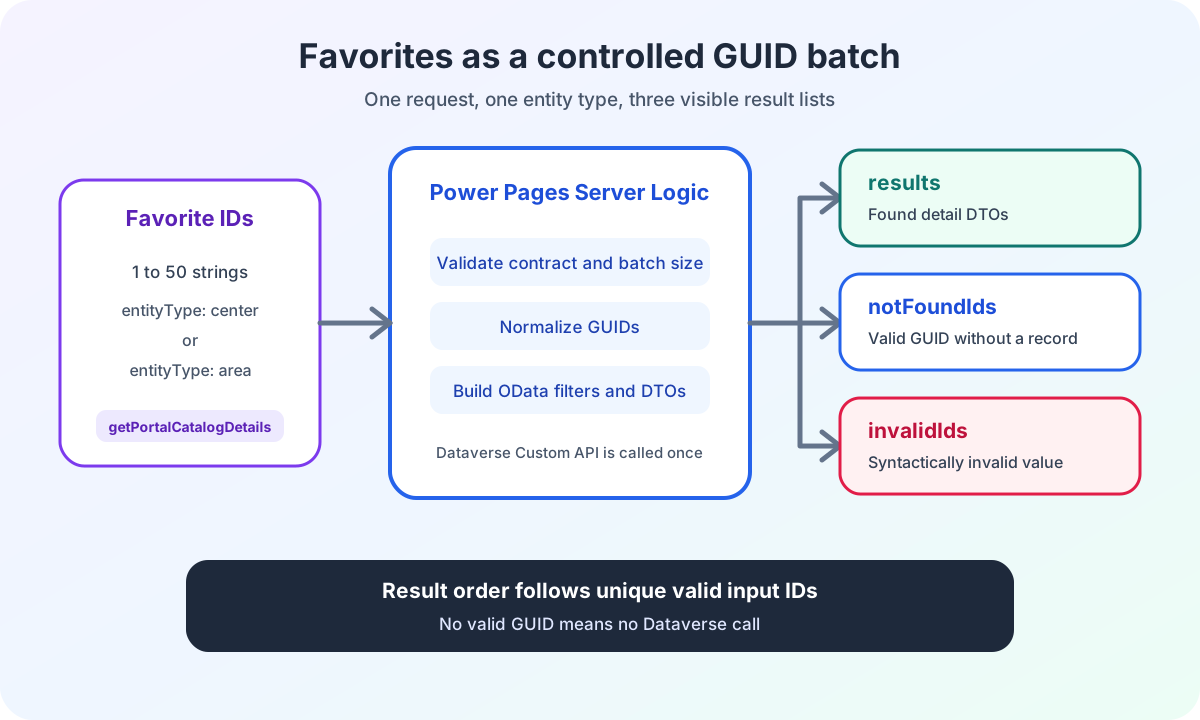
This comparison is deliberately limited to input and the search action. The shared POST endpoint also provides getPortalCatalogDetails for known GUIDs. This third operation triggers neither debounce nor suggestion selection.
The separate article on Power Pages favourites with batch GUIDs documents that use case.
Aspect | Auto-suggest | Complete search |
|---|---|---|
Operation | suggest | search |
Trigger | Valid text input after debounce | Explicit search action |
Request content | Locale and search text | Locale, search text and applied filters |
URL and navigation | No change | Navigation or update of the results-page URL |
Effect of errors | Free-text search remains available | Technical search error remains visible |
The article on typed React and Dataverse contracts explains this separation of layers in its full context.
Why does Power Pages Server Logic remain the Suggest boundary?
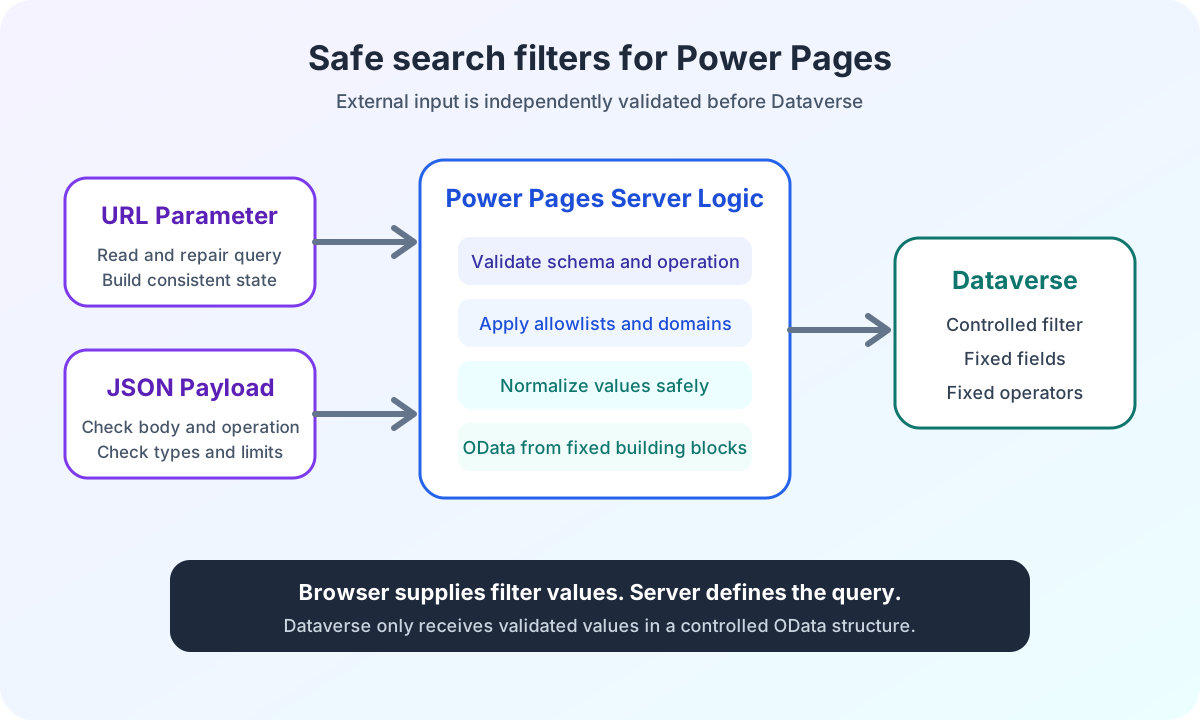
The browser must not determine Suggest rules on its own.
Power Pages Server Logic validates the operation again. For suggest, searchText must be a string. The server trims the value and rejects more than 100 characters.
Below three characters, Server Logic returns a successful empty list without calling the Dataverse Custom API.
From three characters onward, the server itself builds a controlled free-text query for four categories:
- City
- Postal code
- Region
- Location
The browser sends neither field names nor a complete OData expression.
The specific Dataverse implementation deliberately remains hidden in the public example. The architecture contract is nevertheless clear. Server Logic determines permitted fields, operators, locale and authorization. Only then is the Custom API called.
The Microsoft overview of Power Pages Server Logic describes this server-side execution boundary.
My article on the Power Pages Server Logic security boundary also shows how request size, operation allowlist, server-side authorization and OData escaping work together.
How does Power Pages prioritize direct auto-suggest matches?
A matching backend record can supply several usable values.
If the search text matches the location name, the city, postal code and region of the same record may also appear as related suggestions.
Every suggestion therefore has a flag:
type SearchSuggestionKind = 'city' | 'postalCode' | 'region' | 'center';

interface SearchSuggestion {
  readonly kind: SearchSuggestionKind;
  readonly label: string;
  readonly value: string;
  readonly isDirectMatch: boolean;
}
isDirectMatch is true when the raw value of the relevant category contains the trimmed search text, ignoring case.
Sorting works at category level:
- Categories with at least one direct match come first.
- Categories without a direct match follow.
- When directness is equal, the order is city, postal code, region and location.
- Within every category, the order of backend records is retained.
This is an important precision boundary. Direct entries are not additionally sorted ahead of indirect entries within the same category.
The implementation also uses no further relevance scoring or custom diacritic normalization.
How does auto-suggest separate deduplication and labels?
Deduplication combines the category and normalized raw value.
A city and a location with the same text therefore remain two different suggestions. Two cities with the same lowercased value are returned only once.
The response is limited to ten suggestions.
Postal codes have an additional display rule:
const suggestion: SearchSuggestion = {
  kind: 'postalCode',
  label: '39104 - Example City',
  value: '39104',
  isDirectMatch: true,
};
The label provides context. The selected value remains the postal code alone.
In the browser, types are connected to fixed group labels:
const GROUP_LABELS: Record<SearchSuggestionKind, string> = {
  city: 'CITY',
  postalCode: 'POSTAL CODE',
  region: 'REGION',
  center: 'CENTER',
};
The UI renders label. On selection, it writes value into the search field.
How does React validate every auto-suggest suggestion?
TypeScript types end at the network boundary.
The response parser first checks whether the server response belongs to the suggest operation. Then data.suggestions must be an array.
Each entry is validated individually:
function parseSuggestion(value: unknown): SearchSuggestion {
  if (!isRecord(value)) {
    throw new Error('Suggestion must be an object.');
  }

  if (!isSuggestionKind(value['kind'])) {
    throw new Error('Suggestion has an invalid kind.');
  }

  if (typeof value['label'] !== 'string' || value['label'].trim() === '') {
    throw new Error('Suggestion needs a label.');
  }

  if (typeof value['value'] !== 'string' || value['value'].trim() === '') {
    throw new Error('Suggestion needs a value.');
  }

  if (typeof value['isDirectMatch'] !== 'boolean') {
    throw new Error('Suggestion needs isDirectMatch.');
  }

  return {
    kind: value['kind'],
    label: value['label'],
    value: value['value'],
    isDirectMatch: value['isDirectMatch'],
  };
}
An incorrect kind value or an empty label is not treated as an empty list. The parser rejects the response. The hook then displays the error state.
This keeps a contract error visible.
Why does selecting a suggestion not trigger a search?
Selection intentionally has a small effect:
function handleSelect(value: string): void {
  onChange(value);
  selectSuggestion(value);
  autoCompleteRef.current?.hidePopup();
}
selectSuggestion increments the request sequence, clears the timer, empties the list and sets the state to idle.
The hook also remembers the selected trimmed value. If the AutoComplete component immediately reports the same value again as filter input, no new Suggest request starts for it.
Selection:
- sets the search text
- closes the suggestion popup
- does not navigate
- does not update the URL
- does not trigger a
search-changedevent - does not start a complete search
The article on CustomEvents in Power Pages React microfrontends explains when the search state and results are actually published.
Why does free text remain valid in Power Pages auto-suggest?
Auto-suggest is an aid. It does not validate input against a master-data list.
You can enter text and submit the search without selecting a suggestion. This also applies after an empty suggestion list or a technical Suggest error.
This decision keeps Suggest and Search functionally separate.
A Suggest error must not block a complete search. Conversely, selecting a suggestion must not silently start the more expensive search.
This boundary matters in partner projects. Suggestions improve orientation and input speed. The actual search operation remains controllable and traceable.
How does Syncfusion update auto-suggest before paint?
The AutoComplete component renders its content for empty data before React has fully made the new template prop visible.
Without an additional step, an outdated fallback may briefly appear even though the hook has already set loading, empty or error.
I therefore update the text and filtered data in useLayoutEffect:
useLayoutEffect(() => {
  const autoComplete = autoCompleteRef.current;

  if (status === 'idle' || document.activeElement !== autoComplete?.element) {
    return;
  }

  autoComplete.noRecordsTemplate = noRecordsTemplate;
  autoComplete.filter(suggestionItems);
}, [noRecordsTemplate, status, suggestionItems]);
The effect runs only when the input field has focus and the state is not idle.
The React documentation on useLayoutEffect explains why this work finishes before the next paint.
This is not a general recommendation for every AutoComplete. It is a specific adjustment to the rendering behavior of the component used.
What does this Power Pages auto-suggest architecture not promise?
The implementation has clear limits:
- It does not physically abort running HTTP requests.
- It ignores stale responses through a sequence number.
- It sorts categories by direct matches, not every entry by a relevance score.
- It normalizes case but not diacritics.
- It does not require selection from the suggestion list.
- It does not treat auto-suggest as a security boundary.
- Selecting a suggestion does not start a complete search.
These statements are less spectacular than a blanket promise of intelligent search. They are, however, verifiable.
Power Pages auto-suggest experience from the enterprise project
I implemented this flow for an enterprise search in Power Pages.
The public ECE Power Pages enterprise search case study shows the project context. This article publishes no customer-specific endpoints, schema names, IDs or production values.
For me, the benefit is not just faster input. The greater value comes from separate operations, visible error states and a controlled transition from React through Server Logic to the Dataverse Custom API.
Are you planning a Power Pages search with React, auto-suggest and server-side business rules? In the Power Pages Pro-Code section, I explain how I clarify contracts, security boundaries and interaction behavior before development.