Power Pages Server Logic connecting React and Dataverse securely
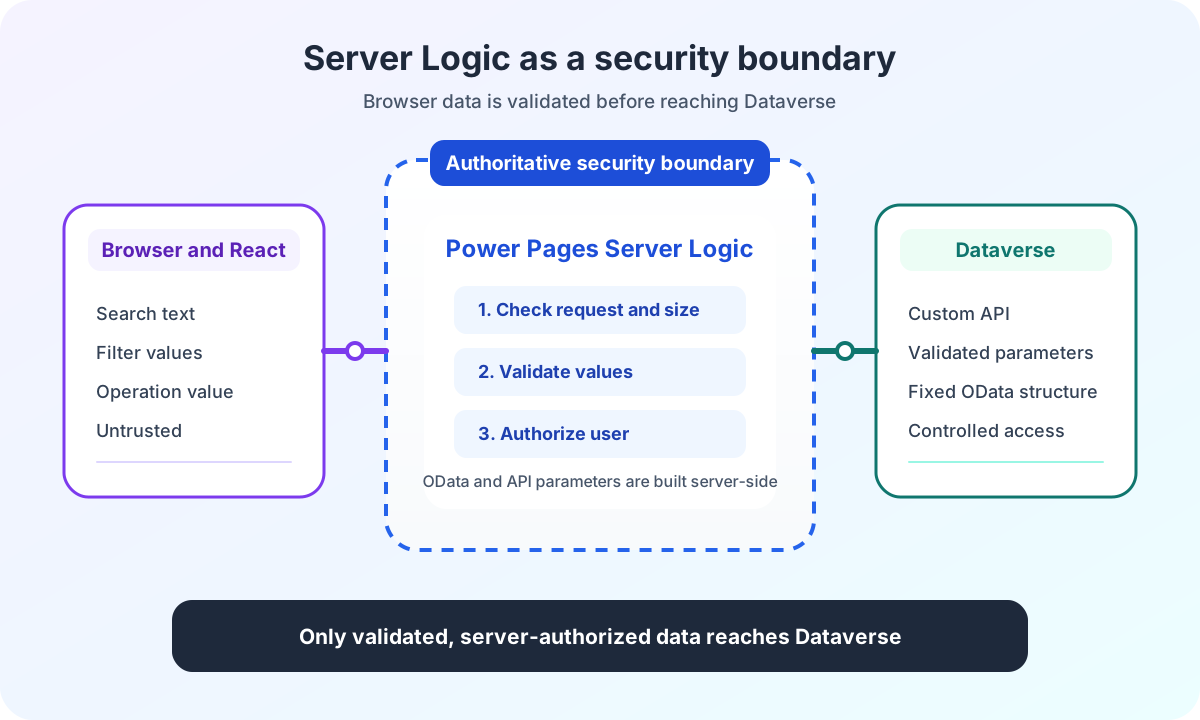
Power Pages Server Logic validates browser data, request size, authorization and OData filters before React reaches the Dataverse Custom API.
Contents
- Why browser data cannot replace authorization in Power Pages
- Which checks does React perform in Power Pages search?
- How does a CSRF token protect Power Pages Server Logic requests?
- How does Power Pages Server Logic limit request size and operations?
- How does Power Pages Server Logic derive authorization?
- How does Power Pages Server Logic validate search filters?
- How does Power Pages Server Logic generate safe OData filters?
- How does Power Pages Server Logic log without search data?
- Why must errors remain visible in Power Pages Server Logic?
- Which security boundaries does Power Pages Server Logic complement?
- Power Pages Server Logic security boundary experience from the project
Why browser data cannot replace authorization in Power Pages
A React form can validate every filter. It can block invalid values, limit numbers and display only known options.
The browser still remains mutable.
A portal user can edit the request in DevTools. Another script can bypass the React application. A direct HTTP request needs none of the form logic.
A manipulated body might look like this:
{
  "operation": "search",
  "searchText": "Berlin",
  "isauthorized": true,
  "objectfilter": "$filter=untrusted expression"
}
If the server directly accepts these values, client-side validation is only a usability aid. It provides no security boundary.
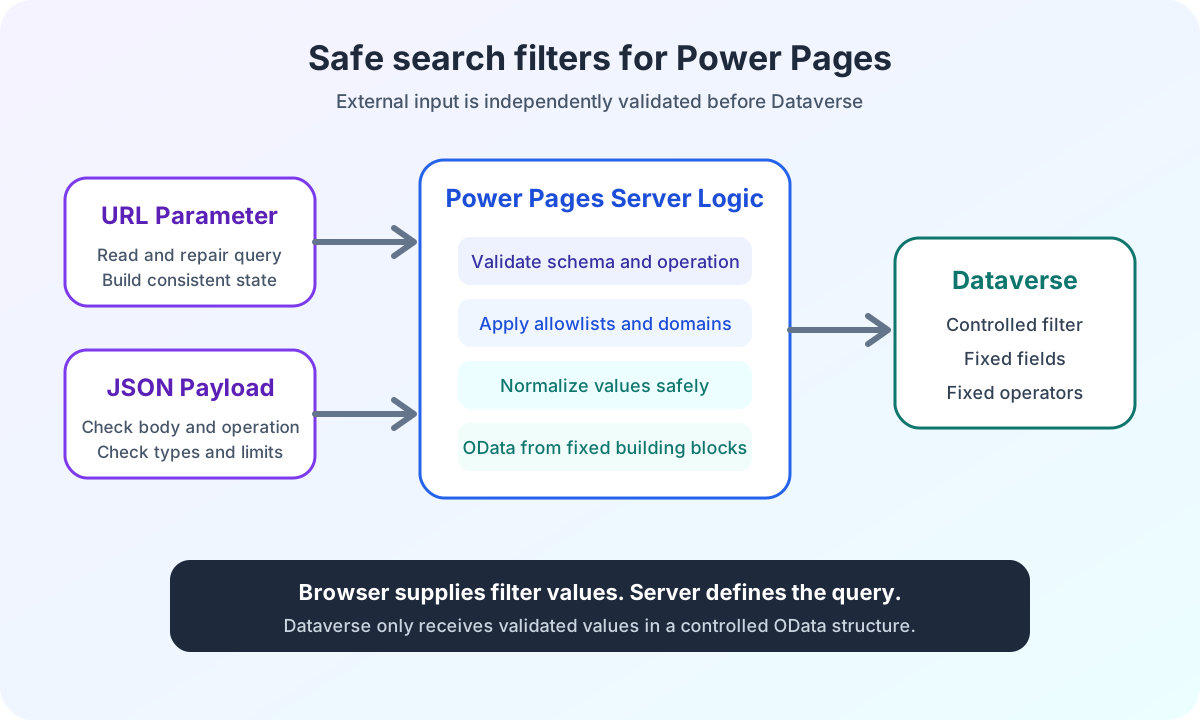
In my enterprise search, the browser may therefore determine neither authorization nor complete OData expressions. Power Pages Server Logic reads the request as untrusted input and constructs a new, controlled Dataverse contract.
For me, Power Pages Server Logic security starts with a clear trust boundary. The Power Pages enterprise search architecture overview shows where that boundary sits in the complete data flow.
Which checks does React perform in Power Pages search?
I validate filters in React already. The search field has a maximum length. Option values come from a known catalog. Numbers are checked against their business ranges.
These rules provide quick feedback and clean URLs. They prevent unnecessary requests.
They still need to be repeated.
Server Logic checks the same relevant limits independently of the browser. A valid React request and a directly constructed request pass through the same server-side contract.
This separation begins with the central React host and its JSON configuration. The host controls how the widget starts. Server Logic controls which browser data may influence the backend contract.
Task | React | Server Logic | Dataverse Custom API |
|---|---|---|---|
Validate input | Quick feedback and clean URLs | Authoritative validation of all relevant limits | Expects controlled parameters |
Authorization | No decision | Derives user status from the portal session | Applies the business contract |
OData filters | Sends only filter values | Builds fixed expressions from accepted values | Receives server-generated filters |
Error handling | Displays a technical error or result state | Reports contract errors visibly | Returns a defined status and body |
How does a CSRF token protect Power Pages Server Logic requests?
Microsoft requires a Cross-Site Request Forgery token for client-side Server Logic calls.
The documentation on calling Power Pages Server Logic uses shell.safeAjax for this.
In the existing portal, the already loaded Power Pages dependency provides a wrapper as webapi.safeAjax. The transport adapter uses exactly this central function:
function postServerLogicRequest(request: ServerLogicRequest): Promise<string> {
  return new Promise((resolve, reject) => {
    const webapi = window.webapi;

    if (webapi === undefined) {
      reject(new Error('Power Pages webapi.safeAjax is unavailable.'));
      return;
    }

    webapi.safeAjax({
      type: 'POST',
      url: '/_api/serverlogics/catalog-search',
      contentType: 'application/json',
      data: JSON.stringify(request),
      success: (response) => {
        if (response.success !== true) {
          reject(new Error('Server Logic returned an unsuccessful response.'));
          return;
        }

        resolve(response.data);
      },
      error: (error) => {
        reject(new Error(error.responseJSON?.error?.message ?? 'Server Logic request failed.'));
      },
    });
  });
}
The wrapper adds protection against forged requests from another page context. The Microsoft documentation on the CSRF wrapper shows how the request verification token is loaded before the AJAX request.
CSRF protection does not establish whether searchText, option values or numbers are valid for the business domain. Nor does it replace authorization.
The token protects the request path. Server Logic protects request content.
How does Power Pages Server Logic limit request size and operations?
My Server Logic accepts only a JSON body that produces an object after parsing. null, arrays, primitive values and malformed JSON are rejected.
I also limit the serialized body to 8192 UTF-8 bytes.
This limit is a contract of my search application. It is not a general Power Pages platform limit.
I measure bytes rather than JavaScript string length because umlauts and other Unicode characters may need more than one byte:
const MAX_BROWSER_PAYLOAD_BYTES = 8192;

function getUtf8ByteLength(value) {
  let bytes = 0;

  for (let index = 0; index < value.length; index += 1) {
    const codePoint = value.codePointAt(index);

    if (codePoint <= 0x7f) bytes += 1;
    else if (codePoint <= 0x7ff) bytes += 2;
    else if (codePoint <= 0xffff) bytes += 3;
    else {
      bytes += 4;
      index += 1;
    }
  }

  return bytes;
}

function parseBrowserBody(body) {
  let payload;
  let serialized;

  if (typeof body === 'string') {
    serialized = body;
    payload = JSON.parse(body);
  } else {
    if (body === null || typeof body !== 'object' || Array.isArray(body)) {
      throw new Error('Search payload must be a JSON object.');
    }

    serialized = JSON.stringify(body);
    payload = body;
  }

  if (getUtf8ByteLength(serialized) > MAX_BROWSER_PAYLOAD_BYTES) {
    throw new Error('Search payload must not exceed 8192 bytes.');
  }

  if (payload === null || typeof payload !== 'object' || Array.isArray(payload)) {
    throw new Error('Search payload must be a JSON object.');
  }

  return payload;
}
The size limit does not solve denial of service in general. It does prevent this specific endpoint from processing filter contracts of arbitrary size.
Body validation is followed by a fixed operation allowlist:
const OPERATIONS = {
  SEARCH: 'search',
  SUGGEST: 'suggest',
  DETAILS: 'getPortalCatalogDetails',
};

function readBrowserPayload() {
  const payload = parseBrowserBody(Server.Context.Body);

  if (!Object.values(OPERATIONS).includes(payload.operation)) {
    throw new Error('Server Logic operation must be "search", "suggest", or "getPortalCatalogDetails".');
  }

  return payload;
}

function post() {
  const payload = readBrowserPayload();

  if (payload.operation === OPERATIONS.SEARCH) {
    return postSearch(payload);
  }
  if (payload.operation === OPERATIONS.SUGGEST) {
    return postSuggest(payload);
  }

  return postPortalCatalogDetails(payload);
}
The operation is mandatory. Missing and unknown values terminate the request before the Custom API call.
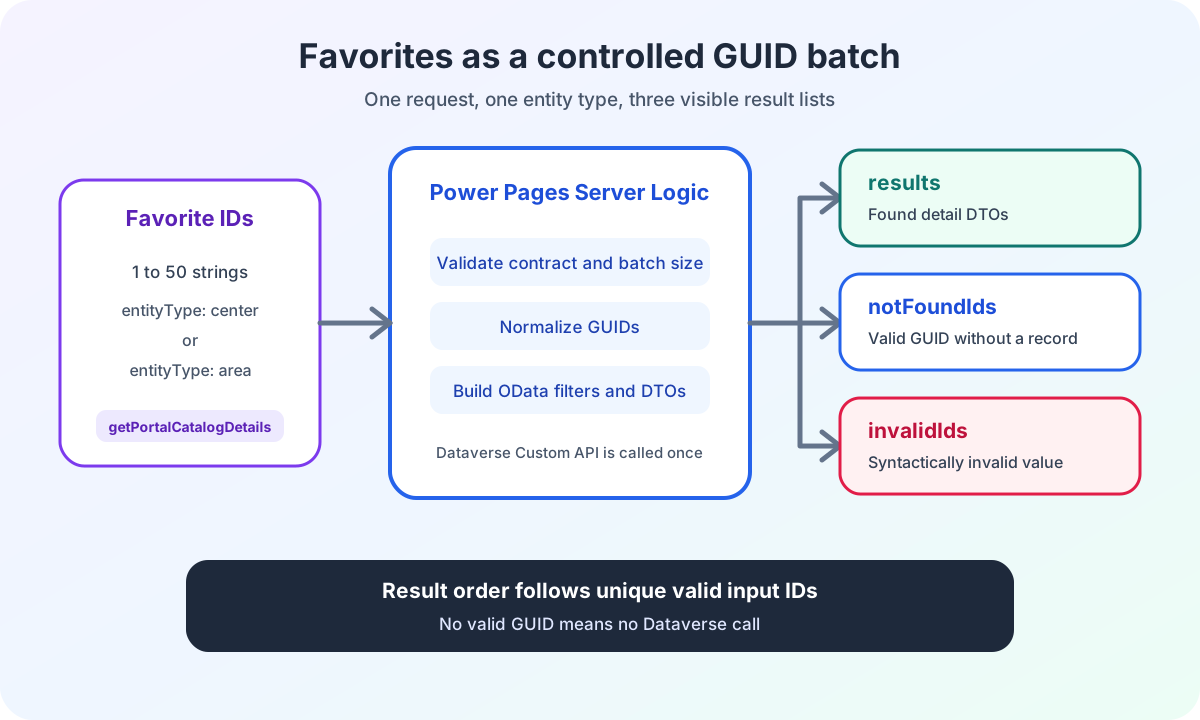
Separate contracts then apply. Search ignores unknown optional filters. Suggest requires a string for searchText. The detail batch rejects unknown fields and non-string members entirely.
The article on Power Pages favourites with batch GUIDs and Server Logic documents this stricter validation, along with invalidIds and notFoundIds.
How does Power Pages Server Logic derive authorization?
The browser must not determine a value such as isauthorized.
Server Logic derives that state from the current Power Pages user:
function buildApiPayload(browserPayload) {
  return {
    lcid: browserPayload.lcid,
    isauthorized: Server.User !== null,
  };
}
Even if a manipulated request contains isauthorized: true, that value is ignored. The Custom API parameter is created afresh from the server-side session context.
This Boolean is part of the business-specific Custom API contract. It does not replace platform permissions.
The Microsoft overview of securing Server Logic describes web roles, table permissions and the Power Pages session as the foundation for access and execution.
I therefore check two separate levels:
- May the current portal user execute this Server Logic through their web role?
- Which server-derived values does the Custom API receive for its own business logic?
These levels complement each other. They must not collapse into a single browser field.
How does Power Pages Server Logic validate search filters?
After request validation, Server Logic normalizes every supported filter individually.
Strings are checked for type and maximum length. Option values must belong to a fixed allowlist. Duplicate array values are removed. Numbers must be finite and are restricted to known domains.
An invalid individual filter does not automatically discard the complete search. The invalid value is removed. Other valid filters remain.
For the complete search operation, the request is rejected only if its body is unusable or the operation is unsupported. Invalid optional search filters are removed.
The Suggest operation additionally has a required searchText field. An incorrect type or more than 100 characters terminates that request with an error.
The article on Power Pages auto-suggest with React shows how this server validation works with debounce, request sequences and visible states in the React input field.
This behavior matters for stable search pages. A damaged optional URL parameter must not hide valid filters. A manipulated operation value, by contrast, must never silently become a default search.
The specific business rules remain field-specific:
function sanitizeKnownArray(value, isSupported) {
  if (!Array.isArray(value)) {
    return undefined;
  }

  const sanitized = [];

  for (const item of value) {
    if (isSupported(item) && !sanitized.includes(item)) {
      sanitized.push(item);
    }
  }

  return sanitized.length > 0 ? sanitized : undefined;
}

function sanitizeOptionSetArray(value, allowedValues) {
  return sanitizeKnownArray(value, (item) => Number.isInteger(item) && allowedValues.includes(item));
}
The browser supplies candidates. The server-side allowlist determines which values become part of the backend request.
Input | Handling | Reason |
|---|---|---|
Invalid JSON body | Reject the request | No usable input contract exists |
Unknown operation | Reject the request | No silent default operation |
Invalid optional filter | Remove the value | Other valid filters remain usable |
Manipulated authorization | Ignore the browser value | User status comes from the portal session |
Unknown optional field | Do not forward it | Only documented fields influence the backend request |
The Power Pages search filter support matrix shows, for every filter group, which validation is actually implemented in the browser, in Server Logic and in the Dataverse query.
How does Power Pages Server Logic generate safe OData filters?
The React application sends no complete OData filters.
Server Logic builds objectfilter, areafilter and levelfilter exclusively from accepted fields. Field names, operators and logical connections are defined in server-side code.
Only validated values come from the browser contract.
Strings are escaped for OData string literals. An apostrophe is doubled:
function quoteODataString(value) {
  return "'" + value.replace(/'/g, "''") + "'";
}

function buildSearchTextClause(searchText) {
  const value = quoteODataString(searchText.toLowerCase());
  return 'contains(tolower(name),' + value + ')';
}
This escaping does not make any arbitrary OData expression safe.
It works because the browser supplies only a value. The field name name, the contains operator and the parenthesis structure remain fixed in server code.
I therefore accept no dynamic field names, operators or complete filter clauses from the request.
Another principle is equally important. A filter is not mapped to the Custom API until its backend contract is confirmed. A visible selection in the frontend is not enough to establish a safe data contract.
The deep dive on generating Power Pages OData filters from fixed components also shows grouping with and and or, along with mapping to objectfilter, areafilter and levelfilter.
How does Power Pages Server Logic log without search data?
Operations need traceable signals.
I therefore log the operation, locale value and result counts. Search text, generated OData filters and selected IDs stay out of the log.
Complete Custom API contents or resolved detail DTOs do not belong in production logs. Temporary debug output must be removed before deployment. For details, entity type, language, match status and aggregate counts are sufficient.
function logOperationMetrics(operation, lcid, resultCount, selectionCount) {
  Server.Logger.Log(
    'Server logic operation metrics: ' +
      JSON.stringify({
        operation,
        lcid,
        resultCount,
        selectionCount,
      })
  );
}
This lets me see whether search or suggest was called and how large the accepted response was. I do not write user input to an additional logging destination.
This reduction is deliberate. More log data does not automatically mean better diagnosis. It can complicate privacy, access control and retention.
Why must errors remain visible in Power Pages Server Logic?
An empty result list is a valid search result.
A Custom API body that cannot be parsed is not an empty search result.
My Server Logic therefore propagates errors when the Custom API does not return a successful status, an expected string body or a valid result structure. The React transport also rejects the Promise when Server Logic reports an error.
The interface can therefore distinguish two situations:
- The search succeeded and has no matches.
- The search could not be completed technically.
A success-shaped replacement such as { results: [] } would hide a contract error. Users would apparently see no data even though the integration is broken.
This rule also applies in the browser. The transport reads a specific error message from the HTTP response and uses a general message only when the server provides no usable message.
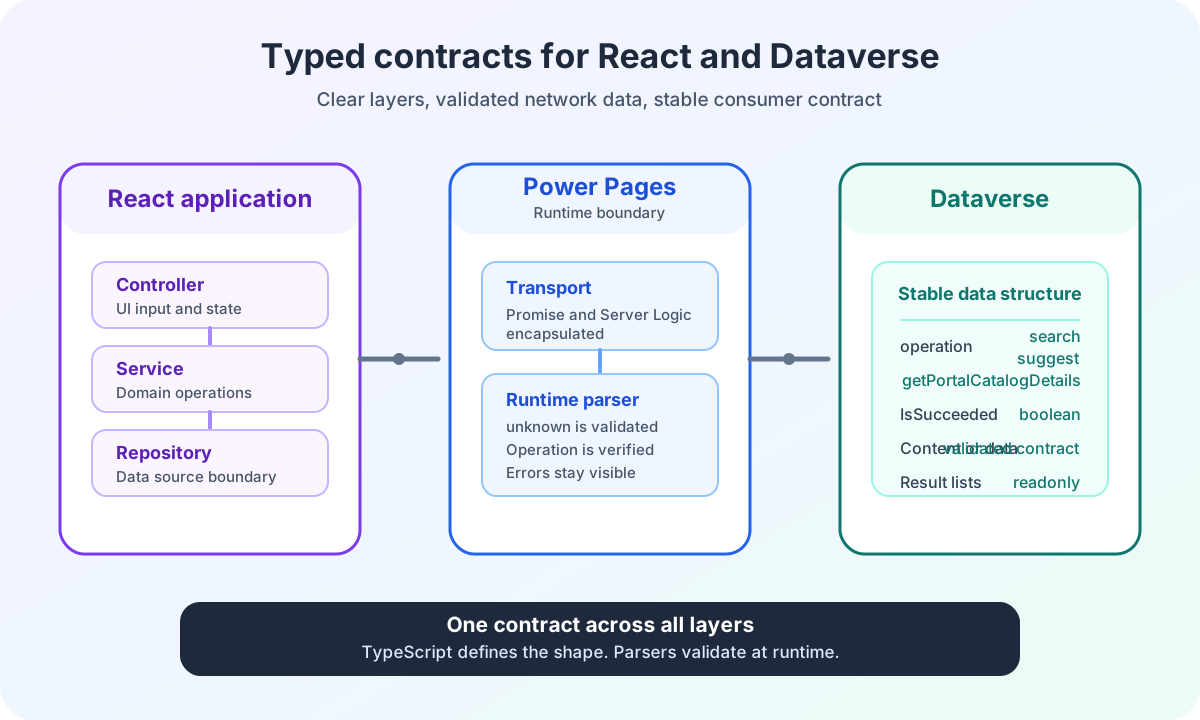
The article on typed React and Dataverse interfaces documents the complete path from transport interface through nested response envelopes to the validated consumer contract.
Which security boundaries does Power Pages Server Logic complement?
Server Logic is the authoritative business boundary of this search. It is not the portal’s only security measure.
Web roles control who may call the endpoint. Table permissions control Dataverse access. The CSRF token protects client-side requests. Parsers also validate responses. A Content Security Policy restricts which scripts and destinations the browser may use.
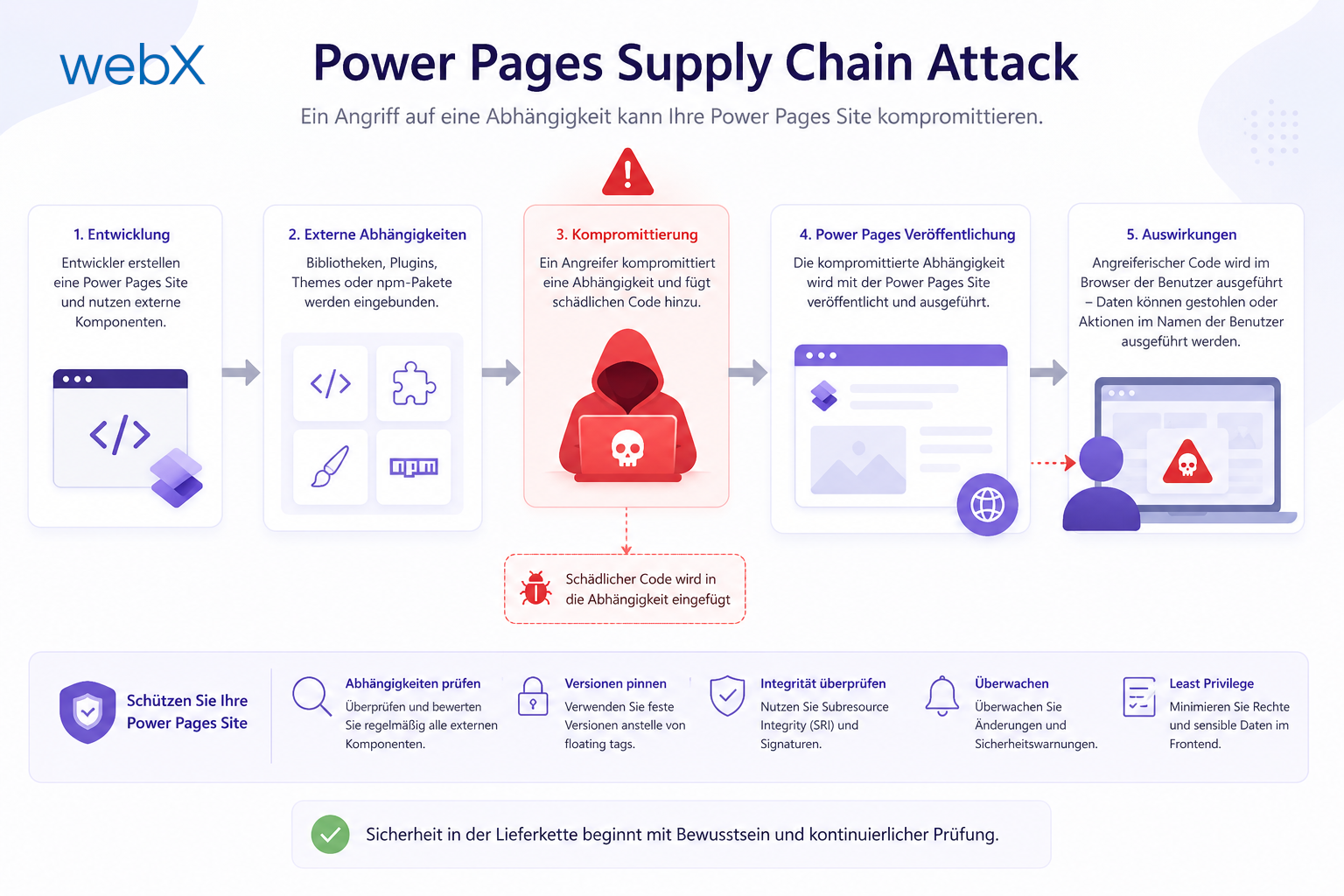
The browser remains a separate area of risk. My article on supply chain attacks in Power Pages shows why a third-party script can still endanger portal state and user data in the browser despite well-implemented Server Logic.
For the general context of React as an isolated widget, the Power Pages React frontend architecture describes when Pro-Code makes sense and which platform boundaries must remain.
The security architecture therefore consists of several controlled boundaries. Server Logic handles the boundary for request content, server-side business rules and the transition to the Dataverse Custom API.
Security measure | Protects | Does not replace |
|---|---|---|
CSRF token | Request path from a valid page context | Field validation and authorization |
Web roles | Access to Server Logic | Validation of request content |
Table permissions | Access to Dataverse records | The business-specific Custom API contract |
Server Logic | Request content and backend parameters | Platform permissions and browser protection |
Content Security Policy | Permitted scripts and browser destinations | Server-side input validation |
Power Pages Server Logic security boundary experience from the project
I implemented this pattern for a complex enterprise search in Power Pages.
The React application supports multiple search modes, extensive filters, auto-suggest and decoupled result consumers. Server Logic accepts only the defined request contract and builds the permitted Custom API parameters itself.
The public ECE Power Pages enterprise search case study shows the project context and complete architecture. This technical article deliberately remains generalized.
I am not selling ready-made search software. I am documenting how I build business-critical Power Pages workflows so that browser, Server Logic and Dataverse have clearly separated responsibilities.
Are you planning a React application in Power Pages that uses sensitive business rules or a Custom API? In the Power Pages Pro-Code section, I explain how I clarify security boundaries, contracts and implementation risks before development.