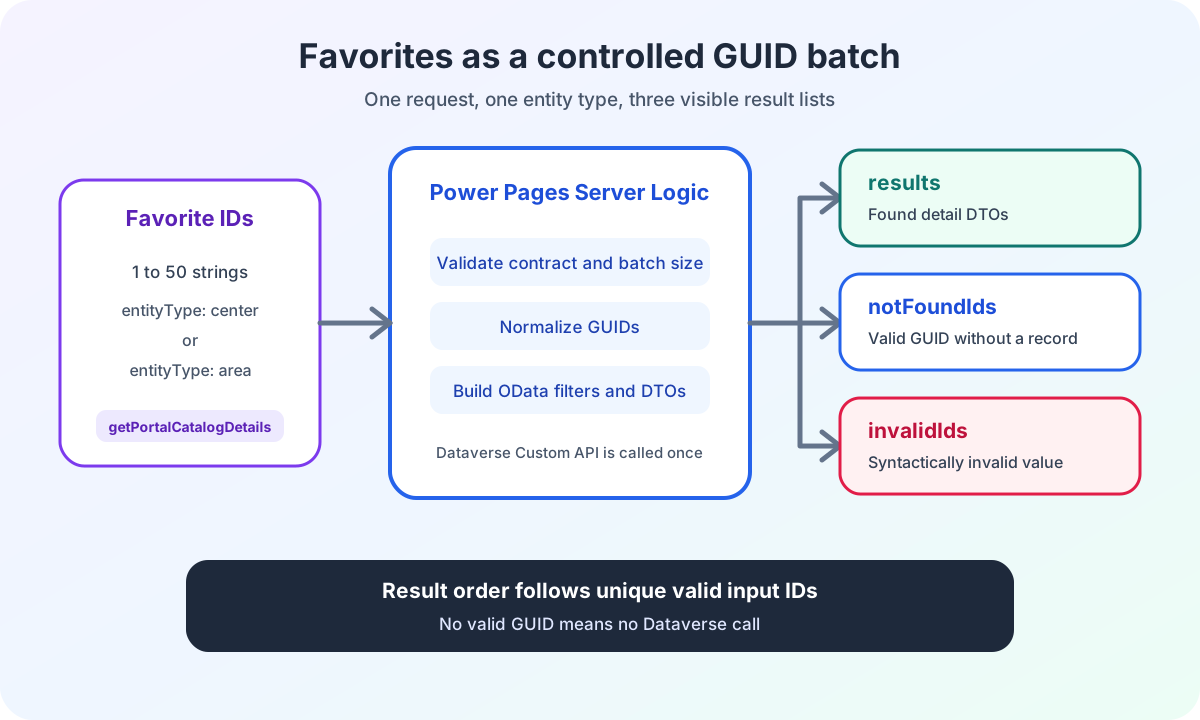
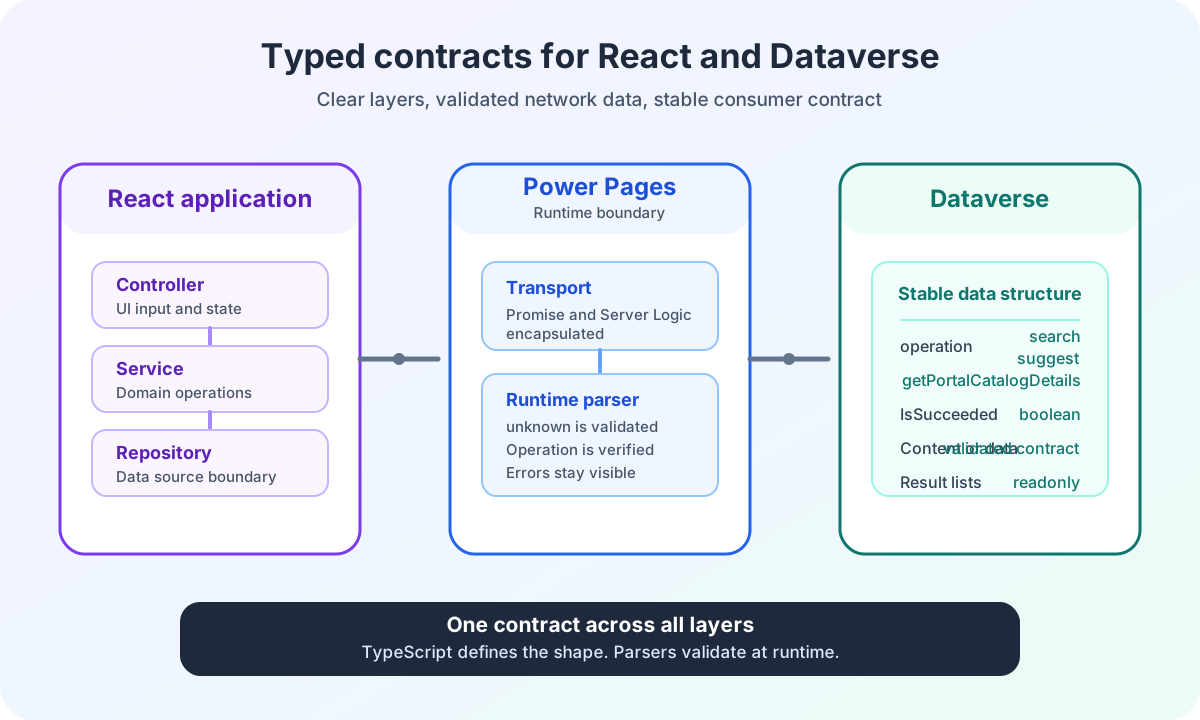
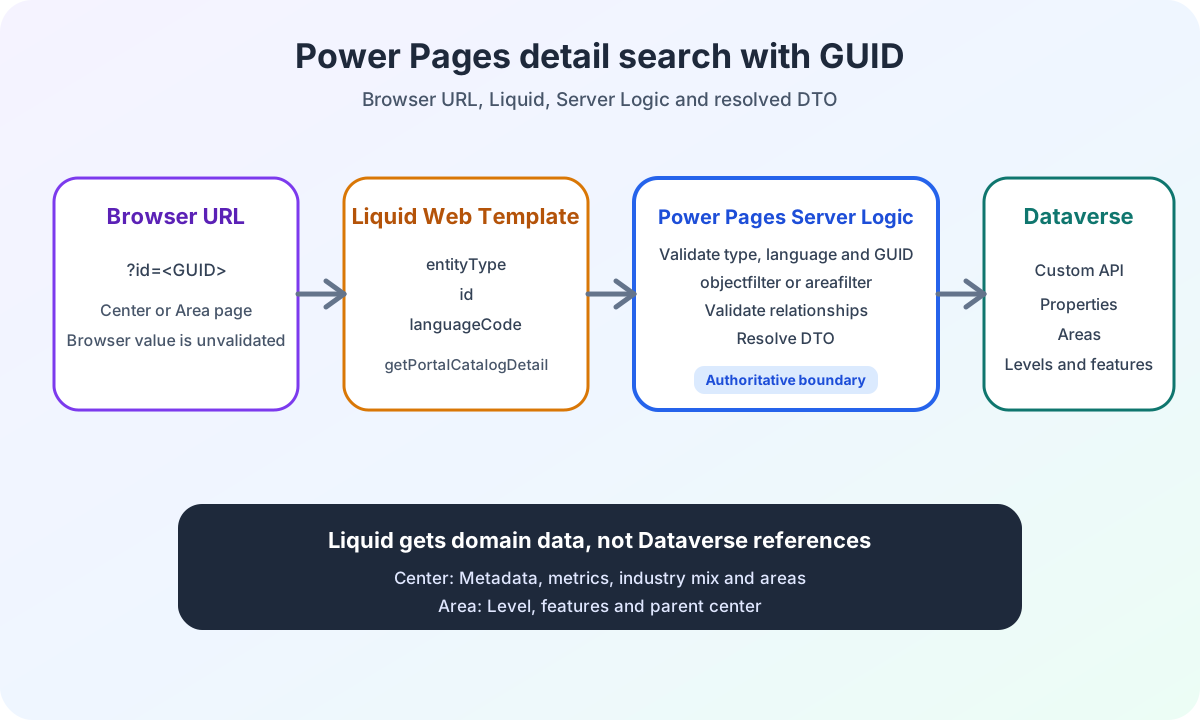
Validating Power Pages search filters and generating safe OData
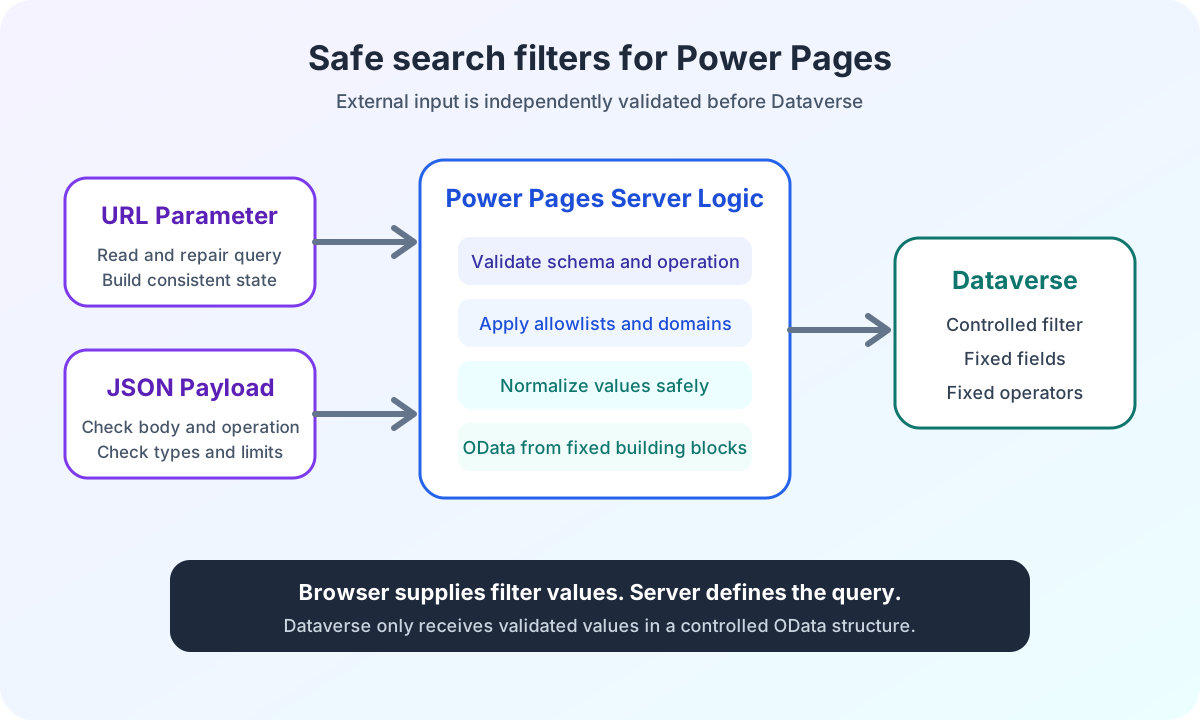
Validate Power Pages search filters safely: URL and payload checks remain separate before Server Logic generates controlled OData filters from fixed components.
Contents
- Why a Power Pages filter is not yet a valid data contract
- Which three checks does Power Pages filter validation need?
- How is the supported Power Pages filter scope defined?
- How does Power Pages repair URLs and preserve valid partial values?
- How does Power Pages validate search text and maximum length?
- How does Power Pages validate numbers and value ranges?
- Why are URL and payload sanitization separate checks?
- How does Power Pages Server Logic validate filters independently of the browser?
- Why does CSRF protection not replace a business rule?
- Why must authorization not come from a browser field?
- How does Power Pages generate OData filters from fixed components?
- What does OData escaping protect and what does it not?
- How do locale rules prevent incorrect Power Pages support?
- How does the support matrix separate UI values from Dataverse filters?
- Experience validating Power Pages search filters in an enterprise project
Why a Power Pages filter is not yet a valid data contract
A filter can be visible in the React form without having a confirmed path all the way to Dataverse.
At first, that sounds contradictory. The interface knows the value. State stores it. It may even appear as an active selection.
But only the complete chain determines whether the filter has its intended business effect.
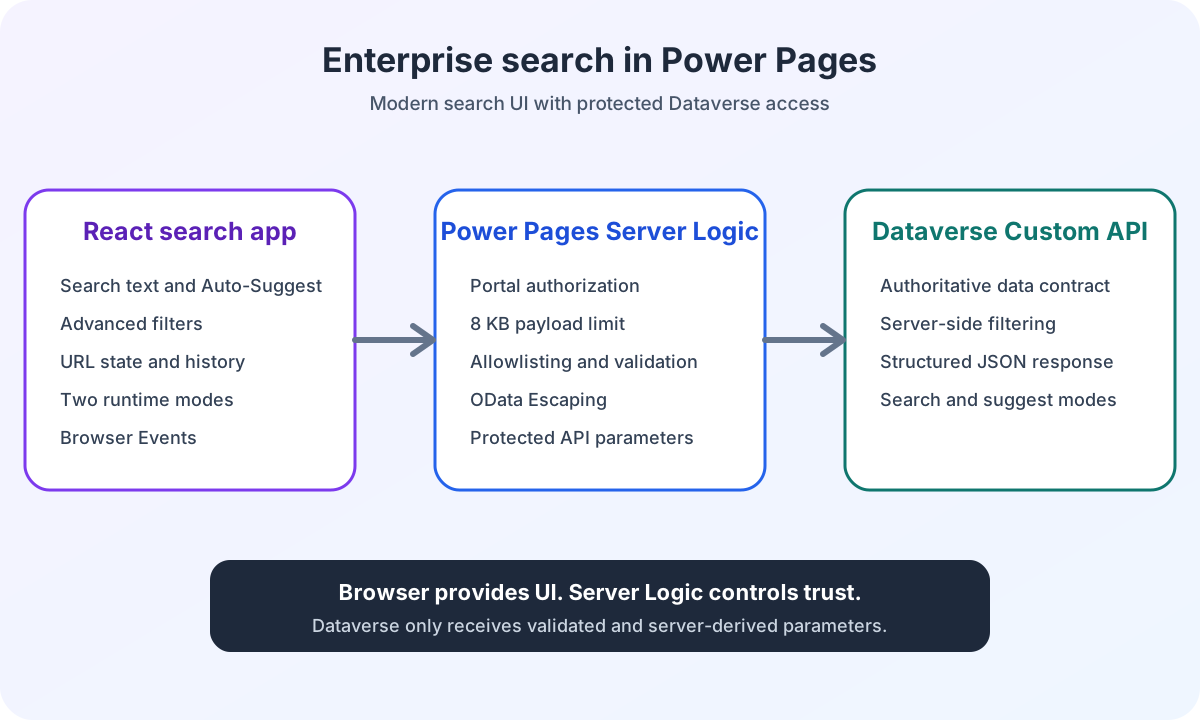
The URL must serialize the value unambiguously. The browser must be able to restore it. Power Pages Server Logic must validate it independently. OData construction needs a fixed field and a fixed operator. The Dataverse Custom API must demonstrably support that parameter.
If any of these boundaries is missing, the filter is not fully implemented.
That is why I document more than input fields. I document each filter’s path from browser to backend. The Power Pages enterprise search architecture overview shows this data flow in context.
For me, validating Power Pages search filters means naming each boundary separately and never presenting browser validation as a server-side guarantee.
Which three checks does Power Pages filter validation need?
In my search, a value passes through three checks.
The first check is in the React form. It prevents avoidable input mistakes. Search text that is too long receives a clear message. Selection fields offer only known options.
The second check happens when reading and writing the URL. It trims text, parses numbers, removes unknown list values and produces a normalized query. This layer keeps reloads, sharing and Back and Forward navigation consistent.
The third check is in Power Pages Server Logic. It starts independently of the browser. It validates the body, operation and every supported filter again. Only then are the Dataverse parameters created.
Only this server-side validation is authoritative for the backend contract.
Client-side validation can reduce requests and show errors earlier. It cannot guarantee authorization. A browser value remains mutable.
Microsoft describes Power Pages Server Logic as a server-side execution environment for business logic, validation and Dataverse operations. In my architecture, this is exactly where helpful normalization ends and authoritative decisions begin.
How is the supported Power Pages filter scope defined?
The support matrix describes each filter group’s contract from the browser through to the Dataverse query.
Filter group | Browser and URL | Server Logic | Dataverse query | Filter scope |
|---|---|---|---|---|
Search text | Trim and limit to 100 characters | Recheck type and length | Fixed free-text filter | Supported |
Main area | Normalize bounds individually | Normalize bounds again |
| Supported |
Location type and location setting | Keep known option values | Independent allowlist |
| Supported |
Shopping center metrics | Normalize numeric ranges | Normalize numeric ranges again |
| Supported |
Level | Keep known slugs | Translate only for the supported language |
| Partially supported |
Industry | Keep known IDs and sort consistently | Independent allowlist | Industry filter from validated IDs | Supported |
Additional area characteristics | Partly present in UI state | Not included in the search request | No Dataverse filter | Not supported |
Search radius and metropolitan region | Represented in the domain model | Not included in the search request | No Dataverse filter | Not supported |
The table describes the filter scope of this Power Pages search. Field names and catalog values are generalized for the article.
For industry selection, the browser serializes known IDs. Server Logic checks them independently against its own allowlist and translates valid values into a Dataverse industry filter.
The selected industry IDs narrow the search results. Cluster labels and groupings remain the interface’s responsibility.
My article on Power Pages React JSON configuration documents how editable grouping is shared between Web Template, landing-page JavaScript and React without replacing the server allowlist.
A visible control, a TypeScript field and a server-side allowlist do not replace a confirmed API contract.
How does Power Pages repair URLs and preserve valid partial values?
Shared URLs are external input.
A user can edit a query string. An old link can contain values that are no longer supported. A list can mix valid and invalid entries.
That is why I do not automatically discard the entire search state.
A generalized list parser works on each member:
function parseAllowedNumbers(
  value: string | null,
  allowed: readonly number[]
): {
  readonly values: readonly number[];
  readonly changed: boolean;
} {
  if (value === null || value.trim() === '') {
    return { values: [], changed: false };
  }

  const values: number[] = [];
  let changed = false;

  for (const item of value.split(',')) {
    const normalizedItem = item.trim();
    const parsed = Number(normalizedItem);

    if (normalizedItem === '' || !Number.isInteger(parsed) || !allowed.includes(parsed) || values.includes(parsed)) {
      changed = true;
      continue;
    }

    values.push(parsed);
  }

  return { values, changed };
}
If a list contains three values and only one is invalid, the two valid values remain active.
Empty members, unknown values and duplicates are removed. The URL is then written in normalized form.
An additional rule applies to industry IDs. Valid values are not serialized in arbitrary input order. They follow the known catalog’s order. The same selection therefore always produces the same query string.
The article on URL state and browser history shows how this repair uses replaceState while preserving unrelated query parameters.
How does Power Pages validate search text and maximum length?
Search text has a small contract.
It is trimmed before processing. Empty text is not included in the filter. Up to 100 characters remain valid.
A URL value above this limit is removed and marked as an invalid parameter. The results page can still load the remaining valid state and repair the URL.
The interface behaves differently for a direct form action. The controller returns a visible validation message and does not start a search.
Server Logic checks the same value again. In the full search, an optional search text with an incorrect type or excessive length is removed. Other valid filters remain.
The Suggest operation is stricter. It requires searchText. An incorrect type or more than 100 characters terminates the request with an error. Below three characters, the current implementation returns a successful empty suggestion list without calling the Custom API.
These differences are intentional. A full search without free text remains valid for the business domain. A Suggest request without usable text has no meaningful task.
The article on Power Pages auto-suggest with React, debounce and requests shows this smaller contract alongside debounce, request sequences and visible UI states.
How does Power Pages validate numbers and value ranges?
Each numeric filter has a domain from 0 to a field-specific maximum M.
The endpoints are normalized independently:
function normalizeBound(value: number | null, direction: 'min' | 'max', maximum: number): number | null {
  if (value === null || !Number.isFinite(value)) {
    return null;
  }

  const clamped = Math.min(maximum, Math.max(0, value));

  if (direction === 'min' && clamped === 0) {
    return null;
  }

  if (direction === 'max' && clamped === maximum) {
    return null;
  }

  return clamped;
}
A value below zero is clamped to zero. A lower bound of zero does not narrow the results further, so it is removed.
A value above the maximum is clamped to M. An upper bound of M is also ineffective and is removed.
The asymmetry matters:
Input | Result |
|---|---|
min < 0 | Clamp to |
min = 0 | Remove |
0 < min <= M | Keep |
min > M | Clamp to |
max < 0 | Clamp to |
0 <= max < M | Keep |
max = M | Remove |
max > M | Clamp to |
The current implementation does not check the relationship between the two endpoints.
If min > max after normalization, both values remain. Server Logic generates two range clauses from them. The search then typically returns no matching records, but no dedicated validation error for their order.
I document this limitation explicitly. Sanitization does not automatically swap the bounds. That would be a different business rule.
Why are URL and payload sanitization separate checks?
URL validation must also detect whether repair is needed.
That is why it returns a list of changed parameter names alongside the filters:
interface SearchUrlParseResult {
  readonly filters: SearchFilters;
  readonly invalidParameters: readonly string[];
}
A parameter is added to this list when a value is removed, clamped, identified as ineffective, deduplicated or put into a consistent order.
The results page uses this information. If at least one known parameter has changed, it writes the cleaned query into the same history entry with replaceState.
Preparing direct form state has a different goal. It builds a valid request payload. It does not need a list of repaired URL keys.
Payload normalization therefore returns only:
- the normalized query string
- the supported browser payload
- the normalized filters
Both paths use the same business limits and allowlists. Their return contracts differ, however.
How does Power Pages Server Logic validate filters independently of the browser?
Power Pages Server Logic does not accept the cleaned browser state as truth.
The server first validates the complete request.
The body must be usable as a JSON object. null, arrays, primitive values and malformed JSON are rejected. The implementation additionally limits the serialized body to 8192 UTF-8 bytes.
This number is a project-specific contract for this endpoint. It is not a general Power Pages platform limit.
A fixed operation allowlist follows. Only search and suggest are allowed. A missing or unknown operation value terminates the request before the Custom API call.
Only then does Server Logic recheck each optional search filter.
Invalid optional values are removed. Valid neighboring values remain. Unknown additional fields have no effect.
This behavior distinguishes request errors from filter sanitization:
Case | Result | Category |
|---|---|---|
Body is not a usable JSON object | Reject the request | Contract error |
Body exceeds the project-specific limit | Reject the request | Contract error |
Operation is missing or unknown | Reject the request | Contract error |
Optional text has the wrong type | Remove the field | Filter sanitization |
An individual list member is unknown | Remove the member and keep valid members | Filter sanitization |
Number is outside the domain | Clamp or remove as an ineffective bound | Filter sanitization |
Optional field is unknown | Ignore it | Filter sanitization |
Suggest text has the wrong type or is too long | Reject the request | Contract error |
This distinction prevents two problematic extremes.
The search does not fail completely because of one damaged optional filter. But it also does not silently treat an unclear request contract as a valid default operation.
Why does CSRF protection not replace a business rule?
Client-side calls to Power Pages Server Logic need a CSRF token.
Microsoft shows the shell.safeAjax wrapper in the documentation on calling Server Logic. The CSRF wrapper documentation shows how the request verification token is added to the AJAX request.
The token protects the request against a specific class of forged browser-side requests.
It does not decide:
- whether a filter is supported by the business domain
- whether a number is within its domain
- whether an option value is allowed
- whether a user may access a particular record
Separate controls make these decisions.
Why must authorization not come from a browser field?
The browser does not send an authoritative statement such as isAuthorized: true.
The current Server Logic derives the required user status from the Power Pages session. A field with the same name in the browser payload could not override this value.
This server-derived Boolean does not replace platform permissions either.
Microsoft documents that table permissions restrict access to Dataverse records in Power Pages and are assigned through web roles. The Power Pages Web API follows these table permissions.
A signed-in user therefore does not automatically have access to every record.
Sign-in, web role, table permission, server-derived user status and business filter rules are separate parts of the same security architecture.
The article on the Power Pages Server Logic security boundary places these controls within the complete request path.
How does Power Pages generate OData filters from fixed components?
The browser sends no complete OData clause.
Server Logic determines:
- field names
- operators
- functions
- parentheses
- connections with
andoror
Only the validated value comes from the browser.
A generalized example looks like this:
function quoteODataString(value) {
  return "'" + value.replace(/'/g, "''") + "'";
}

function buildTextClause(searchText) {
  const value = quoteODataString(searchText.toLowerCase());

  return ['contains(tolower(name),' + value + ')', 'contains(tolower(city),' + value + ')'].join(' or ');
}

function buildRangeClauses(fieldName, range) {
  const clauses = [];

  if (range.min !== undefined) {
    clauses.push(fieldName + ' ge ' + range.min);
  }

  if (range.max !== undefined) {
    clauses.push(fieldName + ' le ' + range.max);
  }

  return clauses;
}
Multiple values from the same selection form a parenthesized or group. Different filter groups are joined with and. Numeric bounds use fixed comparisons such as ge and le.
The current implementation distributes these clauses across three business parameters:
Parameter | Contents |
|---|---|
objectfilter | Free text, allowed option values and supported metrics |
areafilter | Lower and upper main-area bounds |
levelfilter | Allowed localized level names for the supported language |
Private Dataverse field names and the production Custom API do not belong in a public article. The pattern is what matters. The server owns the structure. The browser supplies only candidate values.
The Power Pages documentation on OData filters describes comparison operators, logical operators, grouping and functions such as contains. The Dataverse documentation on $filter adds the rules for strings and special characters.
What does OData escaping protect and what does it not?
An apostrophe within a single OData string literal is represented by two apostrophes.
This:
O'Brianbecomes:
'O''Brian'This transformation protects the literal value within an already fixed expression structure.
It does not turn arbitrary text into a safe OData expression.
If the browser could supply field names, operators, functions or complete clauses, doubling apostrophes could not control the structure.
That is why I combine escaping with fixed server-side components and allowlists.
An OData filter in a URL has another layer. Special characters must be encoded for URL transport. OData literal escaping and URL encoding solve different problems.
How do locale rules prevent incorrect Power Pages support?
The URL may contain only supported locale values. An invalid URL value is marked as changed. When serializing again, the application uses the Power Pages language that was actually resolved.
Server Logic also has its own fallback for missing or invalid locale values.
Level filters show why locale is more than a number. The current implementation has confirmed names for only one language. In the other language, the server omits the level filter.
This is better than writing an unconfirmed translation into the Dataverse filter.
Partially supported means:
- the browser knows the stable level slug
- Server Logic accepts only known slugs
- an OData filter is created only for the confirmed language
- for other languages, the selection has no backend mapping
This limitation belongs in the support matrix, not in a hidden code assumption.
How does the support matrix separate UI values from Dataverse filters?
The earlier support matrix for the supported Power Pages filter scope assigns each filter group its browser contract, server-side validation and effect in Dataverse.
Not every value in the domain model is part of the search contract. Additional area characteristics, search radius and metropolitan region are not transmitted in the search request and generate no Dataverse filter.
UI state or a TypeScript field therefore does not, on its own, describe a filter’s effect.
Server Logic generates OData only for filter groups with a defined request contract and backend mapping.
This separation keeps the meaning of a selection traceable. It prevents a visible field from unintentionally changing the Dataverse query.
If you use this approach in your own Power Pages portal, document the following for each filter group:
- the value’s meaning in the interface
- its representation in the URL and browser payload
- the browser sanitization rule
- the independent allowlist or domain in Server Logic
- the mapping to the Dataverse parameter
- the effect on search results
This keeps filter scope a business contract rather than an assumption based on the interface.
Experience validating Power Pages search filters in an enterprise project
I implemented this pipeline for an enterprise search in Power Pages.
The ECE Power Pages enterprise search case study shows the project context. The examples in this article use neutral field names and anonymized catalog values.
For me, the value of these rules is traceability.
A damaged URL remains usable because valid partial values are preserved. The browser produces clean state. Server Logic repeats validation independently. OData is generated only from defined components of the search contract.
Are you planning a Power Pages search with complex filters, Server Logic and Dataverse? In the Power Pages Pro-Code section, I show how I review data contracts, security boundaries and business rules before implementation.