Power Pages enterprise search with React, Dataverse and Server Logic
The architecture of Power Pages enterprise search with React, Server Logic and Dataverse. An overview of responsibilities, data contracts and security boundaries.
Contents
- How Power Pages enterprise search is structured
- Embedding React in Power Pages with web templates and JSON
- How React manages search state and filters in Power Pages
- Connecting React and Power Pages through typed interfaces
- Why Power Pages Server Logic forms the security boundary
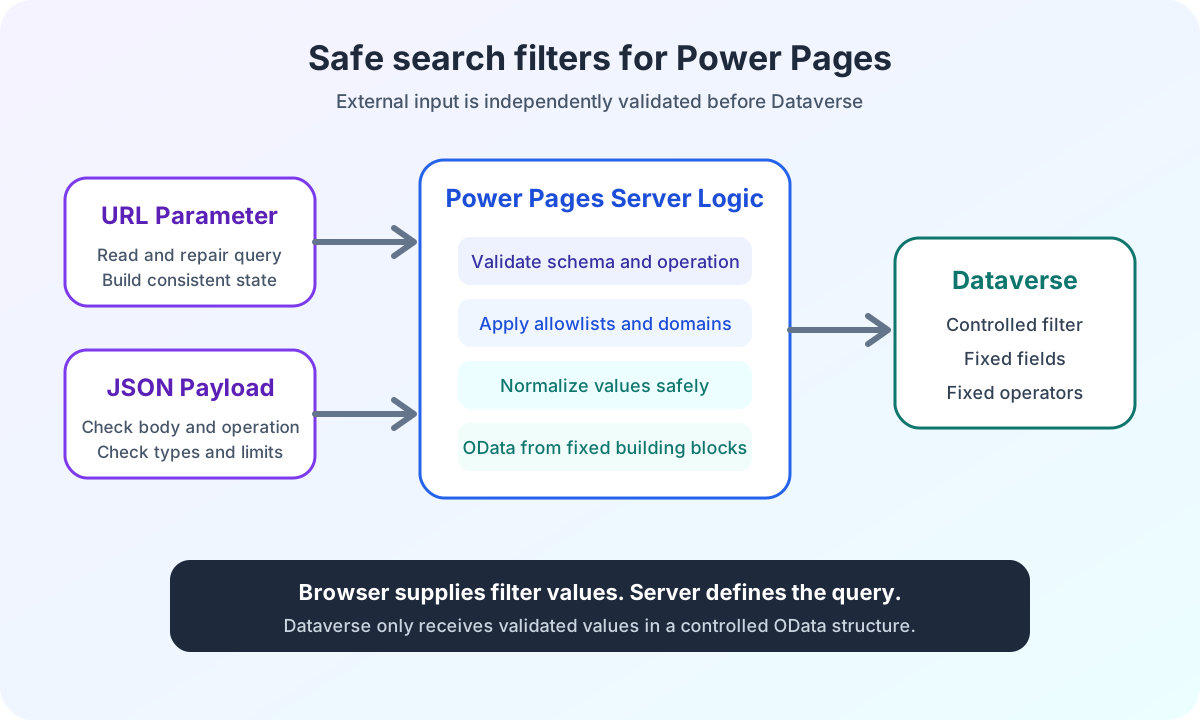
- How Power Pages Server Logic creates safe OData filters
- How React safely validates Dataverse responses
- Synchronizing Power Pages search filters with the URL, React and browser history
- Decoupling React search results in Power Pages with CustomEvents
- Implementing robust auto-suggest in Power Pages with React
- Building Power Pages detail search with GUIDs and Liquid
- Loading Power Pages favorites with multiple GUIDs
- All articles on Power Pages enterprise search
- Frequently asked questions about Power Pages enterprise search
- Why must React not handle authorization in Power Pages enterprise search?
- How does Power Pages Server Logic protect enterprise search?
- How does React synchronize Power Pages search filters with the URL and browser history?
- How does auto-suggest in Power Pages with React work?
- How does Power Pages load details using a GUID?
- How does a Power Pages favorites page load multiple GUIDs?
- Power Pages enterprise search architecture and project context
How Power Pages enterprise search is structured
A complex search in Power Pages consists of more than an input field and a results list. It connects page templates, React state, browser navigation, HTTP requests, server-side business rules and Dataverse contracts.
I implemented this architecture for an enterprise search. The application processes search text, areas, location types, industries, levels and operational metrics. It runs on a landing page and a results page with different behavior.
The visible React part is important. The harder decisions, however, lie at the boundaries between systems.
Which data may the browser send? Who determines authorization? How does search state survive Back and Forward? How do other components receive results without becoming part of the same React application?
This series documents each decision separately. This article provides the shared architecture overview.
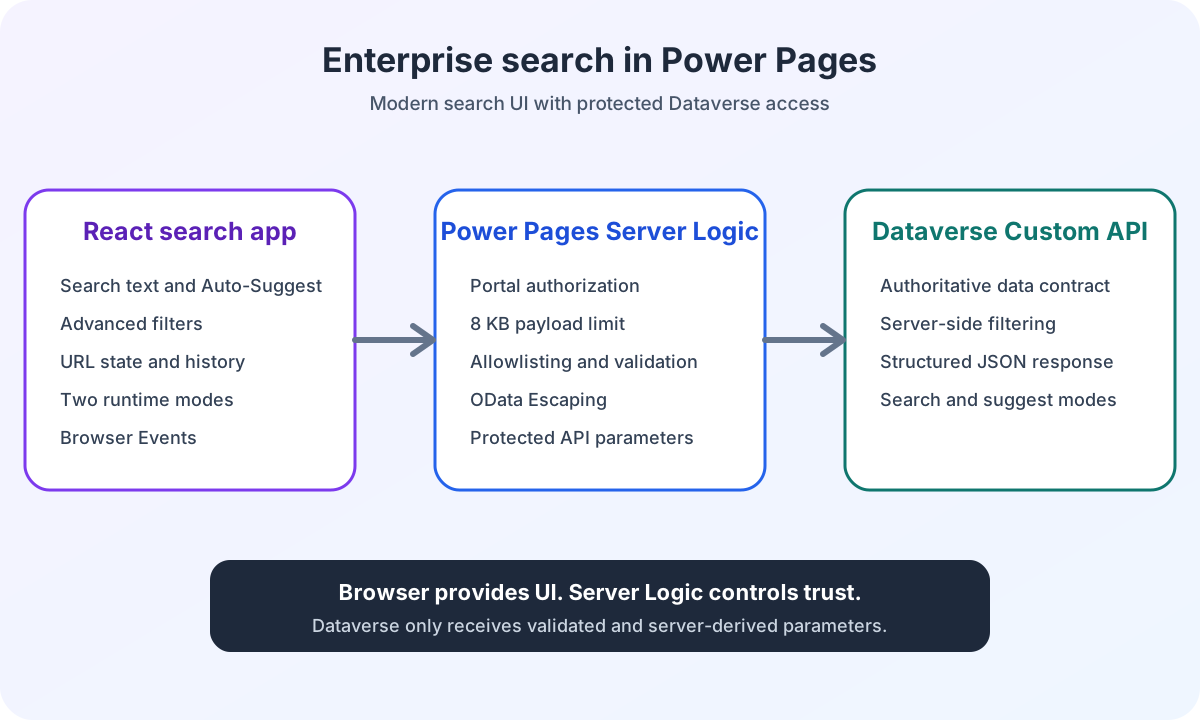
The architecture separates three areas of responsibility. React controls interaction. Server Logic controls the security boundary. The Dataverse Custom API processes only the validated request.
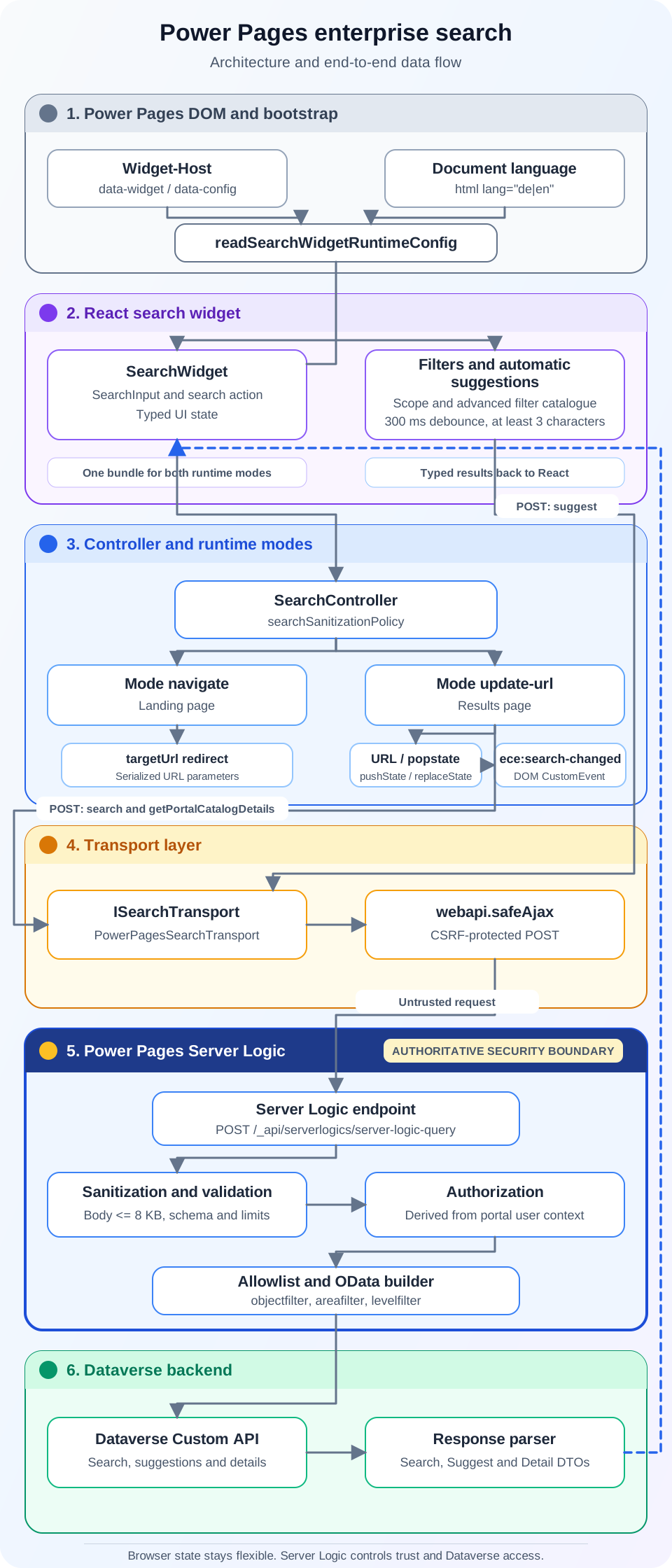
The data flow runs from the Power Pages host through React and the controller to the transport layer. Server Logic forms the authoritative security boundary. Dataverse receives only validated parameters. Typed response parsers return search and suggestion results to the React widget.
Component | Responsibility | Does not own |
|---|---|---|
Power Pages host | Mount point, bundle path and small runtime contract | React state and backend rules |
React widget | Interaction, filter state, URL and visible errors | Authoritative authorization |
Transport adapter | Power Pages AJAX, Promises and handoff to response parsers | Domain-specific filter decisions |
Server Logic | Request validation, user context, allowlists and OData construction | Trust in browser values |
Dataverse Custom API | Domain data processing with validated parameters | Direct access to React or browser state |
Result consumer | Its own presentation of validated search results | Internal hooks and context of the search widget |
Embedding React in Power Pages with web templates and JSON
Power Pages renders the host for the React widget. The web template owns the mount point, bundle path and a small JSON configuration.
The calling page decides only the behavior. A landing page uses navigate mode. A results page uses update-url.
I describe the technical implementation of this contract in the article on modular React embedding with web templates and JSON configuration.
This separation keeps client-specific site markers and Liquid objects out of the React project. The bundle works only with a validated runtime contract.
The contract deliberately distinguishes the two pages through runtime mode:
type SearchSubmitBehavior =
  | {
      readonly type: 'navigate';
      readonly targetUrl: string;
    }
  | {
      readonly type: 'update-url';
      readonly historyMode: 'push';
      readonly eventName?: string;
    };
navigate moves to the results page after filter validation. update-url keeps state in the results-page URL and adds browser history entries.
Aspect | navigate | update-url |
|---|---|---|
Page | Landing page | Results page |
Submit | Navigates to the configured target URL | Updates the URL and adds browser history entries |
Initial state | Local form state | Restored from query parameters |
Full search | Only on the results page | After an accepted state change |
Browser history | Normal page navigation |
|
The article on Power Pages React JSON configuration shows how I additionally supply editable industry groups as shared JSON, validate them independently in React and JavaScript, and keep them separate from the server-side allowlist.
Power Pages web templates provide the platform foundation for this. Microsoft describes them as reusable Liquid content that can be included in other templates. The documentation on Power Pages web templates explains this model.
How React manages search state and filters in Power Pages
After bootstrap, React takes over interaction.
The widget has components for search text, areas, industries and advanced filters. The flow separates four specific tasks:
- Components hold editable form state.
- The controller validates input and creates normalized filters, a query string and a backend payload.
- The service adds the operation for search or suggestions.
- The repository passes the complete request to the transport.
These layers are not a general requirement for every Power Pages customization. They make sense because the same search supports multiple runtime modes, many filters and different result consumers.
React makes no server-side security decision.
The browser may normalize values, remove invalid URL parameters and display understandable errors. These checks improve interaction. They do not replace server-side control.
The article on typed React and Dataverse interfaces shows these layers’ responsibilities in code. The deep dive on URL and browser history explains how the same prepared contract keeps the query string and backend payload aligned.
Connecting React and Power Pages through typed interfaces
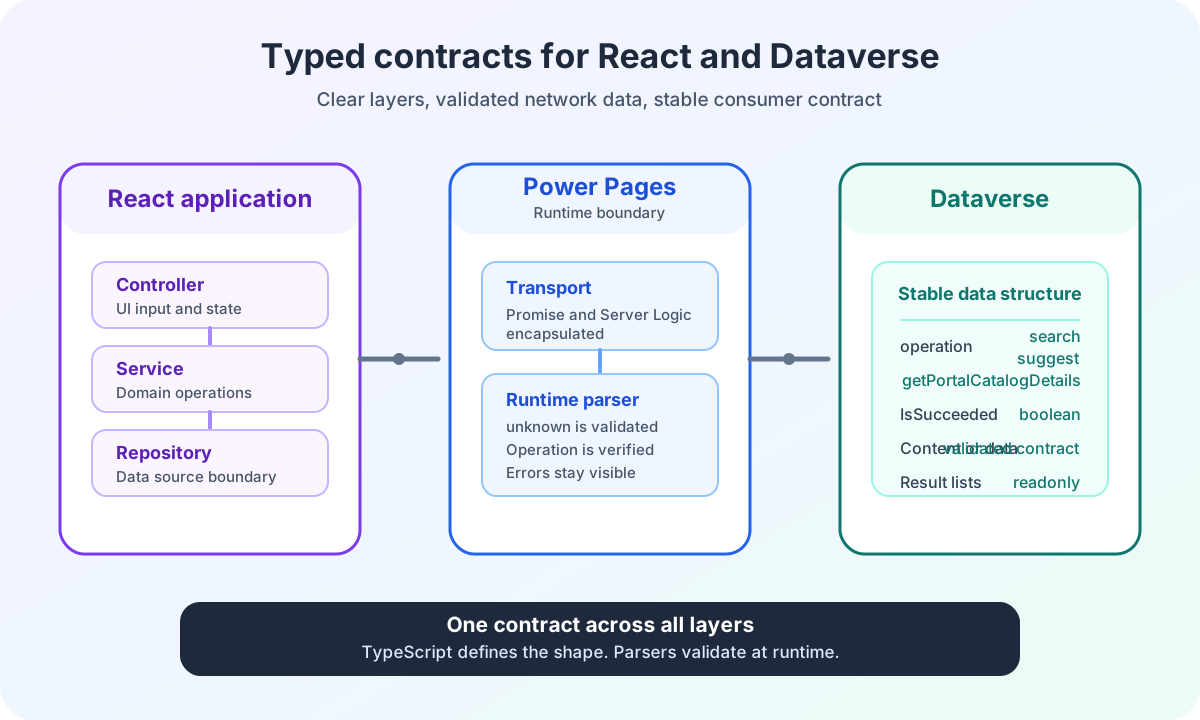
The React application does not communicate directly with a Dataverse table. It uses a small transport interface.
interface SearchTransport {
  submitSearchFilters(request: SearchRequest): Promise<SearchResponse>;
  fetchSuggestions(request: SuggestRequest): Promise<readonly Suggestion[]>;
}
The concrete implementation uses webapi.safeAjax. The repository, service and controller know nothing about jQuery details or the portal’s callback structure.
This adapter keeps an important boundary stable. Application layers work with Promises and typed contracts. Only the transport knows the Power Pages runtime.
The article on typed React and Dataverse interfaces shows how the controller, service, repository, transport and runtime parsers keep this contract consistent throughout.
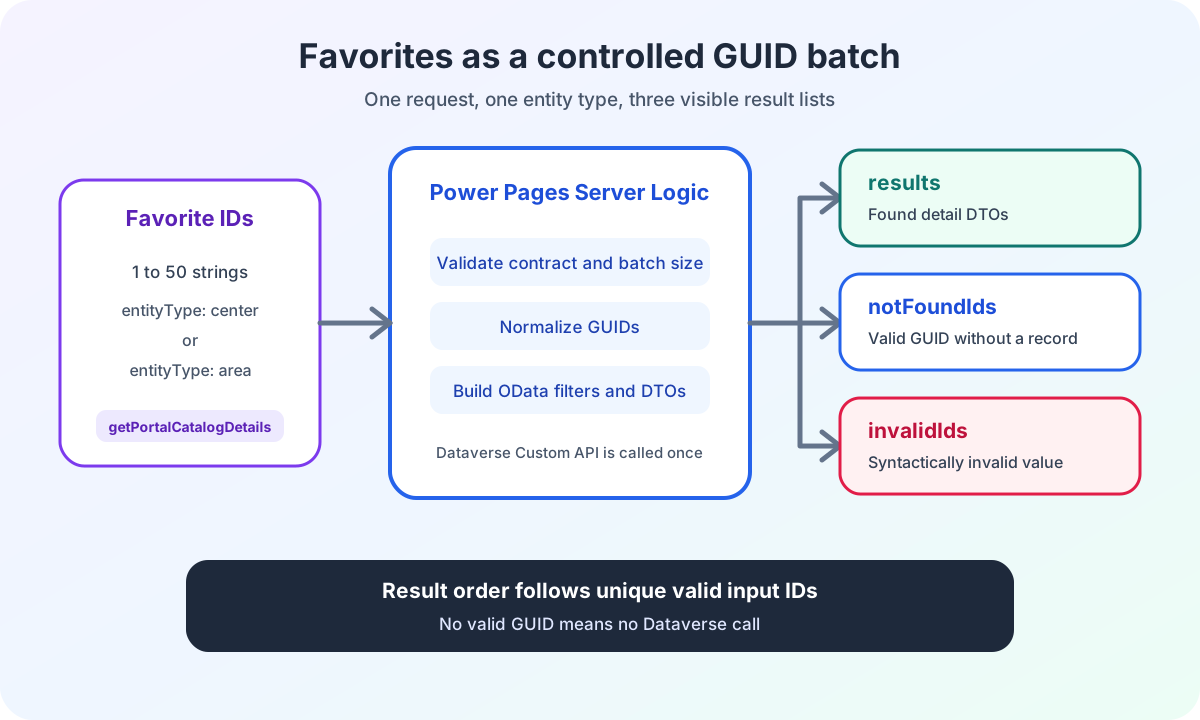
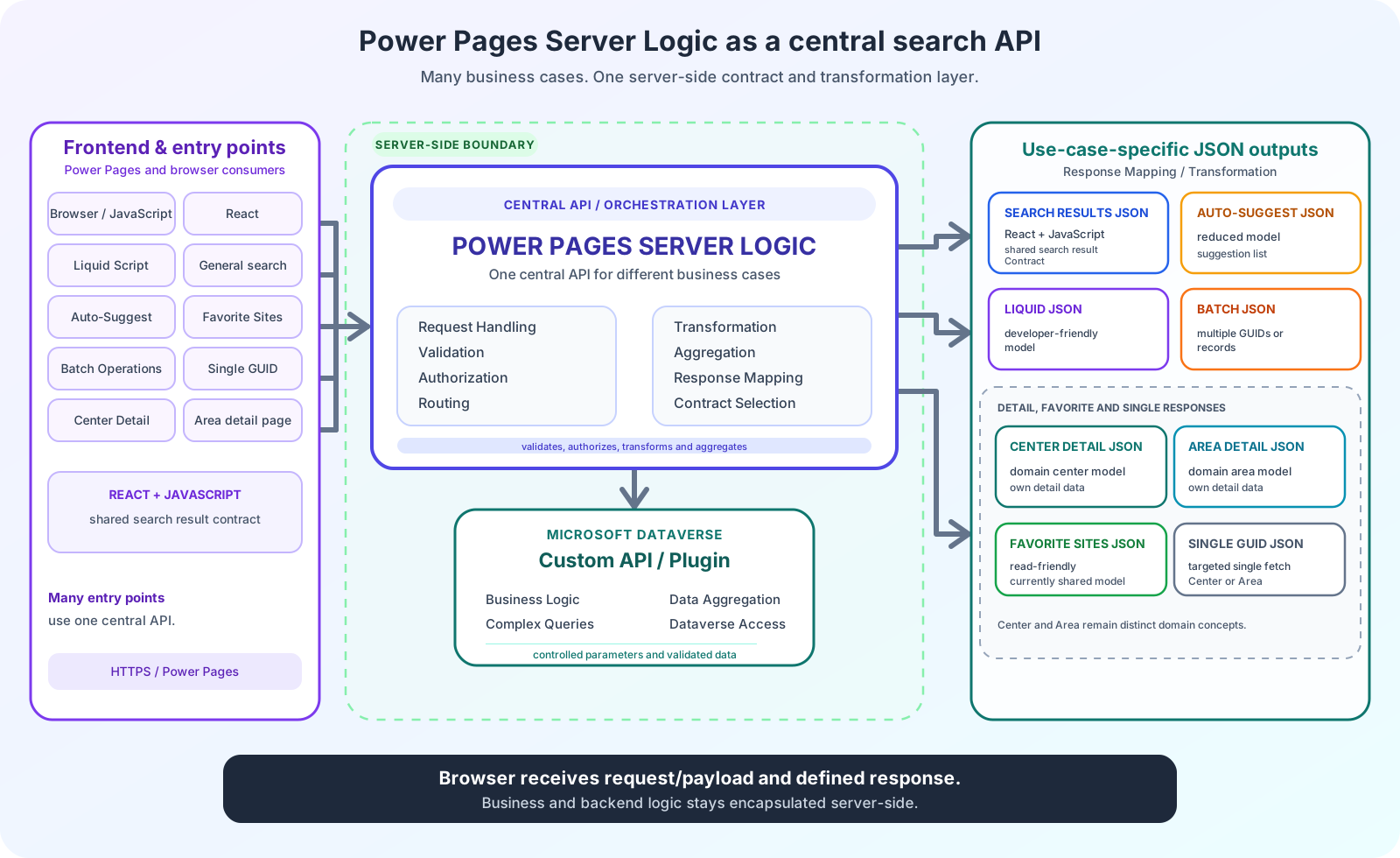
Every HTTP request contains an explicit operation. search starts a full search. suggest requests suggestions only. getPortalCatalogDetails loads known center or area GUIDs for detail and favorites views.
The existing React search widget consumes the first two operations. The shared endpoint contract types all three use cases.
Central Server Logic serves multiple entry points through a shared contract. It validates and transforms requests, selects the appropriate operation and calls the Custom API and plugin. It then returns a suitable JSON contract for each use case.
Aspect | search | suggest | getPortalCatalogDetails |
|---|---|---|---|
Trigger | Explicit search action | Valid text input after debounce | Favorites page or known GUID batch |
Request | Search text, locale and supported filters | Locale and required search text | Entity type, language and 1 to 50 IDs |
Result | Complete search contract | Small validated suggestion list | Resolved center or area DTOs with partial-failure lists |
URL effect | Navigation or update of the results-page URL | No change | No change by the endpoint itself |
Selection behavior | Applied filters determine results | A suggestion sets search text only | The caller renders found favorites and handles missing IDs |
Why Power Pages Server Logic forms the security boundary
The transport sends the request to Power Pages Server Logic.
Server Logic validates the body again. The implementation accepts only JSON objects within a defined size. It allows only known operations and normalizes each supported filter independently.
Authorization does not come from React. Server Logic derives it from the current portal user.
A manipulated browser therefore cannot force a value such as isauthorized: true. The browser sends domain filters. The server determines the security context.
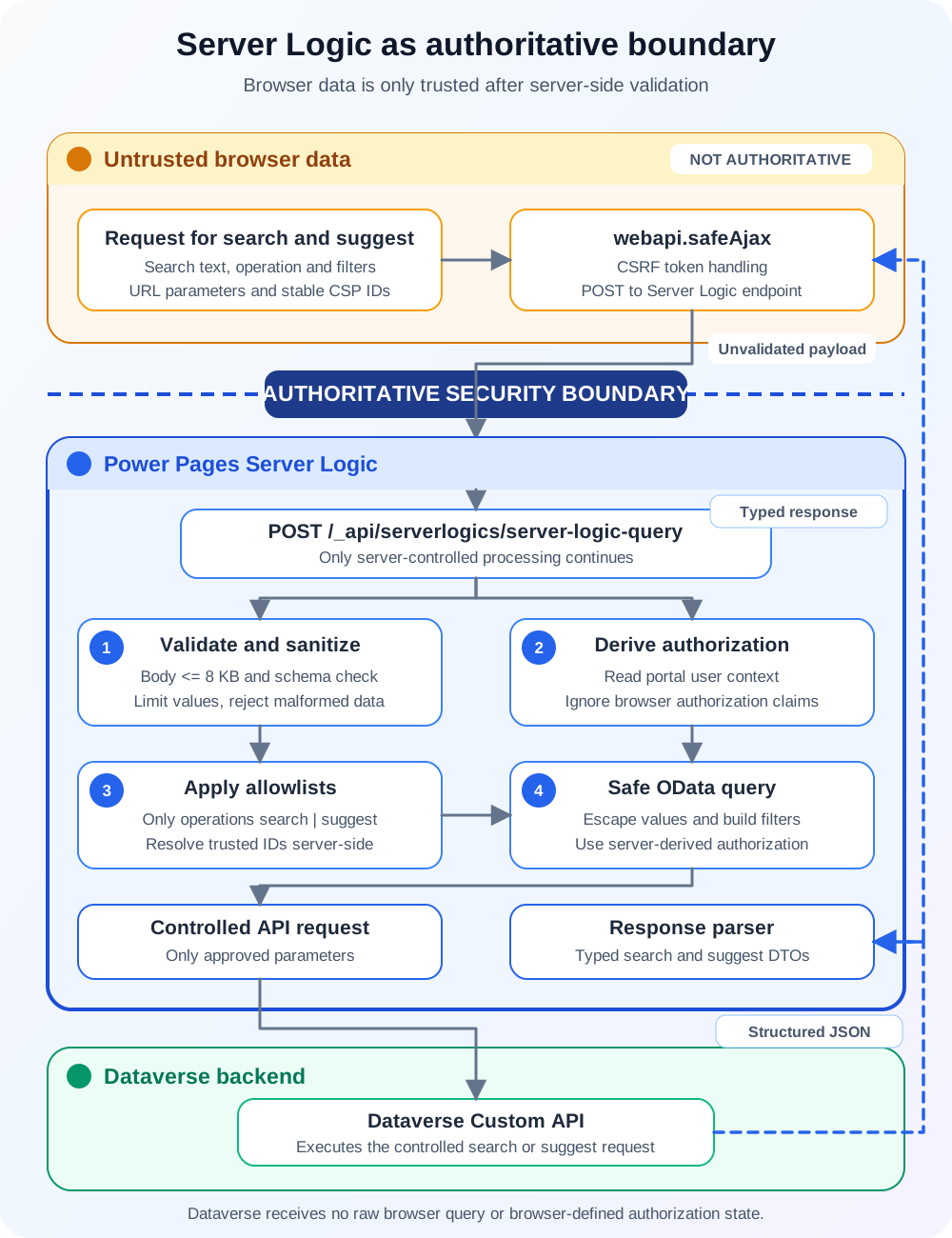
Microsoft describes Server Logic as a server-side JavaScript extension for controlled data operations and integrations. The Power Pages Server Logic overview names web roles, table permissions and server-side protection against direct inspection in the browser.
Browser requests also require a CSRF token. The documentation on calling Server Logic shows shell.safeAjax for this purpose. In the existing portal, the global Power Pages dependency provides the wrapper used here as webapi.safeAjax.
I document how request size, the operation allowlist, server-side authorization, OData escaping and safe logs work together in the deep dive on the Power Pages Server Logic security boundary.
How Power Pages Server Logic creates safe OData filters
After sanitization, Server Logic translates permitted filters into Dataverse Custom API parameters.
This is necessary in this architecture because the Custom API contract processes OData expressions in objectfilter, areafilter and levelfilter. React, by contrast, sends only domain values such as search text, option values and numeric ranges. Server Logic performs the controlled translation between the two contracts.
The relevant implementation, shortened and with a neutralized Dataverse field name, looks like this:
const objectClauses = [];

if (browserPayload.searchText) {
  objectClauses.push(buildSearchTextClause(browserPayload.searchText));
}

addRangeClauses(objectClauses, 'dataverse_shop_count', browserPayload.shopCount);

if (objectClauses.length > 0) {
  apiPayload.objectfilter = '$filter=' + objectClauses.join(' and ');
}
Server Logic therefore owns field names, operators and combinations. The browser supplies only previously validated candidate values. Multiple values from the same selection are grouped with or. Different filter groups are combined with and.
Search text, location types and metrics become a controlled objectfilter. Area limits are processed separately. Localized levels have their own filter contract.
Strings are escaped before use in OData literals. Option values come from server-side allowlists. Numeric values are checked against known domains.
One important principle remains: a filter is not passed to the Custom API until its accepted contract has been confirmed.
This keeps browser selection, server-side validation and Dataverse filters aligned with the same contract.
The deep dive on validating Power Pages search filters and generating OData safely shows the complete path from the support matrix and sanitization to assignment of the three OData parameters.
How React safely validates Dataverse responses
The Custom API returns a nested response. Power Pages Server Logic returns an operation contract. Inside it is the Custom API response, whose Content in turn contains serialized JSON.
The React application does not trust this return path without validation either.
Parsers check:
- The expected operation.
- The Server Logic data envelope.
- The Custom API success value.
- The type of the
Contentfield. - The required result lists.
An incorrect data shape is not converted into an empty successful result. The error remains visible.
The parser stops as soon as the operation name is incorrect or a content field is missing:
const { data } = parseServerLogicOperationResult(value, 'search');

if (typeof data['Content'] !== 'string') {
  throw new Error('Custom API data does not contain a string Content.');
}

return {
  IsSucceeded: data['IsSucceeded'],
  Content: parsePortalSearchResponse(data['Content']),
};
This decision is particularly important when several teams work on Power Pages, Server Logic and Dataverse. A silent default would hide contract errors.
Synchronizing Power Pages search filters with the URL, React and browser history
On the results page, search state lives in the URL.
A new search uses pushState. Back and Forward trigger popstate. The widget reads the filters again, cleans up invalid values and starts exactly one appropriate search.
Partially invalid URLs remain usable. Valid filters are preserved. Invalid values are removed. The cleaned URL replaces the current history entry with replaceState.
Unrelated query parameters remain intact.
This lets users share, reload and restore search states through browser navigation.
The deep dive on Power Pages search filters with the URL, React and browser history separates landing-page navigation, new searches, URL cleanup and restoration through popstate.
Decoupling React search results in Power Pages with CustomEvents
The search widget does not need to render every results view itself.
After an accepted search change, it publishes a browser event containing the cause, filters, query string and URL. After a successful response, a second event supplies the validated result contract.
Vanilla JavaScript, jQuery or another React application can subscribe to these events.
The search widget therefore knows no specific map view, table view or results list. Consumers know no internal hooks or React context of the search widget.
The state contract stays small and versionable:
window.dispatchEvent(
  new CustomEvent('ece:search-changed', {
    detail: {
      version: 1,
      cause,
      filters,
      queryString,
      url,
    },
  })
);
This decoupling is particularly useful for Power Pages. Existing web templates and new React applications can use the same result contract.
The deep dive on decoupling search results with Power Pages React CustomEvents separates state changes from result delivery and shows consumers in JavaScript, jQuery and React.
Implementing robust auto-suggest in Power Pages with React
Auto-suggest uses the same Server Logic endpoint but not the same flow as a full search.
After three characters, the interface waits 300 milliseconds. New input makes older requests ineffective. Empty suggestions and technical errors remain separate states.
Selecting a suggestion only sets the search text. It does not start navigation or a full search.
This separation prevents hidden side effects. Free text remains valid even if no suggestion is selected.
The deep dive on Power Pages auto-suggest with React, debounce and requests explains debounce, sequence protection, UI states, suggestion groups and the separate server operation in detail.
Building Power Pages detail search with GUIDs and Liquid
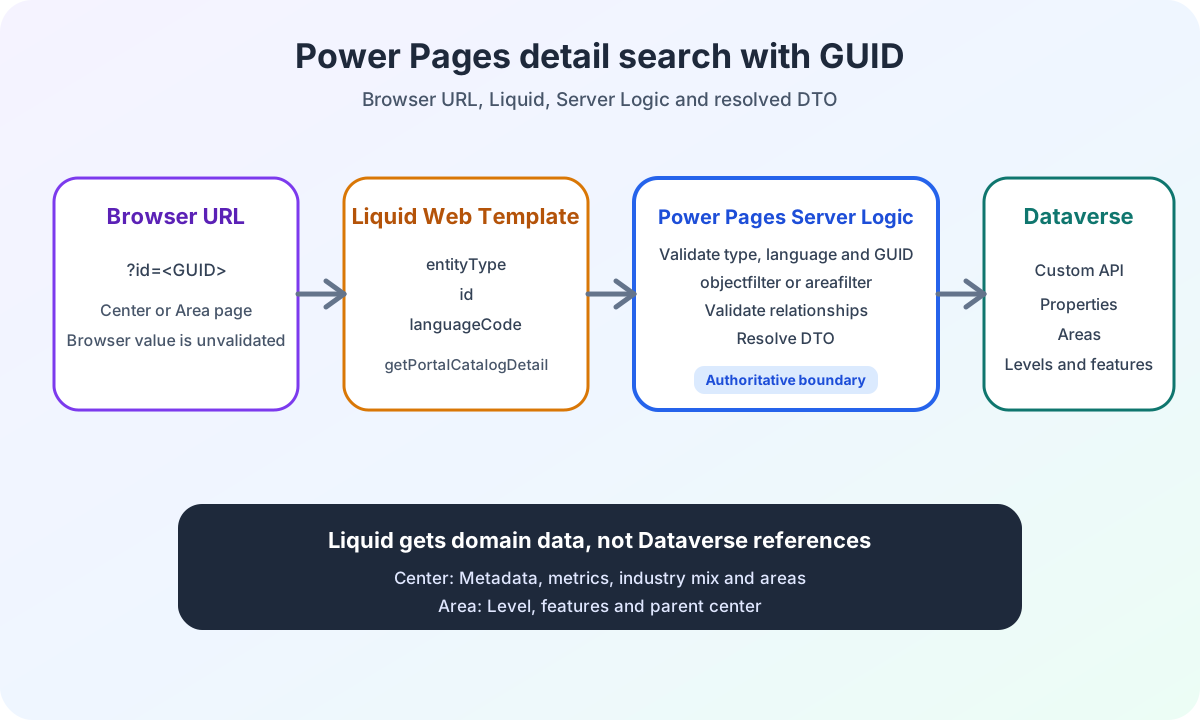
A results list already knows the GUID of a center or area. The detail page still needs an unambiguous contract.
The web template reads id from the URL and adds entityType and the active language. The named Liquid call getPortalCatalogDetail validates these values, generates the appropriate center or area filter and then calls the Dataverse Custom API.
Server Logic does not pass the normalized Dataverse response graph to Liquid. It first resolves levels, characteristics, areas and parent centers. The web template can therefore use direct DTO properties.
The deep dive on Power Pages detail search with GUIDs, Server Logic and Liquid shows single-record retrieval, DTO resolution and the three Liquid result states.
Loading Power Pages favorites with multiple GUIDs
A favorites page has multiple known IDs. Individual requests would repeat the same Server Logic and Dataverse flow for each GUID.
getPortalCatalogDetails therefore accepts a batch of up to 50 center or area IDs. Valid GUIDs are normalized and deduplicated. Invalid values and records not found remain visible in separate lists.
The batch is the third discriminated operation of the shared HTTP endpoint. Liquid can use the same domain function through a named Server Logic call.
The deep dive on Power Pages favorites with batch GUIDs and Server Logic documents the request contract, OData filters, result ordering and partial failures.
All articles on Power Pages enterprise search
The following articles document the architecture, implementation and independent technical boundaries:
- Power Pages enterprise search with React, Dataverse and Server Logic
- Power Pages React web templates with JSON configuration
- Power Pages Server Logic connecting React and Dataverse securely
- Connecting Power Pages React and Dataverse through types
- Power Pages search filters with the URL, React and browser history
- Decoupling search results with Power Pages React CustomEvents
- Power Pages auto-suggest with React, debounce and requests
- Validating Power Pages search filters and generating OData safely
- Power Pages JSON configuration with Liquid, React and JavaScript
- Power Pages detail search with GUIDs, Server Logic and Liquid
- Power Pages favorites with batch GUIDs and Server Logic
The shared Power Pages enterprise search series tag brings together all articles on the architecture and its technical components.
Frequently asked questions about Power Pages enterprise search
Why must React not handle authorization in Power Pages enterprise search?
React runs in the browser and can be changed or bypassed by portal users. Authorization must therefore be derived from the current portal user and the applicable server-side permissions. React may validate input and display understandable errors, but it does not replace Server Logic.
How does Power Pages Server Logic protect enterprise search?
Server Logic limits request size and operations, normalizes filters, checks values against allowlists and only then constructs controlled Dataverse parameters. A CSRF token also protects the request. Invalid data is treated as an error rather than returned as an empty successful list.
How does React synchronize Power Pages search filters with the URL and browser history?
The results page stores search state in the URL. New searches use pushState. Back and Forward trigger popstate. The parser removes invalid values, preserves valid filters and replaces a cleaned URL with replaceState.
How does auto-suggest in Power Pages with React work?
Auto-suggest has different requirements from a full search. Debounce, request sequences, empty suggestions and technical errors need their own states. A selection initially sets only the search text. Navigation and full search remain separate flows.
How does Power Pages load details using a GUID?
A web template reads the GUID from the URL and adds entityType and language. The named Server Logic function validates the contract, uses objectfilter for centers and areafilter for areas, and then returns a resolved DTO to Liquid.
How does a Power Pages favorites page load multiple GUIDs?
The HTTP endpoint uses getPortalCatalogDetails as its third operation. One request processes up to 50 IDs of a single entity type. The response separates found DTOs, valid but missing IDs and syntactically invalid values.
Power Pages enterprise search architecture and project context
This series is based on an implemented enterprise search in Power Pages.
The ECE case study on enterprise search shows the project context and technical scope. The technical articles deliberately remain generalized.
For a general introduction, my article on React frontend architecture in Power Pages explains when an isolated React widget makes sense.
I document deployment of the built bundle separately in the article on automated React deployment with PAC CLI.
Are you working on a Power Pages workflow that needs more than standard forms, lists and simple JavaScript customizations? In Power Pages Pro-Code, I show how I clarify architecture, security boundaries and implementation risks before development.