Power Pages React Web Templates with JSON configuration
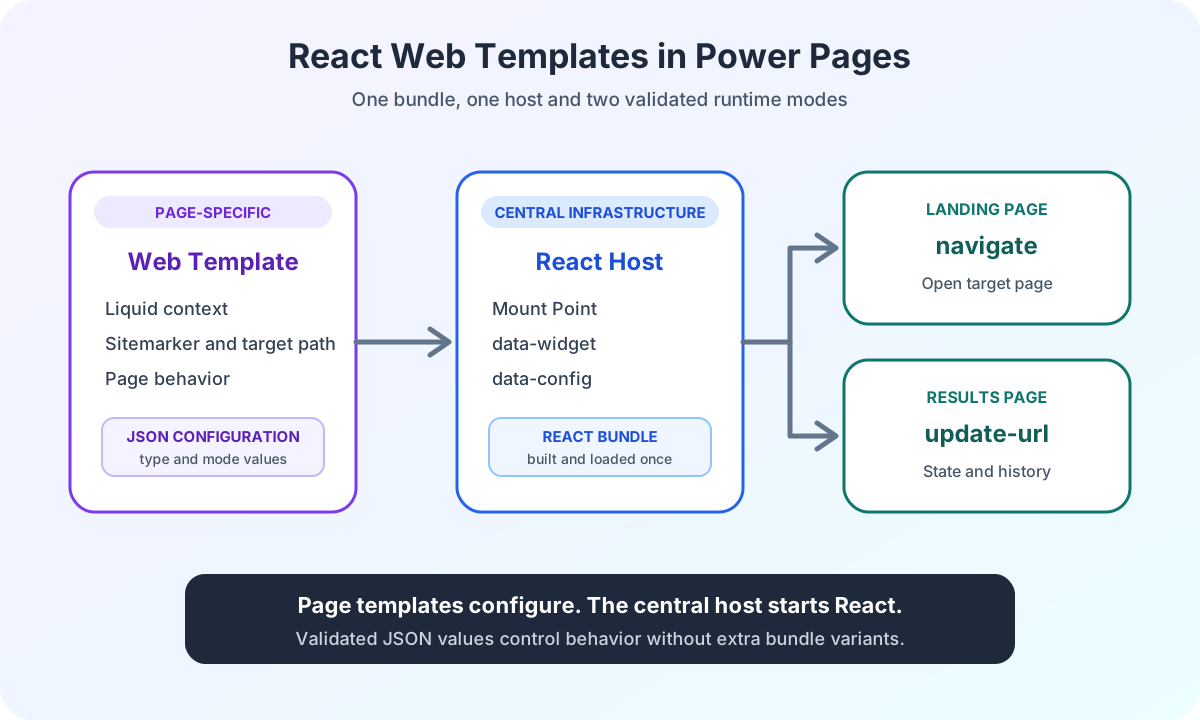
Power Pages React Web Templates separate host, bundle and JSON configuration. One widget runs on landing and results pages in the appropriate mode.
Contents
- Why a central React Web Template makes sense in Power Pages
- Which Power Pages Web Templates does a React application need?
- What does the technical contract of a Power Pages React host contain?
- How does a Power Pages landing page configure the React widget?
- How does the Power Pages results page use the same React bundle?
- How does React validate JSON configuration before startup?
- Why does a Power Pages React widget need exactly one host?
- What benefits does a central React host provide in Power Pages?
- Is
deferin Power Pages genuine lazy loading? - Which errors occur with React Web Templates in Power Pages?
- When is a React Web Template worthwhile in Power Pages?
- Power Pages React host experience from the enterprise project
Why a central React Web Template makes sense in Power Pages
While developing a complex enterprise search in Power Pages, I needed the same React application in several places. On the landing page, it had to collect search filters and then navigate to the results page. On the results page, it had to read state from the URL, update browser history and distribute new search results to other components.
A quick approach would have been to copy the container, script and initialization logic into every page. Technically, that would have worked at first. But every additional variant would have repeated the same technical structure. Bundle path, mount point, dependencies and page behavior would have been mixed together.
I therefore separated these responsibilities. A central Web Template hosts the React application. The calling page passes only a small JSON configuration.
The result is not a general React pattern. It is a specific Power Pages contract between Liquid, HTML and an isolated frontend application.
This article belongs to my series on the architecture of a complex enterprise search in Power Pages. The overview places this host contract in the complete data flow between React, Power Pages Server Logic and Dataverse.
Which Power Pages Web Templates does a React application need?
Power Pages Web Templates suit reusable technical components. Microsoft describes Web Templates as central metadata records for Liquid content that can be included in other templates. The Power Pages Web Templates documentation provides the platform foundation.
I divide the solution into two roles:
- The host Web Template owns the mount point, widget marker, configuration handoff and bundle path.
- The page-specific Web Template owns the business context and creates the appropriate runtime configuration.
A named Liquid parameter connects them. The official include tag can pass parameters to an included template. Microsoft documents this behavior in the Liquid template tags for Power Pages.
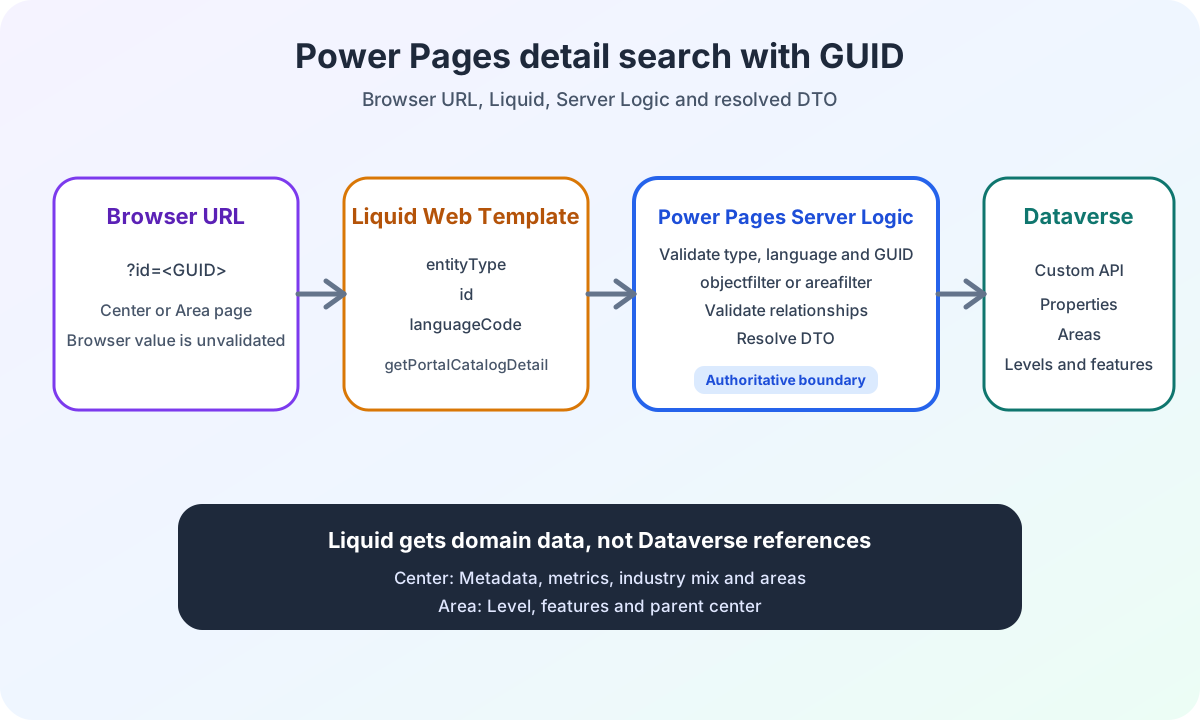
Detail pages use a second Power Pages mechanism. The documented serverlogic tag calls a named Server Logic function during rendering and makes the parsed result available under result.data.
The article on Power Pages detail retrieval with GUIDs and Liquid shows this call for center and area pages. The React host template and detail Web Template remain separate components.
React therefore knows nothing about sitemarkers, template names or Liquid objects. The page template knows no internal React components, services or state rules.
This boundary makes the widget flexible. It also prevents flexibility from becoming uncontrolled configuration.
Responsibility | Page template | Host template | React application |
|---|---|---|---|
Page context | Sitemarker and target path | No knowledge | No knowledge |
Technical host | Includes the host | Mount point and bundle path | Finds a unique host |
Runtime mode | Defines JSON values | Transports configuration | Validates and uses values |
UI state | No control | No control | Owns state and behavior |
What does the technical contract of a Power Pages React host contain?
The generalized host deliberately remains small:
{% comment %} Central host for one React widget instance. The parent page must load WebAPIAJAX first. {% endcomment %}

<div data-widget="portal-search" data-config="{{ config | escape }}"></div>

<script src="/portal-search.js" defer></script>
The host has four responsibilities:
data-widgetprovides a stable application selector.data-configtransports the JSON configuration.escapeprotects the HTML attribute context.- The script path remains defined centrally.
The built bundle is stored as a Web File in the portal. The Microsoft documentation on Power Pages Web Files describes them as records whose contents are stored through Dataverse note attachments. My article on local resources in Power Pages shows how to create and provide them in practice.
The host assumes the global Power Pages dependency WebAPIAJAX has already loaded. This prerequisite remains documented outside the widget. The host template does not load a second copy of global infrastructure.
How does a Power Pages landing page configure the React widget?
On the landing page, search should not yet start a complete result search. It collects valid filters and navigates to the results page on submission.
The page template needs only the target path and mode:
{% assign search_results_marker = sitemarkers['Search Results'] %} {%- capture search_config -%}
{"type":"navigate","targetUrl":"{{ search_results_marker.url }}"} {%- endcapture -%} {% include 'Portal Search Host',
config: search_config %}
The sitemarker stays in Liquid. React receives only the completed URL.
This separation matters. The React project needs no knowledge of customer-specific sitemarkers. A Power Pages page can change its destination without requiring a new frontend bundle.
The page template also loads no separate copy of portal-search.js. It always uses the same host.
How does the Power Pages results page use the same React bundle?
Different rules apply on the results page. The application must restore filters from the URL. A new search should create a browser history entry. Other components should be able to respond to accepted search changes.
The configuration therefore looks different:
{%- capture search_config -%} {"type":"update-url","historyMode":"push","eventName":"portal:search-changed"} {%-
endcapture -%} {% include 'Portal Search Host', config: search_config %}
The bundle remains identical. Only the validated runtime mode changes.
The optional eventName names only the state event. The article on Power Pages React CustomEvents explains how it differs from the fixed result event and describes the listener contracts.
The following article on URL state in Power Pages React search documents how navigate and update-url serialize filters, preserve unrelated query parameters and restore browser history.
This avoids separate builds for landing and results pages. The difference does not live in copied initialization logic. It lives in a small, documented configuration contract.
Aspect | navigate | update-url |
|---|---|---|
Usage | Landing page | Results page |
Required values | targetUrl | historyMode |
Browser behavior | Navigates to the target page | Updates URL and history |
Optional value | None | eventName |
React bundle | Identical bundle | Identical bundle |
This pattern also applies to other widgets. A configurator can have compact and complete modes. A multistep workflow can have different starting steps depending on the page. A dashboard can receive its own event name or a fixed data view.
How does React validate JSON configuration before startup?
A JSON configuration is reliable only if the application treats it as untrusted input.
My bootstrap reads data-config, parses the value as unknown and then validates the specific mode:
const rawConfig = host.dataset.config;

if (!rawConfig) {
  throw new Error('Widget configuration is missing.');
}

const parsed: unknown = JSON.parse(rawConfig);

if (!isConfigObject(parsed)) {
  throw new Error('Widget configuration must be an object.');
}

if (parsed.type === 'navigate') {
  return readNavigateConfig(parsed);
}

if (parsed.type === 'update-url') {
  return readUpdateUrlConfig(parsed);
}

throw new Error('Unsupported widget configuration type.');
The shared validation illustration below retains its German interface text. It illustrates the configuration checks without changing the widget’s actual startup contract.
- 1Konfiguration lesen
data-config muss einen Wert enthalten.
- 2JSON parsen
Das Ergebnis von JSON.parse wird bewusst als unknown behandelt.
- 3Objekt prüfen
Der Wert muss ein gültiges Konfigurationsobjekt sein.
- 4Modus validieren
navigate und update-url prüfen ihre eigenen Pflichtfelder.
- 5React starten
Nur eine vollständig geprüfte Konfiguration erreicht die Anwendung.
The navigate mode requires a nonempty targetUrl. The update-url mode accepts only the intended historyMode. An optional event name must be a string.
If a required value is missing, the application does not start with an invented default. It reports a clear error.
This decision saves time later. A misspelled mode is detected during loading. It does not produce an apparently working widget with incorrect behavior.
This validation protects the widget’s startup contract. It does not make browser data trusted backend input.
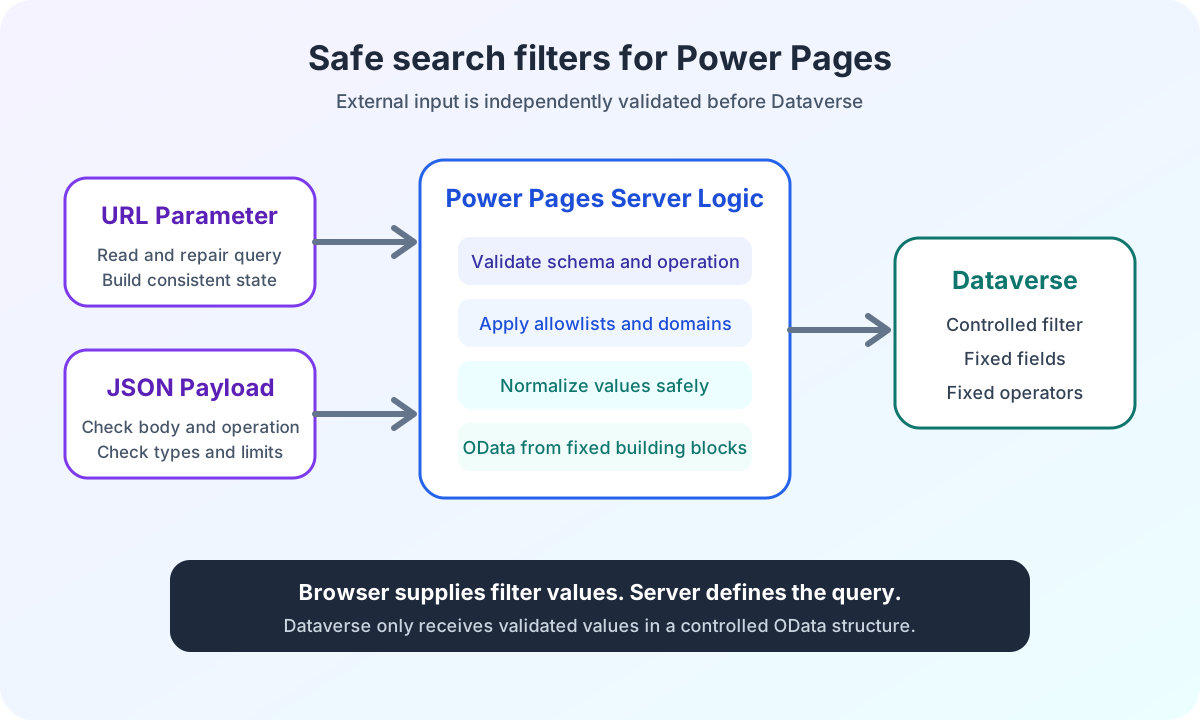
The authoritative Power Pages Server Logic security boundary therefore validates the request again, derives authorization from the portal session and builds allowed OData parameters only on the server.
Why does a Power Pages React widget need exactly one host?
The bundle does not search for an arbitrary root element. It specifically looks for its widget contract:
const hosts = document.querySelectorAll<HTMLElement>('[data-widget="portal-search"]');

if (hosts.length !== 1) {
  throw new Error('Exactly one Portal Search host element is required.');
}
No host is an integration error. Multiple hosts are also an integration error.
This rule is deliberately narrow. The bundle starts exactly one application and receives exactly one configuration. If a page later needs multiple instances, that case requires its own instance contract. Silently looping over an arbitrary number of containers would only postpone that decision.
What benefits does a central React host provide in Power Pages?
The pattern does more than reduce duplicated code. It improves several parts of delivery.
Central changes
A new bundle path or an additional shared include is changed once in the host.Small page templates
Each page describes only its business behavior.Independent frontend development
React works with typed configurations instead of Liquid objects.Clear error states
Missing hosts and invalid configurations fail visibly.Fewer build variants
One bundle supports several portal contexts.Better handoff
A Power Pages team can immediately recognize the active mode in the consumer template.Targeted tests
Each configuration type can be checked independently.
For daily builds and uploads, I also use an automated PAC CLI workflow. The host pattern and deployment process solve different problems. The host structures runtime. PAC CLI structures delivery.
Is defer in Power Pages genuine lazy loading?
The host script uses defer. The browser can download the file while parsing HTML. Execution waits until the document has been parsed.
This is not lazy loading based on visibility or user interaction. The documentation on the defer attribute explains this behavior in detail.
Deferred execution fits this widget. The host exists at startup, and the application should be available on the page.
If a bundle should load only after a click or when a visible area is reached, it needs a separate loader. The host pattern shown here does not claim that kind of lazy loading.
Which errors occur with React Web Templates in Power Pages?
Even a small host contract can be used incorrectly. I check these points for every embedding:
Error | Expectation | Check |
|---|---|---|
Multiple host elements | Exactly one widget instance | Check the number of matching |
Unescaped JSON | Safe HTML attribute context | Generate Liquid output with |
Missing required values | Complete mode configuration | Validate fields according to |
Incorrect loading order |
| Load global dependencies before widget startup |
Misplaced logic | Clear responsibility boundaries | Keep sitemarkers in the page template and UI state in React |
Undocumented fields | Only known values affect behavior | Review contract and implementation together |
The last rule also concerns language settings. In this search widget, the language comes from the HTML document’s lang attribute. An additional language field in the JSON would not change behavior.
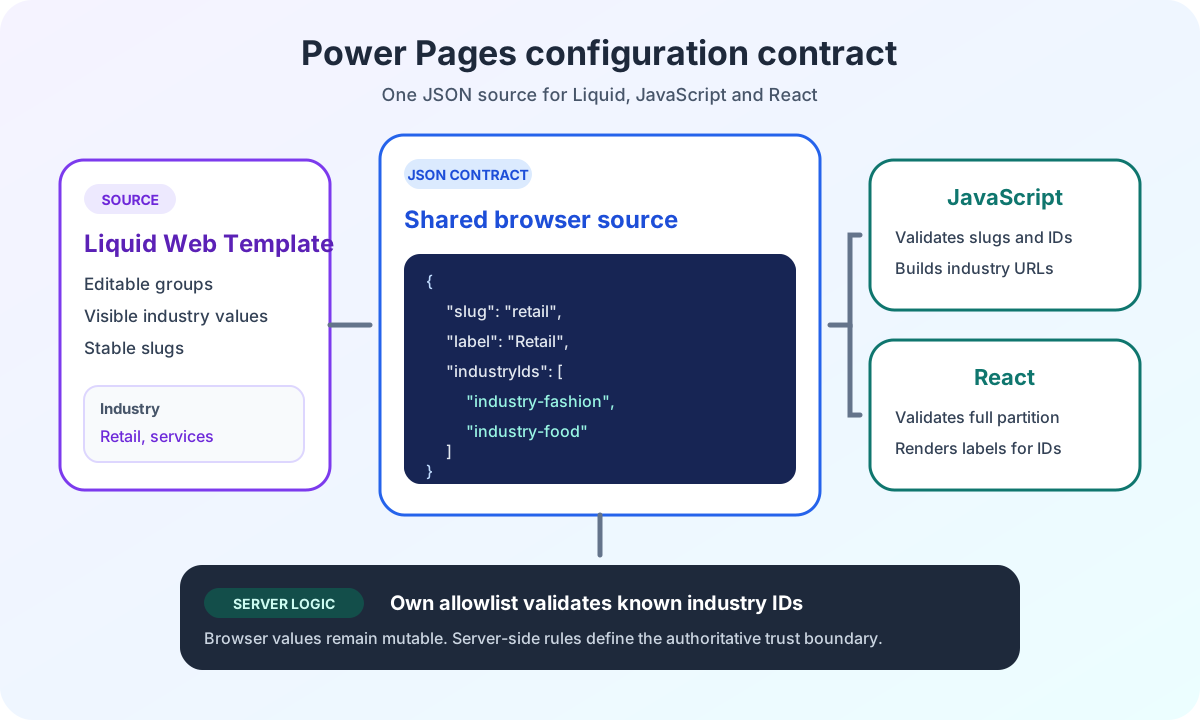
The deep dive on editable Power Pages configuration between Liquid, React and JavaScript extends this small runtime contract with shared industry JSON, stable IDs, complete cluster validation and separate browser and server allowlists.
When is a React Web Template worthwhile in Power Pages?
I use this approach for features with their own state and multiple portal contexts.
Suitable examples include:
- Complex searches
- Configurators
- Multistep workflows
- Dashboards
- Widgets with navigation and a results view
This structure would be unnecessary for a simple standard form or a small static addition. Power Pages should handle those tasks with its native capabilities.
Pro-Code is not the default approach for every page. It is a targeted decision for requirements where isolation, state logic or reuse justify the additional setup.
Power Pages React host experience from the enterprise project
I implemented this host and configuration pattern for a complex enterprise search. The application supports two runtime modes, auto-suggest, URL state, browser history and decoupled result consumers.
The public Power Pages enterprise search case study shows the wider context. It also describes the security boundary through Power Pages Server Logic and the protected Dataverse Custom API.
The most important part of this article remains smaller. A central host Web Template owns technical infrastructure. Page-specific Web Templates provide only validated configuration.
Are you working on a Power Pages workflow that must behave differently across several pages? In the Power Pages Pro-Code section, I explain how I clarify architecture, security boundaries and implementation risks before development.