Power Pages favourites with batch GUIDs and Server Logic
Power Pages loads favourites as a GUID batch through Server Logic. Typed contracts distinguish results, missing records and invalid IDs.
Contents
- Why a favourites page does not need one request per GUID
- How
post()separates three Power Pages operations - How TypeScript models the third request contract
- How Server Logic validates a GUID batch
- How valid GUIDs are normalized and deduplicated
- Why a batch contains only centers or areas
- How one OData query loads multiple GUIDs
- How single and batch retrieval share the same DTO resolution
- How results notFoundIds and invalidIds remain separate
- Which order the favourites page receives
- How Liquid and HTTP use the same core
- Power Pages favourites in the enterprise project
Why a favourites page does not need one request per GUID
A favourites page already has the IDs of its entries. It does not need a complete free-text search.
One request per GUID would still be the wrong boundary. Every call would have to repeat language resolution, authorization, Dataverse access, mapping and error handling.
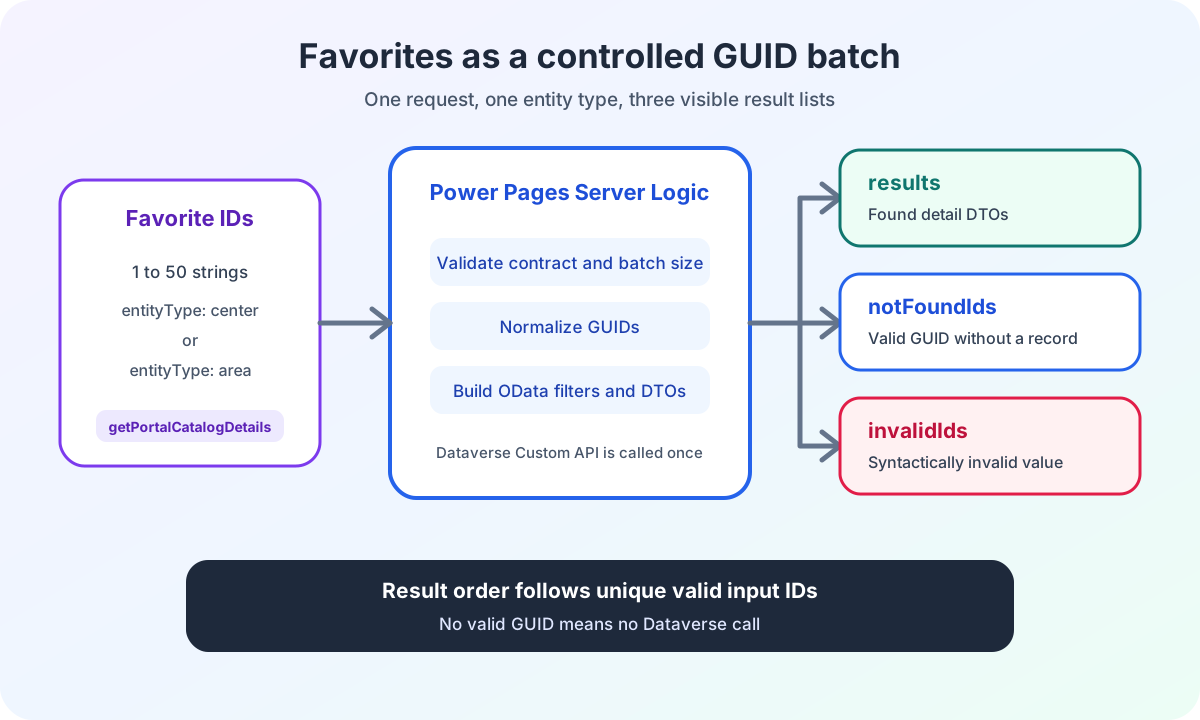
My Server Logic therefore accepts a batch of up to 50 GUIDs. The caller first chooses whether the batch contains centers or areas.
How post() separates three Power Pages operations
The shared HTTP endpoint uses a discriminator. post() checks the operation first and then delegates to the appropriate handler.
function post() {
  const payload = readBrowserPayload();

  if (payload.operation === OPERATIONS.SEARCH) {
    return postSearch(payload);
  }
  if (payload.operation === OPERATIONS.SUGGEST) {
    return postSuggest(payload);
  }
  return postPortalCatalogDetails(payload);
}
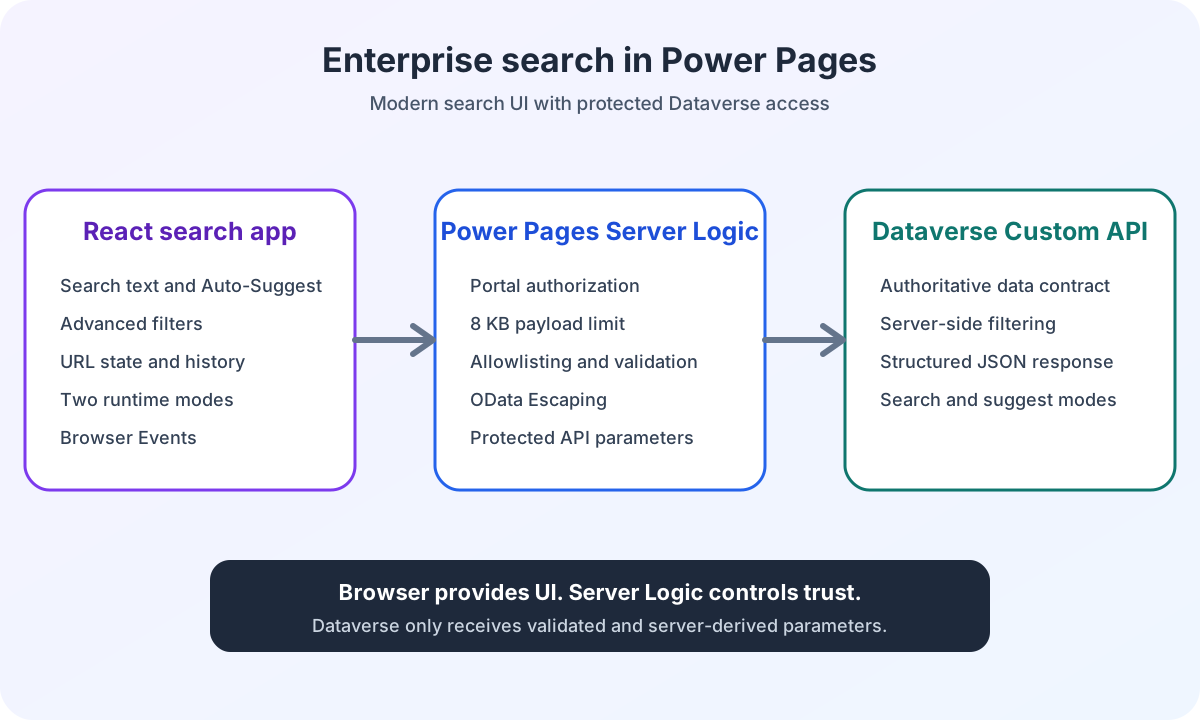
The shared HTTP endpoint therefore serves three use cases. search processes filters. suggest returns small suggestion lists. getPortalCatalogDetails loads known IDs for detail or favourites views.
The discriminator determines the contract before any business processing. A large request type with optional search, suggest and detail fields would allow invalid combinations.
How TypeScript models the third request contract
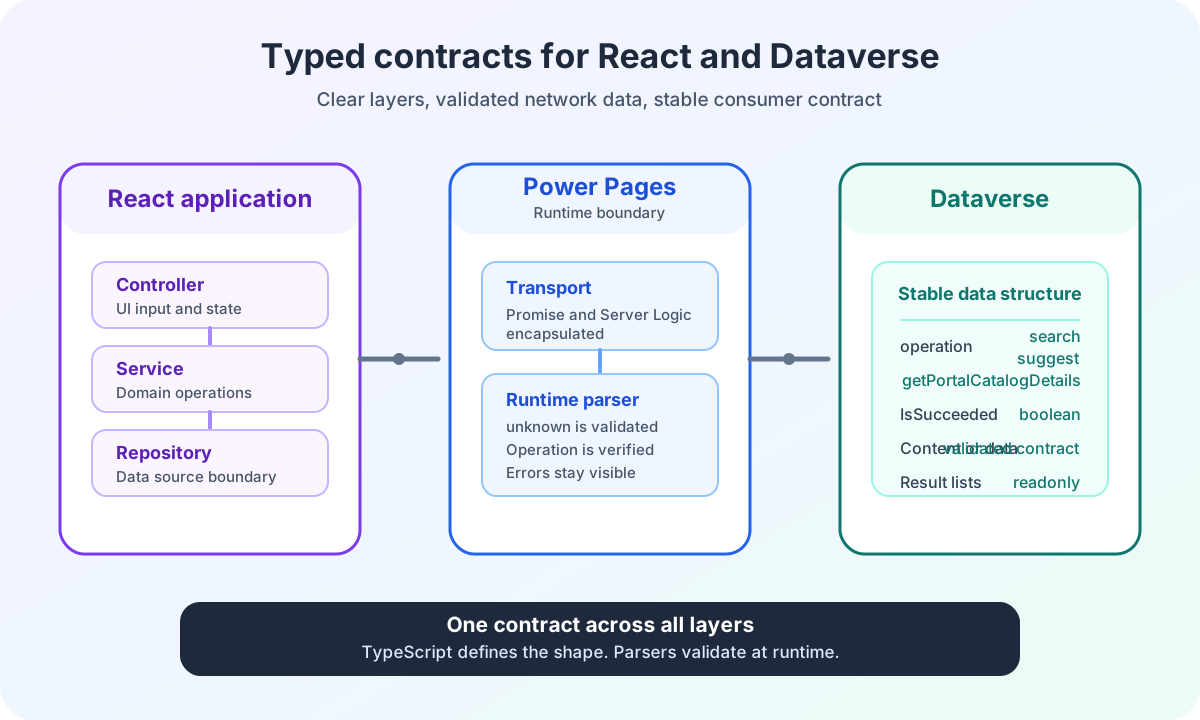
The complete TypeScript contract models the three HTTP POST operations as a union.
interface PortalCatalogDetailsServerLogicRequest {
  readonly operation: 'getPortalCatalogDetails';
  readonly entityType: 'center' | 'area';
  readonly ids: readonly string[];
  readonly languageCode: 'de' | 'de-DE' | 'en' | 'en-US' | 'en-GB';
}

type ServerLogicRequest = SearchServerLogicRequest | SuggestServerLogicRequest | PortalCatalogDetailsServerLogicRequest;
The type describes the browser contract. It does not replace runtime validation.
ids remains a string array because TypeScript does not establish a validated GUID format for network data. Server Logic validates every member again.
How Server Logic validates a GUID batch
The HTTP request explicitly names the operation, entity type, IDs and language.
{
  "operation": "getPortalCatalogDetails",
  "entityType": "center",
  "ids": ["20a6ceef-3e97-e911-a81b-000d3ab2de70", "674f37ec-5494-ea11-a811-000d3abae3d9"],
  "languageCode": "de-DE"
}
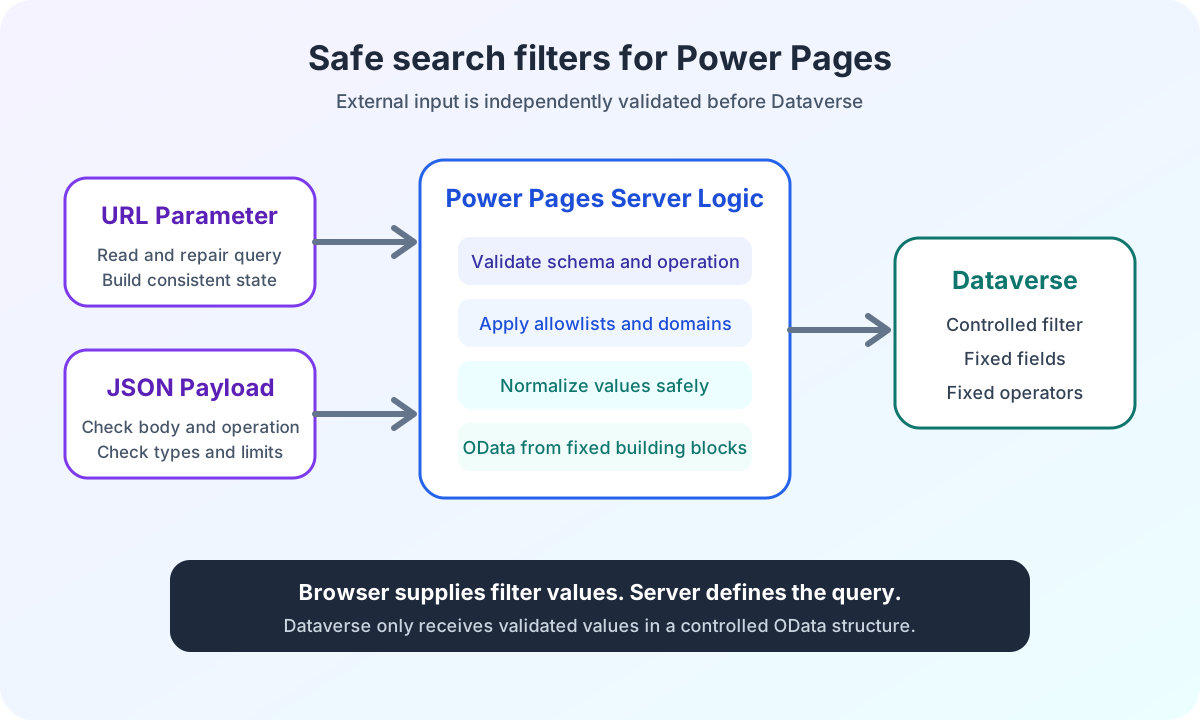
Server Logic validates the batch before calling the Custom API.
- Only
operation,entityType,idsandlanguageCodeare allowed. entityTypeaccepts onlycenterorarea.idsmust be an array with 1 to 50 members.- Every member must be a string.
- Unsupported language codes terminate the request.
- Unknown fields terminate the batch before the Custom API call.
Search filters and batch details intentionally have different error models. Unknown optional search filters have no effect. A batch with unknown contract fields is rejected.
A typo must not silently look like an empty favourites selection.
How valid GUIDs are normalized and deduplicated
Every input is decoded, trimmed and checked as a GUID. Invalid values remain visible so that the favourites page can clean up its local state.
for (const originalId of payload.ids) {
  const decodedId = decodeURIComponent(originalId).trim();

  if (!isGuid(decodedId)) {
    invalidIds.push(originalId);
    continue;
  }

  const normalizedId = decodedId.toLowerCase();
  if (!ids.includes(normalizedId)) {
    ids.push(normalizedId);
  }
}
Invalid GUID strings do not terminate the entire batch. They remain visible as invalidIds.
Valid GUIDs are lowercased. Duplicate values appear only once in the query. Their first position determines the subsequent result order.
Why a batch contains only centers or areas
A batch does not mix centers and areas.
This boundary keeps filters and response types unambiguous. A center batch produces objectfilter. An area batch produces areafilter. The response has the same entityType discriminator.
A favourites page with both types makes two clearly defined requests. It does not send a mixed contract whose result would need to identify the type of every element again.
How one OData query loads multiple GUIDs
Server Logic builds an OData filter list from the unique GUIDs. By this point, the IDs have already passed validation.
const clauses = ids.map((id) => '(id eq ' + id + ')');
const filter = '$filter=' + clauses.join(' or ');

if (entityType === 'center') {
  apiPayload.objectfilter = filter;
} else {
  apiPayload.areafilter = filter;
}
The Custom API is called once for the entire batch. The Dataverse response is then indexed using the validated IDs.
How single and batch retrieval share the same DTO resolution
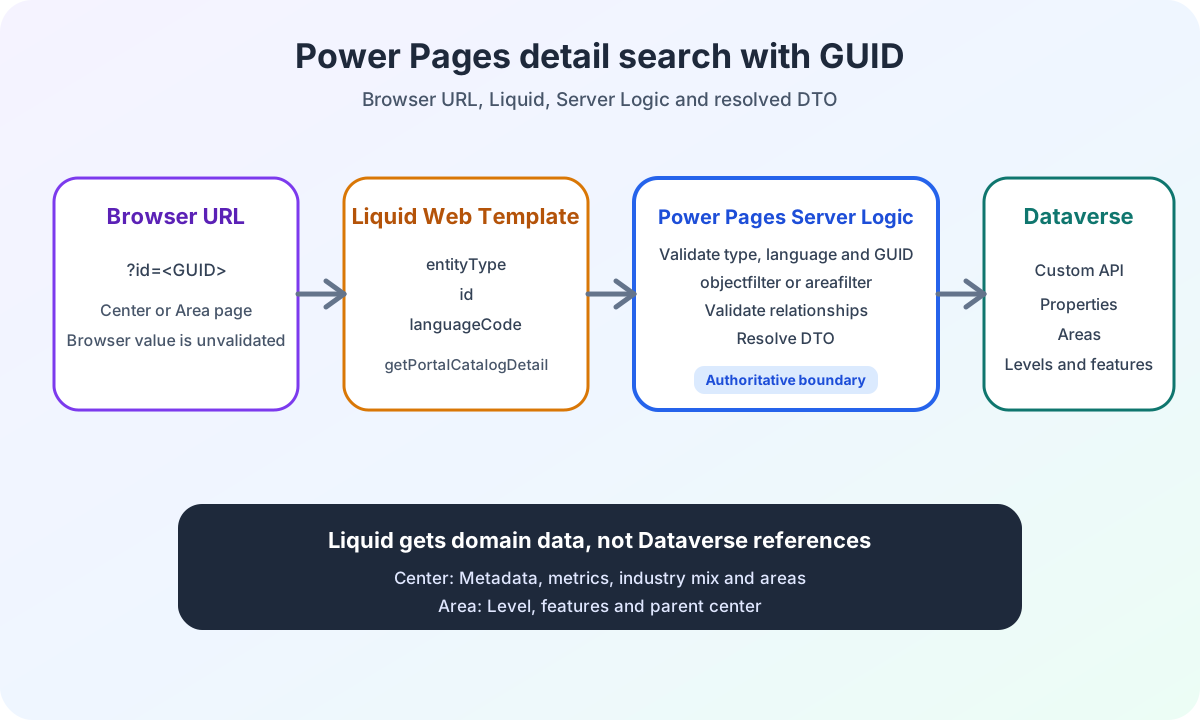
Single retrieval and the batch do not have separate DTO mappers. Both use the same indexes and relationship checks.
The previous article on Power Pages detail retrieval with GUIDs and Liquid shows this resolution for a center and an area.
This reuse prevents two similar detail contracts with different levels of validation.
How results notFoundIds and invalidIds remain separate
The batch distinguishes resolved DTOs, valid GUIDs without a record and syntactically invalid inputs.
type PortalCatalogDetailsData =
  | {
      readonly entityType: 'center';
      readonly results: readonly PortalCatalogCenterDetail[];
      readonly notFoundIds: readonly string[];
      readonly invalidIds: readonly string[];
    }
  | {
      readonly entityType: 'area';
      readonly results: readonly PortalCatalogAreaDetail[];
      readonly notFoundIds: readonly string[];
      readonly invalidIds: readonly string[];
};Field | Meaning | Favourites page response |
|---|---|---|
results | Found and resolved DTOs | Render details |
notFoundIds | Valid GUID without a record | Mark or remove the outdated favourite |
invalidIds | Syntactically invalid input | Clean up the local value and keep the error visible |
Which order the favourites page receives
results follows the order of the unique valid input IDs. IDs that were not found are omitted and collected separately in notFoundIds.
The order of the Dataverse lists does not determine the favourites view. Server Logic iterates over the normalized request and reads the DTOs from an ID index.
If no valid GUID remains after validation, no Custom API call is made. The response contains empty results and notFoundIds along with the collected invalidIds.
How Liquid and HTTP use the same core
The browser sends the batch with a CSRF-protected POST. Microsoft demonstrates shell.safeAjax in its documentation on calling Server Logic from client script.
Liquid can call the same batch function through the documented serverlogic tag. The Liquid input contains no operation field because the function name is already specified in the tag.
Both adapters then run normalizeBatchDetailRequest and executePortalCatalogDetails. The business processing remains identical.
Power Pages favourites in the enterprise project
The batch is not a faster replacement for every search. It addresses a specific case. The IDs are already known and need to be resolved to current detail data through a controlled request.
The third POST operation keeps this case separate from free-text search and auto-suggest. The response makes invalid, missing and found favourites individually visible.
The Power Pages enterprise search architecture overview places all three POST operations and the separate Liquid calls in the overall flow.
The ECE Power Pages enterprise search case study provides the project context for the batch. The batch resolves known favourite IDs to detail data. Saving the selection is a separate responsibility of the favourites view.
Are you building a Power Pages favourites page or saved search state with Dataverse data? In the Power Pages Pro-Code section, I explain how I define batch contracts, error states and Server Logic boundaries before development.