Power Pages JSON configuration with Liquid, React and JavaScript
Power Pages industry configuration connects Liquid, JavaScript and React. Stable IDs, independent checks and server-side allowlists protect the contract.
Contents
- Why an editable Power Pages list creates multiple contracts
- How a Power Pages web template becomes the browser’s data source
- How Liquid creates a safe Power Pages JSON contract
- How to output JSON safely in a Power Pages HTML attribute
- Why React must read Power Pages configuration as unknown
- How React responds to missing Power Pages runtime configuration
- How Power Pages industry JSON separates grouping and identity
- How React checks a complete partition of industry IDs
- How React and JavaScript validate the same Power Pages configuration
- What fail closed means for Power Pages consumers
- How Power Pages configuration gets its locale from the document
- Why Power Pages labels remain display-only
- Why Power Pages Server Logic has its own allowlist
- How a change matrix prevents uncoordinated configuration updates
- Which values each Power Pages configuration layer owns
- Why unknown Power Pages configuration properties have no effect
- Where the Power Pages configuration pattern can be reused
- Why Power Pages configuration is not a security boundary
- Power Pages JSON configuration lessons from the enterprise project
Why an editable Power Pages list creates multiple contracts
An industry list initially looks like editorial content.
A label changes. An industry moves to another group. A new offering is added.
In a Power Pages application, however, that change affects more than text. The landing page builds links. React renders selection fields. The URL stores IDs. Power Pages Server Logic checks the browser request. Dataverse processes only validated parameters.
If every layer holds the same copied JSON block, they drift apart. If only the browser has a shared list, authoritative server-side validation is missing.
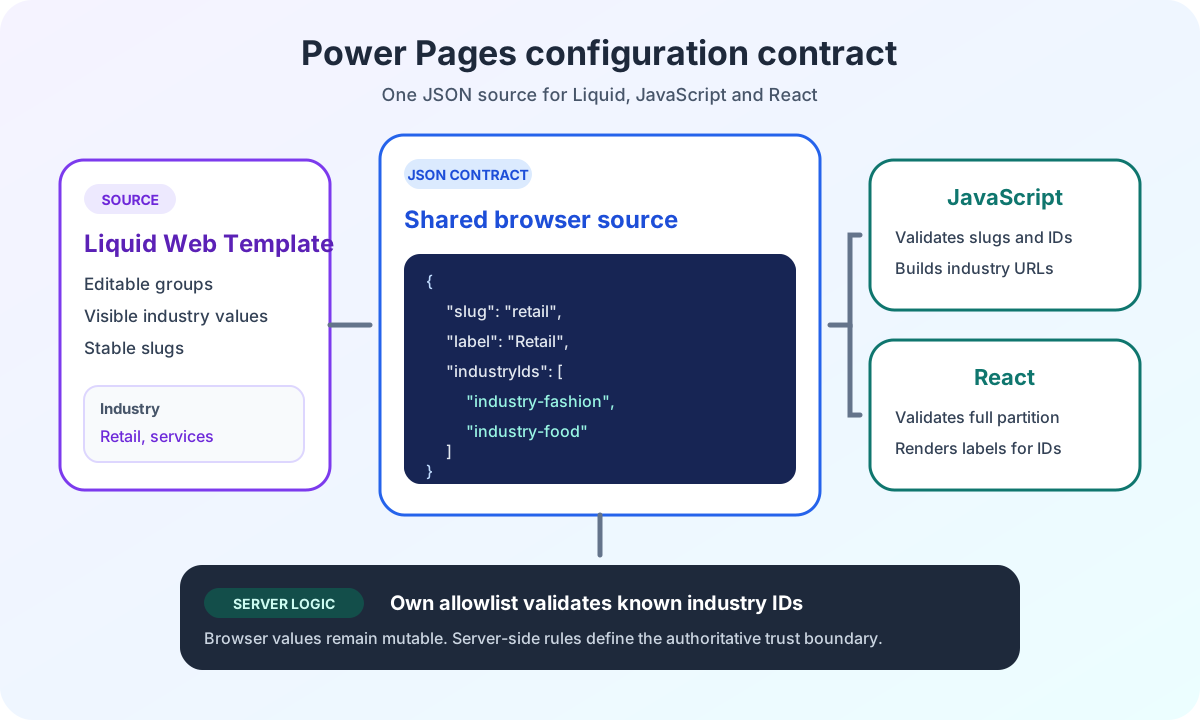
I therefore separate editable grouping, stable identity and security rules.
The architecture overview of Power Pages enterprise search shows the complete data flow. This article focuses on the configuration contract between Liquid, HTML, JavaScript and React.
How a Power Pages web template becomes the browser’s data source
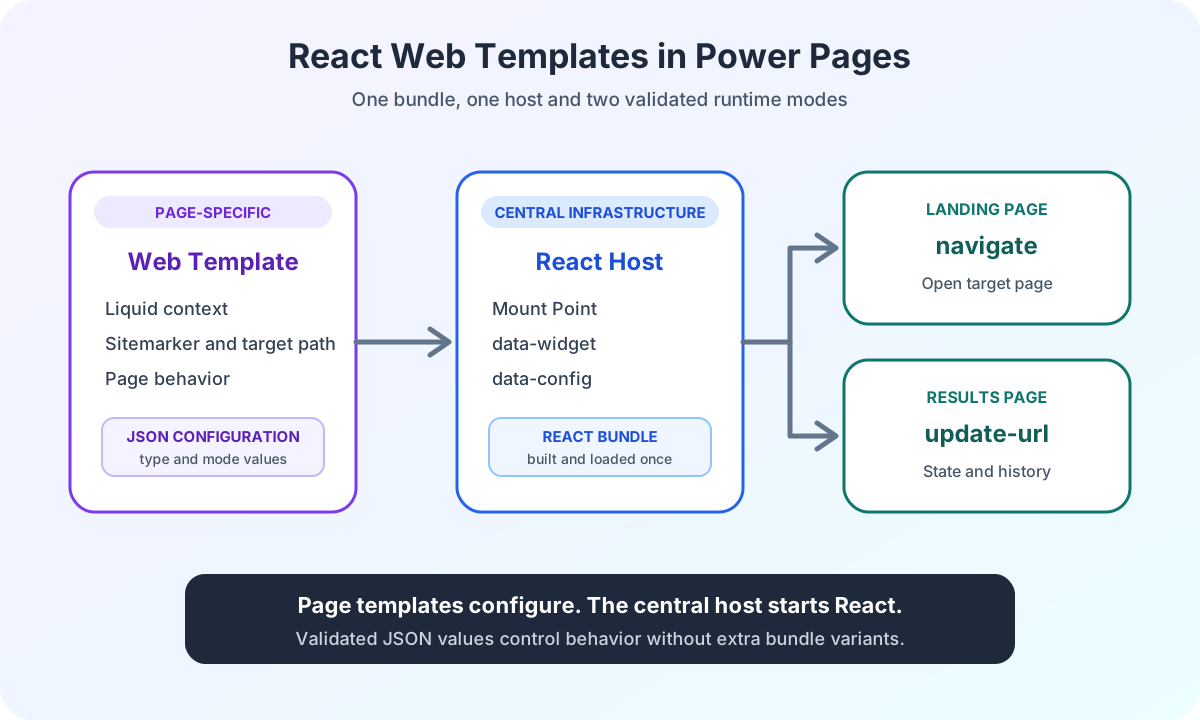
Power Pages web templates are suitable for this contract. They are stored centrally in the portal and can be included on multiple pages.
Microsoft describes Power Pages web templates as reusable Liquid content. A calling template can pass parameters through the documented Liquid include tag.
I use two separate JSON channels.
The first channel is the data-config attribute. It contains only the widget’s small runtime contract.
The second channel is an application/json element. It contains the editable grouping of known industry IDs.
Aspect | data-config | application/json |
|---|---|---|
Content | Small runtime contract for the widget | Editable clusters and known industry IDs |
Examples |
|
|
Output | HTML attribute with Liquid | Non-executable JSON block |
Reading consumer | React bootstrap through | React and landing-page JavaScript through |
Trust level | Untrusted browser input | Untrusted browser input |
{% include 'Industry Cluster Config' %}

<div data-widget="portal-search" data-config="{{ config | escape }}"></div>

<script src="/portal-search.js" defer></script>
The order is mandatory. The cluster JSON appears before the bundle. React can read it immediately at startup.
The existing article on modular React embedding with web templates and JSON configuration explains the host, mount point and bundle path. Here, I extend the same host with editable business data.
How Liquid creates a safe Power Pages JSON contract
The calling page template decides which behavior the current page needs.
A landing page uses navigate:
{%- capture search_config -%}
{"type":"navigate","targetUrl":"/search-results"}
{%- endcapture -%}
{% include 'Portal Search Host', config: search_config %}
A results page uses update-url:
{%- capture search_config -%} {"type":"update-url","historyMode":"push","eventName":"portal:search-changed"} {%-
endcapture -%} {% include 'Portal Search Host', config: search_config %}
navigate requires a non-empty targetUrl.
update-url requires exactly historyMode: "push".
eventName is optional. If the value is missing or empty, React uses the documented default name.
This configuration changes the behavior of the same bundle. It does not create a second build for the landing page and results page.
The article on Power Pages React URL parameters shows how the two modes handle the URL and browser history differently.
How to output JSON safely in a Power Pages HTML attribute
The runtime contract is stored in an HTML attribute.
Valid JSON alone is therefore not enough. Quotes and other special characters must also remain safe in the attribute context.
The MDN documentation on data attributes describes access through dataset.
data-config='{{ config | escape }}'Liquid escape prevents a JSON value from terminating the attribute and creating new markup.
Later, I read the value through dataset. The browser returns the decoded attribute value. Only then does JSON.parse run.
const rawConfig = host.dataset['config'];

if (rawConfig === undefined || rawConfig.trim() === '') {
  throw new Error('Portal Search configuration is missing.');
}

const parsed: unknown = JSON.parse(rawConfig);
An application/json element has a different context. There, I read textContent.
<script type="application/json" id="portal-industry-clusters">
  {
    "clusters": [
      {
        "slug": "retail",
        "label": "Retail",
        "industryIds": ["industry-fashion", "industry-food"]
      },
      {
        "slug": "services",
        "label": "Services",
        "industryIds": ["industry-health", "industry-leisure"]
      }
    ]
  }
</script>
The example contains static JSON. If editorial values are written into this block dynamically, they must be generated with a verified JSON serializer. String concatenation with unchecked labels is not a safe substitute.
I use neither innerHTML nor executable JavaScript code for this data.
Why React must read Power Pages configuration as unknown
A data-* attribute has no TypeScript contract at runtime.
I therefore parse to unknown first and check the discriminator afterward.
type SearchSubmitBehavior =
  | {
      readonly type: 'navigate';
      readonly targetUrl: string;
    }
  | {
      readonly type: 'update-url';
      readonly historyMode: 'push';
      readonly eventName?: string;
    };

function isRecord(value: unknown): value is Record<string, unknown> {
  return typeof value === 'object' && value !== null && !Array.isArray(value);
}

function readWidgetConfig(host: HTMLElement): SearchSubmitBehavior {
  const rawConfig = host.dataset['config'];

  if (rawConfig === undefined || rawConfig.trim() === '') {
    throw new Error('Portal Search configuration is missing.');
  }

  let parsed: unknown;

  try {
    parsed = JSON.parse(rawConfig) as unknown;
  } catch (error: unknown) {
    if (error instanceof SyntaxError) {
      throw new Error('Portal Search configuration must be valid JSON.');
    }

    throw error;
  }

  if (!isRecord(parsed)) {
    throw new Error('Portal Search configuration must be an object.');
  }

  if (parsed['type'] === 'navigate') {
    const targetUrl = parsed['targetUrl'];

    if (typeof targetUrl !== 'string' || targetUrl.trim() === '') {
      throw new Error('Portal Search targetUrl is required for navigate behavior.');
    }

    return {
      type: 'navigate',
      targetUrl,
    };
  }

  if (parsed['type'] === 'update-url') {
    if (parsed['historyMode'] !== 'push') {
      throw new Error('Portal Search historyMode must be "push" for update-url behavior.');
    }

    const eventName = parsed['eventName'];

    if (eventName === undefined || eventName === '' || (typeof eventName === 'string' && eventName.trim() === '')) {
      return {
        type: 'update-url',
        historyMode: 'push',
      };
    }

    if (typeof eventName !== 'string') {
      throw new Error('Portal Search eventName must be a string when provided.');
    }

    return {
      type: 'update-url',
      historyMode: 'push',
      eventName,
    };
  }

  throw new Error('Portal Search configuration type must be "navigate" or "update-url".');
}
The parser constructs a new object from known fields.
An additional field such as debug, language or endpoint therefore has no effect. It is not carried into the validated contract.
This rule does not prevent DOM manipulation. It only limits which browser values the widget interprets.
How React responds to missing Power Pages runtime configuration
The bootstrap expects exactly one host.
If the host is missing, multiple hosts exist or data-config is invalid, React does not start.
const hosts = document.querySelectorAll<HTMLElement>('[data-widget="portal-search"]');

if (hosts.length !== 1) {
  throw new Error('Exactly one Portal Search host element is required.');
}

const host = hosts[0];

if (host === undefined) {
  throw new Error('Portal Search host element was not found.');
}

const config = readWidgetConfig(host);
I do not invent a default mode here.
A missing targetUrl must not cause navigation to the current page. An incorrect historyMode must not silently change how browser history is handled.
The error remains a visible integration error.
How Power Pages industry JSON separates grouping and identity
The editable cluster file contains three types of value:
- The
slugis the stable technical identity of a group. - The
labelis the visible text. industryIdsrefers to stable industry IDs.
Value | Responsibility | May change | Transmitted |
|---|---|---|---|
slug | Stable technical identity of the cluster | Only as a contract change | Not in the results URL or server request |
label | Visible editorial group name | Without changing stable IDs | For display only |
industryIds | Stable identities of individual industries | Only with updates to every affected contract | As URL and request values |
A label may change without rewriting URLs or requests.
An industry ID must not be replaced by its visible label. Labels can be translated, renamed or editorially corrected.
The public example catalog is deliberately small:
const KNOWN_INDUSTRY_IDS = ['industry-fashion', 'industry-health', 'industry-food', 'industry-leisure'] as const;

const SUPPORTED_CLUSTER_SLUGS = ['retail', 'services'] as const;

type IndustryId = (typeof KNOWN_INDUSTRY_IDS)[number];
type ClusterSlug = (typeof SUPPORTED_CLUSTER_SLUGS)[number];

interface IndustryCluster {
  readonly slug: ClusterSlug;
  readonly label: string;
  readonly industryIds: readonly IndustryId[];
}
The real catalog remains within the project. The article publishes neither the complete IDs nor the client-specific grouping.
How React checks a complete partition of industry IDs
Cluster configuration is valid only if it partitions the known catalog completely and without overlap.
This means:
- Each supported cluster exists exactly once.
- Each known industry ID occurs exactly once.
- No unknown ID is accepted.
- No cluster has an empty label.
- No cluster has an empty ID list.
function hasCompletePartition(clusters: readonly IndustryCluster[], knownIds: readonly IndustryId[]): boolean {
  const configuredIds = clusters.flatMap(({ industryIds }) => industryIds);

  return (
    new Set(configuredIds).size === configuredIds.length &&
    configuredIds.length === knownIds.length &&
    knownIds.every((industryId) => configuredIds.includes(industryId))
  );
}
Checking only membership in the set of known IDs is not enough.
Without a length check, duplicate IDs could hide a missing ID. Without a uniqueness check, the same industry could appear in several groups.
The complete partition makes the editorial change verifiable.
How React and JavaScript validate the same Power Pages configuration
React reads the JSON element through textContent.
type ClusterConfigResult =
  | {
      readonly isValid: true;
      readonly clusters: readonly IndustryCluster[];
    }
  | {
      readonly isValid: false;
      readonly error: string;
    };

function isClusterSlug(value: unknown): value is ClusterSlug {
  return typeof value === 'string' && SUPPORTED_CLUSTER_SLUGS.some((slug) => slug === value);
}

function isIndustryId(value: unknown): value is IndustryId {
  return typeof value === 'string' && KNOWN_INDUSTRY_IDS.some((industryId) => industryId === value);
}

function readClusterConfig(documentRef: Pick<Document, 'getElementById'>): ClusterConfigResult {
  const element = documentRef.getElementById('portal-industry-clusters');

  if (element === null) {
    return {
      isValid: false,
      error: 'Industry cluster config element is missing.',
    };
  }

  let parsed: unknown;

  try {
    parsed = JSON.parse(element.textContent ?? '') as unknown;
  } catch (error: unknown) {
    if (error instanceof SyntaxError) {
      return {
        isValid: false,
        error: 'Industry cluster config must be valid JSON.',
      };
    }

    throw error;
  }

  if (!isRecord(parsed) || !Array.isArray(parsed['clusters'])) {
    return {
      isValid: false,
      error: 'Industry cluster config must contain a clusters array.',
    };
  }

  const clusters: IndustryCluster[] = [];

  for (const value of parsed['clusters']) {
    if (!isRecord(value)) {
      return {
        isValid: false,
        error: 'Every industry cluster must be an object.',
      };
    }

    const slug = value['slug'];
    const label = value['label'];
    const industryIds = value['industryIds'];

    if (!isClusterSlug(slug)) {
      return {
        isValid: false,
        error: 'Industry cluster config contains an unsupported slug.',
      };
    }

    if (typeof label !== 'string' || label.trim() === '') {
      return {
        isValid: false,
        error: `Industry cluster ${slug} must have a non-empty label.`,
      };
    }

    if (!Array.isArray(industryIds) || industryIds.length === 0 || !industryIds.every(isIndustryId)) {
      return {
        isValid: false,
        error: `Industry cluster ${slug} contains invalid industry IDs.`,
      };
    }

    clusters.push({
      slug,
      label: label.trim(),
      industryIds,
    });
  }

  const configuredSlugs = clusters.map(({ slug }) => slug);

  if (
    clusters.length !== SUPPORTED_CLUSTER_SLUGS.length ||
    SUPPORTED_CLUSTER_SLUGS.some(
      (slug) => configuredSlugs.filter((configuredSlug) => configuredSlug === slug).length !== 1
    )
  ) {
    return {
      isValid: false,
      error: 'Industry cluster config must contain each supported slug exactly once.',
    };
  }

  if (!hasCompletePartition(clusters, KNOWN_INDUSTRY_IDS)) {
    return {
      isValid: false,
      error: 'Industry cluster config must assign every known industry ID exactly once.',
    };
  }

  return {
    isValid: true,
    clusters: SUPPORTED_CLUSTER_SLUGS.map((slug) => {
      const cluster = clusters.find((item) => item.slug === slug);

      if (cluster === undefined) {
        throw new Error(`Validated industry cluster ${slug} is missing.`);
      }

      return cluster;
    }),
  };
}
The parser checks slugs, labels, ID lists, duplicates and complete coverage before a consumer receives the configuration.
Landing-page JavaScript performs the same business validation with its own ID allowlist. It does not reuse the React result.
This double browser-side check is intentional. The two runtimes can be loaded and changed independently.
What fail closed means for Power Pages consumers
An error in the small runtime contract prevents React from starting at all.
An error in the industry contract affects only cluster-based interaction.
React logs the error. The widget continues to render. The cluster dropdown is disabled. Individual industry selection from the React catalog remains available.
Landing-page JavaScript handles the same error differently. It removes the destinations of all cluster links, sets aria-disabled="true" and prevents clicks.
function disableQuickFilters($links, error) {
  console.error(error);

  $links
    .removeAttr('href')
    .attr('aria-disabled', 'true')
    .addClass('disabled')
    .on('click.portalIndustryClusters', function (event) {
      event.preventDefault();
    });
}
This is not a silent fallback to potentially incorrect grouping.
In each case, the safe alternative is more limited than the faulty function. React retains the known individual selection. The landing page disables quick filters whose configuration can no longer be verified.
How Power Pages configuration gets its locale from the document
Language does not belong in a client-specific widget contract when Power Pages already outputs it in the document.
React therefore reads the lang attribute:
type SupportedLcid = 1031 | 1033;

const LANGUAGE_TO_LCID: Readonly<Record<string, SupportedLcid>> = {
  de: 1031,
  'de-de': 1031,
  en: 1033,
  'en-us': 1033,
  'en-gb': 1033,
};

function resolvePowerPagesLcid(): SupportedLcid {
  const language = document.documentElement.lang.trim().toLowerCase();

  return LANGUAGE_TO_LCID[language] ?? 1033;
}
An additional language field in data-config does not change this process. The runtime parser does not recognize the field and discards it.
This separation prevents two competing language sources.
The document determines the locale. The industry catalog supplies stable IDs and visible labels. Server Logic has its own rules for supported LCIDs.
Why Power Pages labels remain display-only
React has its own catalog of stable IDs and current labels.
interface IndustryDefinition {
  readonly id: IndustryId;
  readonly label: string;
}

const INDUSTRY_CATALOG: readonly IndustryDefinition[] = [
  { id: 'industry-fashion', label: 'Fashion' },
  { id: 'industry-health', label: 'Health' },
  { id: 'industry-food', label: 'Food service' },
  { id: 'industry-leisure', label: 'Leisure' },
];
The URL serializes IDs. The interface renders labels.
The cluster label describes only a group. It is not sent to Server Logic as an industry.
On the landing page, JavaScript expands a cluster into its IDs. It writes only the industries parameter. The cluster slug stays out of the results URL.
This lets me rename a cluster or move a known ID without creating a second bundle build.
Why Power Pages Server Logic has its own allowlist
Browser data remains mutable.
A portal user can change the application/json element. A script can replace data-config. A URL can contain unknown industry IDs.
Power Pages Server Logic therefore checks incoming IDs again against its own allowlist.
Cluster membership has no authoritative role there.
const ALLOWED_INDUSTRY_IDS = ['industry-fashion', 'industry-health', 'industry-food', 'industry-leisure'];

function sanitizeIndustryIds(value) {
  if (!Array.isArray(value)) {
    return undefined;
  }

  const sanitized = value.filter(
    (item, index) => typeof item === 'string' && ALLOWED_INDUSTRY_IDS.includes(item) && value.indexOf(item) === index
  );

  return sanitized.length > 0 ? sanitized : undefined;
}
Server Logic translates validated industry IDs into a Dataverse industry filter. The selected IDs therefore narrow the search results. The editable cluster assignment controls grouping in the browser, not the server-side meaning of an industry ID.
The article on business rules and filter sanitization explains the processing from browser value to Dataverse filter. The Power Pages Server Logic security boundary shows why browser allowlisting does not replace server-side validation.
How a change matrix prevents uncoordinated configuration updates
Not every editorial change affects the same files.
Change | Web template | React catalog | Landing-page allowlist | Server Logic |
|---|---|---|---|---|
Move a known ID to another cluster | Change | Unchanged | Unchanged | Unchanged |
Rename a cluster label | Change | Unchanged | Unchanged | Unchanged |
Rename an industry label | Unchanged | Change | Unchanged | Change only for a server-side text contract |
Add or remove a known ID | Change | Change | Change | Change |
Replace an existing ID | Change | Change | Change | Change |
A new ID is not merely a content change. It extends several contracts and therefore requires a new build and a Server Logic update.
Moving a known ID between existing clusters, by contrast, is browser configuration only. The bundle stays the same.
Which values each Power Pages configuration layer owns
I assign each value to the layer with the relevant business responsibility.
Layer | Belongs here | Does not belong here |
|---|---|---|
Liquid and web template | Page mode, target URL, optional event name, cluster labels and assignment of known IDs | React components, authorization and complete backend queries |
React | Stable IDs, industry labels, ordering, URL allowlist and UI behavior | Site markers, secrets and authoritative user permissions |
Landing-page JavaScript | Independent ID allowlist, cluster resolution and construction of the target URL | Dataverse schema names and server-side permissions |
Power Pages Server Logic | Authoritative ID allowlist, user context, request sanitization and API mapping | Browser labels and clusters as an authority |
This assignment avoids a central configuration file trying to take on too many responsibilities.
Only the editable browser presentation is shared. Each trust boundary remains independent.
Why unknown Power Pages configuration properties have no effect
The parsers allow additional JSON properties but do not use them.
This is useful for controlled evolution. A web template can prepare a new field before an older bundle version recognizes it.
This forward compatibility has a limit.
An unknown field must not cause a security-relevant side effect. Parsers therefore never copy the complete object. They construct new objects from known fields.
If a new field is meant to change behavior, it needs:
- A documented type.
- Runtime validation.
- Defined error cases.
- Tests or assertions.
- Clear responsibility.
Its presence in JSON alone is not enough.
Where the Power Pages configuration pattern can be reused
The architecture is not limited to industries.
A configurator can provide editable product groups. An appointment widget can load known location groups. A dashboard can read visible views and groupings from a web template.
The pattern stays the same:
- Liquid and web templates supply a small page context.
- HTML transports data in a documented format.
- JavaScript and React parse
unknown. - Stable IDs remain separate from labels.
- Each browser consumer has its own validation.
- Server Logic validates all security-relevant values again.
This setup would be excessive for a static widget with a single context. It is worthwhile when several pages or runtimes use the same editable grouping.
Why Power Pages configuration is not a security boundary
data-* attributes and application/json elements are part of the delivered HTML.
Every browser user can read and change them.
They must therefore contain no secrets, internal keys, authoritative permissions, complete OData expressions or unchecked Dataverse parameters.
HTML escaping protects the markup context. JSON parsing protects the expected data shape. An allowlist limits values to known entries.
None of these measures makes browser data trustworthy.
Server-side validation remains authoritative. Content Security Policy, web roles, table permissions and CSRF protection complement this boundary. They do not replace it.
The section on server-side validation of Power Pages search filters shows how Server Logic removes or rejects modified browser values before they influence the backend request.
Power Pages JSON configuration lessons from the enterprise project
I implemented this pattern for enterprise search in Power Pages.
A central web template supplies the editable cluster assignment. Landing-page JavaScript and React read the same browser data source. Both validate it independently. Server Logic accepts only known IDs from its own allowlist.
The public ECE case study on Power Pages enterprise search shows the project context. The article publishes no complete client catalog, internal IDs, site markers or Dataverse schema names.
The benefit is a clear boundary for changes. Editorial grouping can be adjusted without a second bundle build. New identities and new backend contracts remain controlled development work.
Are you planning a Power Pages widget with editable configuration and multiple browser consumers? In Power Pages Pro-Code, I show how I clarify runtime contracts, security boundaries and change procedures before development.