Power Pages consent management for React and external services
Power Pages consent management connects consentmanager, web templates and React. Control external services separately and keep responsibilities clear.
Contents
- Why a cookie banner is not enough in Power Pages
- The boundary between consent and service operation
- How four components work together
- What companies gain from this separation
- Which technical decisions the deep dives document
- How to apply the architecture to your own portal
Why a cookie banner is not enough in Power Pages
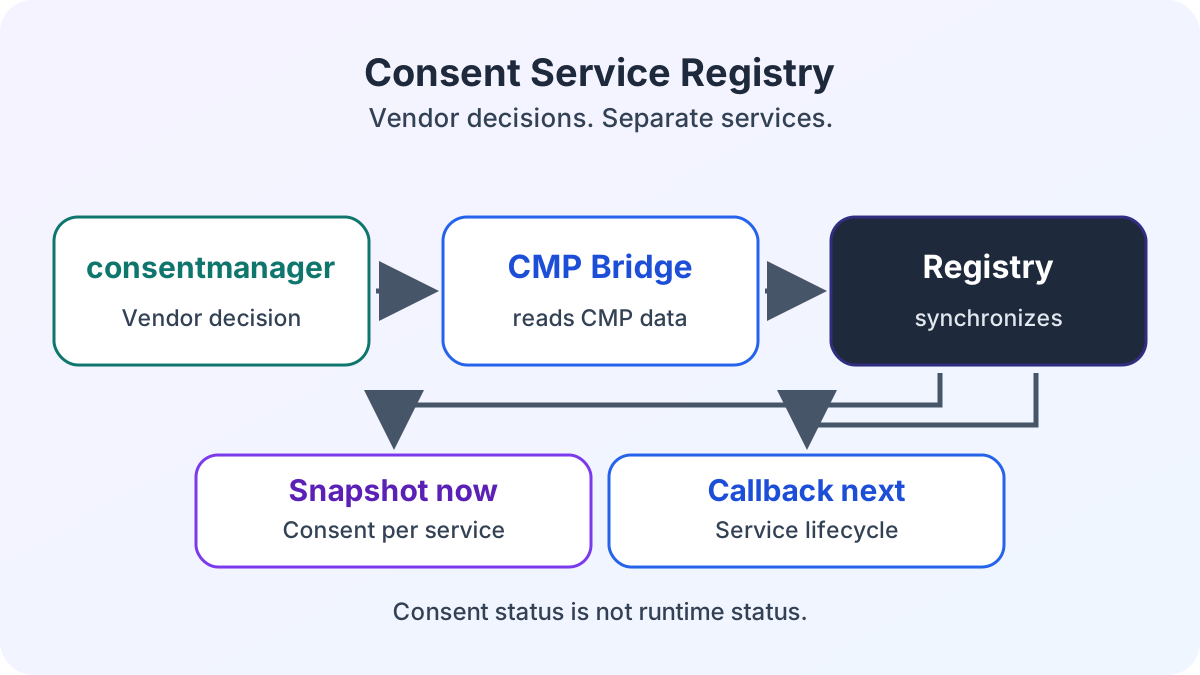
For external services in Power Pages, I use a shared consent service registry. The CMP bridge synchronizes decisions from consentmanager, the consent management platform in use, with this registry. The registry publishes the browser snapshot from these decisions and initiates the appropriate lifecycle for each service. Application Insights uses its own adapter. For Google Maps, React and JavaScript in the web template read consent status and take responsibility for the SDK themselves.
A cookie banner presents choices. It does not automatically control which web templates or React components load an external SDK. The hybrid architecture of Power Pages and React therefore needs a technical contract rather than repeated CMP queries in individual components.
The CMP remains the source of vendor decisions. The registry is custom project logic. It translates those decisions into a shared browser contract but does not replace the CMP. A banner or a technical consent flow alone does not demonstrate legal compliance.
The boundary between consent and service operation
In the registry, I separate consent status from runtime status. A snapshot can report true even though an SDK has not yet loaded or the telemetry instance is not active. The value describes the CMP decision. It does not prove that a service is actually running.
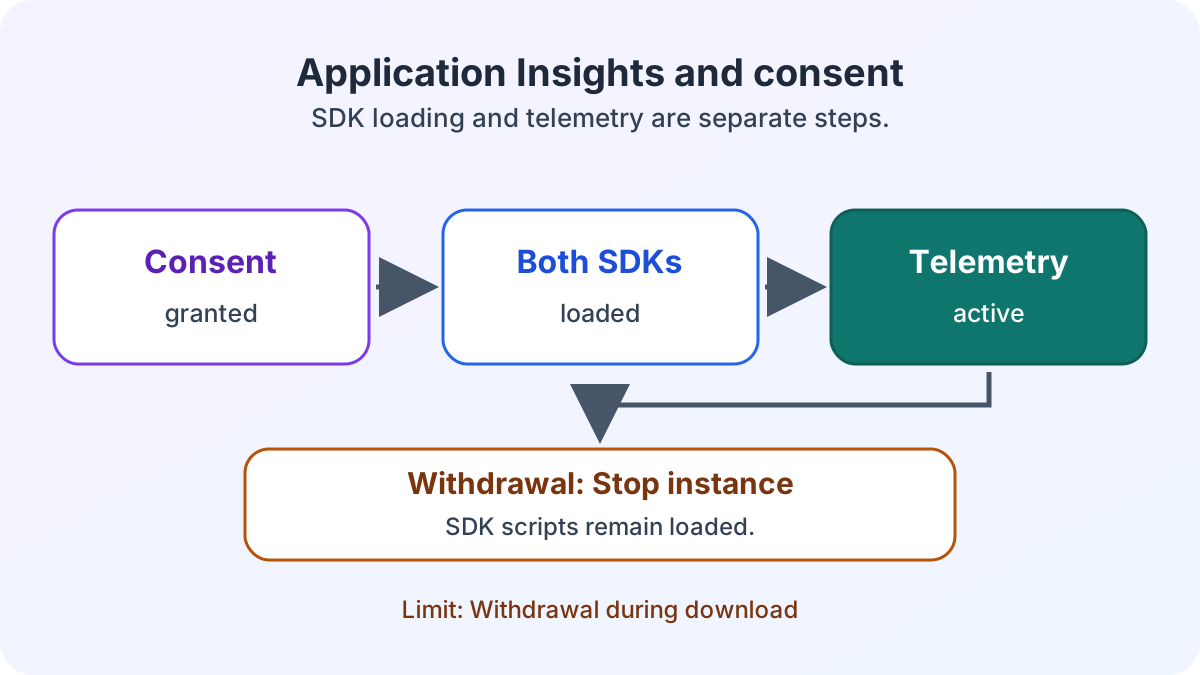
On withdrawal, the Application Insights adapter ends the telemetry instance, deletes tracking cookies and removes the global telemetry object. However, SDK script elements already loaded remain in the document. If withdrawal occurs during SDK download, the running enable callback can finish first. The queue processes the disable callback afterward. Immediate termination during download is therefore not guaranteed.
The Application Insights case study places analytics and data protection in the project context. This article examines the technical responsibilities of the CMP, registry and service.
How four components work together
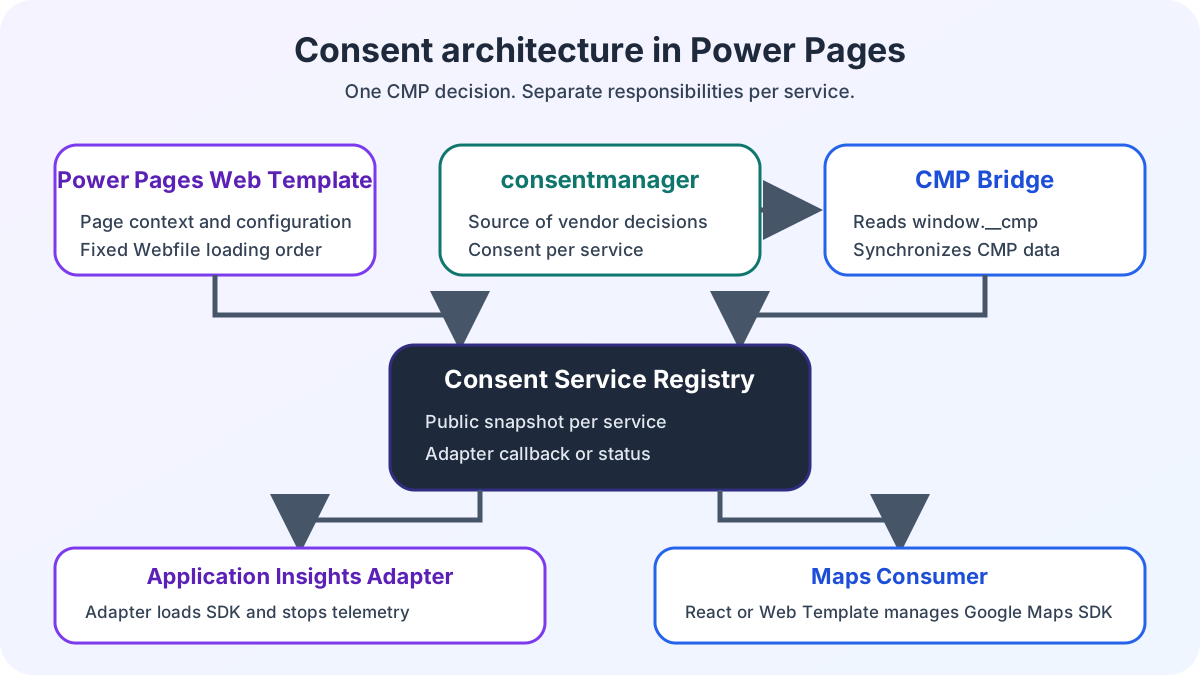
I use the hero diagram to distinguish four coordinating components and two service consumers. The web template sets the page context and service configuration. It then loads the three web files in a fixed order:
<script src="~/consent-services.js"></script>
<script src="~/application-insights-consent.js"></script>
<script src="~/consentmanager-bridge.js"></script>
The first script creates the registry and registers configured services. The second adds enable and disable callbacks for Application Insights. The third waits for window.__cmp and synchronizes vendor decisions with the registry.
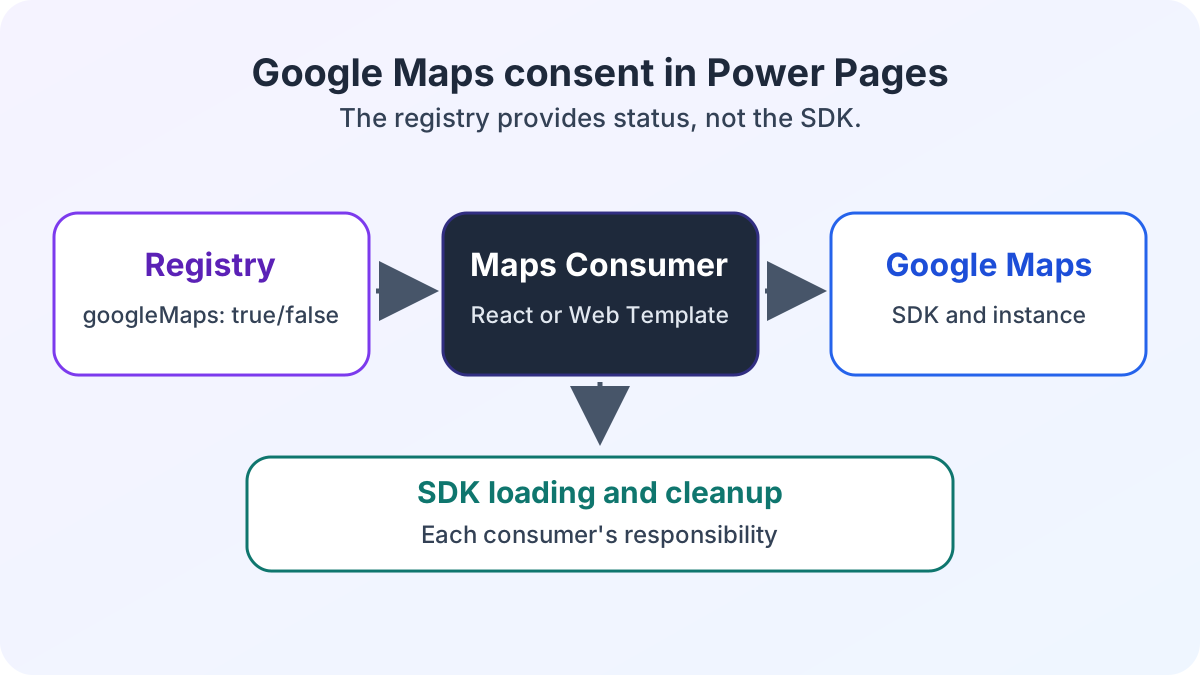
The registry publishes a snapshot and the project-specific consentserviceschange event. Application Insights has an adapter that loads its SDK after consent and ends the telemetry instance on withdrawal. Google Maps is connected differently. The registry only publishes consent status. Each consumer manages the Maps SDK and Google Maps instance itself.
Google Maps uses this contract in two variants. The React application manages the Google Maps instance within its component lifecycle. On a detail page, JavaScript in the Power Pages web template handles the Google Maps display. Both consumers read the same consent without creating their own CMP queries.
What companies gain from this separation
I assign each service a vendor mapping and clear responsibility for its lifecycle. Web templates keep vendor configuration separate from the React bundle. React and other browser JavaScript can read the same registry instead of each implementing its own CMP query.
The ECE case study on Power Pages enterprise search shows how this consent architecture operates as a portal-wide extension alongside an independent search application.
The Application Insights section of the e-commerce project shows the business analytics context. This separation creates technical governance and traceable responsibilities. It is not a legal certification.
Which technical decisions the deep dives document
In the deep dive on the consent service registry in Power Pages, I describe the browser contract, snapshot and CMP bridge in detail.
The article on Application Insights and consent covers SDK loading, withdrawal, renewed consent and the limitation during an ongoing download.
In the article on Google Maps in Power Pages with React and web templates, I describe displaying Google Maps in both variants and distinguish the published status from each consumer’s responsibility.
How to apply the architecture to your own portal
If you use this architecture in your own Power Pages portal, check four points:
- Vendor mapping: Is it clear in each environment which CMP decision belongs to which service?
- Loading order: Are configuration, registry, adapter and CMP bridge in the required order?
- Lifecycle: Does an adapter start the service, or does the registry only publish status for a separate consumer?
- Withdrawal: Which SDK scripts, instances, cookies and requests remain after withdrawal?
Check the snapshot, network traffic and cookies separately. Granted consent does not confirm runtime status. The technical implementation also does not replace a separate legal assessment.
Are you reorganizing external services in a Power Pages portal? Let us review the responsibility boundaries together.