Why module Node16 breaks a Vite extension and how to fix it
Nine TypeScript errors at once, all about missing .js extensions in imports. The cause is a tsconfig.json setting that is correct for Node.js but incompatible with Vite as a bundler. I explain why and show the right configuration.
Contents
- The error that seems to have no explanation
- What is actually happening
- The solution
- Why the backend has a different tsconfig
- Checking all three projects
- The pattern behind the error
- Why I document this in a separate post
- All articles in the series
The error that seems to have no explanation
You have written syntactically correct TypeScript. The imports look like this:
import { API_ENDPOINT } from '@/config';
import { buildPayload } from '@/background/payload-builder';
Then you run npm run build and get:
error TS2835: Relative import paths need explicit file extensions in EcmaScript imports
when '--moduleResolution' is 'node16' or 'nodenext'.
Did you mean './payload-builder.js'?
Not one error. Nine of them. In different files. All the same.
The absurd part is that the code worked before. You changed nothing.
What is actually happening
The problem lies in tsconfig.json and the interaction between two settings that produce errors together:
{
  "compilerOptions": {
    "module": "Node16",
    "moduleResolution": "node16"
  }
}
What "module": "Node16" means: TypeScript treats your files as native ECMAScript modules for Node.js 16+. Node.js ESM rules apply in this mode, and those rules state that relative imports need explicit file extensions.
// correct for Node.js ESM:
import { foo } from './foo.js'; // .js, not .ts!
This is correct for Node.js projects. It is fundamentally wrong for Vite.
Why Vite is different: Vite is a bundler. It processes TypeScript files before they reach the browser or extension bundle. Vite understands .ts imports directly and needs no .js extension because it resolves the files itself.
When the TypeScript compiler, tsc, and Vite are both involved, they conflict. tsc checks against Node.js ESM rules, which require .js. Vite expects bundler semantics, with .ts or no extension.
The solution
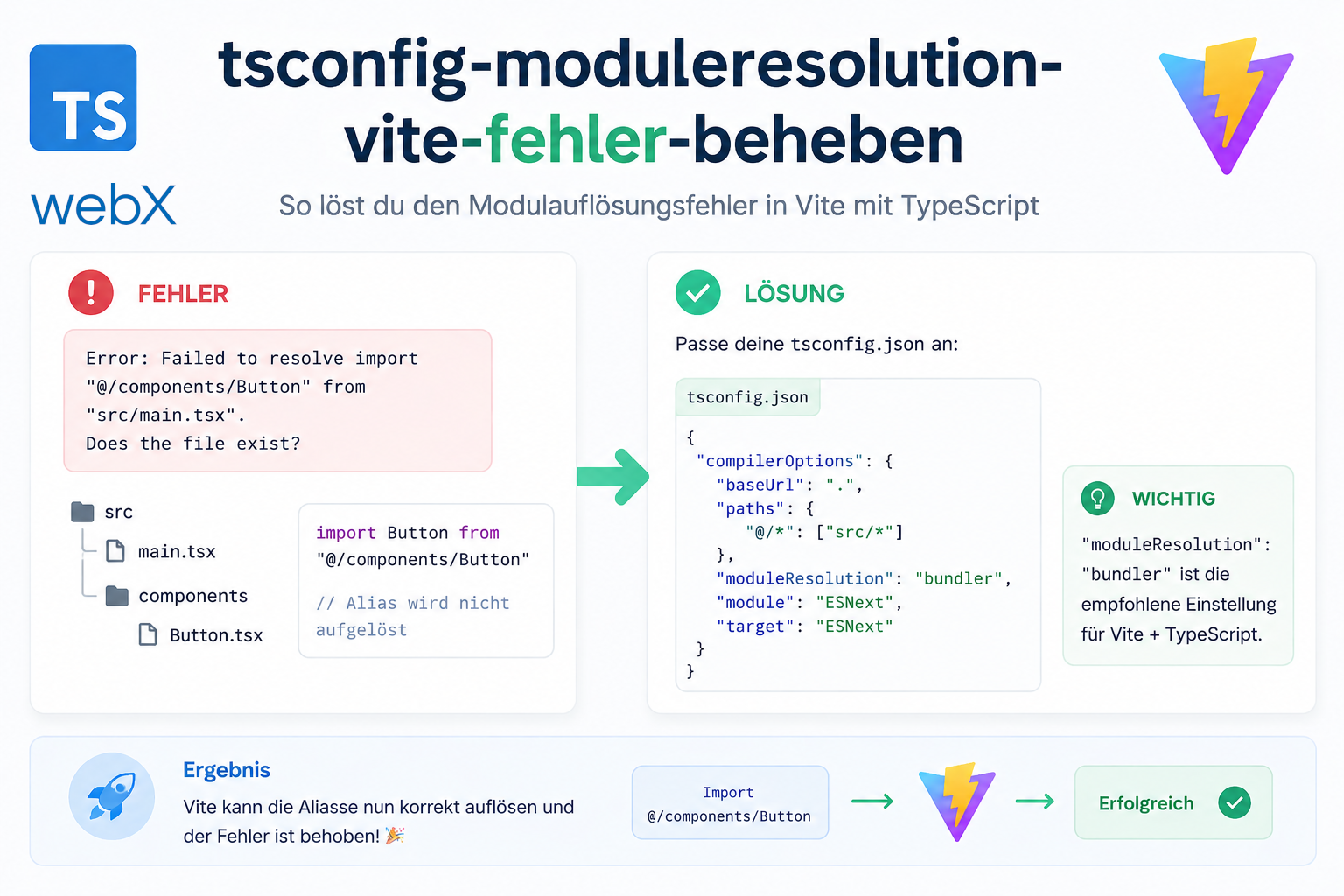
For Vite-based projects, including Chrome Extensions, frontend apps and anything using @crxjs, the correct tsconfig.json is:
{
  "compilerOptions": {
    "target": "ESNext",
    "module": "ESNext",
    "moduleResolution": "bundler",
    "lib": ["ES2020", "DOM"],
    "strict": true,
    "noEmit": true,
    "allowImportingTsExtensions": true,
    "isolatedModules": true,
    "jsx": "react-jsx"
  },
  "include": ["src"]
}
The four decisive changes:
| Setting | Before | After | Why |
|---|---|---|---|
module | Node16 | ESNext | No Node.js ESM enforcement |
moduleResolution | node16 | bundler | Vite-compatible resolution |
noEmit | (missing) | true | tsc only checks types; Vite builds |
allowImportingTsExtensions | (missing) | true | Allows .ts in imports |
noEmit: true is the most important switch.
With noEmit: true, tsc emits no JavaScript. It only checks types. This is the right approach for Vite projects. Vite handles building and TypeScript handles type checking. Each does what it does best. Another consequence of this build model is that Vite embeds import.meta.env.VITE_* variables directly into the bundle at build time. My article on Vite build-time environment variables in Docker explains the practical implications for Docker builds.
Why the backend has a different tsconfig
The backend project has a different configuration:
{
  "compilerOptions": {
    "target": "ES2020",
    "module": "CommonJS",
    "moduleResolution": "node",
    "outDir": "./dist",
    "strict": true
  }
}
Here, "module": "CommonJS" is correct.
The backend is a Node.js server. It uses require() and CommonJS modules. No bundler, no Vite and no browser context. TypeScript should actually emit JavaScript here through outDir: ./dist, which Node.js can execute directly.
The rule is therefore:
- Vite project (extension, frontend):
"module": "ESNext","moduleResolution": "bundler",noEmit: true - Node.js project (backend, CLI):
"module": "CommonJS","moduleResolution": "node", withoutDirset
Using the same tsconfig for both is a classic beginner mistake. It is not immediately obvious because the error says “missing .js extensions”, not “wrong module system”.
Checking all three projects
After the fix, I checked all three projects in the system:
# Extension (Vite + @crxjs)
cd extension && npm run build
# build successful: moduleResolution bundler is correct

# Backend (Node.js + Express)
cd backend && npm run build
# build successful: module CommonJS is correct

# Frontend (Vite + React)
cd frontend && npm run build
# build successful: moduleResolution bundler was already correct
Three projects, three build contexts and three tsconfig configurations. All correct. All optimized for their respective runtimes.
The pattern behind the error
This error appears whenever someone:
- Copies
tsconfig.jsonfrom a Node.js project into a Vite project - Uses instructions written for Node.js ESM projects in a bundler project
- Uses TypeScript templates that are not Vite-specific
What makes this difficult to diagnose is a superficially plausible solution: adding .js to every import. That does not solve the actual problem. It makes it worse.
The right question is always: What is this project’s runtime model?
- Browser with Vite as bundler:
bundler - Node.js without a bundler:
nodeornode16 - Both in a monorepo: separate tsconfig files for each project
Why I document this in a separate post
Because this error costs time. Not five minutes, but sometimes hours when the wrong fix is tried or the error is not connected to Vite.
I also regularly encounter outdated or incorrectly configured TypeScript setups in client projects. Power Pages portals with React integrations often have complex project setups with several tsconfig files, such as main, test and strict. Understanding the difference between node, node16 and bundler for moduleResolution can solve these problems in minutes rather than hours.
All articles in the series
- Vision and system overview: Chrome Extension, RAG architecture and project background: Read article
- Building a RAG system: Qdrant, embeddings and cosine similarity in TypeScript: Read article
- AI provider abstraction: Ollama vs. OpenAI, interface design and no vendor lock-in: Read article
- Chrome Extension MV3: Three isolated runtime contexts, message passing and Strategy Pattern: Read article
- Docker Compose strategy: The override pattern, from local development to Azure: Read article
- Ollama locally vs. Docker: The decision and its consequences: Read article
- Ollama auto-pull entrypoint: Automated model setup at container startup: Read article
- tsconfig and Vite:
Node16vs.bundler, and why Vite has its own rules: (this article) - Load complete Instagram captions with MutationObserver: Read article
- Chrome Extension foundation with health indicator and retry queue: Read article
- Phase 2 features: Shadow DOM overlay, Tailwind v4 and duplicate detection: Read article
- Race condition in platform detection: How a UI event breaks Instagram detection: Read article
- Extracting PostId in two Instagram layouts: querySelector vs. ancestor traversal: Read article
- Capture a complete Instagram carousel with MutationObserver: Lazy loading, observer-before-click and timeout fallback: Read article
- Notes and tags when saving screenshots: Read article
- Instagram keyboard shortcuts block Chrome Extension input: Read article
- Lowercase normalization and duplicate detection in tag input: Read article
- Zitadel Login V2 in Docker Compose with three hidden errors: Read article
- PKCE OAuth in a Chrome MV3 extension: Read article
- React frontend with react-oidc-context and Zitadel: Read article
- Vite build-time environment variables in Docker: Read article
- Event-driven ingestion with BullMQ and Redis: Read article
- MinIO instead of Azurite: S3-compatible object storage locally and on Hetzner: Read article
- access_token, id_token and the Userinfo endpoint: Which belongs where: Read article
- Qdrant multi-tenancy with one collection per user: Read article
- When backend and frontend know different types: Read article
- Removing Zitadel bootstrap: Host header bug and manual setup: Read article
- Backend code review with six problems fixed before launch: Read article
- Traefik instead of NGINX: Reverse proxy for a growing Docker Compose stack: Read article
- Two-layer rate limiting: Traefik and express-rate-limit with Redis: Read article
- Implementing GDPR Article 17 correctly: Promise.allSettled and export batching: Read article
- Embedding model lock-in: Why mxbai-embed-large is a permanent production decision: Read article
- Docker volumes in production: Named volumes, bind mounts and the Hetzner volume approach: Read article
- Two vulnerabilities before launch: Redis without authentication and an exposed Qdrant admin port: Read article
- Traefik as the single entry point in the Docker Compose stack: Read article
- Connecting Zitadel behind Traefik with issuer, JWKS and Login V2: Read article
- Fixing the frontend when the nginx healthcheck fails on localhost: Read article
- Observability for my Docker Compose stack with Bull Board and Dozzle: Read article
- Open the Qdrant dashboard securely with local Traefik and an SSH tunnel: Read article
- Diagnosis of chunking failures despite tokenization: Read article
- Why I set the chunk size to 1500 tokens: Read article
- Splitting the embedding workflow into clear steps: Read article
- Bringing chunking, storage and search back together: Read article
- Capture Intake as a separate module, less orchestration in the Express endpoint: Read article
Are you working on a project with multiple TypeScript configurations and want each optimized for its build context? Let us assess it together.