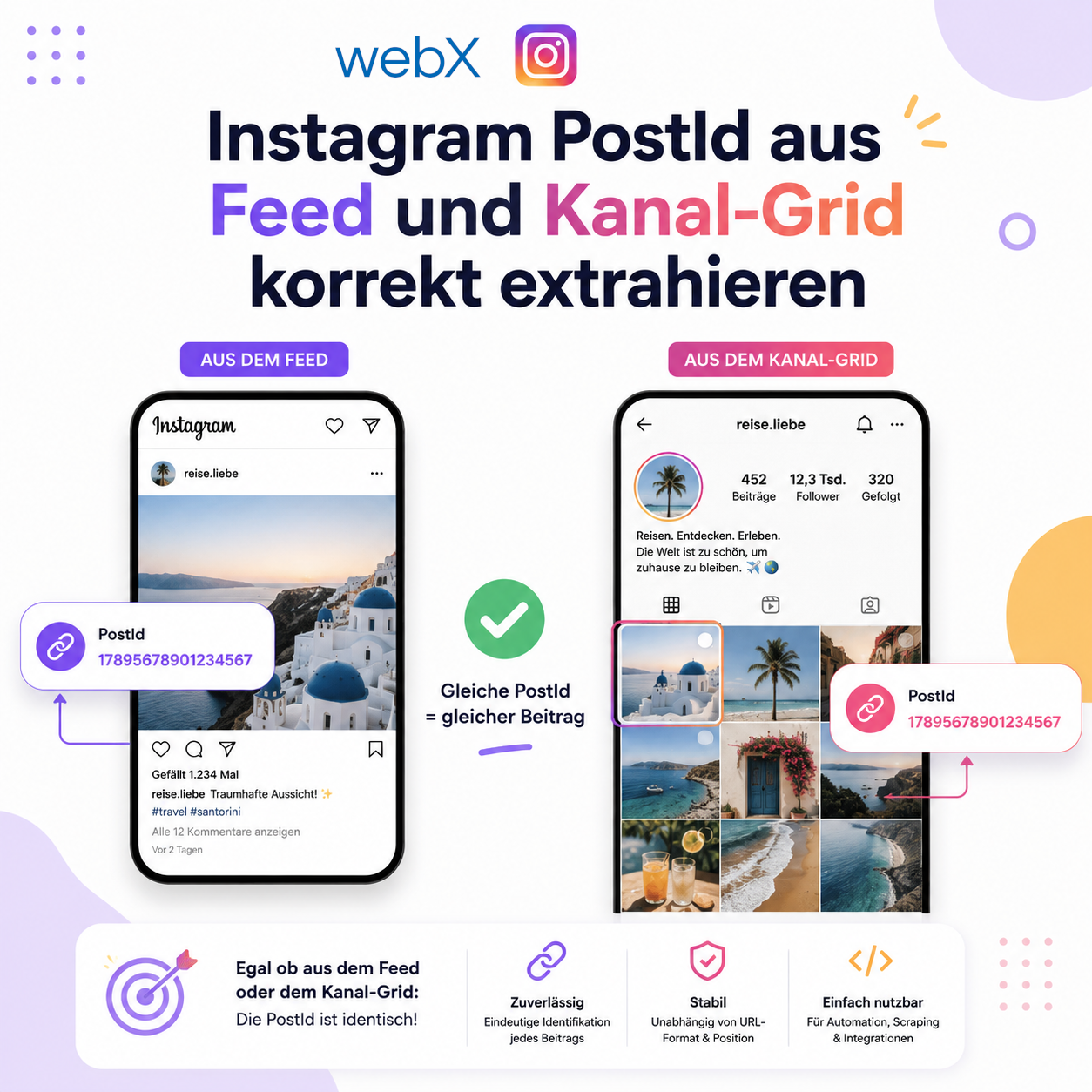
Extract Instagram PostId correctly from the feed and profile grid
Instagram uses article tags in the feed, but not in the profile grid. Ancestor traversal fixes incorrect PostIds, while a promise map prevents duplicate backend requests.
Contents
- The problem with two Instagram layouts
- Why querySelector in the wrong container is dangerous
- The two strategies
- Duplicate requests from simultaneous events
- What this says about DOM traversal decisions
- All articles in the series
The problem with two Instagram layouts
Instagram does not render posts the same way everywhere. On the homepage and in the feed, each post is wrapped in an <article> element. On a profile page, when you visit a specific account, posts appear as grid thumbnails without <article>.
This is not an edge case. It is a fundamental Instagram layout decision with direct consequences for any extension working with PostIds.
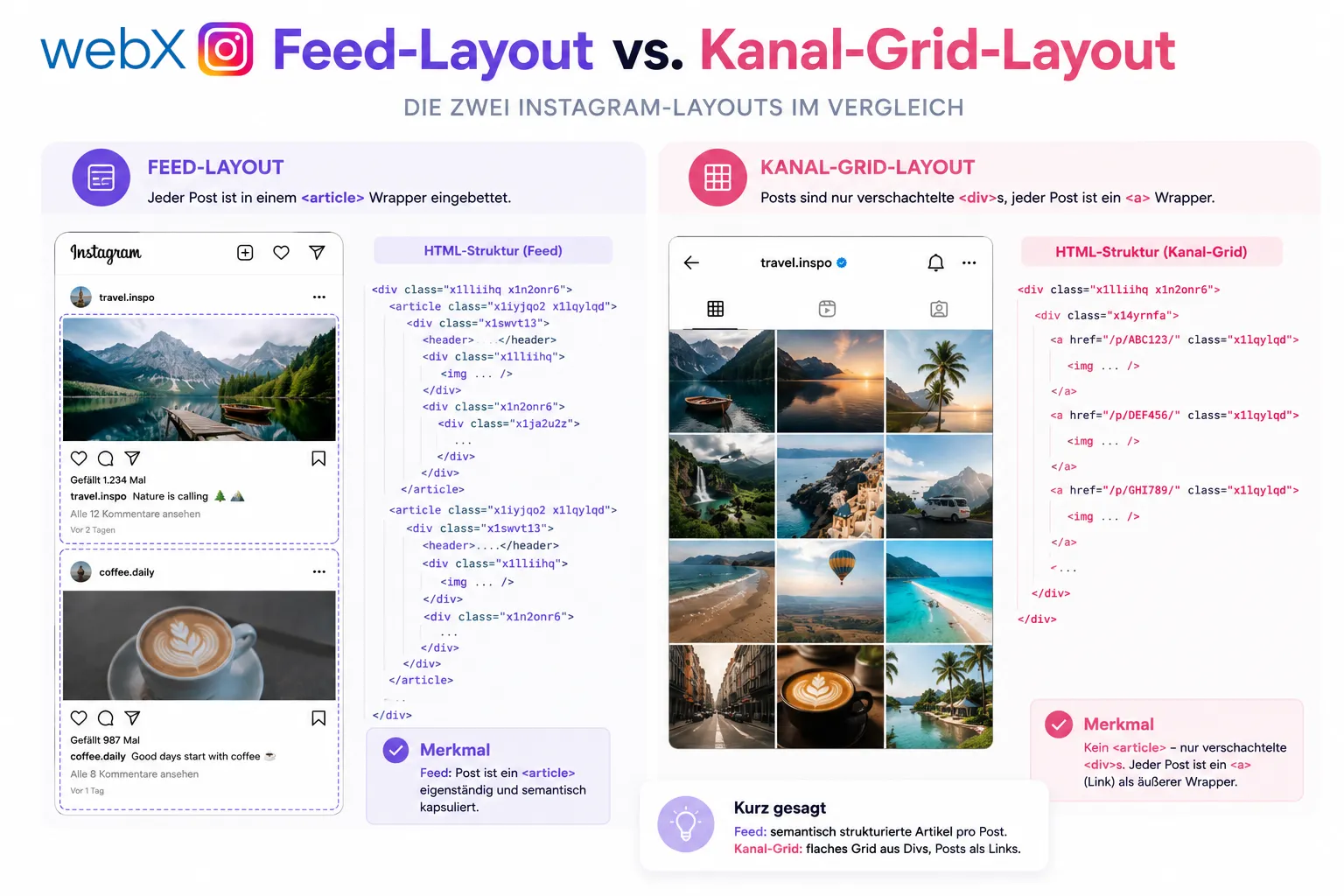 Figure: The two Instagram layouts compared. On the left, the feed wraps each post in article. On the right, the profile grid has no article, only nested divs with an a tag as the outer wrapper. The original illustration retains its German labels.
Duplicate detection from Phase 2 extracts a PostId from the DOM on hover and asks the backend whether that post is already saved. That worked on the feed page. On profile pages, the extension always showed a red border, whether the post was new or not.
Why querySelector in the wrong container is dangerous
The original extraction was structured like this:
const article = findArticleElement(element);
const postId = article ? quickExtractPostId(article) : null;
findArticleElement traverses upward from the currently hovered element, looking for an <article> tag. On the feed page, it finds one. On the profile page, it does not.
The mistake was simply returning null when <article> was absent. No <article>, no PostId, red border. Technically correct, but not the goal.
The first fix introduced a subtler problem. I changed quickExtractPostId to work without <article> by calling querySelector on the currently hovered element.
That caused duplicate backend calls with two different PostIds.
The reason: querySelector searches all descendants. If event.target is a container div enclosing several post cells, querySelector('a[href*="/p/"]') finds the first <a> link in that entire container. It may belong to a different post than the one under the pointer.
For example, the cursor is over an outer wrapper div. querySelector goes through all of that div’s children and returns the link for post number 3, even though the cursor is over post number 7.
The two strategies
The clean solution separates the layouts explicitly.
Strategy 1 for feed/landing (quickExtractPostId)
Here, querySelector is safe because each <article> encloses exactly one post. A descendant search inside an <article> can never return a link belonging to another post.
const quickExtractPostId = (article: HTMLElement): string | null => {
  const link =
    article.querySelector<HTMLAnchorElement>('a[href*="/p/"]') ||
    article.querySelector<HTMLAnchorElement>('a[href*="/reel/"]');
  if (!link) return null;
  const match = link.getAttribute('href')?.match(/\/(p|reel)\/([^/]+)/);
  return match ? match[2] : null;
};
Called with the <article> found earlier. Safe. Deterministic.
Strategy 2 for the profile grid (quickExtractPostIdFromAncestor)
On the profile page, the DOM structure looks like this:
<div>
  <!-- outer wrapper -->
  <a href="/businessinsider/p/DYck-9TFw40/">
    <!-- PostId is here -->
    <div>
      <div><img … /></div>
      <!-- hovered element -->
      <div></div>
      <!-- empty div -->
    </div>
    <div></div>
    <!-- empty div -->
  </a>
</div>
The hovered element is the <img>. The <a> link containing the PostId is an ancestor, not a descendant. querySelector looks downward. Here, traversal must go upward.
const quickExtractPostIdFromAncestor = (element: HTMLElement): string | null => {
  let current: HTMLElement | null = element;
  while (current && current !== document.body) {
    if (current.tagName.toLowerCase() === 'a') {
      const href = current.getAttribute('href') ?? '';
      const match = href.match(/\/(p|reel)\/([^/]+)/);
      if (match) return match[2];
    }
    // Empty divs mark the boundary between grid cells
    if (
      current !== element &&
      current.tagName.toLowerCase() === 'div' &&
      current.children.length === 0 &&
      !current.textContent?.trim()
    ) {
      break;
    }
    current = current.parentElement;
  }
  return null;
};
Ancestor traversal goes exclusively upward. It can never enter a neighboring post. The stopping condition at empty divs prevents traversal from crossing the structural boundary of a grid cell.
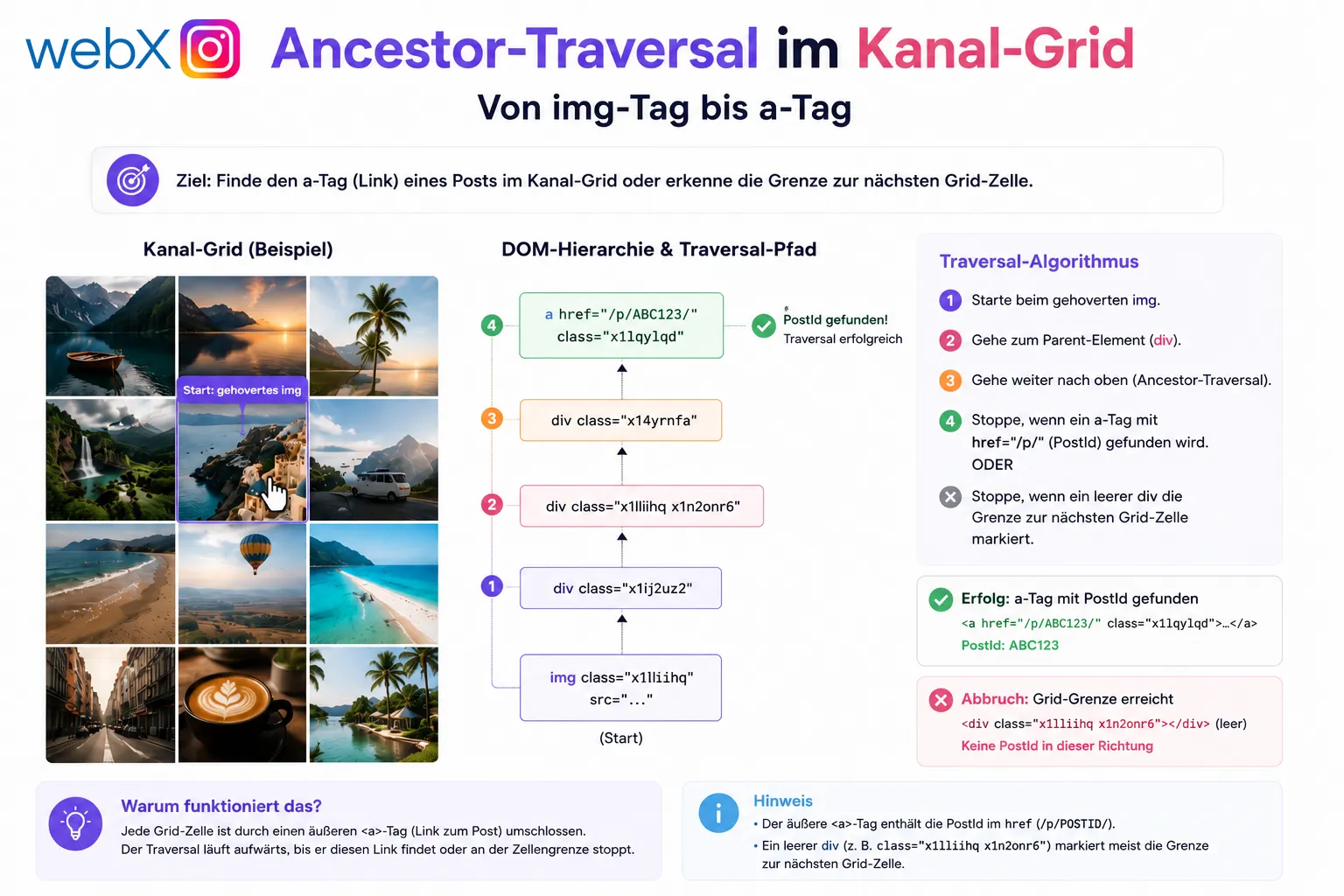 Figure: Traversal path in the profile grid. Starting at the hovered img, the algorithm moves upward until it either finds an a tag with a PostId href or an empty div marks the boundary to the next grid cell. The original illustration retains its German labels.
The mouseover handler now branches explicitly:
const article = findArticleElement(element);
const postId = article
  ? quickExtractPostId(article) // Feed/Landing: safe because of <article> boundary
  : quickExtractPostIdFromAncestor(element); // Channel grid: traverse upwards
Duplicate requests from simultaneous events
After fixing the incorrect PostIds, another problem remained: two identical backend requests were sent for the same post.
The reason is how mouseover works in browsers. When the pointer moves over an <img>, mouseover fires for the <img> and all parent elements receiving the event. Within a few milliseconds, the same mouseover handler can run multiple times for different DOM elements that all resolve to the same PostId.
A cache based on the last stored PostId only helps once a request has completed. With simultaneous calls, both see the same empty cache and both send a request.
The solution is an in-flight deduplication map. The check goes through chrome.runtime.sendMessage to the background script, which acts as a proxy to the backend. I explain how these runtime contexts interact in the MV3 architecture article.
const pendingColourChecks = new Map<string, Promise<string>>();

const resolveHighlightColour = (postId: string): Promise<string> => {
  if (postId === lastCheckedPostId) return Promise.resolve(lastCheckedColour);

  // Request for this postId already in flight: return the same promise
  const inflight = pendingColourChecks.get(postId);
  if (inflight) return inflight;

  const promise = chrome.runtime
    .sendMessage({ action: 'check-duplicate', postId })
    .then((response) => {
      const colour = response?.exists ? COLOUR_DUPLICATE : COLOUR_NEW;
      lastCheckedPostId = postId;
      lastCheckedColour = colour;
      return colour;
    })
    .catch(() => COLOUR_DEFAULT)
    .finally(() => pendingColourChecks.delete(postId)); // clean up after completion

  pendingColourChecks.set(postId, promise);
  return promise;
};
If two mouseover events request the same PostId simultaneously, they share a single promise. The second caller waits for the first caller’s result without triggering its own backend request.
Two caching layers, each for a different point in time:
| Layer | Timing | Mechanism |
|---|---|---|
lastCheckedPostId | After a completed request | Simple string comparison |
pendingColourChecks | While a request is running | Map<string, Promise<string>> |
What this says about DOM traversal decisions
The central lesson from this debugging process: querySelector and querySelectorAll are not universal solutions. They work when you know the container represents exactly one semantic area. That is true in a feed with <article> elements. It is not true in a grid layout without semantic containers.
When traversing the DOM of dynamic websites, always answer this question: can my search container contain multiple elements of the same kind? If so, a descendant search is imprecise. Ancestor traversal is the more reliable strategy in these cases because it moves exclusively upward and cannot produce unintended matches.
And for all simultaneous asynchronous requests for the same data item, a Map<key, Promise> is the simplest and most reliable way I know to prevent duplicate requests.
All articles in the series
- Vision and system overview: Chrome Extension, RAG architecture and project background: Read article
- Building a RAG system: Qdrant, embeddings and cosine similarity in TypeScript: Read article
- AI provider abstraction: Ollama vs. OpenAI, interface design and no vendor lock-in: Read article
- Chrome Extension MV3: Three isolated runtime contexts, message passing and Strategy Pattern: Read article
- Docker Compose strategy: The override pattern, from local development to Azure: Read article
- Ollama locally vs. Docker: The decision and its consequences: Read article
- Ollama auto-pull entrypoint: Automated model setup at container startup: Read article
- tsconfig and Vite:
Node16vs.bundler, and why Vite has its own rules: Read article - Load complete Instagram captions with MutationObserver: Read article
- Chrome Extension foundation with health indicator and retry queue: Read article
- Phase 2 features: Shadow DOM overlay, Tailwind v4 and duplicate detection: Read article
- Race condition in platform detection: How a UI event breaks Instagram detection: Read article
- Extracting PostId in two Instagram layouts: querySelector vs. ancestor traversal: (this article)
- Capture a complete Instagram carousel with MutationObserver: Lazy loading, observer-before-click and timeout fallback: Read article
- Notes and tags when saving screenshots: Read article
- Instagram keyboard shortcuts block Chrome Extension input: Read article
- Lowercase normalization and duplicate detection in tag input: Read article
- Zitadel Login V2 in Docker Compose with three hidden errors: Read article
- PKCE OAuth in a Chrome MV3 extension: Read article
- React frontend with react-oidc-context and Zitadel: Read article
- Vite build-time environment variables in Docker: Read article
- Event-driven ingestion with BullMQ and Redis: Read article
- MinIO instead of Azurite: S3-compatible object storage locally and on Hetzner: Read article
- access_token, id_token and the Userinfo endpoint: Which belongs where: Read article
- Qdrant multi-tenancy with one collection per user: Read article
- When backend and frontend know different types: Read article
- Removing Zitadel bootstrap: Host header bug and manual setup: Read article
- Backend code review with six problems fixed before launch: Read article
- Traefik instead of NGINX: Reverse proxy for a growing Docker Compose stack: Read article
- Two-layer rate limiting: Traefik and express-rate-limit with Redis: Read article
- Implementing GDPR Article 17 correctly: Promise.allSettled and export batching: Read article
- Embedding model lock-in: Why mxbai-embed-large is a permanent production decision: Read article
- Docker volumes in production: Named volumes, bind mounts and the Hetzner volume approach: Read article
- Two vulnerabilities before launch: Redis without authentication and an exposed Qdrant admin port: Read article
- Traefik as the single entry point in the Docker Compose stack: Read article
- Connecting Zitadel behind Traefik with issuer, JWKS and Login V2: Read article
- Fixing the frontend when the nginx healthcheck fails on localhost: Read article
- Observability for my Docker Compose stack with Bull Board and Dozzle: Read article
- Open the Qdrant dashboard securely with local Traefik and an SSH tunnel: Read article
- Diagnosis of chunking failures despite tokenization: Read article
- Why I set the chunk size to 1500 tokens: Read article
- Splitting the embedding workflow into clear steps: Read article
- Bringing chunking, storage and search back together: Read article
- Capture Intake as a separate module, less orchestration in the Express endpoint: Read article
Working on DOM extraction in complex SPAs or building a monitoring tool based on browser extensions? Let us assess it together.