Debugging and preventing race conditions in Chrome Extensions
The Shadow DOM overlay triggered a race condition. Instagram was detected as generic, and all metadata was missing. The cause and fix using capturedElement and a previewOpen flag.
Contents
- The bug that cannot be reproduced
- How platform detection works
- Why the overlay causes the problem
- The two-part solution
- What this bug teaches about Chrome Extension architecture
- All articles in the series
The bug that cannot be reproduced
I had completed Phase 2 of the extension. Tailwind CSS v4 in the popup, a Shadow DOM preview overlay, color-coded duplicate detection on hover. Everything built, everything tested. Then the first real user feedback arrived.
The platform was no longer detected. Every Instagram capture returned platform: "generic". No metadata. No channel name. No timestamp. Just the URL and page title.
That was unexpected because nothing in platform detection had changed. No commit had touched payload-context-builder.ts. The logic was identical.
That is exactly the symptom of a race condition: the bug is not in the changed code. It is in the timing between two operations that had never caused a problem before.
How platform detection works
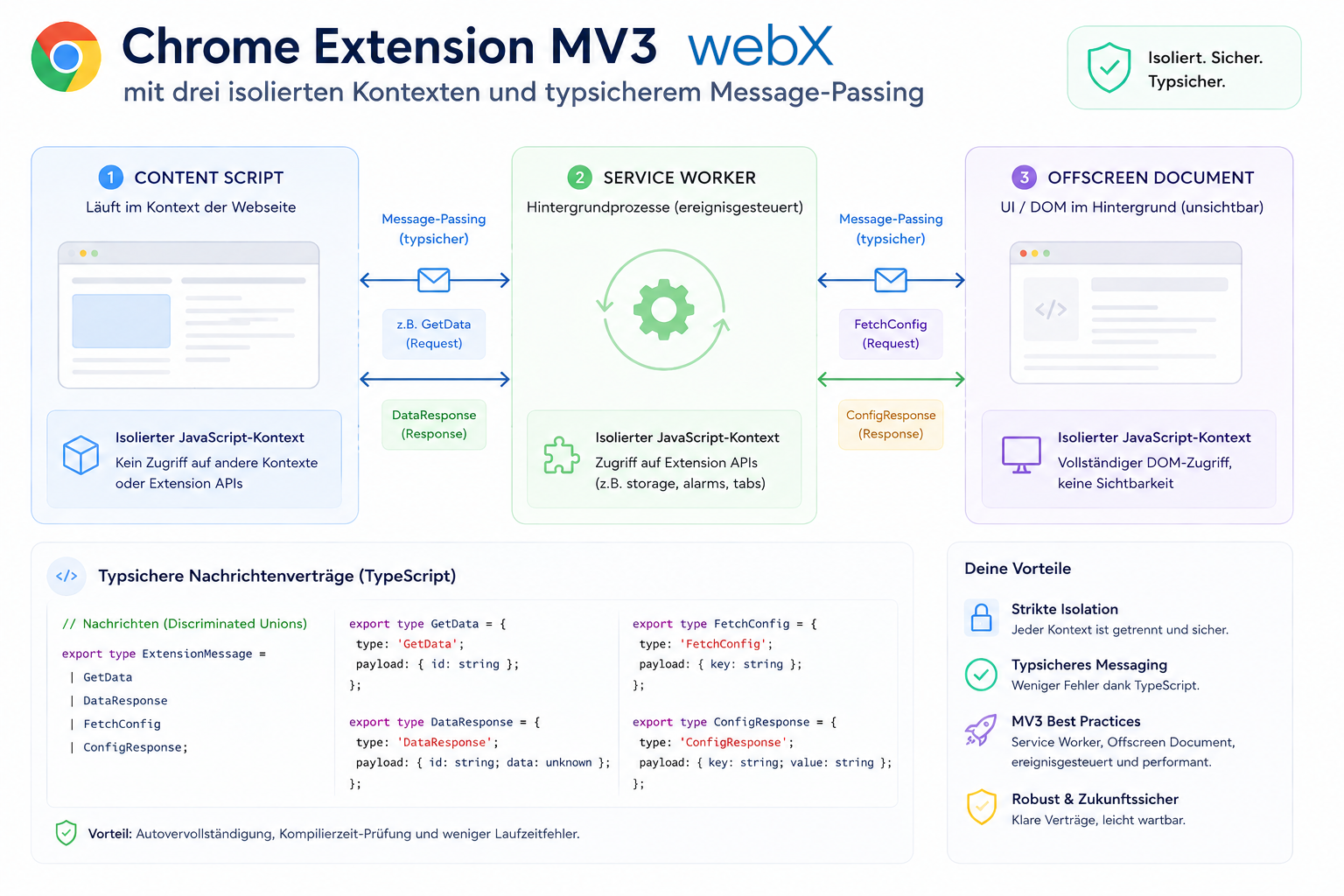
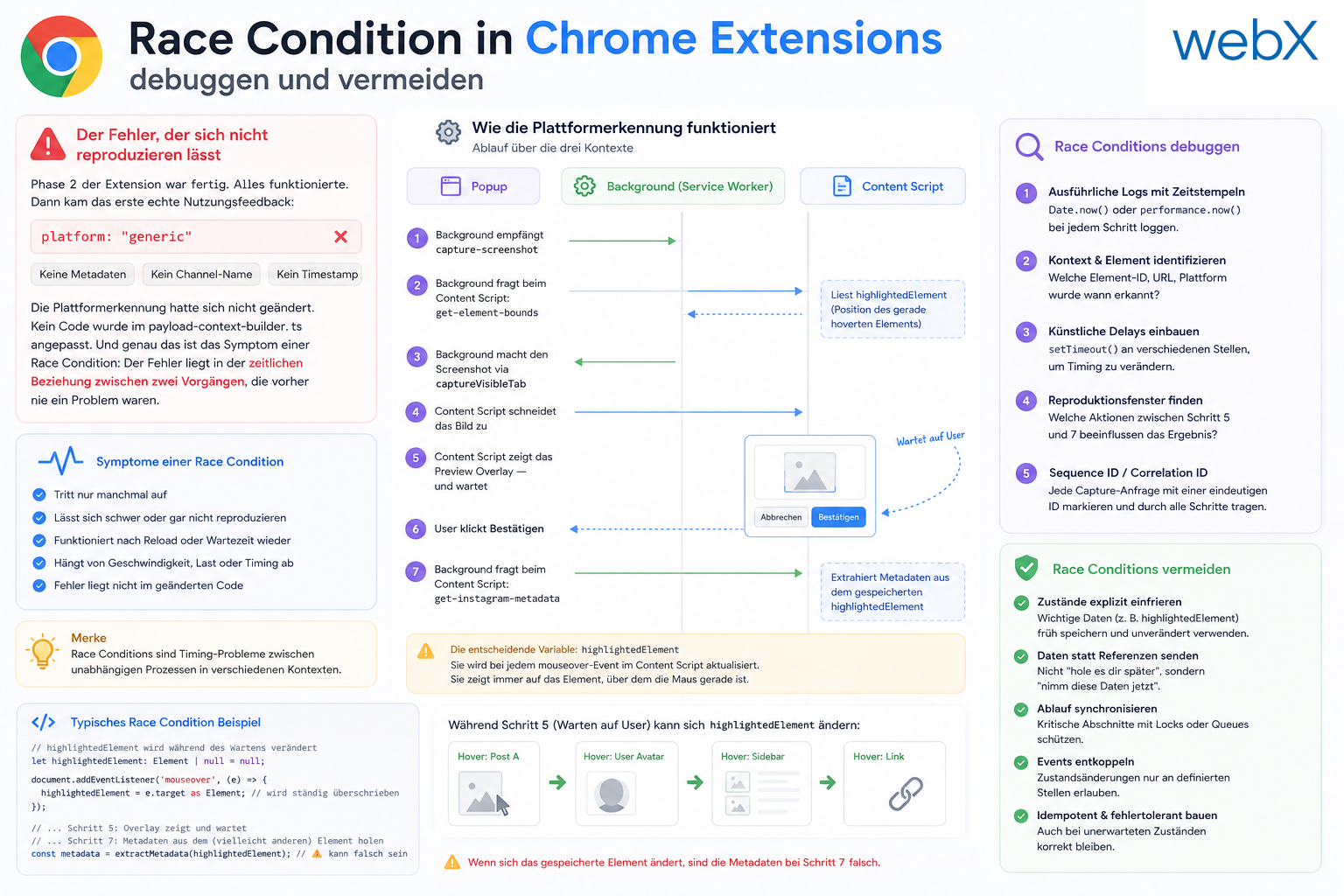
To understand why the bug occurs, you need to know how the extension extracts metadata. The flow across the three contexts is:
- Background receives
capture-screenshot - Background asks the Content Script for
get-element-boundsand receives the position of the currently hovered element - Background takes the screenshot with
captureVisibleTab - The Content Script crops the image
- The Content Script displays the preview overlay and waits
- The user clicks confirm
- Background asks the Content Script for
get-instagram-metadata, and the Content Script extracts metadata from the storedhighlightedElement
The critical variable is highlightedElement. The Content Script updates it on every mouseover event. It always points to the element currently under the mouse.
Why the overlay causes the problem
Step 6 is where the race condition occurs.
The user clicks the confirmation button in the Shadow DOM overlay. The overlay is removed from the DOM with host.remove(). This is a DOM mutation event. The browser responds by firing a mouseover event on the element now physically under the cursor, because the overlay is gone.
The Content Script listens to all mouseover events. It immediately updates highlightedElement.
Then, milliseconds later, the Background Service Worker sends get-instagram-metadata. The Content Script processes it and reads highlightedElement. But that no longer points to the Instagram post. It points to the element under the cursor after the overlay was removed. Often a button, a container or a navigation element.
// content/main.ts: the problem in one variable
let highlightedElement: HTMLElement | null = null;

document.addEventListener('mouseover', (event) => {
  if (!isScreenshotActive) return;
  highlightedElement = event.target as HTMLElement; // gets overwritten after overlay dismiss
});

chrome.runtime.onMessage.addListener((message, _sender, sendResponse) => {
  if (message.action === 'get-instagram-metadata') {
    extractInstagramPostMetadata(highlightedElement) // reads the already overwritten value
      .then((metadata) => sendResponse({ metadata }));
    return true;
  }
});
Extraction fails because highlightedElement is no longer an Instagram post. It returns null. Background falls back to generic. No metadata.
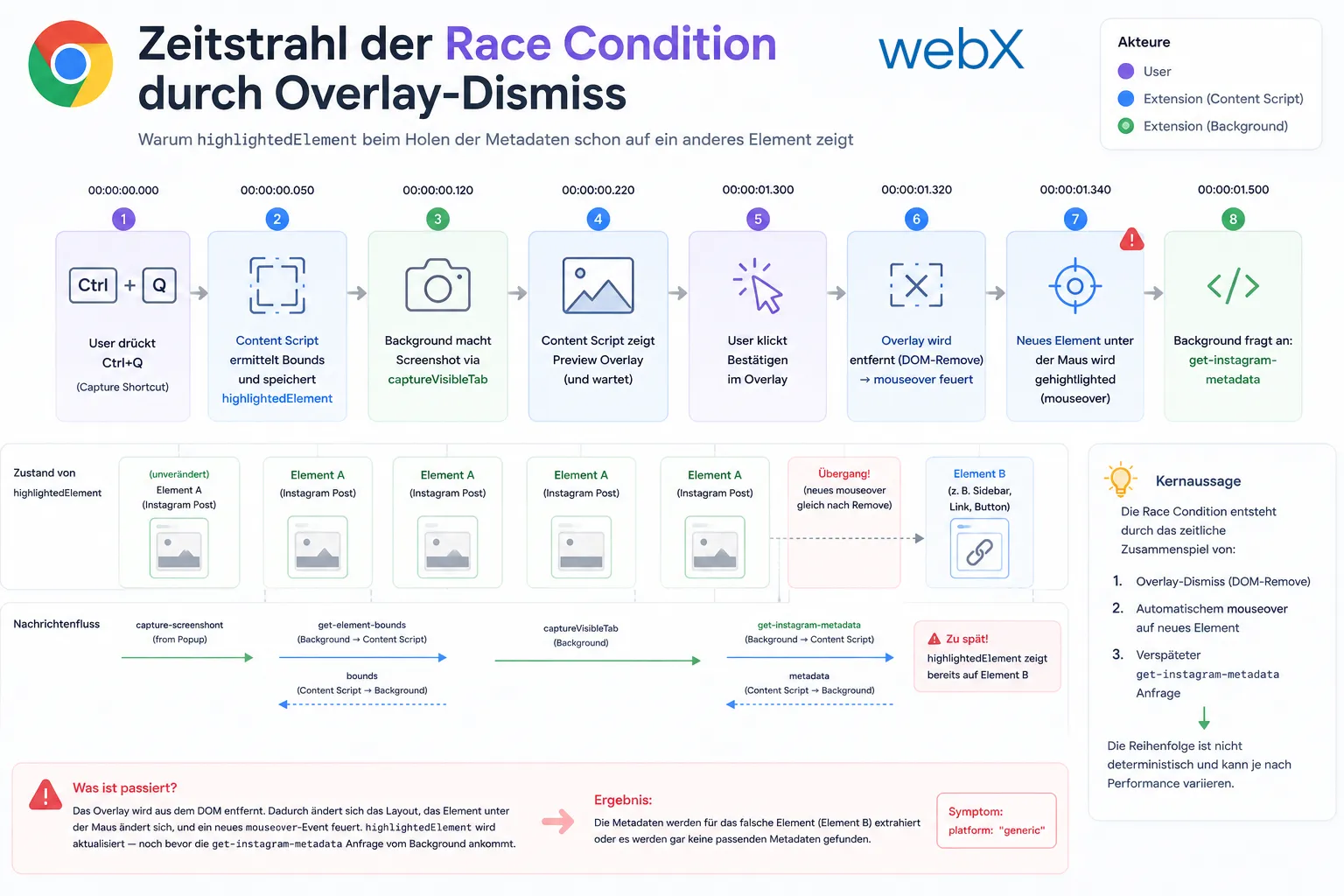 Figure: Race condition timeline. The user presses Ctrl+Q, the overlay opens, the user confirms, and the DOM removal fires a new mouseover. Only then does the get-instagram-metadata request arrive, but highlightedElement already points to another element. The original illustration retains its German labels.
The two-part solution
The problem has two causes, so it needs two countermeasures.
Part 1: Freeze the element at the right moment
The right moment is get-element-bounds. This is the message Background sends at the beginning of the capture flow. At that point, the user has just pressed Ctrl+Q. highlightedElement is exactly what they want to capture.
I freeze it as capturedElement:
let capturedElement: HTMLElement | null = null;

chrome.runtime.onMessage.addListener((message, _sender, sendResponse) => {
  if (message.action === 'get-element-bounds') {
    capturedElement = highlightedElement; // snapshot at the right moment
    const bounds = getElementBounds();
    sendResponse({ bounds });
    return false;
  }

  if (message.action === 'get-instagram-metadata') {
    const elementToExtract = capturedElement || highlightedElement; // stable reference
    extractInstagramPostMetadata(elementToExtract).then((metadata) => sendResponse({ metadata }));
    return true;
  }
});
mouseover does not change capturedElement. It stays stable throughout the capture flow, regardless of what the browser fires in between.
Part 2: Pause mouseover while the overlay is open
Freezing the reference is the most important fix. But there is another weakness: if the user moves the mouse over Instagram elements on the way to the confirmation button, the mouseover listener keeps writing to highlightedElement. This is unnecessary and causes visual artifacts as the outline color jumps.
The solution is a previewOpen flag:
let previewOpen = false;

// In the show-preview handler
if (message.action === 'show-preview') {
  previewOpen = true;
  showCapturePreview(message.dataUrl, message.width, message.height).then((confirmed) => {
    previewOpen = false; // only release when overlay is gone
    sendResponse({ confirmed });
  });
  return true;
}

// In the mouseover listener
document.addEventListener('mouseover', (event) => {
  if (!isScreenshotActive || previewOpen) return; // no update while overlay is open
  highlightedElement = event.target as HTMLElement;
});
While the overlay is open, no new hover events are processed. The mouse can move freely. highlightedElement stays stable. And capturedElement is frozen anyway.
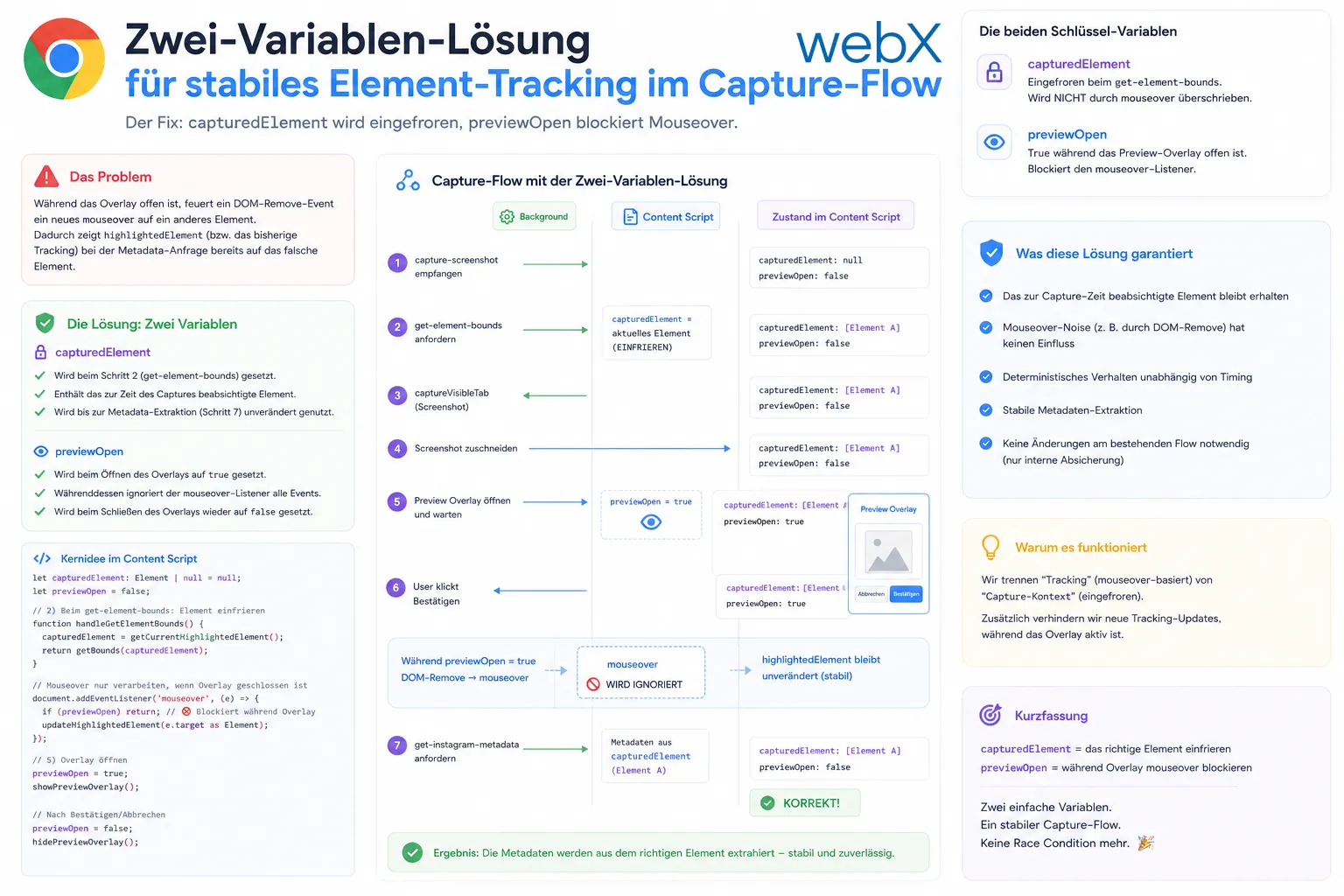 Figure: The two-variable fix. capturedElement is frozen during get-element-bounds and is no longer overwritten by mouseover. previewOpen blocks the mouseover listener for the lifetime of the overlay. The original illustration retains its German labels.
What this bug teaches about Chrome Extension architecture
The interesting part of this race condition is that bad code did not cause it. The original architecture was correct for the original workflow.
The problem came from temporal decoupling in a three-stage messaging system. If A sends a message to B, and B interacts with C before A sends the next message, C can change B’s state between A’s messages.
This is not specific to Chrome Extensions. It is the fundamental problem of all event-driven systems with shared state. The solution is always the same: freeze state at the right moment and carry it explicitly through the flow, rather than rereading it from a global variable.
In this case, the right moment was get-element-bounds. From that point on, the user’s intent is clear. The capture target must not change after it.
All articles in the series
- Vision and system overview: Chrome Extension, RAG architecture and project background: Read article
- Building a RAG system: Qdrant, embeddings and cosine similarity in TypeScript: Read article
- AI provider abstraction: Ollama vs. OpenAI, interface design and no vendor lock-in: Read article
- Chrome Extension MV3: Three isolated runtime contexts, message passing and Strategy Pattern: Read article
- Docker Compose strategy: The override pattern, from local development to Azure: Read article
- Ollama locally vs. Docker: The decision and its consequences: Read article
- Ollama auto-pull entrypoint: Automated model setup at container startup: Read article
- tsconfig and Vite:
Node16vs.bundler, and why Vite has its own rules: Read article - Load complete Instagram captions with MutationObserver: Read article
- Chrome Extension foundation with health indicator and retry queue: Read article
- Phase 2 features: Shadow DOM overlay, Tailwind v4 and duplicate detection: Read article
- Race condition in platform detection: How a UI event breaks Instagram detection: (this article)
- Extracting PostId in two Instagram layouts: querySelector vs. ancestor traversal: Read article
- Capture a complete Instagram carousel with MutationObserver: Lazy loading, observer-before-click and timeout fallback: Read article
- Notes and tags when saving screenshots: Read article
- Instagram keyboard shortcuts block Chrome Extension input: Read article
- Lowercase normalization and duplicate detection in tag input: Read article
- Zitadel Login V2 in Docker Compose with three hidden errors: Read article
- PKCE OAuth in a Chrome MV3 extension: Read article
- React frontend with react-oidc-context and Zitadel: Read article
- Vite build-time environment variables in Docker: Read article
- Event-driven ingestion with BullMQ and Redis: Read article
- MinIO instead of Azurite: S3-compatible object storage locally and on Hetzner: Read article
- access_token, id_token and the Userinfo endpoint: Which belongs where: Read article
- Qdrant multi-tenancy with one collection per user: Read article
- When backend and frontend know different types: Read article
- Removing Zitadel bootstrap: Host header bug and manual setup: Read article
- Backend code review with six problems fixed before launch: Read article
- Traefik instead of NGINX: Reverse proxy for a growing Docker Compose stack: Read article
- Two-layer rate limiting: Traefik and express-rate-limit with Redis: Read article
- Implementing GDPR Article 17 correctly: Promise.allSettled and export batching: Read article
- Embedding model lock-in: Why mxbai-embed-large is a permanent production decision: Read article
- Docker volumes in production: Named volumes, bind mounts and the Hetzner volume approach: Read article
- Two vulnerabilities before launch: Redis without authentication and an exposed Qdrant admin port: Read article
- Traefik as the single entry point in the Docker Compose stack: Read article
- Connecting Zitadel behind Traefik with issuer, JWKS and Login V2: Read article
- Fixing the frontend when the nginx healthcheck fails on localhost: Read article
- Observability for my Docker Compose stack with Bull Board and Dozzle: Read article
- Open the Qdrant dashboard securely with local Traefik and an SSH tunnel: Read article
- Diagnosis of chunking failures despite tokenization: Read article
- Why I set the chunk size to 1500 tokens: Read article
- Splitting the embedding workflow into clear steps: Read article
- Bringing chunking, storage and search back together: Read article
- Capture Intake as a separate module, less orchestration in the Express endpoint: Read article
Working on a Chrome Extension or another event-driven system and encountering similar state problems? Let us assess it together.