Chrome Extension foundation with a health indicator and retry queue
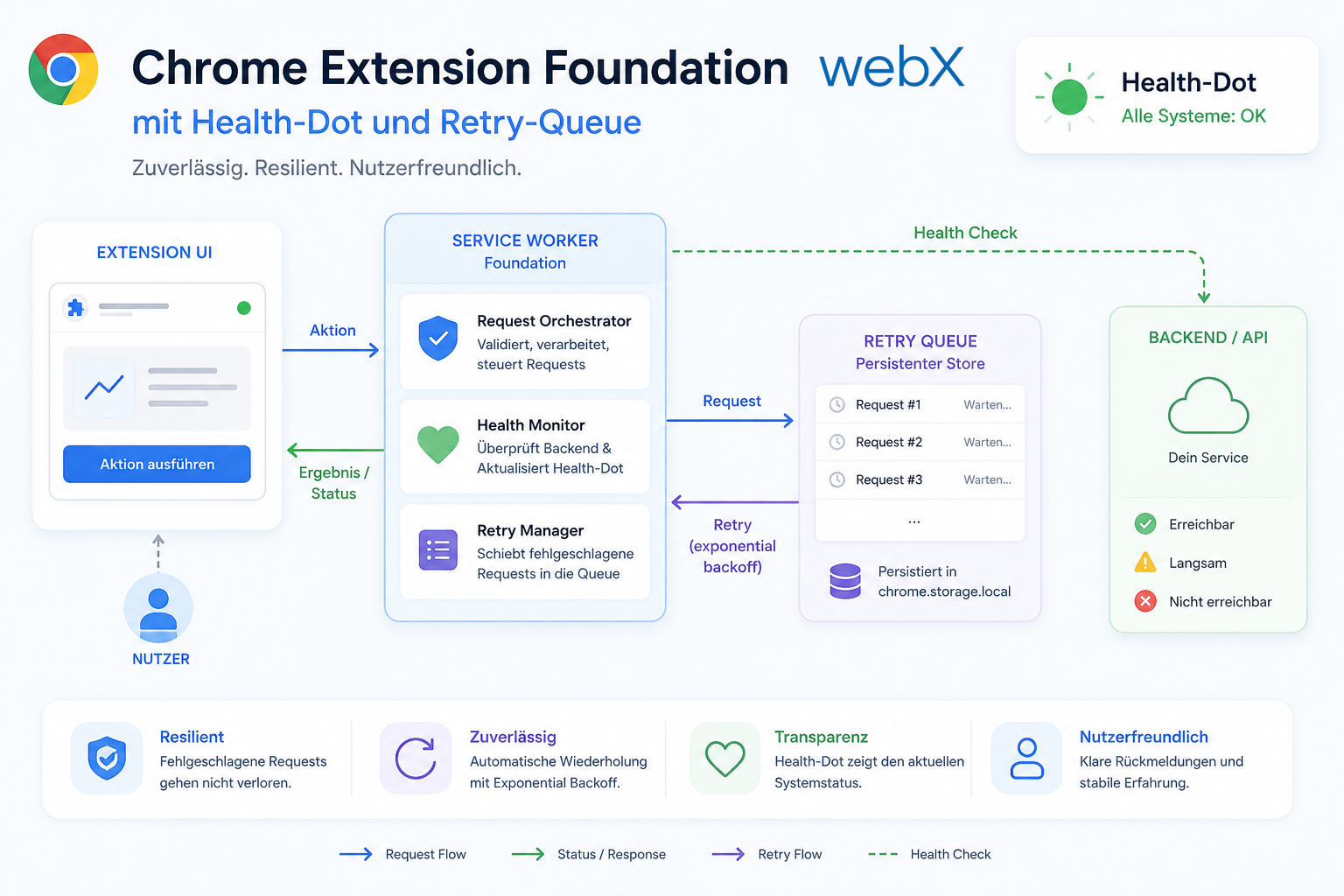
Phase 1 establishes the foundation: a health indicator, retry queue and capture history make the Chrome Extension reliable and transparent in everyday use.
Contents
- Why Phase 1 has no new capabilities
- The roadmap comes first
- userId as an investment in the future
- The health indicator makes the backend visible
- The retry queue for lost captures
- Capture history closes the feedback loop
- What Phase 1 really is
- All articles in the series
Why Phase 1 has no new capabilities
I had a working system. The extension recognized Instagram posts, extracted metadata, cropped screenshots and saved everything in a vector database. The RAG backend answered questions about the saved posts.
Then came the question: what comes next?
I had written down sixteen feature ideas. Carousel capture, multi-platform support, tags, shortcut configuration, an offline queue. All interesting. All feasible.
But before I build new capabilities, the foundation needs to be right. An extension that fails silently does not inspire trust. An extension that leaves users unsure whether the backend is running does not become a habit. An extension without fault tolerance loses data.
That is why Phase 1 is called “Foundation & Trust”. Four features. None adds a new capture capability. All make the system noticeably more robust.
The roadmap comes first
Before writing a line of code, I created a five-phase roadmap. The principle: each phase can ship independently. Each builds on its predecessor. Schema changes happen as early as possible, before they become backward-incompatible.
The five phases:
- Chrome Extension foundation: Health indicator, retry queue, capture history
- Phase 2, Capture Quality: Duplicate detection, visual preview, shortcut configuration
- Phase 3, Content Enrichment: Tags, notes, carousel capture
- Phase 4, Power and Platform: Offline queue, multi-platform support, bulk capture
- Phase 5, Scale and Habit: Analytics, privacy blocklist, export
The roadmap lives in ROADMAP.md at the project root. It is not a task-tracking document. It provides direction by explaining why the features arrive in this order, not just what comes next.
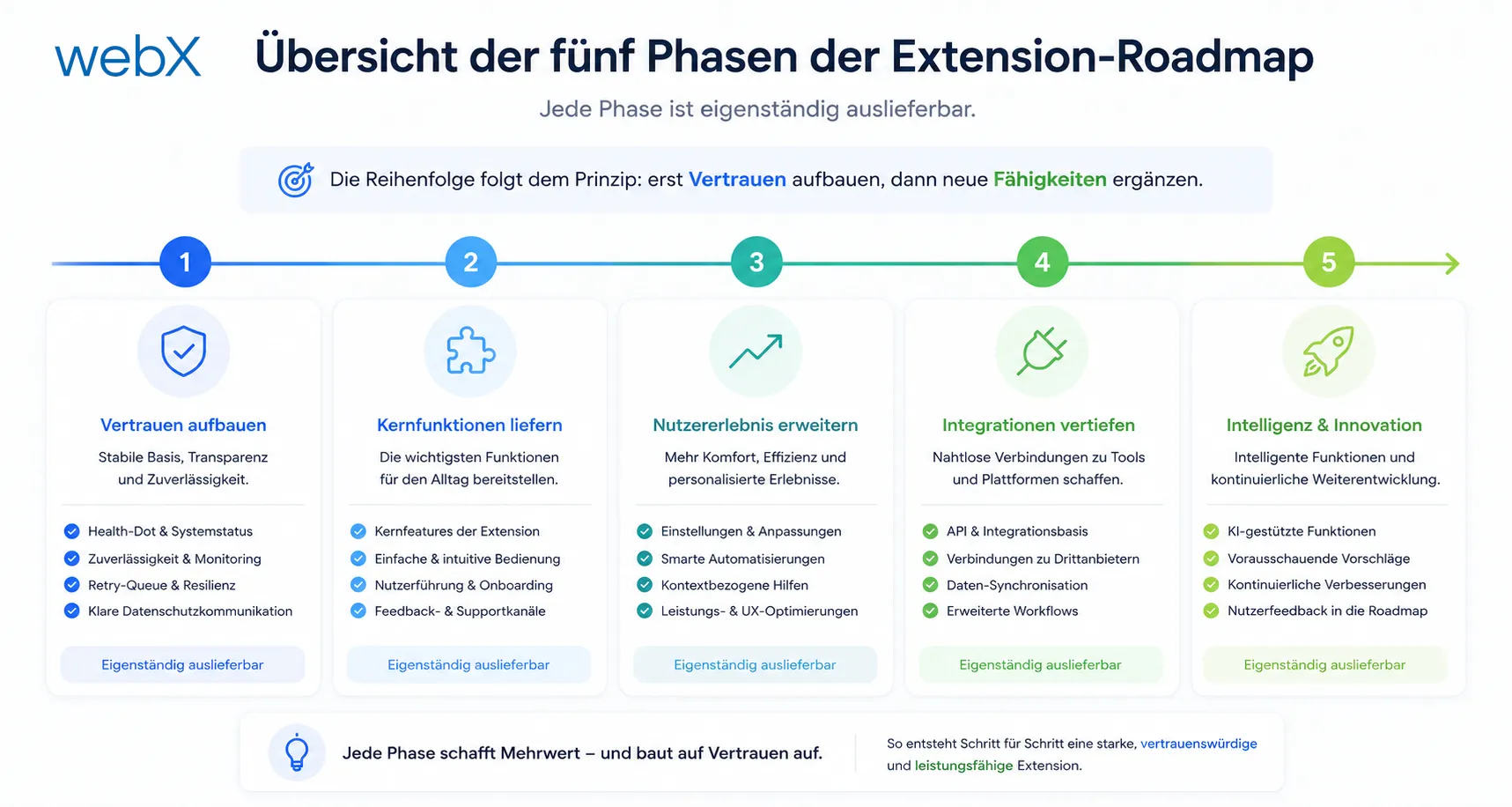 Figure: The five phases of the extension roadmap. Each can ship independently. The order follows a clear principle: establish trust first, then add new capabilities. The original illustration retains its German labels.
userId as an investment in the future
The first Phase 1 feature is the least conspicuous. I added userId: string | null to the capturedBy object. Everywhere: in the extension’s types.ts, the backend and the frontend.
At this point, the value is always null. No authentication system, no login. Just the field.
capturedBy: {
  username: string;
  userId: string | null; // TODO: replace with authenticated provider userId
  capturedAt: string;
}
The reason: when I add authentication later, I will not need to migrate the existing data in Qdrant. The field already exists. It is null, which is semantically correct: unknown. As soon as an authentication provider exists, a real ID replaces null.
That costs one line per file today. And saves a breaking change tomorrow.
That “later” has since been implemented. Follow-up articles explain how to set up Zitadel as an identity provider in Docker Compose and how the complete PKCE flow in the extension works.
The health indicator makes the backend visible
An invisible problem is an unresolved problem.
If the backend is unreachable, every capture fails silently. The extension does not respond. No error message. No indication. The user cannot tell whether they made a mistake or the server is down.
The health indicator solves this. A small circle appears in the top-right corner of the popup. Green means the backend is reachable. Red means no connection.
When opened, the popup calls GET /health with a four-second timeout.
async function checkHealth(): Promise<void> {
  try {
    const controller = new AbortController();
    const timeout = setTimeout(() => controller.abort(), 4000);

    const res = await fetch(HEALTH_ENDPOINT, { signal: controller.signal });
    clearTimeout(timeout);

    setHealthStatus(res.ok ? 'online' : 'error');
  } catch {
    setHealthStatus('offline');
  }
}
This is not monitoring. It is feedback. In under a second, the user knows whether they can work.
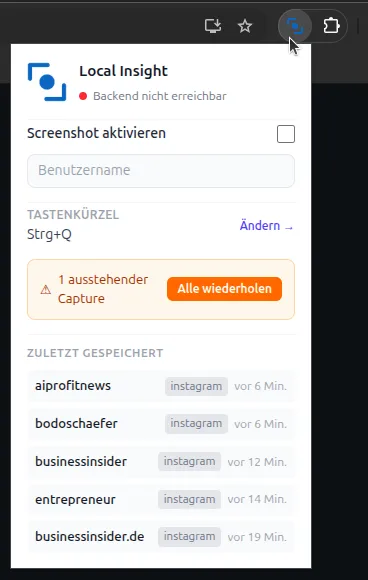 Figure: The extension popup after Phase 1. The green or red health indicator is at the top, recent captures with relative timestamps sit below, and a retry button appears at the bottom when captures have failed. The original screenshot retains its German interface.
The retry queue for lost captures
Captures sometimes fail. The backend does not respond, the network stalls, or the server is restarting. Without error handling, the data is lost.
The retry queue stores failed payloads in chrome.storage.local. At most five entries. The extension icon receives a red badge showing the number of pending captures.
async function enqueuePendingCapture(payload: AnalysisPayload): Promise<void> {
  const existing = (await getStorage<PendingCapture[]>('pendingCaptures')) ?? [];
  const updated = [
    ...existing.slice(0, 4), // max 5 entries
    { payload, enqueuedAt: new Date().toISOString() },
  ];

  await chrome.storage.local.set({ pendingCaptures: updated });
  await chrome.action.setBadgeText({ text: String(updated.length) });
  await chrome.action.setBadgeBackgroundColor({ color: '#ef4444' });
}
The popup has a “Retry all” button. It loads the queue, resends each entry and removes successfully sent entries.
An important detail: the queue only applies if the failure happens after the payload has been built. If metadata extraction itself fails, there is no valid payload to store.
Capture history closes the feedback loop
What did I capture, and when? From which channel? On which platform?
Without feedback, every interaction with the extension is an act of faith. You press Ctrl+Q, briefly see the overlay, then confirm. And afterwards? Nothing. You do not know whether it worked.
After every successful capture, capture history stores an entry in chrome.storage.local:
type CaptureHistoryEntry = {
  capturedAt: string;
  channel: string;
  platform: string;
};
The popup shows the last five captures with relative timestamps: “3 minutes ago”, “2 hours ago”. That is enough to answer the most important question: did the last capture work?
function relativeTime(isoString: string): string {
  const diff = Date.now() - new Date(isoString).getTime();
  const minutes = Math.floor(diff / 60_000);

  if (minutes < 1) return 'Just now';
  if (minutes < 60) return `${minutes} minute${minutes > 1 ? 's' : ''} ago`;

  const hours = Math.floor(minutes / 60);
  if (hours < 24) return `${hours} hour${hours > 1 ? 's' : ''} ago`;

  const days = Math.floor(hours / 24);
  return `${days} day${days > 1 ? 's' : ''} ago`;
}
No external package. No formatting library. Thirty lines.
What Phase 1 really is
The four Phase 1 features share no technical framework. There is no new service, no new architectural layer.
What they share is observability. The user sees the system state. The user sees what happened. The user can respond to failures without opening debug logs.
That is the real goal of Phase 1. Not features. Trust.
All articles in the series
- Vision and system overview: Chrome Extension, RAG architecture and project background: Read article
- Building a RAG system: Qdrant, embeddings and cosine similarity in TypeScript: Read article
- AI provider abstraction: Ollama vs. OpenAI, interface design and no vendor lock-in: Read article
- Chrome Extension MV3: Three isolated runtime contexts, message passing and Strategy Pattern: Read article
- Docker Compose strategy: The override pattern, from local development to Azure: Read article
- Ollama locally vs. Docker: The decision and its consequences: Read article
- Ollama auto-pull entrypoint: Automated model setup at container startup: Read article
- tsconfig and Vite:
Node16vs.bundler, and why Vite has its own rules: Read article - Load complete Instagram captions with MutationObserver: Read article
- Chrome Extension foundation with health indicator and retry queue: (this article)
- Phase 2 features: Shadow DOM overlay, Tailwind v4 and duplicate detection: Read article
- Race condition in platform detection: How a UI event breaks Instagram detection: Read article
- Extracting PostId in two Instagram layouts: querySelector vs. ancestor traversal: Read article
- Capture a complete Instagram carousel with MutationObserver: Lazy loading, observer-before-click and timeout fallback: Read article
- Notes and tags when saving screenshots: Read article
- Instagram keyboard shortcuts block Chrome Extension input: Read article
- Lowercase normalization and duplicate detection in tag input: Read article
- Zitadel Login V2 in Docker Compose with three hidden errors: Read article
- PKCE OAuth in a Chrome MV3 extension: Read article
- React frontend with react-oidc-context and Zitadel: Read article
- Vite build-time environment variables in Docker: Read article
- Event-driven ingestion with BullMQ and Redis: Read article
- MinIO instead of Azurite: S3-compatible object storage locally and on Hetzner: Read article
- access_token, id_token and the Userinfo endpoint: Which belongs where: Read article
- Qdrant multi-tenancy with one collection per user: Read article
- When backend and frontend know different types: Read article
- Removing Zitadel bootstrap: Host header bug and manual setup: Read article
- Backend code review with six problems fixed before launch: Read article
- Traefik instead of NGINX: Reverse proxy for a growing Docker Compose stack: Read article
- Two-layer rate limiting: Traefik and express-rate-limit with Redis: Read article
- Implementing GDPR Article 17 correctly: Promise.allSettled and export batching: Read article
- Embedding model lock-in: Why mxbai-embed-large is a permanent production decision: Read article
- Docker volumes in production: Named volumes, bind mounts and the Hetzner volume approach: Read article
- Two vulnerabilities before launch: Redis without authentication and an exposed Qdrant admin port: Read article
- Traefik as the single entry point in the Docker Compose stack: Read article
- Connecting Zitadel behind Traefik with issuer, JWKS and Login V2: Read article
- Fixing the frontend when the nginx healthcheck fails on localhost: Read article
- Observability for my Docker Compose stack with Bull Board and Dozzle: Read article
- Open the Qdrant dashboard securely with local Traefik and an SSH tunnel: Read article
- Diagnosis of chunking failures despite tokenization: Read article
- Why I set the chunk size to 1500 tokens: Read article
- Splitting the embedding workflow into clear steps: Read article
- Bringing chunking, storage and search back together: Read article
- Capture Intake as a separate module, less orchestration in the Express endpoint: Read article
Planning a browser extension or a system with offline resilience and user feedback? Let us assess it together.