Chrome Extension MV3 with three isolated contexts and type-safe message passing
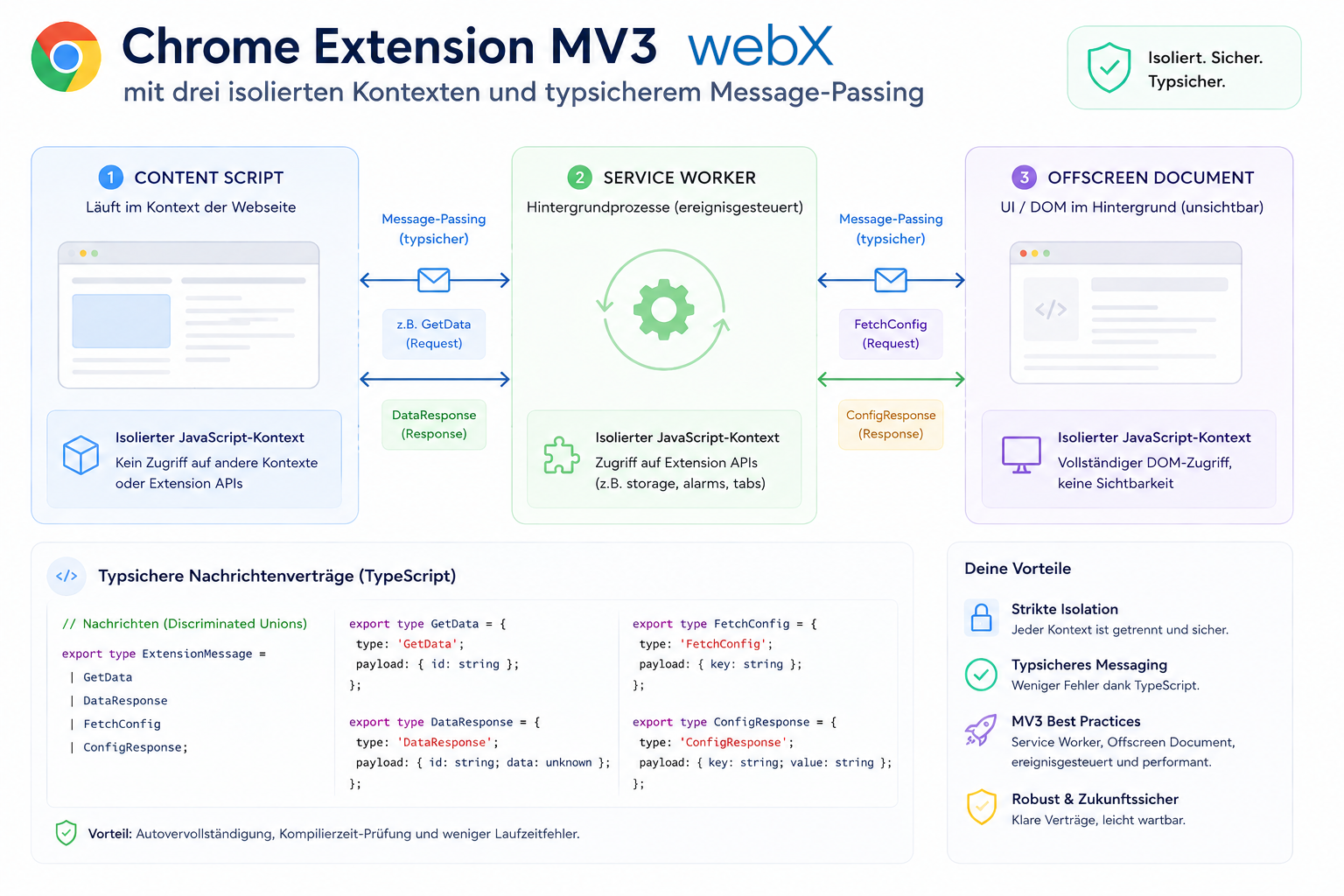
A Chrome Extension has no "main.js". It has three completely isolated runtime contexts that must communicate through a strict message protocol. Understanding this distinction is what makes extensions robust rather than fragile.
Contents
- The misconception that breaks most extensions
- How this works in my extension
- The message protocol
- The Strategy Pattern for platform-specific payloads
- What this means in practice
- All articles in the series
The misconception that breaks most extensions
Most developers building their first Chrome Extension make the same mistake: they think in terms of a single codebase with shared state.
That does not work. Chrome MV3 actively prevents it.
A Chrome Extension has three completely isolated runtime contexts that cannot communicate directly with one another:
| Context | Lifetime | DOM access | fetch() |
|---|---|---|---|
| Background Service Worker | Short-lived, event-driven | No | Yes |
| Content Script | While the tab is open | Yes (the page) | Restricted (CORS) |
| Popup | Only while open | Its own HTML | Yes |
This isolation is not a technical limitation. It is a security architecture. Understanding it and working with it produces more stable systems.
How this works in my extension
Background Service Worker
// src/background/main.ts
chrome.commands.onCommand.addListener(async (command) => {
  if (command !== 'capture-screenshot') return;

  const [tab] = await chrome.tabs.query({ active: true, currentWindow: true });
  if (!tab?.id) return;

  // 1. Get element bounds from the content script
  const boundsResponse = await chrome.tabs.sendMessage<GetElementBoundsMessage, GetElementBoundsResponse>(tab.id, {
    action: 'get-element-bounds',
  });

  // 2. Full-page screenshot via Chrome API
  const screenshotDataUrl = await chrome.tabs.captureVisibleTab(tab.windowId, { format: 'png' });

  // 3. Crop via content script (canvas runs there)
  const cropResponse = await chrome.tabs.sendMessage<CropScreenshotMessage, CropScreenshotResponse>(tab.id, {
    action: 'crop-screenshot',
    screenshotDataUrl,
    bounds: boundsResponse.bounds,
  });

  // 4. Extract metadata
  const metadataResponse = await chrome.tabs.sendMessage<GetInstagramMetadataMessage, GetInstagramMetadataResponse>(
    tab.id,
    { action: 'get-instagram-metadata' }
  );

  // 5. Build payload and POST
  const payload = buildPayload(cropResponse, metadataResponse, tab);
  await fetch(API_ENDPOINT, { method: 'POST', body: JSON.stringify(payload) });
});
The Service Worker orchestrates everything. It performs no DOM operations. It stores no state between calls, because Chrome can terminate and restart it at any time. Instead, it delegates each step to the appropriate context. This also applies to authentication: the entire PKCE OAuth flow with chrome.identity.launchWebAuthFlow runs in the Background Service Worker, because only that context is stable enough to wait for an asynchronous authentication flow to complete.
Content Script
The Content Script lives in the tab. It can access the page DOM, but only while the tab is open. Its responsibilities:
Hover tracking:
// src/content/main.ts
document.addEventListener('mouseover', (e) => {
  if (!isActive) return;
  if (hoveredElement) hoveredElement.style.outline = '';
  hoveredElement = e.target as Element;
  hoveredElement.style.outline = '2px solid red';
});
Canvas cropping with correct DPR handling:
chrome.runtime.onMessage.addListener((message, _sender, sendResponse) => {
  if (message.action === 'crop-screenshot') {
    const canvas = new OffscreenCanvas(
      message.bounds.width * devicePixelRatio,
      message.bounds.height * devicePixelRatio
    );
    const ctx = canvas.getContext('2d')!;
    // ... load image and crop
    canvas.convertToBlob().then((blob) => {
      // send base64 back to background
    });
    return true; // required for async response
  }
});
The critical detail is devicePixelRatio. On a Retina display, Chrome returns a screenshot at twice the resolution. Ignore that and the crops will be offset or scaled incorrectly. Always multiply by DPR.
Instagram metadata extraction:
// src/content/instagram-extractor.ts
export function extractInstagramMetadata(): InstagramPostMetadata {
  // Walk up from hovered element to the <article> container
  let el: Element | null = document.querySelector('[data-hovered]');
  while (el && el.tagName !== 'ARTICLE') {
    el = el.parentElement;
  }
  if (!el) return emptyMetadata();

  const username = el.querySelector("a[href*='/']")?.textContent ?? null;
  const caption =
    el.querySelector("h1, [data-testid='post-comment-root-username']")?.closest('li')?.textContent ?? null;
  const altTexts = [...el.querySelectorAll('img[alt]')].map((img) => (img as HTMLImageElement).alt).filter(Boolean);

  return { username, caption, altTexts /* ... */ };
}
Instagram renders posts as <article> elements. Starting from a clicked child element, you need to walk up the DOM until you find the container. This is typical of modern SPAs, where the semantically meaningful element is not necessarily the one being hovered over.
Popup
Technically, the popup is a separate HTML page with its own JavaScript context. It has no direct access to the Content Script or Service Worker. Communication goes through chrome.runtime.sendMessage or chrome.storage.
// src/popup/main.ts
document.getElementById('toggle')?.addEventListener('change', async (e) => {
  const isActive = (e.target as HTMLInputElement).checked;
  await chrome.storage.sync.set({ isScreenshotActive: isActive });
  // content script reads this value on next action
});
chrome.storage.sync instead of localStorage: this is the most important distinction. localStorage is scoped to an origin and is not shared between extension contexts. chrome.storage.sync is accessible to all contexts and even synchronizes across devices.
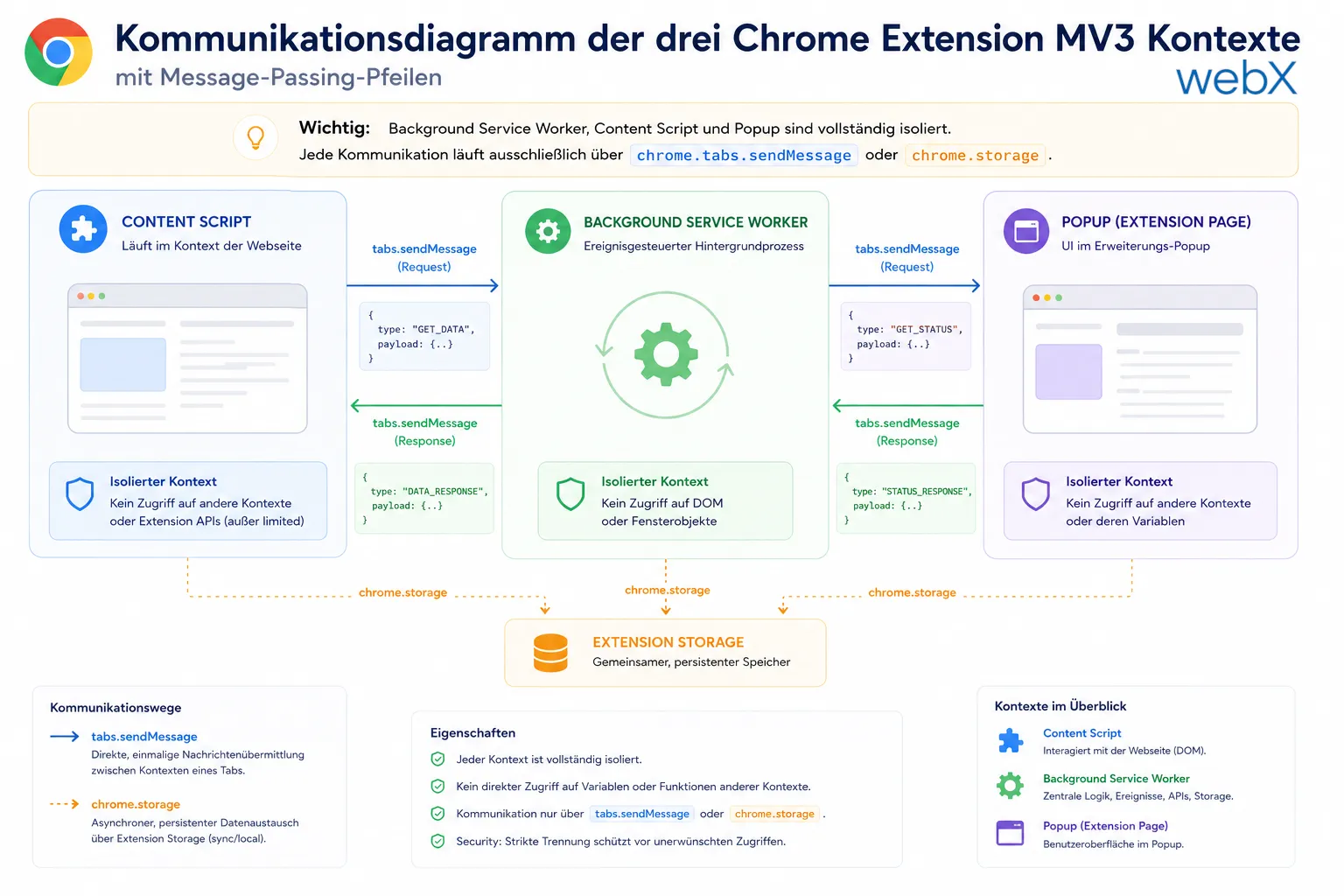 Figure: Background Service Worker, Content Script and Popup are completely isolated. All communication runs exclusively through chrome.tabs.sendMessage or chrome.storage. The original illustration retains its German labels.
The message protocol
All chrome.tabs.sendMessage calls use discriminated union types:
// src/types.ts
type GetElementBoundsMessage = { action: 'get-element-bounds' };
type CropScreenshotMessage = {
  action: 'crop-screenshot';
  screenshotDataUrl: string;
  bounds: DOMRect;
};
type GetInstagramMetadataMessage = { action: 'get-instagram-metadata' };

type ContentScriptMessage = GetElementBoundsMessage | CropScreenshotMessage | GetInstagramMetadataMessage;
The call is fully typed as well:
const response = await chrome.tabs.sendMessage<CropScreenshotMessage, CropScreenshotResponse>(tabId, {
  action: 'crop-screenshot',
  screenshotDataUrl,
  bounds,
});
Why does this matter? Because chrome.tabs.sendMessage returns any by default. In an extension with three contexts, asynchronous message passing and different response types, any creates errors that only surface at runtime, precisely when someone is using the extension.
Discriminated unions let TypeScript check message routing at compile time. If I introduce a new action and do not handle it in the Content Script listener, TypeScript tells me before the code ever reaches the browser.
The Strategy Pattern for platform-specific payloads
The extension supports multiple platforms, currently Instagram and a generic fallback. Payload building uses a functional Strategy Pattern:
// src/background/payload-builder.ts
type PayloadBuilder<T extends PlatformContext> = (context: T) => PlatformAnalysisPayload;

const instagramBuilder: PayloadBuilder<InstagramContext> = (ctx) => ({
  platform: 'instagram',
  metadata: ctx.instagramMetadata,
  image: ctx.croppedImage,
  capturedAt: new Date().toISOString(),
  // ...
});

const genericBuilder: PayloadBuilder<GenericContext> = (ctx) => ({
  platform: 'generic',
  metadata: { pageTitle: ctx.pageTitle, pageUrl: ctx.pageUrl },
  // ...
});
// src/background/payload-context-builder.ts
export async function buildPayloadContext(tab: chrome.tabs.Tab): Promise<PlatformContext> {
if (tab.url?.includes('instagram.com')) {
const metadata = await chrome.tabs.sendMessage(tab.id!, { action: 'get-instagram-metadata' });
return { platform: 'instagram', instagramMetadata: metadata };
}
return { platform: 'generic', pageTitle: tab.title ?? '', pageUrl: tab.url ?? '' };
}To support a new platform, such as LinkedIn or Pinterest, I only need:
- A new extractor in
src/content/ - A new builder function in
payload-builder.ts - A new condition in
payload-context-builder.ts
No existing logic is touched. The Open/Closed Principle in a Chrome Extension.
What this means in practice
These architectural decisions are not theoretical exercises. They matter directly when you advise clients:
- Companies that want to use browser extensions as internal tools, for example to populate a CRM from the browser
- Power Pages portals that need capture functionality provided by an extension
- Any system that needs reliable, type-safe extraction of browser data
Understanding these three contexts and their communication model is the difference between an extension that breaks after two weeks and one that runs in production.
All articles in the series
- Vision and system overview: Chrome Extension, RAG architecture and project background: Read article
- Building a RAG system: Qdrant, embeddings and cosine similarity in TypeScript: Read article
- AI provider abstraction: Ollama vs. OpenAI, interface design and no vendor lock-in: Read article
- Chrome Extension MV3: Three isolated runtime contexts, message passing and Strategy Pattern: (this article)
- Docker Compose strategy: The override pattern, from local development to Azure: Read article
- Ollama locally vs. Docker: The decision and its consequences: Read article
- Ollama auto-pull entrypoint: Automated model setup at container startup: Read article
- tsconfig and Vite:
Node16vs.bundler, and why Vite has its own rules: Read article - Load complete Instagram captions with MutationObserver: Read article
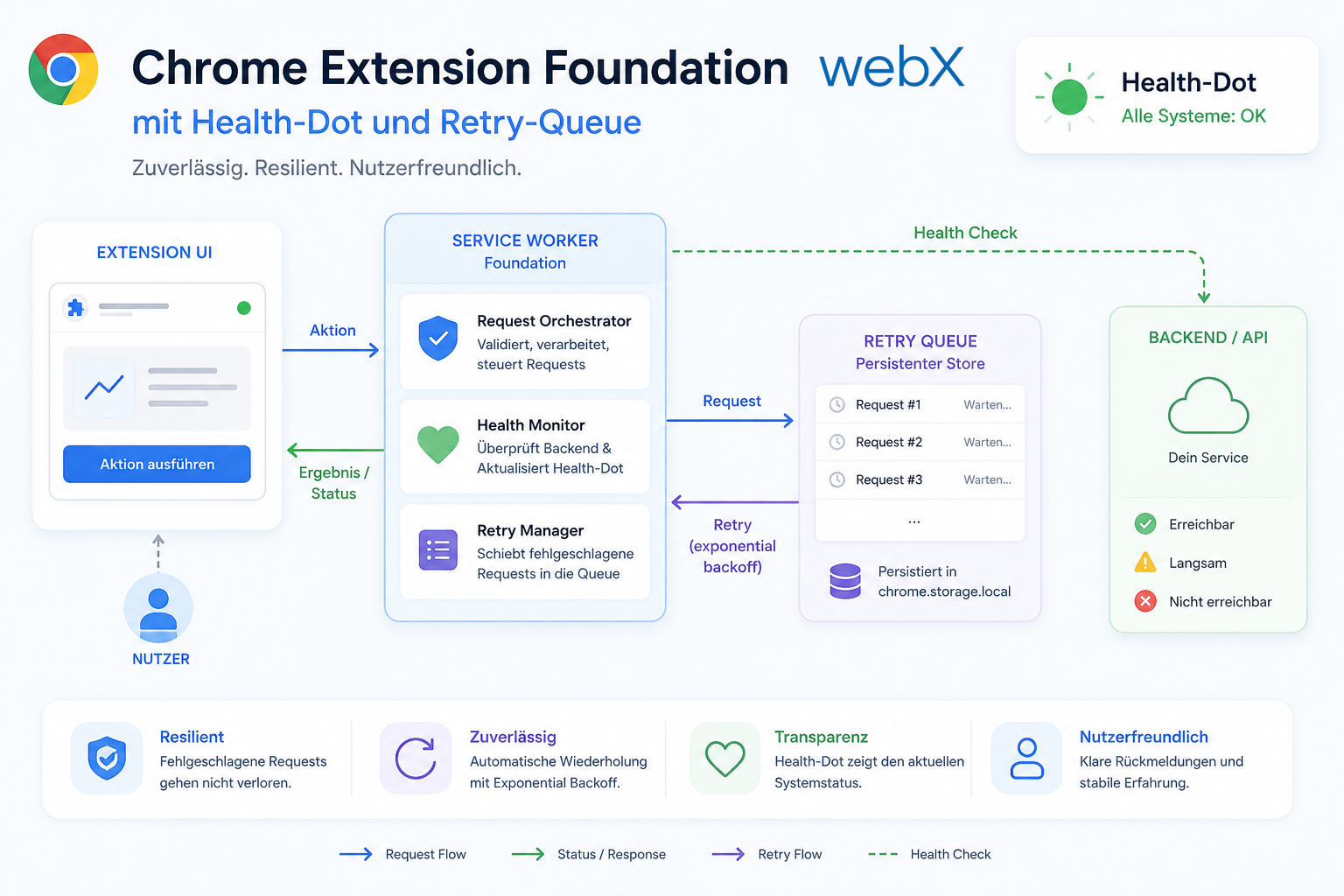
- Chrome Extension foundation with health indicator and retry queue: Read article
- Phase 2 features: Shadow DOM overlay, Tailwind v4 and duplicate detection: Read article
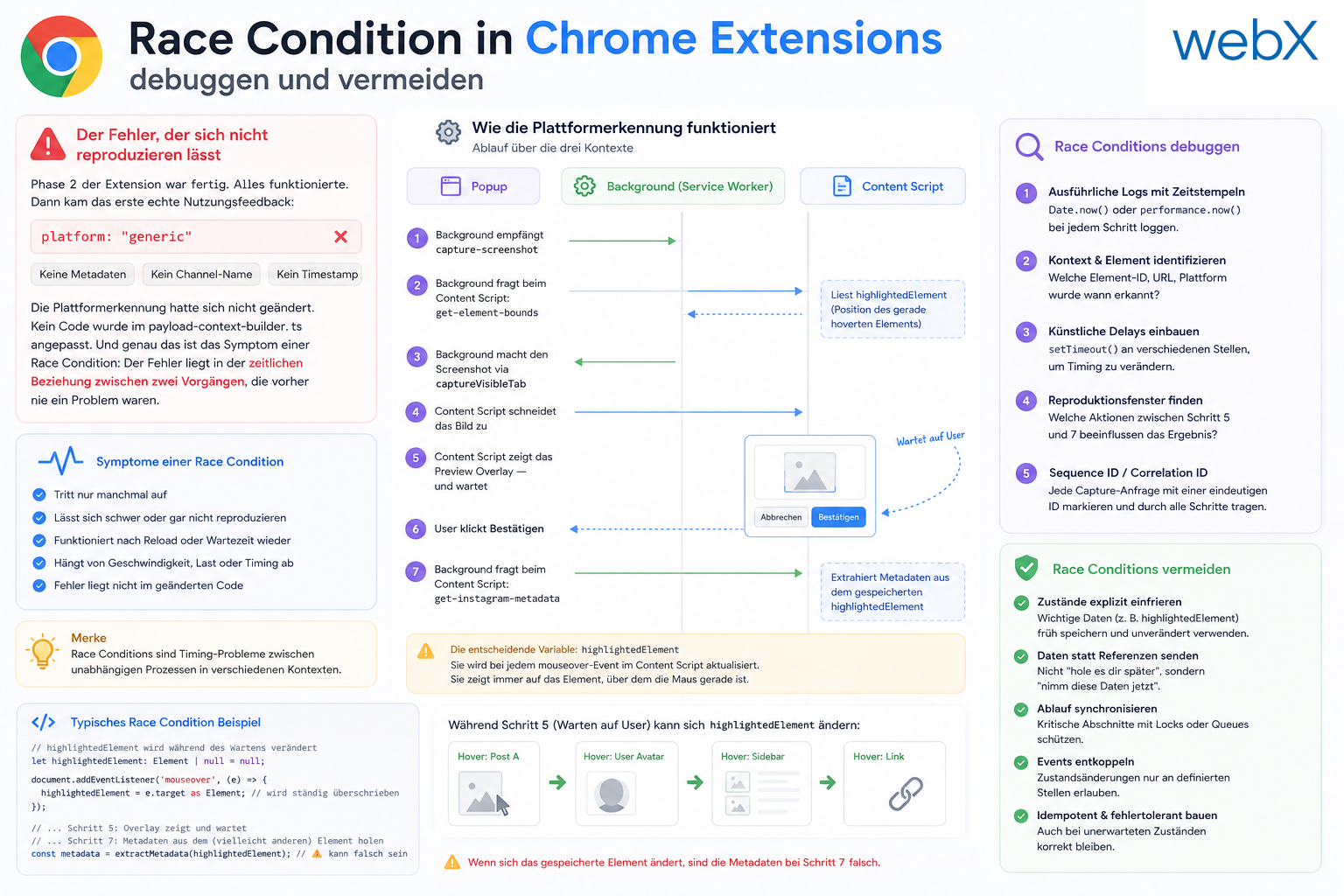
- Race condition in platform detection: How a UI event breaks Instagram detection: Read article
- Extracting PostId in two Instagram layouts: querySelector vs. ancestor traversal: Read article
- Capture a complete Instagram carousel with MutationObserver: Lazy loading, observer-before-click and timeout fallback: Read article
- Notes and tags when saving screenshots: Read article
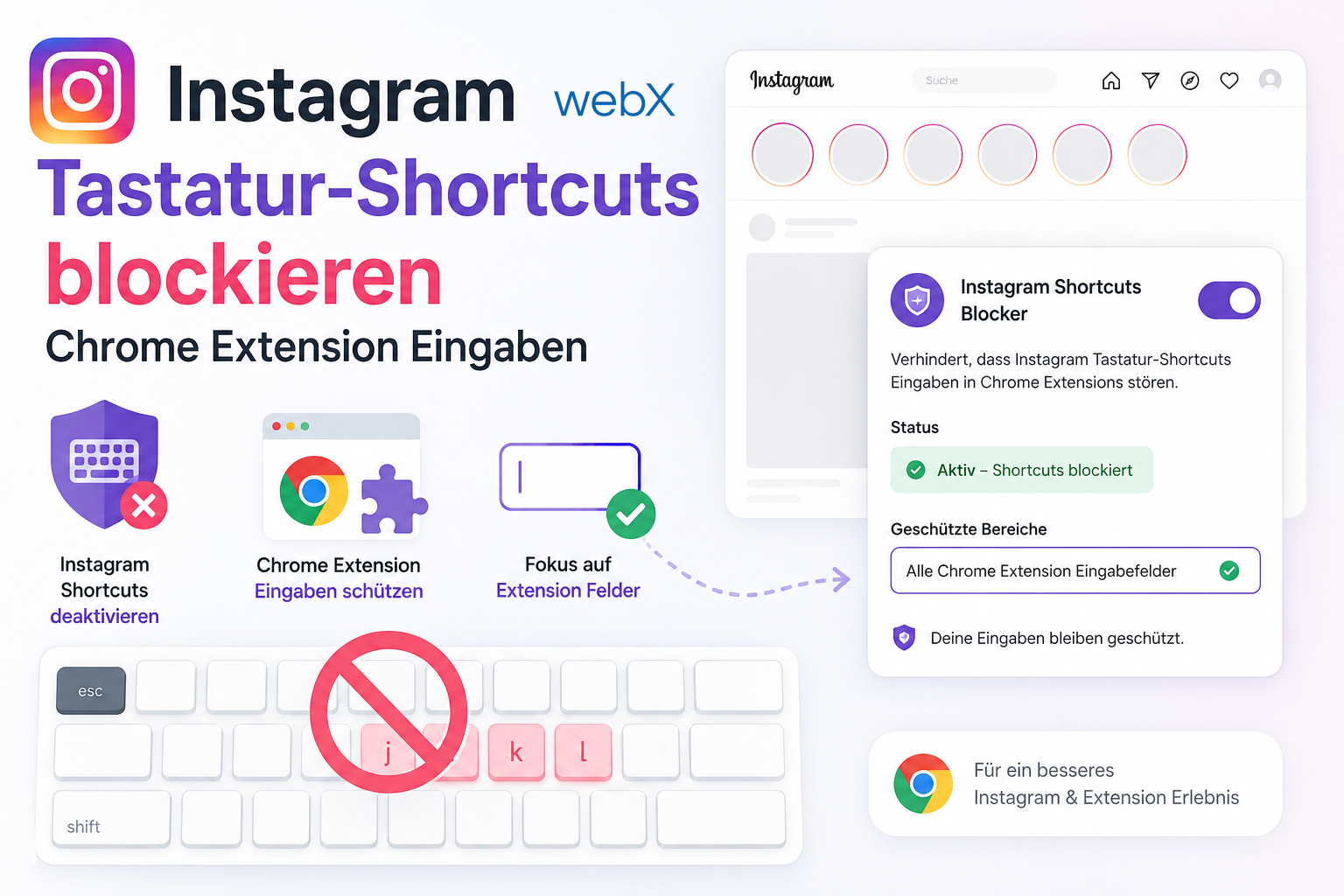
- Instagram keyboard shortcuts block Chrome Extension input: Read article
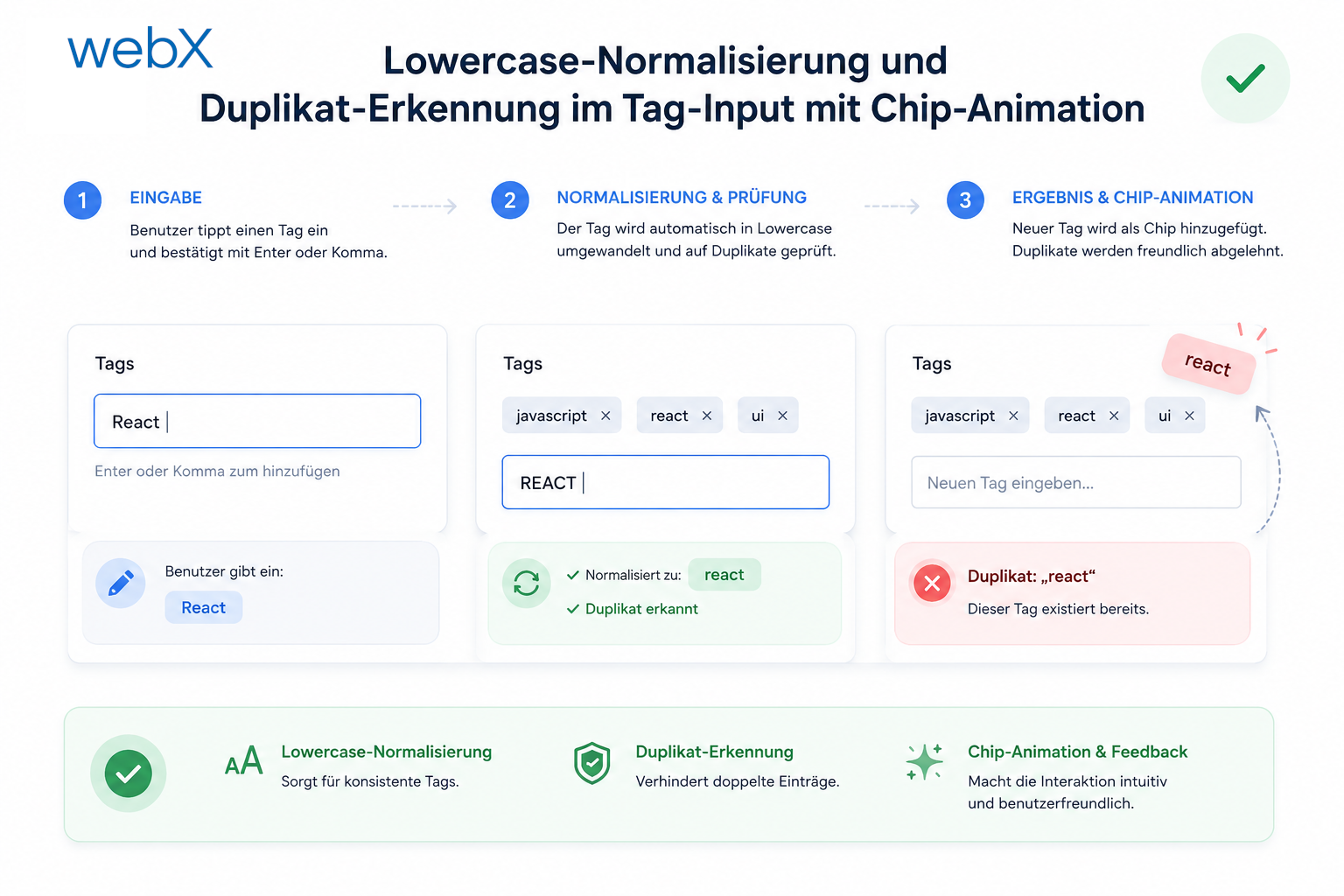
- Lowercase normalization and duplicate detection in tag input: Read article
- Zitadel Login V2 in Docker Compose with three hidden errors: Read article
- PKCE OAuth in a Chrome MV3 extension: Read article
- React frontend with react-oidc-context and Zitadel: Read article
- Vite build-time environment variables in Docker: Read article
- Event-driven ingestion with BullMQ and Redis: Read article
- MinIO instead of Azurite: S3-compatible object storage locally and on Hetzner: Read article
- access_token, id_token and the Userinfo endpoint: Which belongs where: Read article
- Qdrant multi-tenancy with one collection per user: Read article
- When backend and frontend know different types: Read article
- Removing Zitadel bootstrap: Host header bug and manual setup: Read article
- Backend code review with six problems fixed before launch: Read article
- Traefik instead of NGINX: Reverse proxy for a growing Docker Compose stack: Read article
- Two-layer rate limiting: Traefik and express-rate-limit with Redis: Read article
- Implementing GDPR Article 17 correctly: Promise.allSettled and export batching: Read article
- Embedding model lock-in: Why mxbai-embed-large is a permanent production decision: Read article
- Docker volumes in production: Named volumes, bind mounts and the Hetzner volume approach: Read article
- Two vulnerabilities before launch: Redis without authentication and an exposed Qdrant admin port: Read article
- Traefik as the single entry point in the Docker Compose stack: Read article
- Connecting Zitadel behind Traefik with issuer, JWKS and Login V2: Read article
- Fixing the frontend when the nginx healthcheck fails on localhost: Read article
- Observability for my Docker Compose stack with Bull Board and Dozzle: Read article
- Open the Qdrant dashboard securely with local Traefik and an SSH tunnel: Read article
- Diagnosis of chunking failures despite tokenization: Read article
- Why I set the chunk size to 1500 tokens: Read article
- Splitting the embedding workflow into clear steps: Read article
- Bringing chunking, storage and search back together: Read article
- Capture Intake as a separate module, less orchestration in the Express endpoint: Read article
Planning a browser extension or a Power Pages extension with capture functionality? Let us assess it together.