When backend and frontend know different types
A TypeError in the browser after a backend refactoring. The cause is not a bug in the code, but an outdated frontend type that did not know the new API response shape.

Contents
- The error after deployment
- What changed and what did not
- Why TypeScript did not prevent it
- The correction
- What I learned from this
- All articles in the series
The error after deployment
After the Phase 3 backend refactoring, the frontend was simply blank after login. The browser console showed:
TypeError: Cannot read properties of undefined (reading 'pointCount')This is the kind of error whose stack trace does not point to the actual cause. pointCount is undefined. Where does pointCount come from? I had to look at the code.
What changed and what did not
In the backend, Phase 3 had revised the health endpoint. The old response shape was:
// old shape
{
  status: "ok",
  provider: "ollama",
  services: { ollama: "ok", qdrant: "ok" },
  collection: { name: "instagram_memory", pointCount: 42 }
}
That was the collection-centric view: one system, one collection, one point count. After Phase 3, there is no longer a single global collection. Each user has their own collection. The health response now shows Qdrant connectivity at the system level:
// new shape
{
  status: "ok",
  provider: "ollama",
  services: { ollama: "ok", qdrant: "ok" },
  qdrant: { collectionCount: 3 }
}
The frontend knew nothing about this. The TypeScript type in api.ts was still the old one:
// stale type in frontend/src/lib/api.ts
export type HealthResponse = {
  status: 'ok' | 'degraded';
  provider: string;
  services: Record<string, string>;
  collection: { name: string; pointCount: number }; // no longer exists in backend
};
And App.tsx accessed that field directly:
<span>({health.collection.pointCount})</span>health.collection is undefined because the backend no longer returns a collection field. And undefined.pointCount throws a TypeError.
Why TypeScript did not prevent it
The obvious question: should TypeScript not catch exactly this? The answer: TypeScript checks the code, not the runtime value of the API response.
The frontend defines HealthResponse as a TypeScript type. This type describes what the frontend expects. If the backend returns a different shape, there is no compile-time error. TypeScript trusts the type. The runtime object no longer matches it, but nobody notices until the user opens the page.
This is a classic divergence between the backend API contract and the frontend type definition. Both are maintained manually, and when the backend changes, the frontend must follow.
The correction
Two places needed adjustment.
First, the type in api.ts:
export type HealthResponse = {
  status: 'ok' | 'degraded';
  provider: string;
  services: Record<string, string>;
  qdrant: { collectionCount: number }; // updated to match backend
};
Second, the rendering line in App.tsx:
<span>({health.qdrant.collectionCount})</span>The build passes. After login, the page shows the number of Qdrant collections, which is more meaningful information in a multi-tenancy system than a single point count.
What I learned from this
When a backend response shape changes, updating only the backend code and backend tests is not enough. The API contract must remain synchronized across all layers. In this project, that means backend/src/routes/health.ts, backend/README.md, frontend/src/lib/api.ts, frontend/README.md and the affected components.
An API schema tool such as zod with z.infer<> or an OpenAPI generator would solve this problem structurally. The frontend type would be generated from the schema defined by the backend. A type mismatch would then be a build error rather than a runtime error.
That is a worthwhile investment for Phase 4. For now, the fix is in place, the page loads correctly and all README files reflect the current shape.
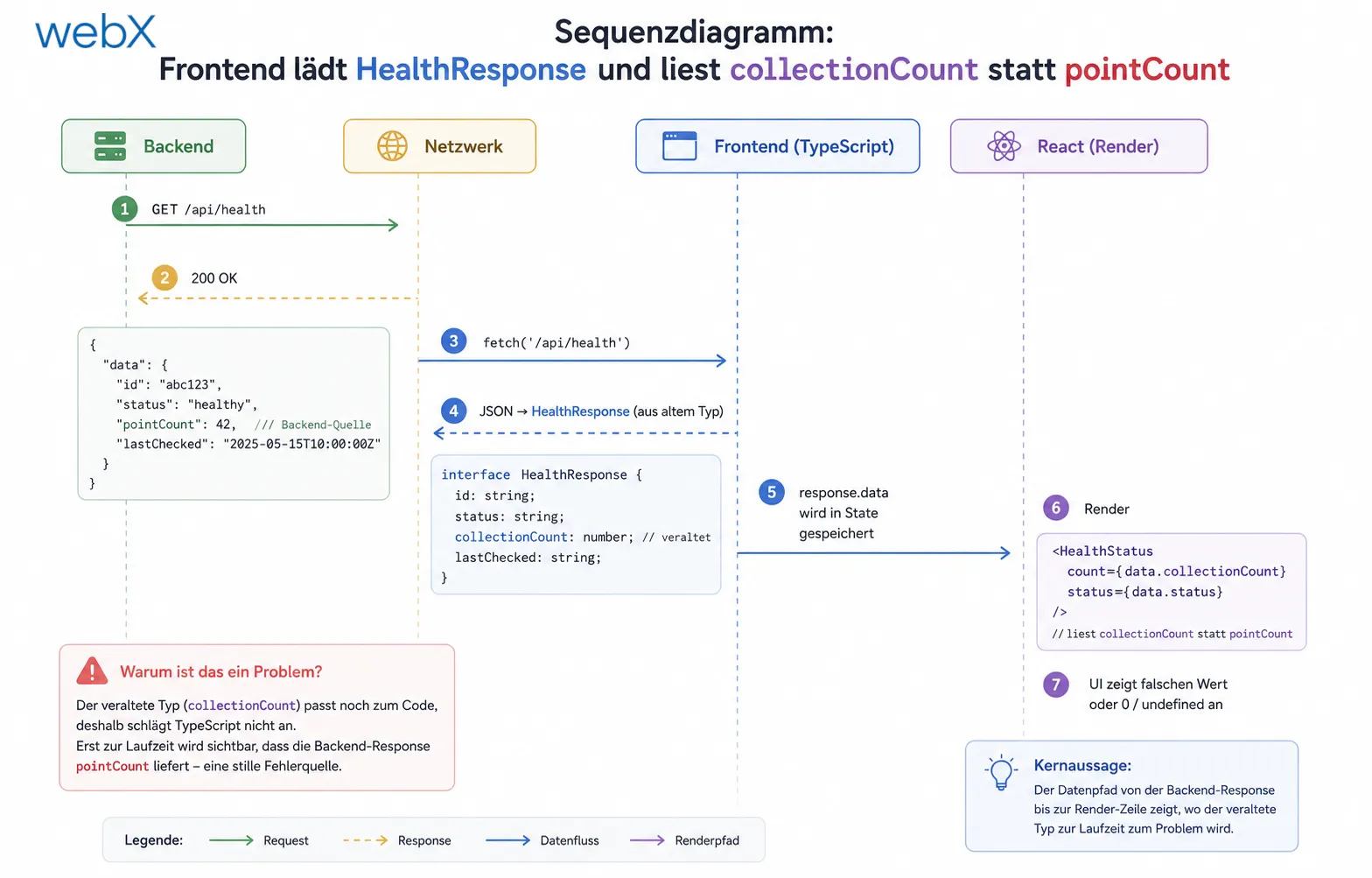
The diagram shows the data path from the backend response to the rendering line in React. The outdated type acted as a silent source of errors because the discrepancy became visible only at runtime, not during compilation. The original diagram retains its German labels.
All articles in the series
- Vision and system overview: Chrome Extension, RAG architecture and project background: Read article
- Building a RAG system: Qdrant, embeddings and cosine similarity in TypeScript: Read article
- AI provider abstraction: Ollama vs. OpenAI, interface design and no vendor lock-in: Read article
- Chrome Extension MV3: Three isolated runtime contexts, message passing and Strategy Pattern: Read article
- Docker Compose strategy: The override pattern, from local development to Azure: Read article
- Ollama locally vs. Docker: The decision and its consequences: Read article
- Ollama auto-pull entrypoint: Automated model setup at container startup: Read article
- tsconfig and Vite:
Node16vs.bundler, and why Vite has its own rules: Read article - Load complete Instagram captions with MutationObserver: Read article
- Chrome Extension foundation with health indicator and retry queue: Read article
- Phase 2 features: Shadow DOM overlay, Tailwind v4 and duplicate detection: Read article
- Race condition in platform detection: How a UI event breaks Instagram detection: Read article
- Extracting PostId in two Instagram layouts: querySelector vs. ancestor traversal: Read article
- Capture a complete Instagram carousel with MutationObserver: Lazy loading, observer-before-click and timeout fallback: Read article
- Notes and tags when saving screenshots: Read article
- Instagram keyboard shortcuts block Chrome Extension input: Read article
- Lowercase normalization and duplicate detection in tag input: Read article
- Zitadel Login V2 in Docker Compose with three hidden errors: Read article
- PKCE OAuth in a Chrome MV3 extension: Read article
- React frontend with react-oidc-context and Zitadel: Read article
- Vite build-time environment variables in Docker: Read article
- Event-driven ingestion with BullMQ and Redis: Read article
- MinIO instead of Azurite: S3-compatible object storage locally and on Hetzner: Read article
- access_token, id_token and the Userinfo endpoint: Which belongs where: Read article
- Qdrant multi-tenancy with one collection per user: Read article
- When backend and frontend know different types: (this article)
- Removing Zitadel bootstrap: Host header bug and manual setup: Read article
- Backend code review with six problems fixed before launch: Read article
- Traefik instead of NGINX: Reverse proxy for a growing Docker Compose stack: Read article
- Two-layer rate limiting: Traefik and express-rate-limit with Redis: Read article
- Implementing GDPR Article 17 correctly: Promise.allSettled and export batching: Read article
- Embedding model lock-in: Why mxbai-embed-large is a permanent production decision: Read article
- Docker volumes in production: Named volumes, bind mounts and the Hetzner volume approach: Read article
- Two vulnerabilities before launch: Redis without authentication and an exposed Qdrant admin port: Read article
- Traefik as the single entry point in the Docker Compose stack: Read article
- Connecting Zitadel behind Traefik with issuer, JWKS and Login V2: Read article
- Fixing the frontend when the nginx healthcheck fails on localhost: Read article
- Observability for my Docker Compose stack with Bull Board and Dozzle: Read article
- Open the Qdrant dashboard securely with local Traefik and an SSH tunnel: Read article
- Diagnosis of chunking failures despite tokenization: Read article
- Why I set the chunk size to 1500 tokens: Read article
- Splitting the embedding workflow into clear steps: Read article
- Bringing chunking, storage and search back together: Read article
- Capture Intake as a separate module, less orchestration in the Express endpoint: Read article
Building a full-stack TypeScript system and want to keep API contracts automatically synchronized between backend and frontend? Let us assess it together.