Capture a complete Instagram carousel with MutationObserver
Instagram lazy-loads carousel slides. Only the first two are in the DOM when a post opens. A MutationObserver and a while loop automatically extract every slide without touching a single class name.
Contents
- Two slides. Six in the post.
- The carousel DOM structure
- The familiar MutationObserver pattern
- Start the observer before clicking
- The timeout fallback for preloaded slides
- The loop
- Finding the next button semantically
- What this means for the RAG system
- All articles in the series
Two slides. Six in the post.
The Chrome Extension captures Instagram posts and stores them with their metadata in a vector database. That metadata includes the images’ alt text. Instagram generates this alt text automatically and describes image content in English. For a RAG system, this is valuable semantic information. I describe how embeddings are generated from these texts in the article on Qdrant and the embedding system.
For a single image, this is no problem. You capture it, an <img> is in the DOM, and the alt text is there.
A carousel post is different.
Instagram renders carousel posts with only two slides initially in the DOM. The first is visible, and the second is already loaded, waiting behind the image area. Slides 3, 4 and 5 are not in the DOM at all. They are loaded only when the user clicks the next button.
So running querySelectorAll('img[alt]') on a carousel post gives you two alt texts at best. Even if the post has six slides.
The carousel DOM structure
Before explaining the algorithm, it is worth looking at the actual structure.
The slides sit inside a <ul>. Each slide is an <li> element. The active slide has transform: translateX(0px) in its inline style, while the next preloaded slide has a positive pixel value. The first <li> in the list is an invisible spacer with no content.
<ul>
  <li style="transform: translateX(2807px); width: 1px;"></li>
  <!-- Spacer -->
  <li tabindex="-1" style="transform: translateX(0px);">
    <!-- Slide 1: visible -->
    <div>
      …
      <img alt="Photo by The Stoics on May 19, 2026. May be an image of text…" />
    </div>
  </li>
  <li tabindex="-1" style="transform: translateX(468px);">
    <!-- Slide 2: already in DOM, not yet visible -->
    <div>
      …
      <img alt="Photo by The Stoics on May 19, 2026. May be an image of text…" />
    </div>
  </li>
  <!-- Slides 3 to N: not yet in DOM -->
</ul>
Two navigation buttons live outside the <ul>, but inside the same post container:
<button aria-label="Zurück">…</button> <button aria-label="Weiter">…</button>The literal labels Zurück and Weiter come from Instagram’s German interface and must stay unchanged in this DOM example. They mean “Back” and “Next”. The next button disappears from the DOM when the final slide is active. That is the algorithm’s natural stopping condition.

Figure: DOM excerpt of a carousel post: the ul container with li slides, inline transform styles and navigation buttons outside the list. The original screenshot shows the German Instagram interface.
The image shows the DOM excerpt of a carousel post in the browser: the outer <ul> with the invisible spacer <li> on the far left, then the first two slides with their transform: translateX(…) inline styles, and the navigation buttons outside the list. The remaining slides are simply absent. They do not exist in the DOM before the user clicks.
The <ul> initially contains only two slides. Slides 3 to N are inserted dynamically only when the user clicks the next button. The img tag with its alt attribute is fully present in the respective <li> as soon as it is inserted into the DOM.
The familiar MutationObserver pattern
I had already solved a similar problem with caption expansion. Instagram truncates long captions and displays a more button. The extension clicks that button and waits with a MutationObserver until the complete text appears in the DOM. You can find the caption expansion article here.
The basic principle transfers: click programmatically, then wait for a DOM change instead of polling blindly.
For the carousel, I click the next button and observe the <ul> for new <li> elements. As soon as a new <li> containing an <img> appears, I read the alt text and click again.
Start the observer before clicking
This is the decisive point, and the intuitive approach is the mistake.
If you click first and start the observer afterward, you can miss the mutation. Instagram is fast. In rare cases, for example on a system with a fast network or with already-cached content, the mutation can happen before your observer is registered.
The correct order:
// 1. Start the observer
const waitPromise = waitForNewCarouselSlide(ul, initialCount);

// 2. Only then click
button.click();

// 3. Wait for the observer
await waitPromise;
The observer is registered before the click is triggered. That structurally rules out a race condition.
The timeout fallback for preloaded slides
Slide 2 is already in the DOM before we click even once. When we move from slide 1 to slide 2, no new <li> is inserted into the <ul>. Instagram only changes the transform values of existing elements.
The observer waits for a new <li>. None arrives. It would wait forever.
The solution is a timeout fallback:
const waitForNewCarouselSlide = (ul: HTMLElement, initialCount: number): Promise<void> =>
  new Promise((resolve) => {
    let settled = false;
    const finish = () => {
      if (settled) return;
      settled = true;
      observer.disconnect();
      resolve();
    };

    const observer = new MutationObserver(() => {
      const currentCount = ul.querySelectorAll('li img[alt]').length;
      if (currentCount > initialCount) finish();
    });

    observer.observe(ul, { childList: true, subtree: true });
    setTimeout(finish, 1000); // Fallback after 1 second
  });
On the transition from slide 1 to slide 2, the observer watches, the slide count does not change, and the timeout fires after 1 second to resolve the promise. For all later slides that are genuinely loaded, the observer fires immediately, well before the timeout.
Timing in practice:
| Transition | New slide in DOM? | How the promise resolves |
|---|---|---|
| Slide 1 to 2 | No (preloaded) | Timeout after 1 s |
| Slide 2 to 3 | Yes | Observer, immediately |
| Slide N to N+1 | Yes | Observer, immediately |
| Final slide | None | while loop ends |
A 6-slide carousel therefore takes approximately 1.2 seconds in total.
The loop
The full algorithm runs in a while loop. Its stopping condition is the next button disappearing from the DOM.
const extractAllAltTexts = async (postRoot: HTMLElement): Promise<string[]> => {
  const nextButton = findCarouselNextButton(postRoot);

  // No next button: not a carousel, direct fallback
  if (!nextButton) return extractImageAltTexts(postRoot);

  const ul = findCarouselList(postRoot);
  if (!ul) return extractImageAltTexts(postRoot);

  const allAltTexts = new Set<string>();

  // Collect initially loaded slides (1 and 2)
  collectAltTextsFromCarouselList(ul, allAltTexts);

  let button: HTMLElement | null = nextButton;
  while (button) {
    const initialCount = ul.querySelectorAll('li img[alt]').length;

    // Start observer BEFORE clicking
    const waitPromise = waitForNewCarouselSlide(ul, initialCount);
    button.click();
    await waitPromise;

    collectAltTextsFromCarouselList(ul, allAltTexts);

    // Re-find next button. It is absent on the last slide.
    button = findCarouselNextButton(postRoot);
  }

  return Array.from(allAltTexts);
};
A Set<string> handles deduplication. Slides 1 and 2 are already captured before the loop. The loop adds only new alt texts. When the next button is absent, findCarouselNextButton is null and the loop ends.
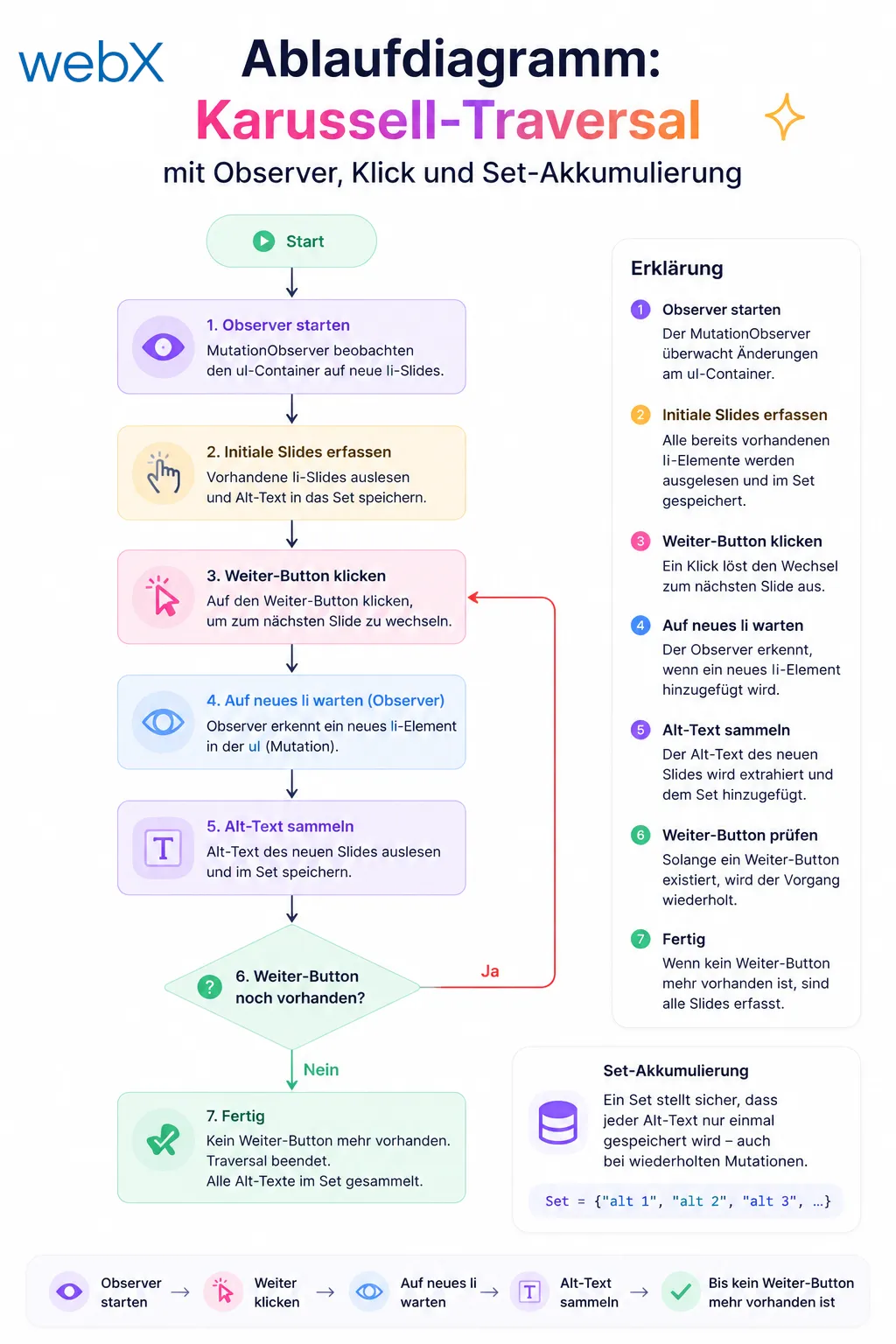
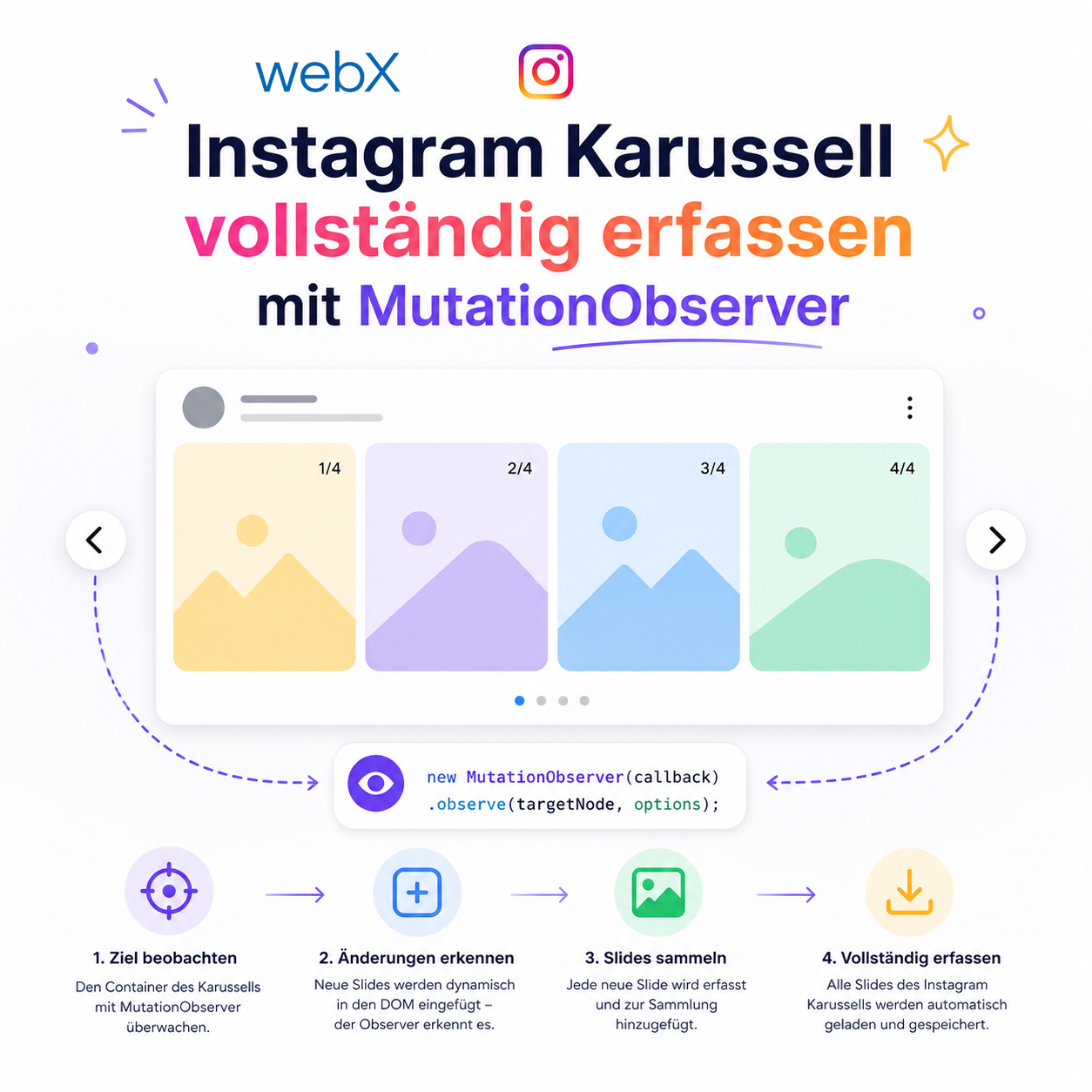
Figure: Carousel traversal flow: start the observer, click the next button, wait for a new li and collect alt text until no next button remains. The original illustration retains its German labels.
The diagram shows the loop from initial capture to completion. Each iteration starts the observer, clicks, waits and collects. The next-button check determines whether the loop continues or ends.
Finding the next button semantically
The same principle applies as with caption expansion: no class names. The next button has aria-label="Weiter", or aria-label="Next" on English-language Instagram instances.
const NEXT_BUTTON_LABELS = ['Weiter', 'Next'];

const findCarouselNextButton = (postRoot: HTMLElement): HTMLElement | null => {
  for (const label of NEXT_BUTTON_LABELS) {
    const btn = postRoot.querySelector<HTMLElement>(`button[aria-label="${label}"]`);
    if (btn) return btn;
  }
  return null;
};
These literal German and English selector values are intentionally preserved. The aria-label attributes belong to Instagram’s accessibility infrastructure. They are considerably more stable than class names, which can change with every deployment.
What this means for the RAG system
Every individual slide’s alt text now becomes part of the embedding. For a 6-slide post containing a series of motivational quotes, the embedding includes all six quotes rather than only the first.
This directly improves retrieval quality. A semantic search for content on slide 4 now reliably finds the post. Previously, that content remained invisible to the vector system.
The overhead is minimal: 1 second for the first slide transition, then under 200 milliseconds for each subsequent transition. All carousel navigation runs in the background after the user confirms the screenshot in the overlay.
All articles in the series
- Vision and system overview: Chrome Extension, RAG architecture and project background: Read article
- Building a RAG system: Qdrant, embeddings and cosine similarity in TypeScript: Read article
- AI provider abstraction: Ollama vs. OpenAI, interface design and no vendor lock-in: Read article
- Chrome Extension MV3: Three isolated runtime contexts, message passing and Strategy Pattern: Read article
- Docker Compose strategy: The override pattern, from local development to Azure: Read article
- Ollama locally vs. Docker: The decision and its consequences: Read article
- Ollama auto-pull entrypoint: Automated model setup at container startup: Read article
- tsconfig and Vite:
Node16vs.bundler, and why Vite has its own rules: Read article - Load complete Instagram captions with MutationObserver: Read article
- Chrome Extension foundation with health indicator and retry queue: Read article
- Phase 2 features: Shadow DOM overlay, Tailwind v4 and duplicate detection: Read article
- Race condition in platform detection: How a UI event breaks Instagram detection: Read article
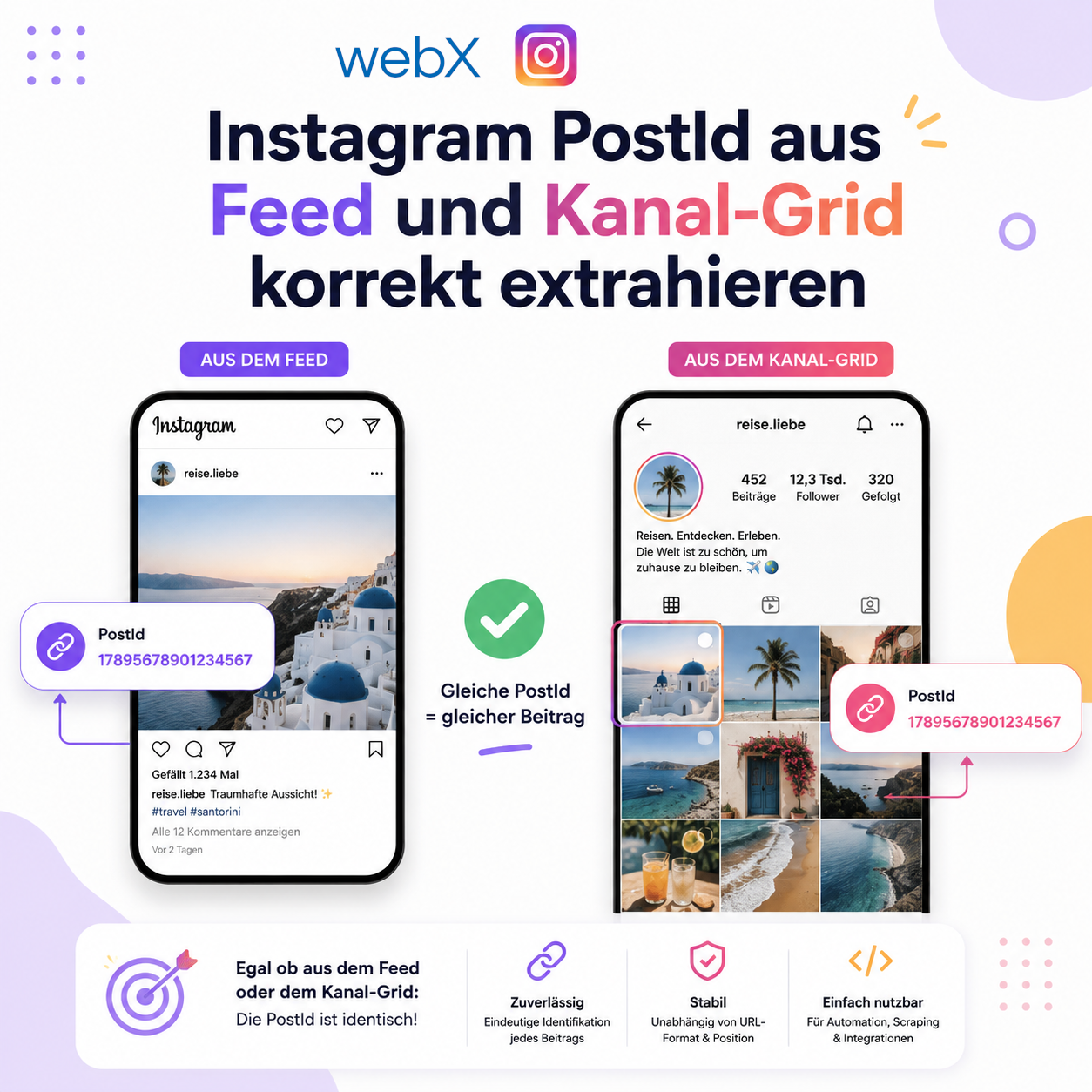
- Extracting PostId in two Instagram layouts: querySelector vs. ancestor traversal: Read article
- Capture a complete Instagram carousel with MutationObserver: Lazy loading, observer-before-click and timeout fallback: (this article)
- Notes and tags when saving screenshots: Read article
- Instagram keyboard shortcuts block Chrome Extension input: Read article
- Lowercase normalization and duplicate detection in tag input: Read article
- Zitadel Login V2 in Docker Compose with three hidden errors: Read article
- PKCE OAuth in a Chrome MV3 extension: Read article
- React frontend with react-oidc-context and Zitadel: Read article
- Vite build-time environment variables in Docker: Read article
- Event-driven ingestion with BullMQ and Redis: Read article
- MinIO instead of Azurite: S3-compatible object storage locally and on Hetzner: Read article
- access_token, id_token and the Userinfo endpoint: Which belongs where: Read article
- Qdrant multi-tenancy with one collection per user: Read article
- When backend and frontend know different types: Read article
- Removing Zitadel bootstrap: Host header bug and manual setup: Read article
- Backend code review with six problems fixed before launch: Read article
- Traefik instead of NGINX: Reverse proxy for a growing Docker Compose stack: Read article
- Two-layer rate limiting: Traefik and express-rate-limit with Redis: Read article
- Implementing GDPR Article 17 correctly: Promise.allSettled and export batching: Read article
- Embedding model lock-in: Why mxbai-embed-large is a permanent production decision: Read article
- Docker volumes in production: Named volumes, bind mounts and the Hetzner volume approach: Read article
- Two vulnerabilities before launch: Redis without authentication and an exposed Qdrant admin port: Read article
- Traefik as the single entry point in the Docker Compose stack: Read article
- Connecting Zitadel behind Traefik with issuer, JWKS and Login V2: Read article
- Fixing the frontend when the nginx healthcheck fails on localhost: Read article
- Observability for my Docker Compose stack with Bull Board and Dozzle: Read article
- Open the Qdrant dashboard securely with local Traefik and an SSH tunnel: Read article
- Diagnosis of chunking failures despite tokenization: Read article
- Why I set the chunk size to 1500 tokens: Read article
- Splitting the embedding workflow into clear steps: Read article
- Bringing chunking, storage and search back together: Read article
- Capture Intake as a separate module, less orchestration in the Express endpoint: Read article
Building a data capture system based on browser extensions with complex DOM interactions? Let us assess it together.