Load complete Instagram captions with MutationObserver
Instagram truncates captions and changes class names with every deployment. Semantic DOM searches and a MutationObserver still load the full text reliably.

Contents
- The problem with long captions
- Finding the button semantically
- Click and observe
- The async chain and Chrome’s particular requirement
- The regression caused by container traversal
- What this delivers
- All articles in the series
The problem with long captions
The Chrome Extension captures Instagram posts and stores them in a vector database. Each post includes its caption, the text below the image. Short captions are no problem. But Instagram truncates long texts. The rest sits behind a button in the DOM, waiting to be clicked.
That sounds simple. Find the button, click it, read the text.
The catch: no stable selector.
Instagram builds its UI with automatically generated class names. xhtzj3i, _aacl, x1lliihq. Every deployment can generate different names. Targeting class names means fighting infrastructure you do not control.
The extension therefore follows one principle: semantic searches instead of class names. That keeps the code stable even when Instagram changes.
Finding the button semantically
Instagram’s “more” button, labelled “mehr” in the German interface, has a specific role and behavior. It is an inline element that appears directly after the visible text lines in the DOM. It carries role="button" and has display: inline-block in its inline style attribute.
The most important characteristic: its immediate parent contains a text node that starts with "..." or the Unicode ellipsis "\u2026".
function findExpandButton(container: Element): Element | null {
  const candidates = container.querySelectorAll('[role="button"]');

  for (const el of candidates) {
    const style = el.getAttribute('style') ?? '';
    if (!style.includes('display: inline-block')) continue;

    const parent = el.parentElement;
    if (!parent) continue;

    const textBefore = Array.from(parent.childNodes).find((n) => n.nodeType === Node.TEXT_NODE);

    if (
      textBefore?.textContent?.trimStart().startsWith('...') ||
      textBefore?.textContent?.trimStart().startsWith('\u2026')
    ) {
      return el;
    }
  }

  return null;
}
Not a single class name. Only structure, role and text content. That is the core of the approach: the question is not “What is the button called in CSS?”, but “What does the button do in the UI?”.
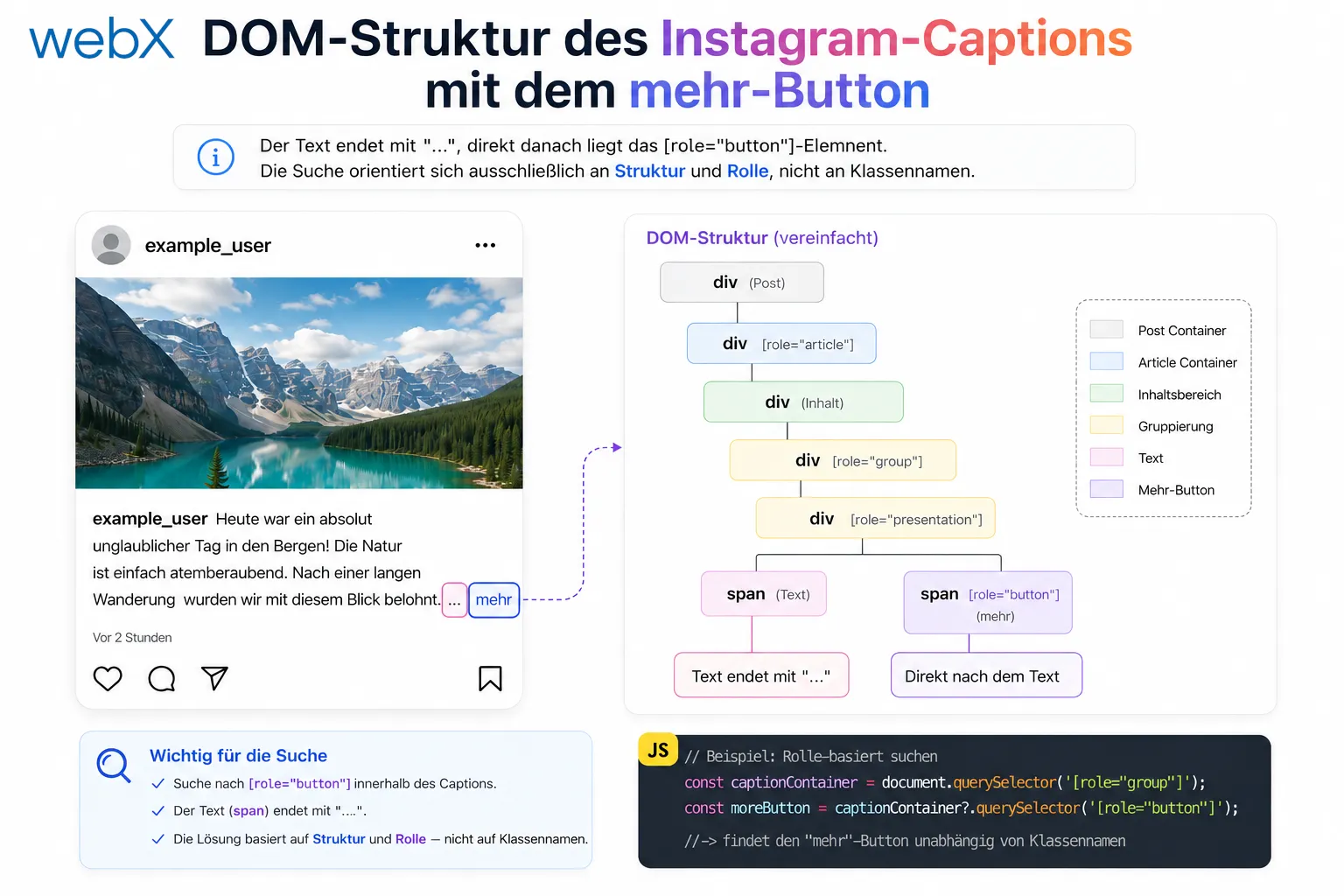 Figure: DOM structure of an Instagram caption. The text ends with ”…”, immediately followed by the [role=“button”] element. The search relies exclusively on structure and role, not class names. The original illustration retains its German labels.
Click and observe
Once found, the button is clicked through JavaScript. Something then happens in the DOM: Instagram loads the full text, replaces or expands the content, and the button disappears.
I need a mechanism that waits until this has happened.
MutationObserver is designed for this. It watches a DOM node for changes and reports when children are added or removed.
async function expandCaptionIfTruncated(container: Element): Promise<void> {
  const button = findExpandButton(container);
  if (!button) return;

  return new Promise((resolve) => {
    const observer = new MutationObserver(() => {
      if (!container.contains(button)) {
        observer.disconnect();
        resolve();
      }
    });

    observer.observe(container, { childList: true, subtree: true });
    (button as HTMLElement).click();

    setTimeout(() => {
      observer.disconnect();
      resolve();
    }, 2000);
  });
}
The logic: watch the container for changes to its child nodes. As soon as the button is no longer inside the container, expansion is complete. The setTimeout after 2 seconds is a fallback that prevents the function from hanging indefinitely on unexpected DOM structures.
The async chain and Chrome’s particular requirement
Expansion is async. That runs through the entire extraction chain: expandCaptionIfTruncated, extractCaption and extractInstagramPostMetadata. All three are now async.
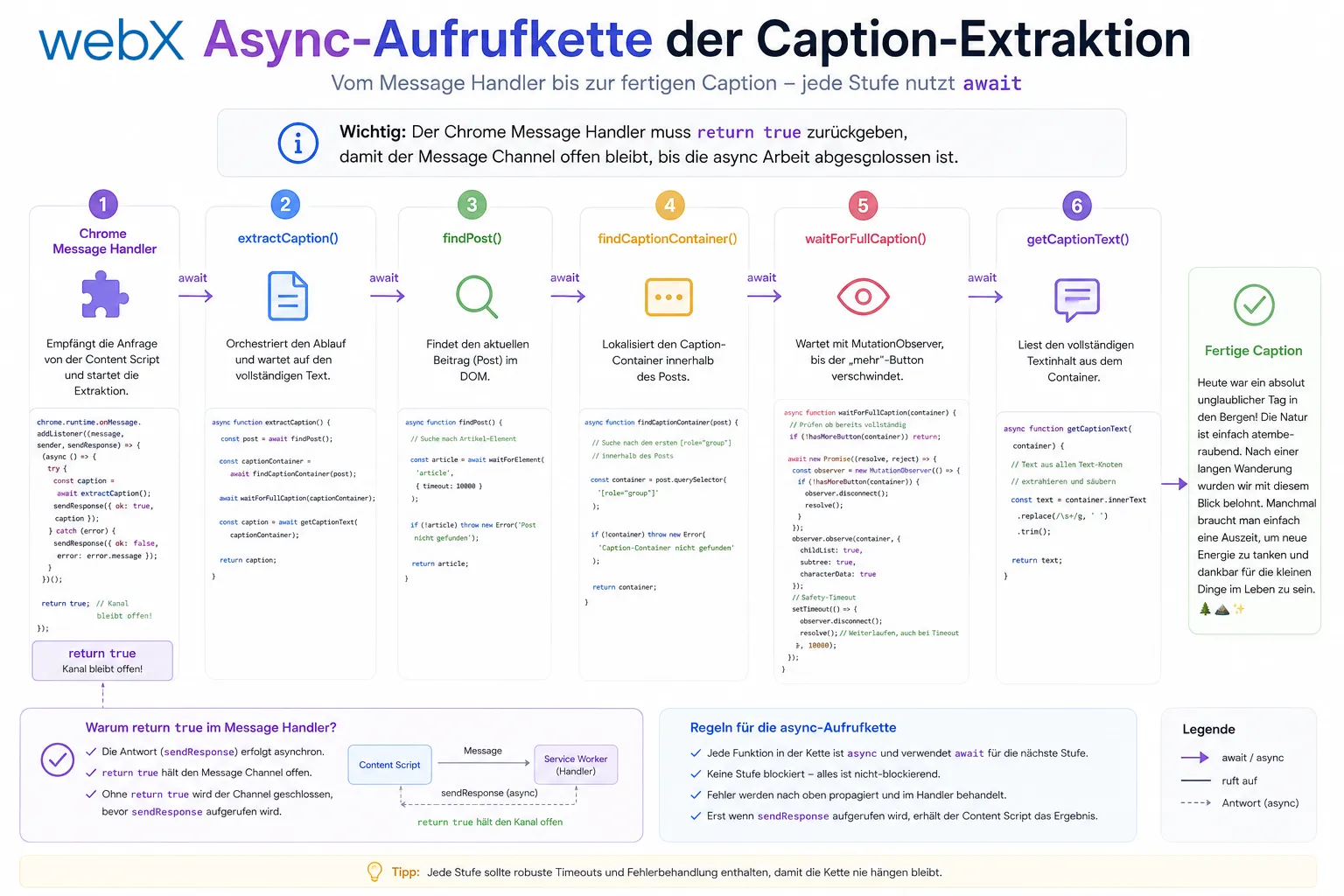 Figure: The async call chain from the message handler to the completed caption. Each stage must use await, and the Chrome message handler must return true to keep the channel open. The original illustration retains its German labels.
This has an important consequence in the Chrome message handler. Chrome allows asynchronous replies to messages, but only if the message handler returns true. That signals Chrome to keep the response channel open.
chrome.runtime.onMessage.addListener((message, _sender, sendResponse) => {
  if (message.action === 'get-instagram-metadata') {
    extractInstagramPostMetadata(capturedElement)
      .then((metadata) => sendResponse({ metadata }))
      .catch(() => sendResponse({ metadata: null }));

    return true; // this return value keeps the channel open
  }
});
Without return true, Chrome closes the channel immediately. sendResponse arrives too late, the reply is lost, and the background script receives undefined.
The regression caused by container traversal
Implementing caption expansion introduced a regression. I had extracted the traversal logic into a helper named findCaptionContainer to make the code clearer.
The problem: the original logic traverses the DOM upward and tries all matching containers. If the first one supplied no caption text, it tried the next.
The helper returned only the first matching container. It returned immediately.
// Before refactoring: full traversal
function extractCaption(element: Element): string | null {
  let current: Element | null = element;
  while (current) {
    if (isTargetContainer(current)) {
      const text = tryExtractFromContainer(current);
      if (text) return text; // keep trying if null
    }
    current = current.parentElement;
  }
  return null;
}

// After refactoring: stops at the first container
function findCaptionContainer(element: Element): Element | null {
  let current: Element | null = element;
  while (current) {
    if (isTargetContainer(current)) return current; // too early
    current = current.parentElement;
  }
  return null;
}
The result: for posts where the first matching container contained no readable text, extraction returned null. Every time. Reliably.
The solution was to remove the helper and put the full loop directly into extractCaption. This time as async, with the expandCaptionIfTruncated step first.
What this delivers
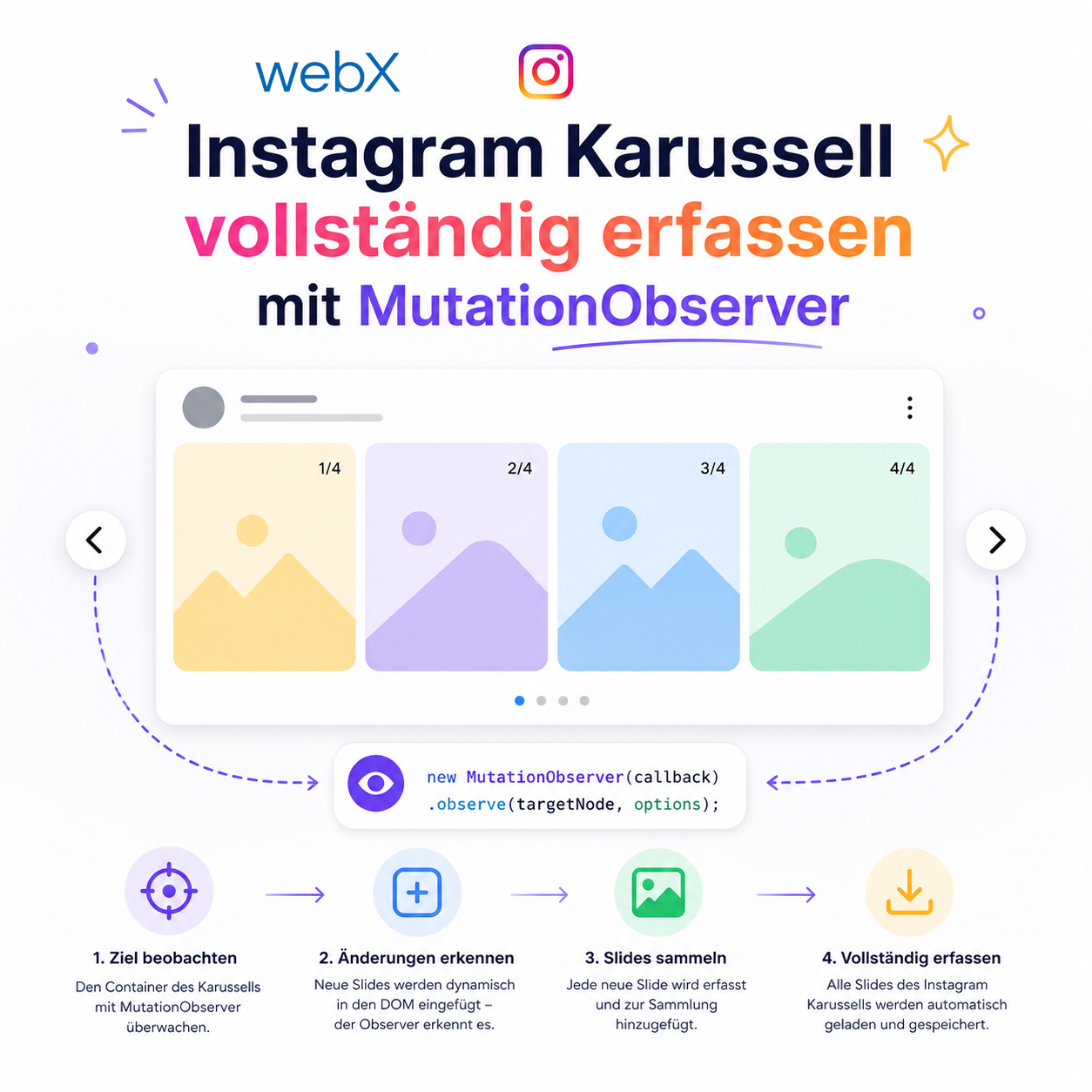
The full caption text, regardless of its length. No hardcoded class names. No timeout polling for particular variants. A clean observer pattern that fires exactly once and cleans itself up. I later reused the same approach for capturing every slide in a carousel.
This matters directly to the RAG pipeline: the more complete the text in the vector store, the better the semantic retrieval quality. Truncated captions produce worse embeddings.
All articles in the series
- Vision and system overview: Chrome Extension, RAG architecture and project background: Read article
- Building a RAG system: Qdrant, embeddings and cosine similarity in TypeScript: Read article
- AI provider abstraction: Ollama vs. OpenAI, interface design and no vendor lock-in: Read article
- Chrome Extension MV3: Three isolated runtime contexts, message passing and Strategy Pattern: Read article
- Docker Compose strategy: The override pattern, from local development to Azure: Read article
- Ollama locally vs. Docker: The decision and its consequences: Read article
- Ollama auto-pull entrypoint: Automated model setup at container startup: Read article
- tsconfig and Vite:
Node16vs.bundler, and why Vite has its own rules: Read article - Load complete Instagram captions with MutationObserver: (this article)
- Chrome Extension foundation with health indicator and retry queue: Read article
- Phase 2 features: Shadow DOM overlay, Tailwind v4 and duplicate detection: Read article
- Race condition in platform detection: How a UI event breaks Instagram detection: Read article
- Extracting PostId in two Instagram layouts: querySelector vs. ancestor traversal: Read article
- Capture a complete Instagram carousel with MutationObserver: Lazy loading, observer-before-click and timeout fallback: Read article
- Notes and tags when saving screenshots: Read article
- Instagram keyboard shortcuts block Chrome Extension input: Read article
- Lowercase normalization and duplicate detection in tag input: Read article
- Zitadel Login V2 in Docker Compose with three hidden errors: Read article
- PKCE OAuth in a Chrome MV3 extension: Read article
- React frontend with react-oidc-context and Zitadel: Read article
- Vite build-time environment variables in Docker: Read article
- Event-driven ingestion with BullMQ and Redis: Read article
- MinIO instead of Azurite: S3-compatible object storage locally and on Hetzner: Read article
- access_token, id_token and the Userinfo endpoint: Which belongs where: Read article
- Qdrant multi-tenancy with one collection per user: Read article
- When backend and frontend know different types: Read article
- Removing Zitadel bootstrap: Host header bug and manual setup: Read article
- Backend code review with six problems fixed before launch: Read article
- Traefik instead of NGINX: Reverse proxy for a growing Docker Compose stack: Read article
- Two-layer rate limiting: Traefik and express-rate-limit with Redis: Read article
- Implementing GDPR Article 17 correctly: Promise.allSettled and export batching: Read article
- Embedding model lock-in: Why mxbai-embed-large is a permanent production decision: Read article
- Docker volumes in production: Named volumes, bind mounts and the Hetzner volume approach: Read article
- Two vulnerabilities before launch: Redis without authentication and an exposed Qdrant admin port: Read article
- Traefik as the single entry point in the Docker Compose stack: Read article
- Connecting Zitadel behind Traefik with issuer, JWKS and Login V2: Read article
- Fixing the frontend when the nginx healthcheck fails on localhost: Read article
- Observability for my Docker Compose stack with Bull Board and Dozzle: Read article
- Open the Qdrant dashboard securely with local Traefik and an SSH tunnel: Read article
- Diagnosis of chunking failures despite tokenization: Read article
- Why I set the chunk size to 1500 tokens: Read article
- Splitting the embedding workflow into clear steps: Read article
- Bringing chunking, storage and search back together: Read article
- Capture Intake as a separate module, less orchestration in the Express endpoint: Read article
Building a browser extension or data capture system with complex DOM interactions? Let us assess it together.