Building a RAG system with Qdrant, embeddings and Node.js
Retrieval-Augmented Generation is not theory. It is a concrete three-step architecture: embed, retrieve and generate. I show how I implemented it entirely locally with Qdrant, nomic-embed-text and llama3.2, without cloud costs.
Contents
- What RAG actually means
- The RAG backend architecture
- What I learned about vector databases
- Why this matters for Power Pages
- All articles in the series
What RAG actually means
RAG stands for Retrieval-Augmented Generation. It sounds like a marketing term. It is not.
It is an architecture that solves a specific problem: LLMs know nothing about your private data.
ChatGPT does not know which Instagram posts you captured last week. GPT-4o cannot analyze which accounts posted about a topic most frequently in the last 30 days. No language model can do that unless you give it context.
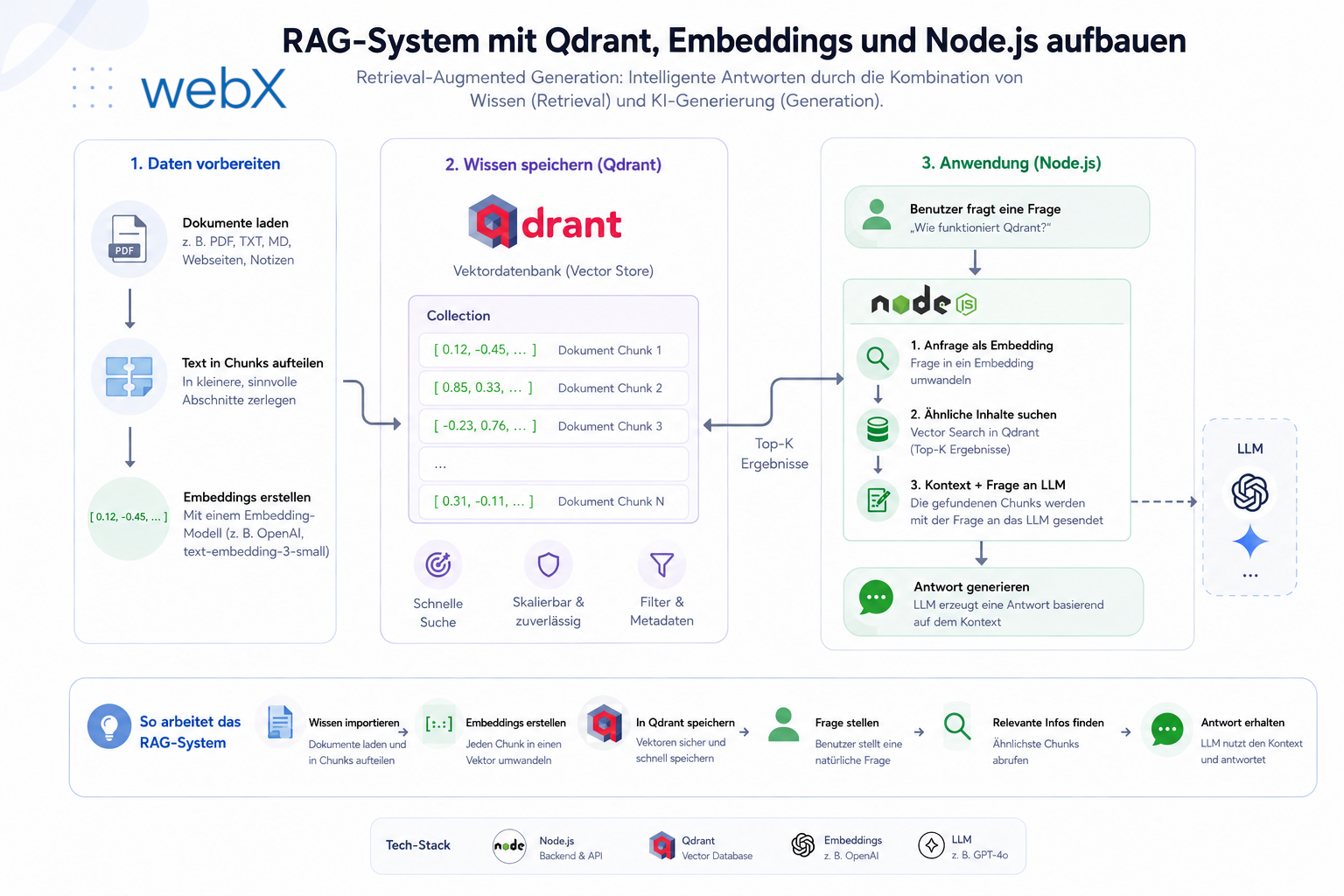
RAG solves this in three steps:
- Embed: text is converted into high-dimensional numeric vectors that encode semantic meaning
- Retrieve: an incoming query is also embedded, and the most similar stored vectors are retrieved
- Generate: the retrieved texts are passed to an LLM as context, which produces a coherent answer
This is not fine-tuning. It is not training. It is context injected at runtime. That is what makes it practical.
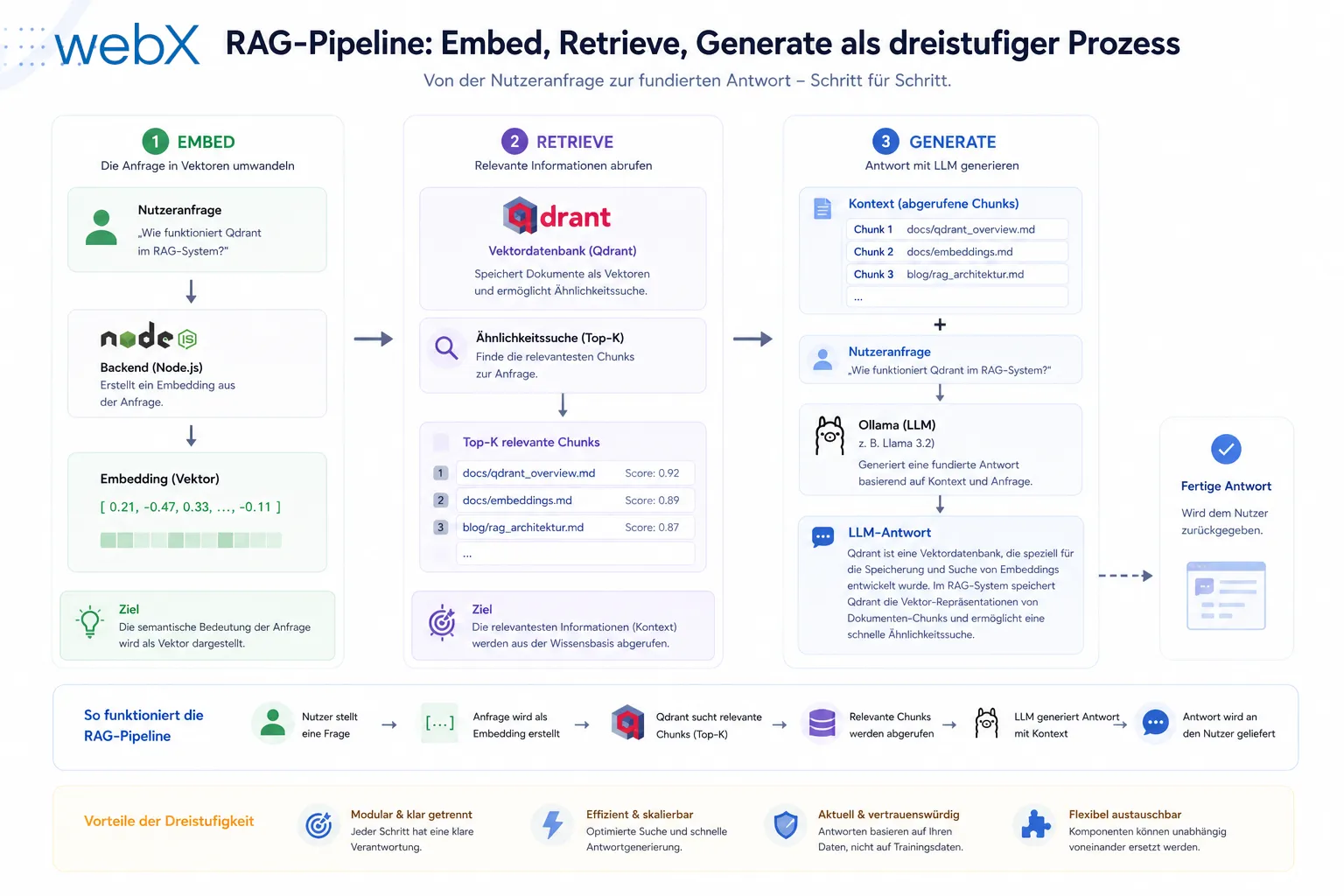 Figure: The three steps. An Instagram post is embedded as text and stored in Qdrant. When a query arrives, its text is also embedded, the most similar entries are retrieved and the language model receives them as context. The original illustration retains its German labels.
The RAG backend architecture
The backend is a Node.js/Express server written in TypeScript. Three endpoints, two services and clear responsibility:
src/
  index.ts           # entry point, collection initialization
  routes/
    ingest.ts        # POST /ingest: store
    query.ts         # POST /query: search + generate
    health.ts        # GET /health: status
  services/
    qdrant.ts        # vector database operations
    ai-provider.ts   # provider abstraction (Ollama | OpenAI)
    providers/
      ollama-provider.ts
      openai-provider.ts
From Instagram post to vector
When the Chrome Extension sends a screenshot and metadata, the following happens:
// src/routes/ingest.ts
router.post('/', async (req, res) => {
  const payload = req.body as PlatformAnalysisPayload;

  // 1. Build embedding text from metadata
  const embeddingText = buildEmbeddingText(payload);
  // result: "some_account Amazing watch #watches Photo of a golden watch"

  // 2. Generate vector (768 dimensions)
  const vector = await generateEmbedding(embeddingText);

  // 3. Store in Qdrant
  const id = crypto.randomUUID();
  await storePoint(id, vector, payload);

  res.status(201).json({ success: true, id, embeddingText });
});
The text being embedded is crucial. It combines:
metadata.username: who posted?metadata.caption: what does the post say?metadata.altTexts.join(" "): what do screen readers see?
Alt text is particularly valuable because it often contains a precise, AI-generated image description, especially on Instagram.
Qdrant as the vector database
Qdrant is a database specifically optimized for vectors. Unlike PostgreSQL with pgvector or Elasticsearch, it is built exclusively for this use case.
The collection is created automatically at server startup:
// src/services/qdrant.ts
export async function ensureCollection(): Promise<void> {
  const exists = await client.collectionExists(COLLECTION_NAME);
  if (!exists) {
    await client.createCollection(COLLECTION_NAME, {
      vectors: {
        size: parseInt(process.env.VECTOR_SIZE ?? '768'),
        distance: 'Cosine',
      },
    });
  }
}
Why cosine similarity? For high-dimensional text vectors, direction matters more than absolute distance. Cosine measures the angle between two vectors. Semantically similar texts point in the same direction regardless of length. This is the right metric for text retrieval.
768 dimensions: this is the output size of nomic-embed-text and of text-embedding-3-small with the dimensions parameter. My article on AI provider abstraction explains the details.
Searching and generating
// src/routes/query.ts
router.post('/', async (req, res) => {
  const { query, limit = 5 } = req.body;

  // 1. Embed the query
  const queryVector = await generateEmbedding(query);

  // 2. Find most similar points in Qdrant
  const results = await searchSimilar(queryVector, limit);

  // 3. Build context from results
  const context = results
    .map((r, i) => {
      const m = (r.payload as any).metadata;
      return `[${i + 1}] @${m.username}: "${m.caption}" (${m.altTexts?.join(', ')})`;
    })
    .join('\n');

  // 4. Generate LLM answer
  const answer = await generateAnswer(query, context);

  res.json({
    answer,
    sources: results.map((r) => ({
      id: r.id,
      score: r.score,
      payload: r.payload,
    })),
  });
});
The context string passed to the LLM is deliberately simple. It lists relevant posts with username, caption and alt text. This gives the model enough information to generate a precise answer.
The prompt design:
// in ollama-provider.ts
const prompt = `You are an analysis assistant for saved social media posts.
Here are the relevant entries from the dataset:

${context}

Question: ${query}

Answer precisely and based on the entries above.`;
No complex chain-of-thought prompting. This is sufficient for the use case.
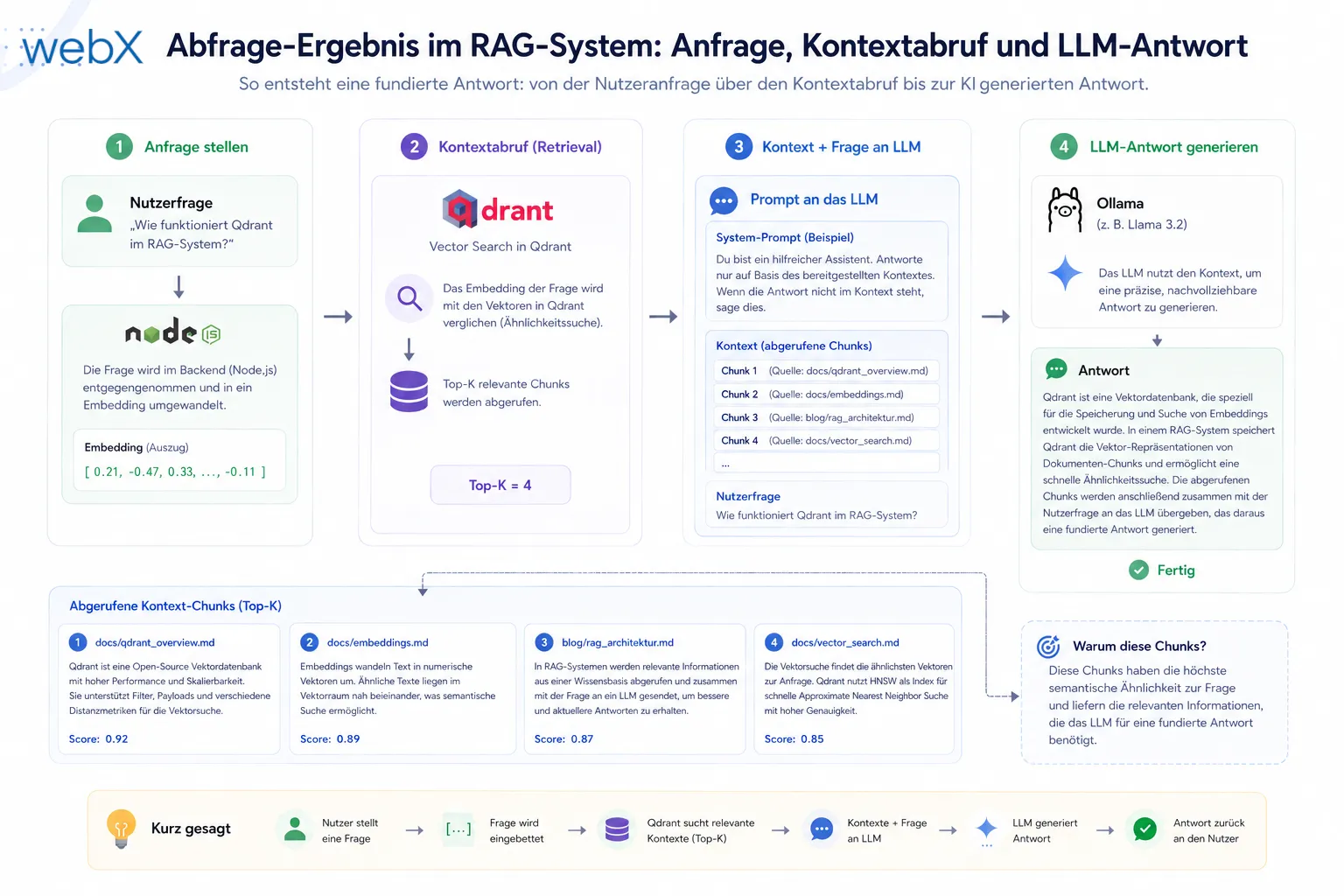 Figure: An analyst’s query passes through the system. Qdrant supplies the most relevant stored posts as context, and Ollama generates a structured answer. The original illustration retains its German text.
What I learned about vector databases
Vector size is a system decision, not a model decision.
Once a collection has been created for 768-dimensional vectors, you cannot simply switch to a model with 1536 dimensions without re-embedding all data and recreating the collection. That is why the provider abstraction ensures both models, Ollama and OpenAI, produce exactly 768 dimensions.
OpenAI provides the dimensions parameter in text-embedding-3-small for this:
const response = await this.client.embeddings.create({
  model: 'text-embedding-3-small',
  input: text,
  dimensions: 768, // explicitly reduced to 768
});
This is a strategic decision: switching providers without data migration.
Cosine similarity is not a percentage score.
A score of 0.91 sounds like “91% similar”. That is incorrect. It is the cosine of the angle between two vectors. A score of 0.7 can already be highly relevant. The absolute number matters less than the relative ranking within a query.
Qdrant’s JavaScript client has loose typing.
The points_count field in collection information is typed as any in the TypeScript client:
// cast required due to loose typing in Qdrant JS client
const count = (collectionInfo as any).points_count as number;
Not beautiful code, but working with external clients requires handling these inconsistencies.
Why this matters for Power Pages
Many Power Pages portals manage large volumes of documents, FAQs, product descriptions or support tickets in Dataverse. Traditional search is keyword-based and finds only exact matches.
RAG-based semantic search would enable questions such as:
- “Which products have similar properties to this item?”
- “Find all support tickets related to this problem”
- “Which FAQ entries are relevant to this request?”
The technology is the same. The stack would be identical. Only the data source, Dataverse instead of Instagram, and the embedding logic change.
The next article covers the decision that changed everything, provider abstraction for Ollama and OpenAI.
All articles in the series
- Vision and system overview: Chrome Extension, RAG architecture and project background: Read article
- Building a RAG system: Qdrant, embeddings and cosine similarity in TypeScript: (this article)
- AI provider abstraction: Ollama vs. OpenAI, interface design and no vendor lock-in: Read article
- Chrome Extension MV3: Three isolated runtime contexts, message passing and Strategy Pattern: Read article
- Docker Compose strategy: The override pattern, from local development to Azure: Read article
- Ollama locally vs. Docker: The decision and its consequences: Read article
- Ollama auto-pull entrypoint: Automated model setup at container startup: Read article
- tsconfig and Vite:
Node16vs.bundler, and why Vite has its own rules: Read article - Load complete Instagram captions with MutationObserver: Read article
- Chrome Extension foundation with health indicator and retry queue: Read article
- Phase 2 features: Shadow DOM overlay, Tailwind v4 and duplicate detection: Read article
- Race condition in platform detection: How a UI event breaks Instagram detection: Read article
- Extracting PostId in two Instagram layouts: querySelector vs. ancestor traversal: Read article
- Capture a complete Instagram carousel with MutationObserver: Lazy loading, observer-before-click and timeout fallback: Read article
- Notes and tags when saving screenshots: Read article
- Instagram keyboard shortcuts block Chrome Extension input: Read article
- Lowercase normalization and duplicate detection in tag input: Read article
- Zitadel Login V2 in Docker Compose with three hidden errors: Read article
- PKCE OAuth in a Chrome MV3 extension: Read article
- React frontend with react-oidc-context and Zitadel: Read article
- Vite build-time environment variables in Docker: Read article
- Event-driven ingestion with BullMQ and Redis: Read article
- MinIO instead of Azurite: S3-compatible object storage locally and on Hetzner: Read article
- access_token, id_token and the Userinfo endpoint: Which belongs where: Read article
- Qdrant multi-tenancy with one collection per user: Read article
- When backend and frontend know different types: Read article
- Removing Zitadel bootstrap: Host header bug and manual setup: Read article
- Backend code review with six problems fixed before launch: Read article
- Traefik instead of NGINX: Reverse proxy for a growing Docker Compose stack: Read article
- Two-layer rate limiting: Traefik and express-rate-limit with Redis: Read article
- Implementing GDPR Article 17 correctly: Promise.allSettled and export batching: Read article
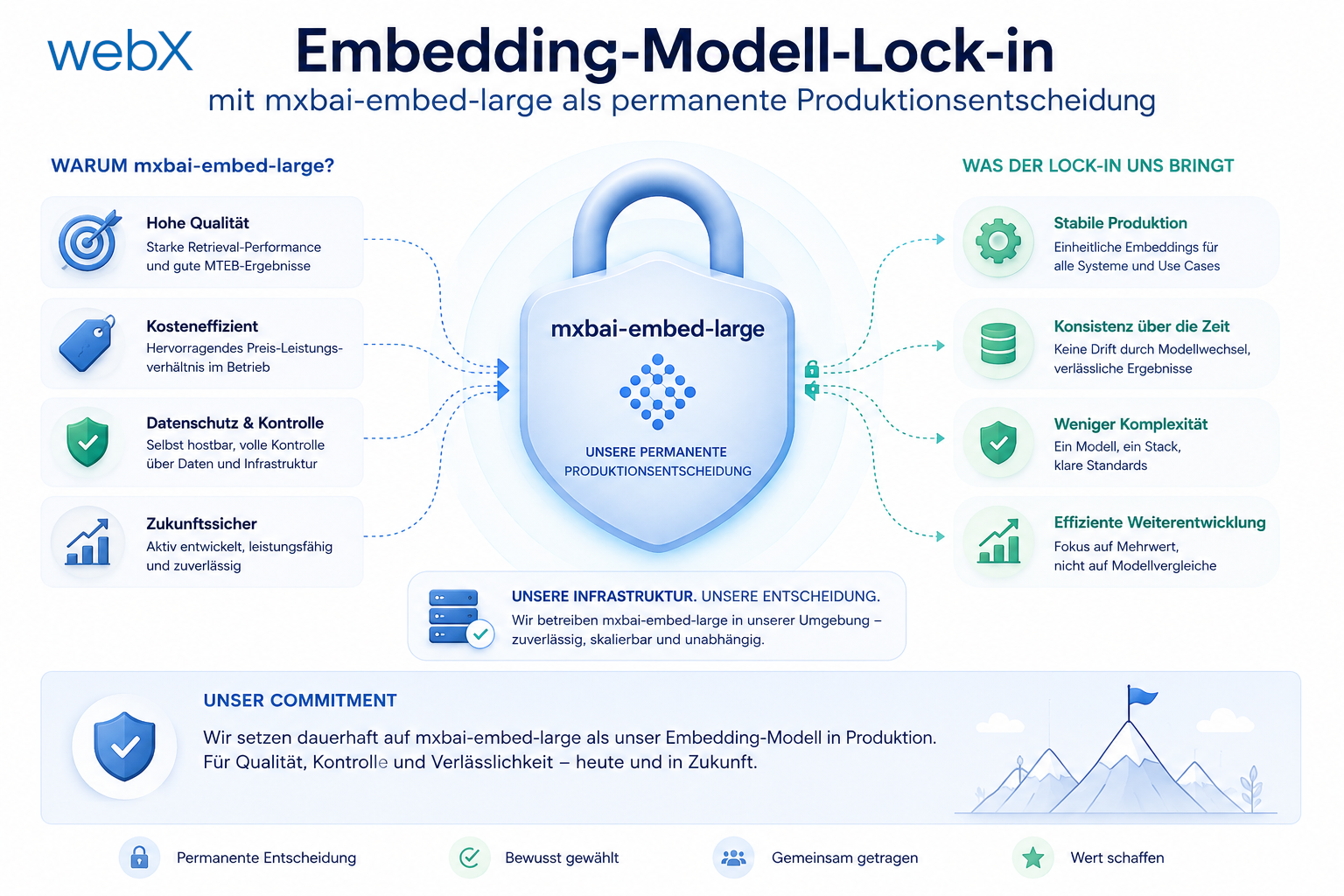
- Embedding model lock-in: Why mxbai-embed-large is a permanent production decision: Read article
- Docker volumes in production: Named volumes, bind mounts and the Hetzner volume approach: Read article
- Two vulnerabilities before launch: Redis without authentication and an exposed Qdrant admin port: Read article
- Traefik as the single entry point in the Docker Compose stack: Read article
- Connecting Zitadel behind Traefik with issuer, JWKS and Login V2: Read article
- Fixing the frontend when the nginx healthcheck fails on localhost: Read article
- Observability for my Docker Compose stack with Bull Board and Dozzle: Read article
- Open the Qdrant dashboard securely with local Traefik and an SSH tunnel: Read article
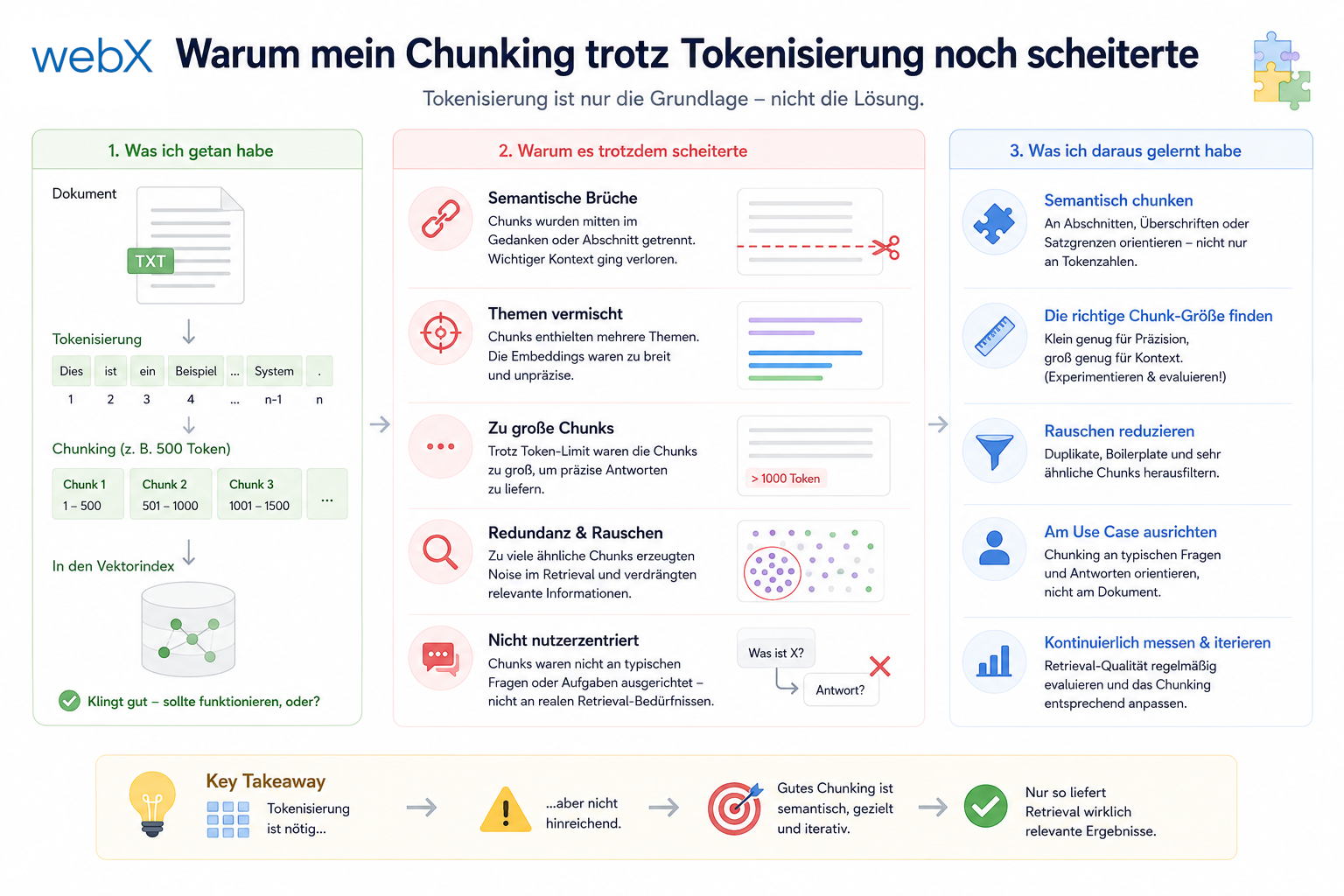
- Diagnosis of chunking failures despite tokenization: Read article
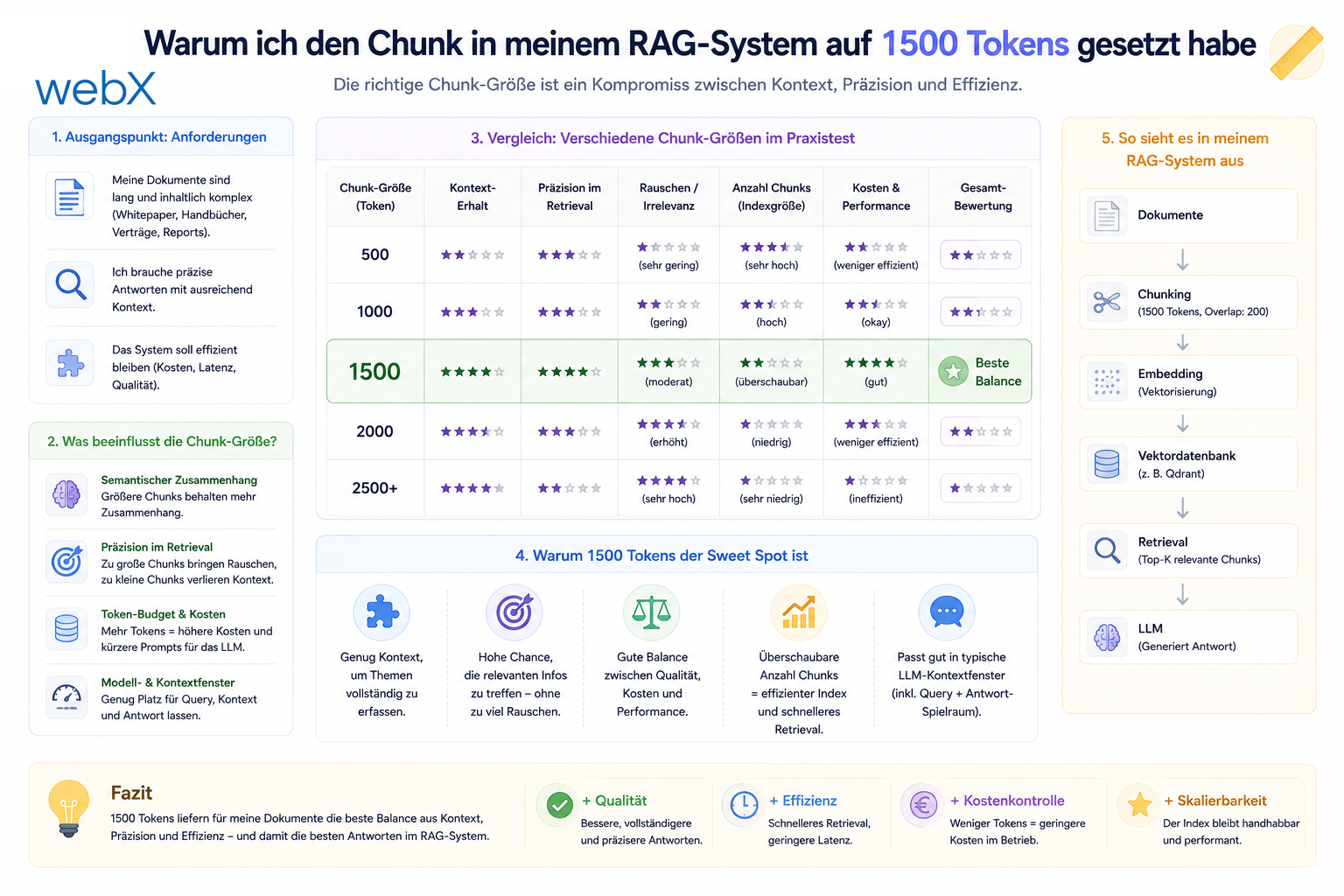
- Why I set the chunk size to 1500 tokens: Read article
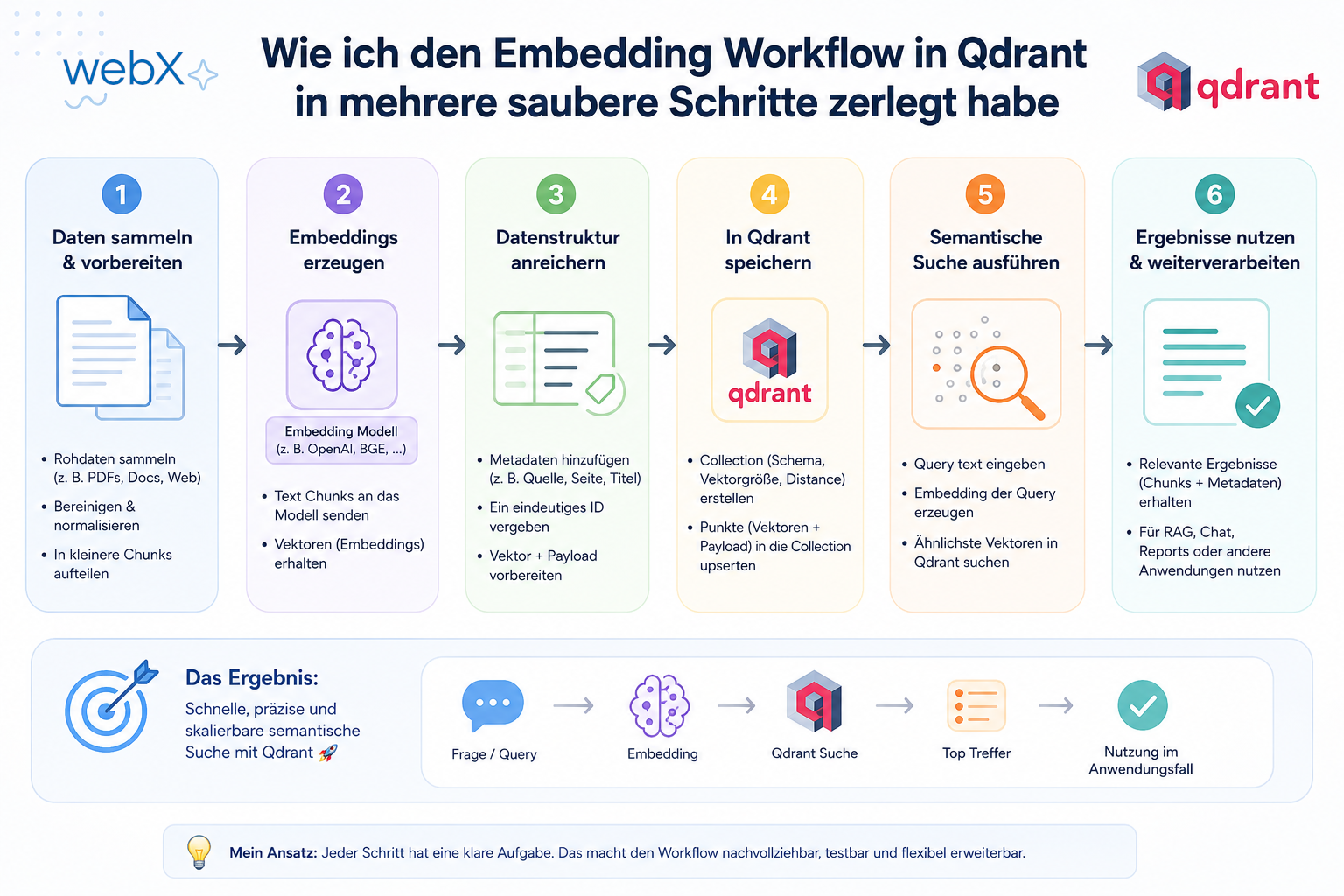
- Splitting the embedding workflow into clear steps: Read article
- Bringing chunking, storage and search back together: Read article
- Capture Intake as a separate module, less orchestration in the Express endpoint: Read article
Do you want semantic search in a Power Pages portal without depending on AI Builder or Copilot Studio? Let us think through the use case together.