Traefik as the single entry point in a Docker Compose stack
I restructured the stack so that browsers and the extension see only Traefik. Everything else runs through two Docker networks, explicit labels and no more direct host ports.
Contents
- Traefik as the single entry point in a Docker Compose stack
- The new topology
- Which services belong on which network
- How Traefik discovers routes
- Why this fits Hetzner
- What I learned from the Traefik entry point
- All articles in the series
Traefik as the single entry point in a Docker Compose stack
Initially, the stack was simple enough to understand directly. One port for the frontend, one for the backend and one for Zitadel. Convenient locally. Completely fine for a short demo.
This is often where the first mistaken assumption appears. A port is not an architecture model. It is only a visible entry point. As more services arrive, a convenient shortcut quickly becomes a system that can be explained only through exceptions.
I therefore moved the stack to a clearer structure. There is only one public entry point. Everything else runs internally.
The new topology
The target architecture is simple.
Browser and Browser Extension
  Traefik
    Frontend
    Backend
    Zitadel
In practice, this means:
- The browser knows only
app.localhost,api.localhostandauth.localhost. - The extension sends data only to
http://api.localhost/ingest. - Traefik decides which container receives the request.
- Internal services such as Redis, Qdrant, Postgres and Ollama remain entirely private.
The actual separation uses two Docker networks.
networks:
  traefik_net:
    name: traefik_net

  internal_net:
    name: internal_net
traefik_net is for everything Traefik needs to route. internal_net is for infrastructure that must never be directly exposed.
Which services belong on which network
The rule is simple.
- Frontend belongs only on
traefik_net. - Backend belongs on
traefik_netandinternal_net. - Zitadel belongs on
traefik_netandinternal_net. - MinIO belongs on both networks.
- Redis, Qdrant, Postgres and Ollama belong only on
internal_net.
This keeps the frontend clearly separated. It cannot see a database directly. It can communicate only with Traefik. This is exactly the kind of boundary that will still make sense later on Hetzner.
How Traefik discovers routes
Traefik reads its configuration directly from Docker labels.
frontend:
  labels:
    - 'traefik.enable=true'
    - 'traefik.http.routers.frontend.rule=Host(`app.localhost`)'
    - 'traefik.http.routers.frontend.entrypoints=web'
    - 'traefik.http.services.frontend.loadbalancer.server.port=80'
The same pattern applies to the backend and Zitadel. The route therefore lives directly with the service. No second configuration system. No scattered exceptions.
For me, this is the real benefit. Adding a service later does not mean searching three files to find where the route is defined. The service carries its own route.
Why this fits Hetzner
The local structure already matches what I can reuse in production.
This means:
- Domains change, not the architecture.
- HTTP later becomes HTTPS.
- Traefik remains the central layer in front.
- Internal service communication stays the same.
Replacing app.localhost with app.example.com later does not require reinventing infrastructure. I change only the domain values and certificate configuration.
This is exactly the kind of preparation that keeps a project manageable later.
What I learned from the Traefik entry point
A Compose stack does not become production-ready merely by starting locally. It becomes production-ready when its topology already has the right boundaries.
I do not need bigger tooling for this. First, I need a clean model.
Traefik is more than a reverse proxy here. It is the layer that turns individual containers into an understandable system.
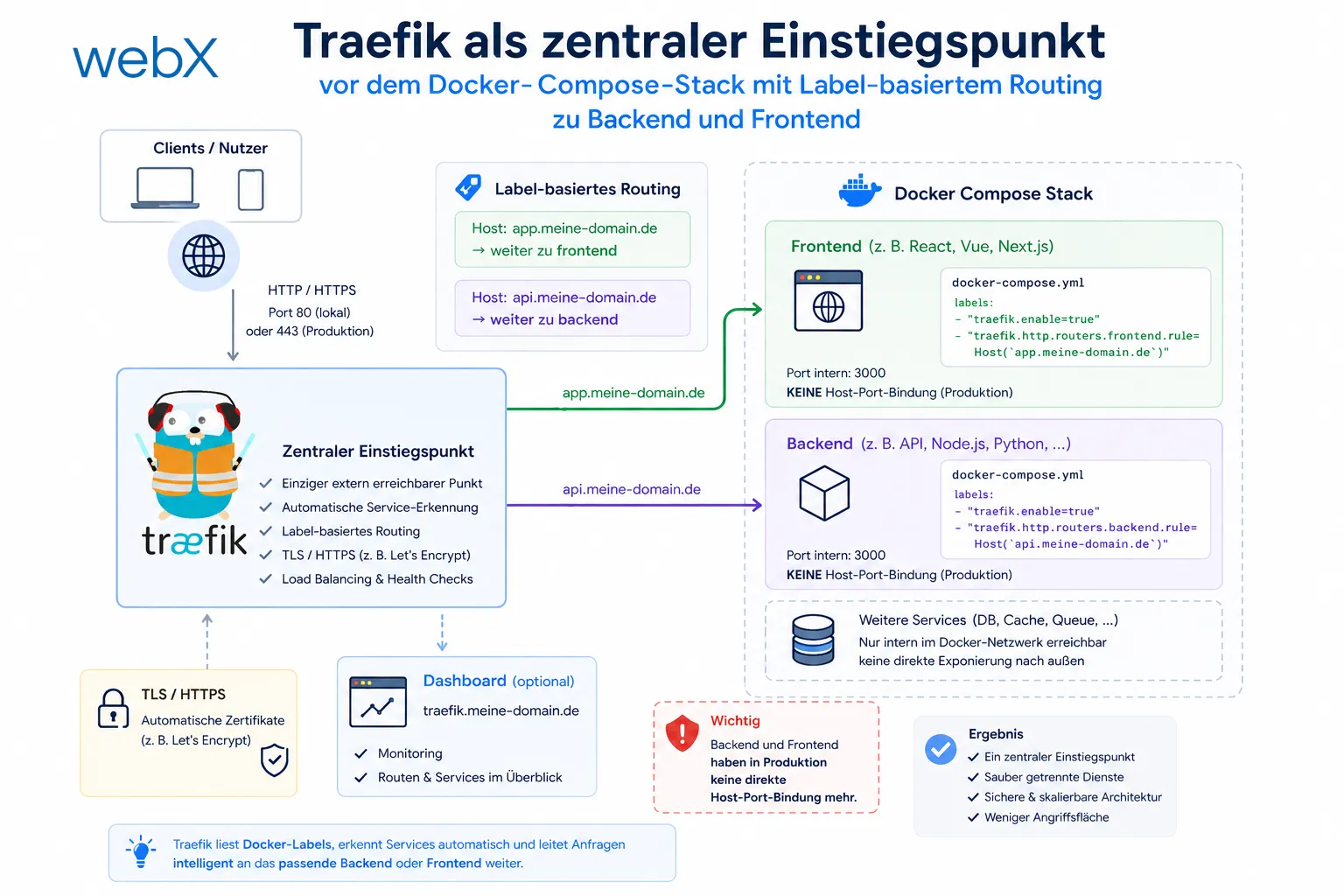
The illustration shows the single public entry point in front of the stack. Browsers and the extension communicate only with Traefik. Internal services remain on private Docker networks. The original illustration retains its German labels.
All articles in the series
- Vision and system overview: Chrome Extension, RAG architecture and project background: Read article
- Building a RAG system: Qdrant, embeddings and cosine similarity in TypeScript: Read article
- AI provider abstraction: Ollama vs. OpenAI, interface design and no vendor lock-in: Read article
- Chrome Extension MV3: Three isolated runtime contexts, message passing and Strategy Pattern: Read article
- Docker Compose strategy: The override pattern, from local development to Azure: Read article
- Ollama locally vs. Docker: The decision and its consequences: Read article
- Ollama auto-pull entrypoint: Automated model setup at container startup: Read article
- tsconfig and Vite:
Node16vs.bundler, and why Vite has its own rules: Read article - Load complete Instagram captions with MutationObserver: Read article
- Chrome Extension foundation with health indicator and retry queue: Read article
- Phase 2 features: Shadow DOM overlay, Tailwind v4 and duplicate detection: Read article
- Race condition in platform detection: How a UI event breaks Instagram detection: Read article
- Extracting PostId in two Instagram layouts: querySelector vs. ancestor traversal: Read article
- Capture a complete Instagram carousel with MutationObserver: Lazy loading, observer-before-click and timeout fallback: Read article
- Notes and tags when saving screenshots: Read article
- Instagram keyboard shortcuts block Chrome Extension input: Read article
- Lowercase normalization and duplicate detection in tag input: Read article
- Zitadel Login V2 in Docker Compose with three hidden errors: Read article
- PKCE OAuth in a Chrome MV3 extension: Read article
- React frontend with react-oidc-context and Zitadel: Read article
- Vite build-time environment variables in Docker: Read article
- Event-driven ingestion with BullMQ and Redis: Read article
- MinIO instead of Azurite: S3-compatible object storage locally and on Hetzner: Read article
- access_token, id_token and the Userinfo endpoint: Which belongs where: Read article
- Qdrant multi-tenancy with one collection per user: Read article
- When backend and frontend know different types: Read article
- Removing Zitadel bootstrap: Host header bug and manual setup: Read article
- Backend code review with six problems fixed before launch: Read article
- Traefik instead of NGINX: Reverse proxy for a growing Docker Compose stack: Read article
- Two-layer rate limiting: Traefik and express-rate-limit with Redis: Read article
- Implementing GDPR Article 17 correctly: Promise.allSettled and export batching: Read article
- Embedding model lock-in: Why mxbai-embed-large is a permanent production decision: Read article
- Docker volumes in production: Named volumes, bind mounts and the Hetzner volume approach: Read article
- Two vulnerabilities before launch: Redis without authentication and an exposed Qdrant admin port: Read article
- Traefik as the single entry point in the Docker Compose stack: (this article)
- Connecting Zitadel behind Traefik with issuer, JWKS and Login V2: Read article
- Fixing the frontend when the nginx healthcheck fails on localhost: Read article
- Observability for my Docker Compose stack with Bull Board and Dozzle: Read article
- Open the Qdrant dashboard securely with local Traefik and an SSH tunnel: Read article
- Diagnosis of chunking failures despite tokenization: Read article
- Why I set the chunk size to 1500 tokens: Read article
- Splitting the embedding workflow into clear steps: Read article
- Bringing chunking, storage and search back together: Read article
- Capture Intake as a separate module, less orchestration in the Express endpoint: Read article
Are you building a similar multi-service stack and considering how to handle routing and TLS cleanly? Let us assess it together.