Multilingual Power Pages and React with centralized content management
How to manage translations for complex portals centrally and pass them seamlessly to React components.
Contents
- The confusion of scattered translation keys in web portals
- Connecting Power Pages content snippets and React
- The technical path to a central language repository
- Full flexibility without code changes
The confusion of scattered translation keys in web portals
If you maintain an international web portal, you know the problem. Some text lives in the portal system, some is hardcoded in frontend components, and other translations are in external Excel templates. With seven languages and over a thousand text entries, you immediately lose track without a clear structure.
I faced exactly this situation. The portal had to be provided in seven languages for international retailers. Every button, error message and column header in the Excel files needed an accurate translation that could be adjusted flexibly. The way I implemented this comprehensive portal internationalization set the direction for the project.
Connecting Power Pages content snippets and React
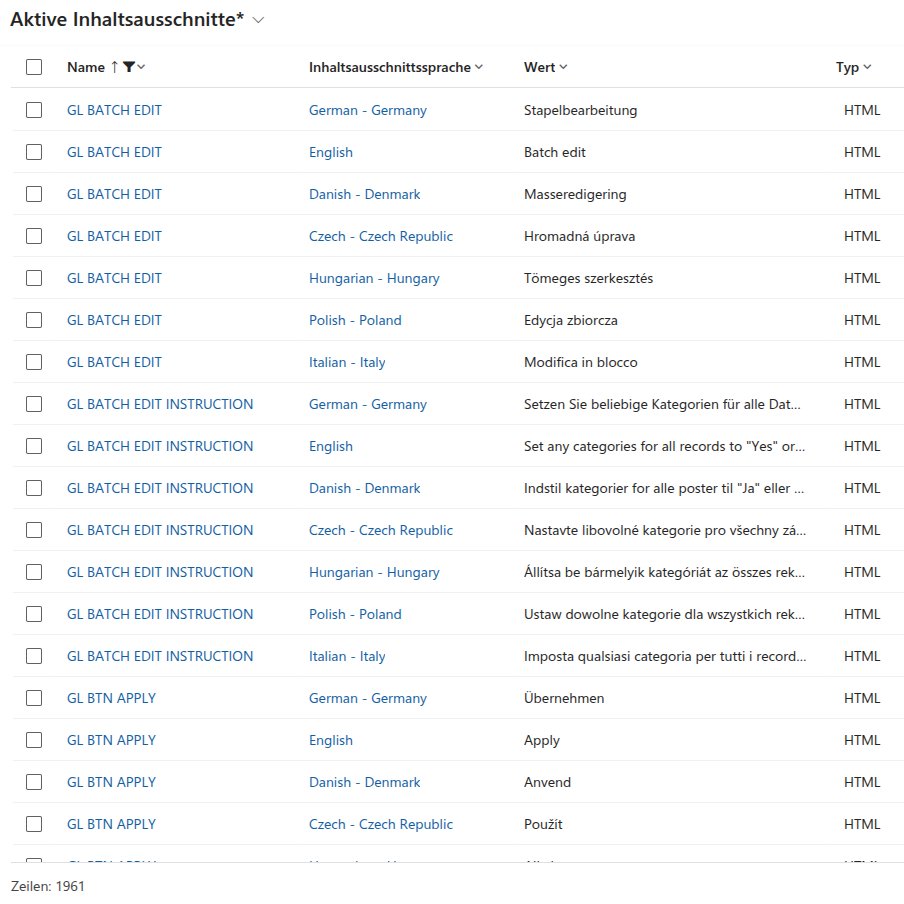
I decided against separate storage. Instead, we use Power Pages’ built-in content snippets as the single source of truth. The portal backend stores all translations in all languages centrally in one place.
The React application reads these content snippets when the page loads. I pass the text to the frontend in one structured JSON object. This makes translations immediately available in React without additional API requests afterward.
The technical path to a central language repository
I implemented the solution through a straightforward but highly effective interface.
I create a content snippet for each text entry in Portal Management. These snippets contain unique keys and the corresponding text for all seven languages. This even applies to the multilingual Excel templates, whose column headers and validation messages are translated dynamically.
When the page is requested, the portal’s Liquid template reads all relevant snippets in the currently active language. I embed this data as a global JSON object in the HTML document.
React takes this object at startup and uses it to populate its own i18n helper class. This class ensures that a defined fallback text is always returned when an entry is missing, so that the portal never displays empty UI elements.
// Define client-side translation repository
interface LanguagePack {
  [key: string]: string;
}

// Global dictionary with fallback mechanism
export class TranslationService {
  private dictionary: LanguagePack;

  constructor(translations: LanguagePack) {
    this.dictionary = translations;
  }

  // Get translated string with simple key fallback
  public translate(key: string, defaultValue: string): string {
    const text = this.dictionary[key];
    if (text === undefined) {
      return defaultValue;
    }
    return text;
  }
}
Full flexibility without code changes
The greatest advantage of this architecture is straightforward maintenance. If a business department wants to adjust wording or correct a translation, it can do so directly in the portal backend.
No new build process or React application deployment is necessary. Changes become visible immediately in the live portal after the content snippet is saved. To see how we also use this multilingual text offline, read my article on Excel integration for bulk editing.
Are you also preparing a complex portal for international users? Let us discuss how to establish a sustainable localization structure.