Building Dataverse payloads for Power Pages from the schema
How I read required fields, Choices, multi-select Choices and lookups from EntityDefinitions before Power Pages Server Logic creates a lead in Dataverse.
Contents
- One form, several tables
- Query the schema separately from data
- Read RequiredLevel and IsValidForCreate together
- Choice and multi-select Choice
- Lookups need the navigation property
- Where Server Logic reached a limit
- Test the payload in the target environment
- What metadata can and cannot establish
One form, several tables
I wanted to save contact enquiries from a React application in Dataverse through Power Pages Server Logic. Depending on the business relationship, the result would be a lead or an opportunity. The request also needed links to contacts, accounts, properties and rental spaces.
Display names, form values and a business description weren’t enough to build that payload. I needed to know which value Dataverse expected for each column and which columns I could write during creation. Those answers are in the schema.
For a create payload, I therefore check column types, RequiredLevel and IsValidForCreate first. Choices need numeric option values. Lookups also need the exact navigation property and the target table’s entity set name.
My article on Power Pages Server Logic as a security boundary explains the boundary between React and Dataverse. This article focuses on the request body that eventually reaches Dataverse.
Query the schema separately from data
I called the Dataverse Web API directly from an authenticated CRM browser session. EntityDefinitions exposes tables, columns and relationships. The CSDL document at $metadata also helps identify Web API names. All Dataverse paths below are relative to https://<dataverse-environment-host>/api/data/v9.2 and use the lead table as an example.
I kept data queries and schema queries separate. A request to /leads with $select and $expand returns records and related values. It doesn’t return column definitions. This request provides the column overview.
GET /EntityDefinitions(LogicalName='lead')/Attributes?$select=LogicalName,SchemaName,AttributeType,AttributeTypeName,RequiredLevel,IsValidForCreateThese were the properties I needed for the mapping.
| Property | What it tells me |
|---|---|
LogicalName | Technical column name used in the mapping |
AttributeTypeName | Actual column type, including multi-select Choices |
RequiredLevel.Value | Declared requirement for a value |
IsValidForCreate | Whether the column can be set during creation |
ReferencingEntityNavigationPropertyName | Exact name for a single lookup binding |
EntitySetName | Resource name for records in the relevant table |
The last two properties come from relationship and table definitions. They aren’t additional properties returned by the column query above. Microsoft documents these separate requests in its guide to querying schema definitions with the Web API.
These queries are a development tool. In the portal, access goes through Server Logic or the Power Pages Web API at /_api, with its own site settings and table permissions. The schema doesn’t define authorization or which form fields are allowed. Server Logic must check both independently.
The direct organization endpoint doesn’t belong in the public frontend as a replacement for the portal API. Credentials for that endpoint must stay out of it too.
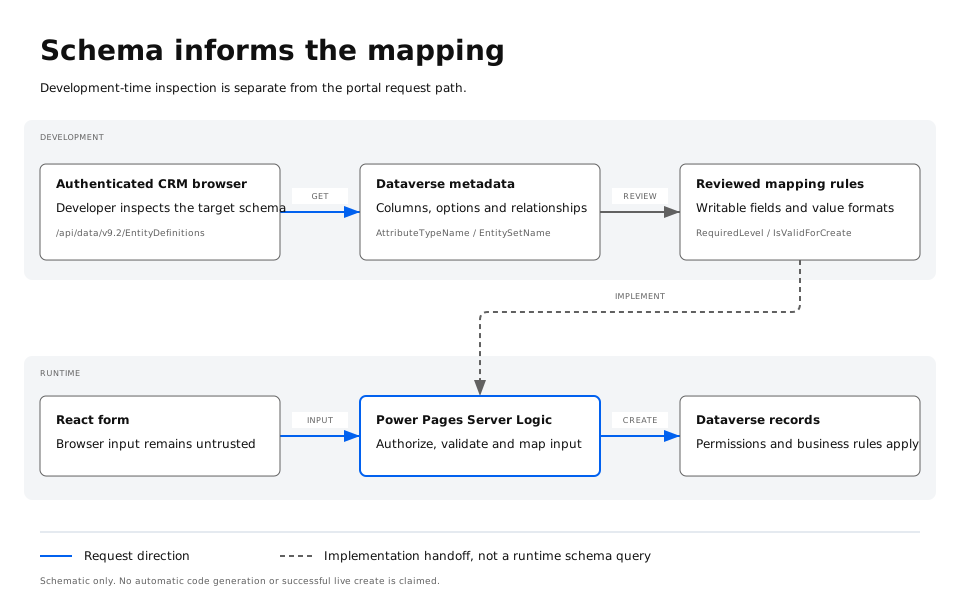
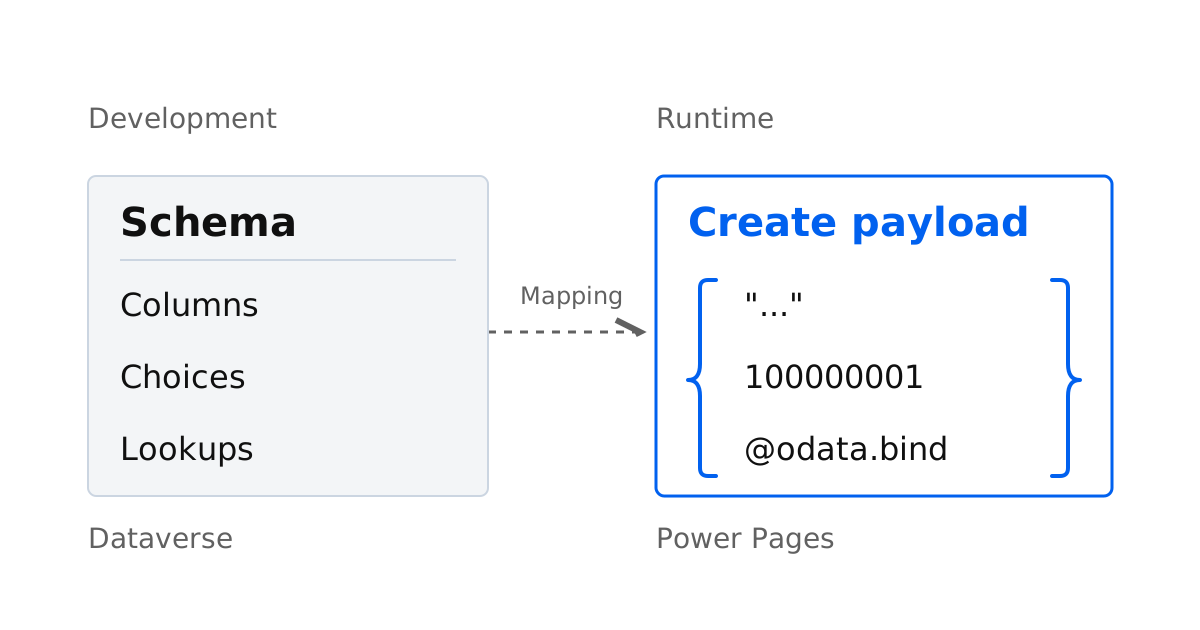
The upper path inspects the schema during development. The resulting mapping rules are implemented in Server Logic. The lower path sends form requests through that validated server logic to Dataverse. The diagram does not show automatic code generation.
Read RequiredLevel and IsValidForCreate together
Columns marked ApplicationRequired can be filtered through RequiredLevel.
GET /EntityDefinitions(LogicalName='lead')/Attributes?$select=LogicalName,RequiredLevel,IsValidForCreate&$filter=RequiredLevel/Value eq Microsoft.Dynamics.CRM.AttributeRequiredLevel'ApplicationRequired'In the schema I inspected, some derived name columns were marked ApplicationRequired. Those same columns had IsValidForCreate: false. They therefore don’t belong in the create payload, even though the metadata marks them as required. I had to read both properties together.
This matches the Dataverse column definitions documentation. A missing value in an ApplicationRequired column doesn’t, on its own, cause Dataverse to return an error. Model-driven apps enforce that level in their UI. At this metadata level, Dataverse enforces only SystemRequired on the server, and only system-created columns can use that level. Plugins and business rules that execute on the server can still impose further conditions.
IsValidForCreate: true describes whether a column can be written during creation. It doesn’t establish the caller’s permission to write it or mean that every value is valid. Length limits, value ranges and business validation still matter.
Only an actual create request establishes which minimum values work in a particular environment. I validate the form’s business requirements independently of whether Dataverse would accept a smaller payload.
Illustrative metadata example
These two columns illustrate how the properties work together. Their names and values are invented examples. This is not an original response from Microsoft or a customer environment.
{
  "value": [
    {
      "LogicalName": "prefix_input",
      "RequiredLevel": { "Value": "ApplicationRequired" },
      "IsValidForCreate": true
    },
    {
      "LogicalName": "prefix_derivedname",
      "RequiredLevel": { "Value": "ApplicationRequired" },
      "IsValidForCreate": false
    }
  ]
}
The requirement level alone doesn’t establish whether a column belongs in the create payload. Microsoft documents the properties and filter under filtering schema definitions by RequiredLevel.
Choice and multi-select Choice
For a single Choice, I send the numeric option value. Its display label doesn’t belong in the payload. Casting to PicklistAttributeMetadata returns that column’s options.
GET /EntityDefinitions(LogicalName='lead')/Attributes(LogicalName='prefix_requesttype')/Microsoft.Dynamics.CRM.PicklistAttributeMetadata?$select=LogicalName&$expand=OptionSetAll names beginning with prefix_ and all option values in this article are examples. Replace them with the names and values from your environment. OptionSet.Options contains numeric Value properties alongside their labels. The number is the transmitted value; the label is for display.
The multi-select Choice was less obvious at first. The product groups column appeared as AttributeType: Virtual in the overview. Microsoft’s column type documentation confirms that the older AttributeType property reports multi-select Choices as Virtual. AttributeTypeName identifies the actual type. Virtual alone therefore isn’t enough to classify the column. Casting to MultiSelectPicklistAttributeMetadata finally identified it as a multi-select column and exposed its options.
GET /EntityDefinitions(LogicalName='lead')/Attributes(LogicalName='prefix_productgroups')/Microsoft.Dynamics.CRM.MultiSelectPicklistAttributeMetadata?$select=LogicalName&$expand=OptionSetIn a Web API payload, a multi-select Choice is a string containing comma-separated option values. I passed a single selected value as a string too. Microsoft documents this format in its guide to multi-select Choices.
| Column type | Example JSON value | Don’t use as the write value |
|---|---|---|
| Choice | 100000001 | The display label |
| Multi-select Choice | "100000000,100000002" | A JSON array or the labels |
| Multi-select Choice with one selection | "100000000" | A single JSON number |
This is the Dataverse Web API contract. An SDK can use different types. A set of option values is also different from a collection of related records.
Adapted from Microsoft’s multi-select example
Microsoft uses the sample_outdooractivities column on contact. The metadata view below is an editorial reconstruction showing only two options. It is not an unmodified GET response.
{
  "LogicalName": "sample_outdooractivities",
  "OptionSet": {
    "Options": [
      {
        "Value": 1,
        "Label": {
          "LocalizedLabels": [{ "Label": "Swimming", "LanguageCode": 1033 }]
        }
      },
      {
        "Value": 9,
        "Label": {
          "LocalizedLabels": [{ "Label": "Camping", "LanguageCode": 1033 }]
        }
      }
    ]
  }
}
The corresponding write value for these two options is:
{
  "sample_outdooractivities": "1, 9"
}
Structure based on Microsoft’s option metadata, with values from its multi-select example. These numbers belong to the sample column on contact. The product groups column on lead needs its own option values.
Lookups need the navigation property
I write lookups using the navigation property with @odata.bind. The value is a path containing the target table’s entity set name and the record’s GUID. The column name, relationship schema name and navigation property can differ. The navigation property’s casing matters too.
Microsoft calls guessing this name a common mistake in its documentation on multi-table lookups. The relationship itself contains the exact name in ReferencingEntityNavigationPropertyName.
GET /EntityDefinitions(LogicalName='lead')/ManyToOneRelationships?$select=ReferencingAttribute,ReferencedEntity,ReferencingEntityNavigationPropertyNameI find the relationship for the lookup column and check ReferencedEntity. I retrieve the target table’s resource path separately. Appending an “s” isn’t a reliable way to derive it.
GET /EntityDefinitions(LogicalName='contact')?$select=LogicalName,EntitySetNameThe entity set name for contact is contacts. I read it from the definition rather than applying the same pluralization rule to other tables.
Polymorphic lookups also need the correct target. A Customer lookup can point to an account or a contact. The Web API exposes a separate navigation property for each target table, for example customerid_account and customerid_contact. I still check the source table’s relationships or CSDL document for the names that apply to that table.
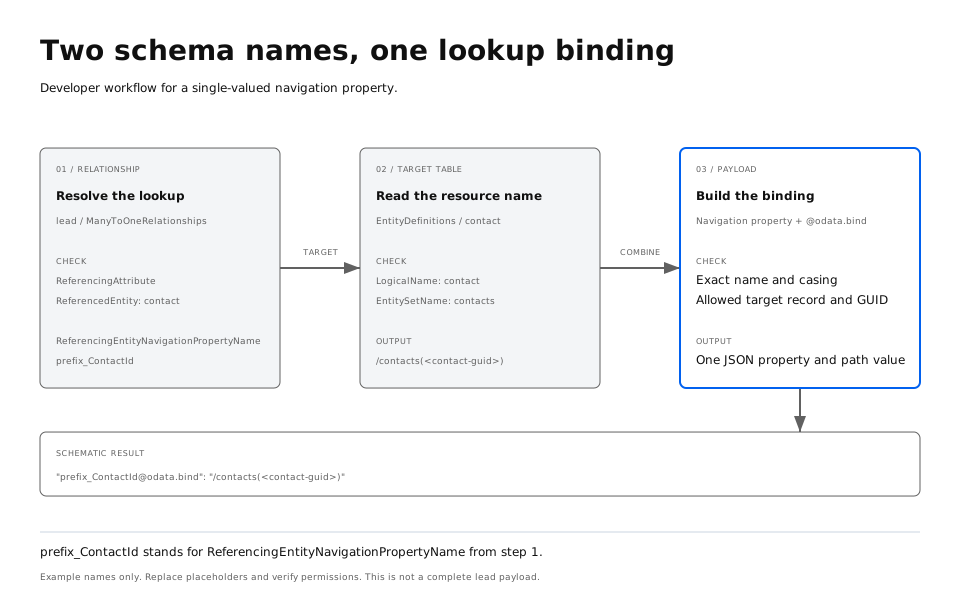
The relationship supplies the name before @odata.bind. The target table supplies the entity set name used in the value. The GUID must identify an allowed record in that table. prefix_ContactId is a placeholder.
A schematic create payload then looks like this. The excerpt shows only the types and lookup binding. It isn’t a verified minimum payload for creating a lead.
{
  "prefix_requesttype": 100000001,
  "prefix_productgroups": "100000000,100000002",
  "prefix_ContactId@odata.bind": "/contacts(<contact-guid>)"
}
Before making a real request, replace the example names, option values and <contact-guid>. Copy the navigation property exactly from the schema. A lookup value read as _..._value isn’t a substitute for this binding when writing.
Where Server Logic reached a limit
For leads linked to several properties, we saw different errors. The N:N relationship required an array for the collection binding. The Server Logic call we tested failed while processing that array. Dataverse then rejected a single string for the collection.
That at least narrowed down the error. A valid OData structure isn’t necessarily processed by every Server Logic call. This attempt doesn’t establish that Server Logic cannot handle arrays in general. The observation applies to the call we tested.
A multi-select Choice is written as a comma-separated string. A collection-valued navigation property describes related records. These are different contracts. The product groups string therefore isn’t a workaround for an N:N binding.
We also investigated separate $ref requests and a custom junction table. With individual lookup columns, such a table could represent each link. It wouldn’t populate the existing native N:N relationship, though. The system-managed intersect table also cannot be written directly, as explained in the documentation on Web API navigation properties. Links are managed through the participating tables’ collection-valued navigation properties.
Single lookup bindings, collection bindings and subsequent $ref requests therefore need separate tests. Successfully creating a lead wouldn’t prove that all intended relationships exist afterwards.
Test the payload in the target environment
For verification, I would start in an approved test environment with the business-required columns that are writable during creation. Choice, multi-select Choice and a single lookup binding can then be added one at a time. This makes it easier to identify which change causes an error.
Two levels need separate checks. A direct Dataverse request tests the data contract under the identity used for that request. Running the same business operation through Power Pages Server Logic also tests the portal path, its serialization and authorization. A successful CRM request doesn’t establish permission for a portal user.
For each attempt, keep the request, actual HTTP status and response together. Then inspect the saved record, its values and its relationships. Production enquiries and real contact data aren’t needed for this.
Shortened Microsoft documentation example
Microsoft demonstrates a basic create request using an account. The request and response below come from that example, with the request reduced to the fields relevant here. This is not a Lead or Server Logic test from my project. Such a POST creates a record and should only be tried in an approved test environment.
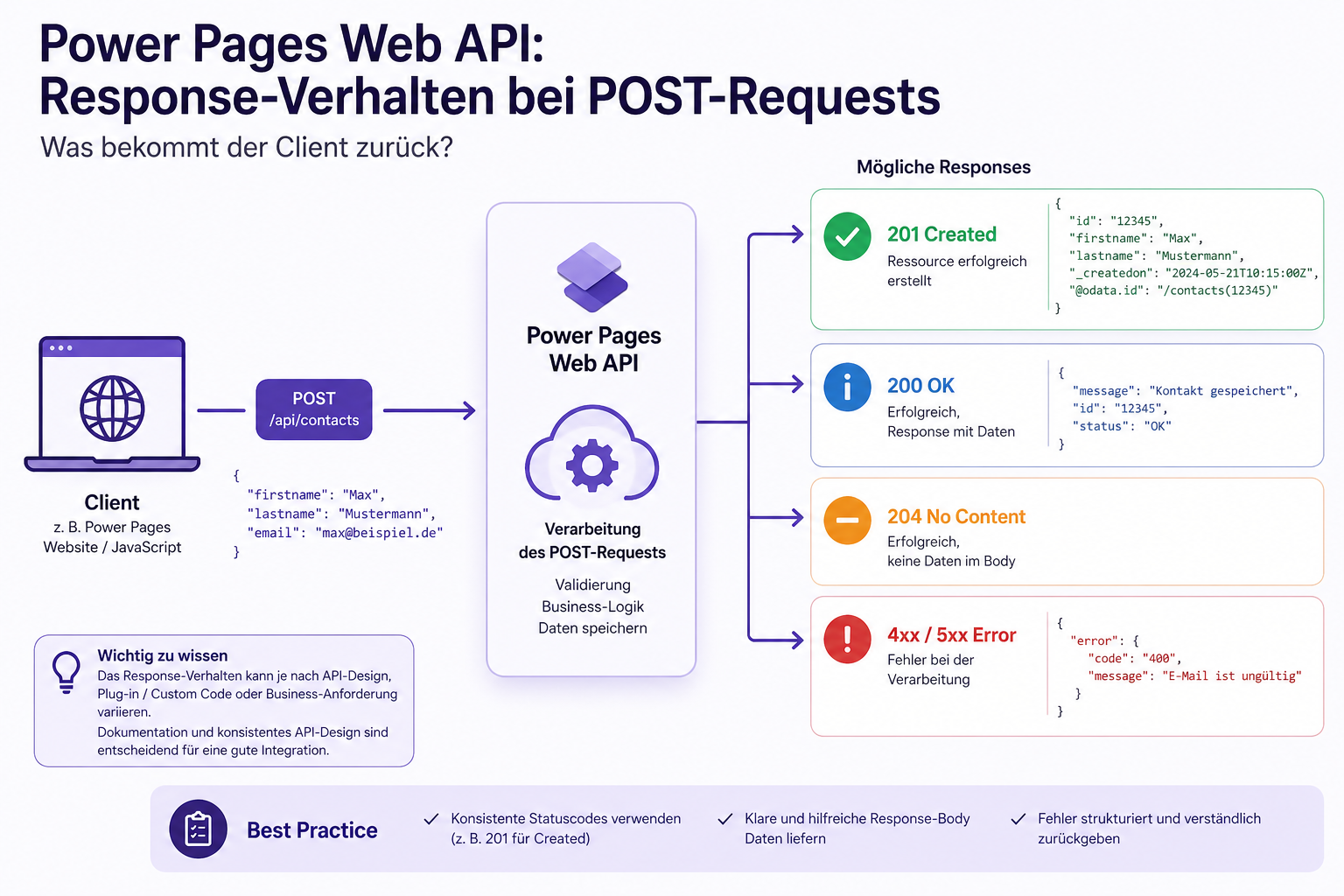
POST [Organization URI]/api/data/v9.2/accounts
Content-Type: application/json; charset=utf-8
OData-MaxVersion: 4.0
OData-Version: 4.0
Accept: application/json

{
  "name": "Sample Account",
  "accountcategorycode": 1
}
Microsoft shows this response with no JSON body:
HTTP/1.1 204 No Content
OData-Version: 4.0
OData-EntityId: [Organization URI]/api/data/v9.2/accounts(00aa00aa-bb11-cc22-dd33-44ee44ee44ee)
Source: Microsoft, Create a table row, Basic create. OData-EntityId contains the address of the created record. This example explains the direct Dataverse contract. It establishes neither portal permissions nor successful end-to-end verification.
What metadata can and cannot establish
Metadata lets me map form values to a payload using their actual types. I separate writable columns from derived ones. For lookups, I check the target table and navigation property instead of guessing names.
This makes failures easier to classify. An incorrect option value, a wrong navigation property, missing permissions and a serialization problem each need a different fix.
The schema doesn’t establish whether saving succeeds, every relationship is created or business rules take effect. I still check those in the target environment. I don’t yet have a successful live test for every path we investigated.