Power Pages Web API response behavior for POST requests
An overview of Power Pages Web API responses to POST requests. Why do you receive 204 No Content, and how do you extract the created record ID from the header?
Contents
- POST requests in the Power Pages Web API
- Default behavior for POST requests in the Power Pages Web API
- The representation scenario and response body data in the Power Pages Web API
- Technical and security considerations for Power Pages Web API developers
- Conclusions on Power Pages Web API response behavior
- Practical experience with Power Pages Web API POST responses
POST requests in the Power Pages Web API
When creating records through OData (Web API) in Power Pages, there are two primary response scenarios. Our implementation of the Dataverse data flow through the Web API in the ECE enterprise portal shows how this works efficiently in practice.
Default behavior for POST requests in the Power Pages Web API
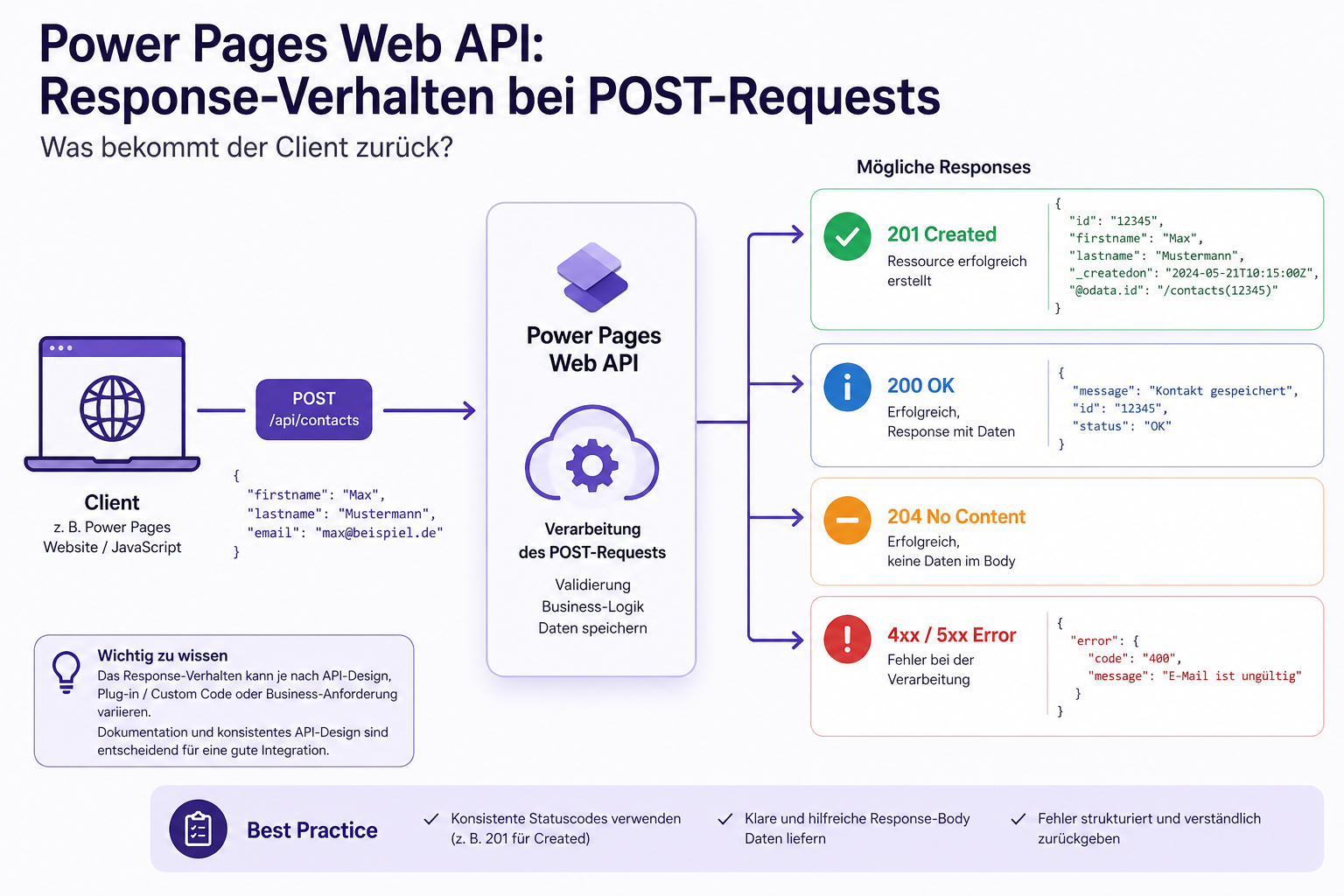
Without additional configuration, the API returns as little as possible to optimize bandwidth.
- HTTP status:
204 No Content - Response body: empty.
- Key insight: the new record’s identity is in the header.
- Extracting the ID: the GUID is in the
entityidresponse header. JavaScript can read it withxhr.getResponseHeader("entityid").
Example POST request with 204 No Content
The following example shows how to create a record and extract its ID from the header:
fetch("/_api/ins_policies", {
  method: "POST",
  headers: {
    "Content-Type": "application/json",
    "__requestverificationtoken": token,
  },
  body: JSON.stringify({
    ins_name: "New Policy",
    // ... optional fields }),
})
  .then((response) => {
    if (response.status === 204) {
      const entityId = response.headers.get("entityid");
      console.log("Created entity ID:", entityId);
    } else {
      throw new Error(`Unexpected status code: ${response.status}`);
    }
  })
  .catch((error) => {
    console.error("Error creating policy:", error);
  });
Response headers for 204 No Content
A successful POST request produces the following response headers:
HTTP/1.1 204 No Content
entityid: 12345678-90ab-cdef-1234-567890abcdef
odata-entityid: https://<domain>.powerappsportals.com/_api/ins_policies(12345678-90ab-cdef-1234-567890abcdef)
The entityid header contains the URL of the newly created record, from which the GUID can be extracted. In this example, the ID would be 12345678-90ab-cdef-1234-567890abcdef.
Benefits of the Power Pages Web API default behavior
Performance: no unnecessary payload and faster transfer.
Security: no accidental exposure of data that is not needed.
Clarity: clear separation between success (204) and errors.
The representation scenario and response body data in the Power Pages Web API
This scenario applies when the app immediately needs the new record’s data, for example for calculated fields or display.
- Requirement: the request must include the
Prefer: return=representationheader. - HTTP status:
201 Created - Response body: contains the complete JSON object of the created record.
- Best practice: combine this with
$selectto return only the columns you need and optimize performance.
Example POST request with 201 Created
fetch('/_api/ins_policies', {
  method: 'POST',
  headers: {
    'Content-Type': 'application/json',
    __requestverificationtoken: token,
    Prefer: 'return=representation',
  },
  body: JSON.stringify({
    ins_name: 'New Policy',
    ins_description: 'This is a new policy created via API.',
  }),
})
  .then((response) => {
    if (response.status === 201) {
      return response.json();
    } else {
      throw new Error(`Unexpected status code: ${response.status}`);
    }
  })
  .then((createdPolicy) => {
    console.log('Created policy data:', createdPolicy);
  })
  .catch((error) => {
    console.error('Error creating policy:', error);
  });
Response body for 201 Created
A successful POST request with Prefer: return=representation produces the following response body:
{
  "ins_policyid": "12345678-90ab-cdef-1234-567890abcdef",
  "ins_name": "New Policy",
  "ins_policynumber": "POL-001"
  // ... other fields
}
Benefits of the representation scenario
Immediate data access: no additional GET request is needed.
Flexibility: can be combined with $select to return only relevant data. Simpler logic: fewer API calls reduce the risk of errors.
Technical and security considerations for Power Pages Web API developers
Before using the Power Pages Web API in production, you should understand several technical and security aspects. These points help you avoid common problems and build a reliable integration:
- Permissions: table permissions must explicitly allow “Create”.
- Site settings: the Web API must be enabled for the relevant table in the site settings.
- CSRF protection: every POST request must include
__RequestVerificationToken. - Header options: choose deliberately between default behavior (204) and representation (201) based on your application’s requirements.
- Error handling: implement robust error handling to detect and handle unexpected status codes or missing headers.
Conclusions on Power Pages Web API response behavior
- The default behavior (
204 No Content) is ideal when the ID can be extracted from the header and no further data is needed. - The representation scenario (
201 Created) is needed when the app requires immediate access to the new record’s data, for example for display or further calculations. - Developers should weigh their application’s requirements carefully to choose the best option while optimizing performance.
The official documentation explains creating a record with data returned in the response body.
Practical experience with Power Pages Web API POST responses
In my case, I could not get Power Pages to return data in the response body with 201 Created, even with the Prefer: return=representation header. Instead, I always received 204 No Content. This may be a security-related limitation or fixed Power Pages Web API behavior that cannot be changed, with this capability reserved for the Dataverse Web API even though both APIs are based on OData.
The created records were always represented in the entityid header, however, so I could extract this value to obtain the new record’s ID. Developers need to know this behavior and plan accordingly when working with the Power Pages Web API.
The official Microsoft documentation on Web API HTTP requests and status codes also confirms that 204 No Content is the expected behavior for successful POST requests when no data is returned. It does not mention 201 Created or the option to return data in the response body, suggesting that this is indeed the correct behavior of the Power Pages Web API.