Cost optimisation in Azure Log Analytics and Azure Application Insights
How a detailed analysis and targeted measures in Azure Log Analytics and Application Insights led to measurable cost savings of around 70% for a client
Disclaimer
This case study is based on a real cost optimisation analysis for Azure Log Analytics and Azure Application Insights. For privacy reasons, all client names, resource names and specific identifiers have been anonymised. The data, analyses and optimisation measures presented nevertheless reflect the project’s actual circumstances and results.
Contents
- Analysis of the existing environments
- Findings from the DEV and QA environments
- Recommended cost optimisation actions
- Conclusion
Analysis of the existing environments
DEV environment
Log Analytics
- Resource:
dev-demo-analytics-log - Location: France Central
- Price per GB: EUR 2.358 (as of 23 July 2025)
App Insights
- Resource:
dev-demo - Location: West Europe
Visual overview of a 90-day period
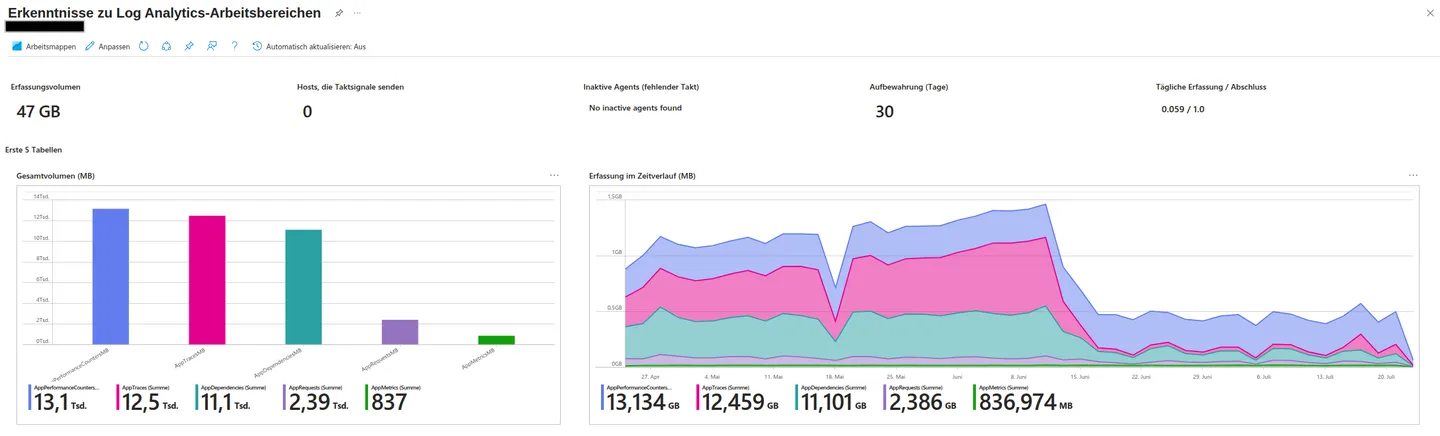 Figure: The last 90 days for the 5 most important App Insights tables. The original Azure portal screenshots in this case study retain their German interface and labels.
Total number of events over 90 days:
| PerformanceCounters | Traces | Dependencies | Requests | Metrics |
|---|---|---|---|---|
| 13.1 thousand | 12.5 thousand | 11.1 thousand | 2.39 thousand | 837 |
Usage sorted in ascending order:
| Usage | Size |
|---|---|
| AppPerformanceCounters | 13.13 GB |
| AppTraces | 12.45 GB |
| AppDependencies | 11.09 GB |
| AppEvents | 7.97 GB |
| AppRequests | 2.38 GB |
| AppMetrics | 0.84 GB |
| AppExceptions | 0.52 GB |
| Total | 48.38 GB |
| Price (EUR 2.358/GB) | ~EUR 114 |
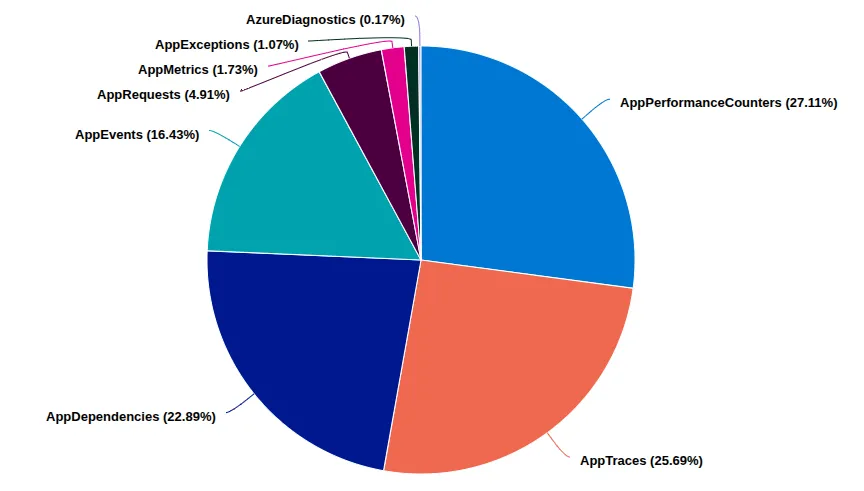 Figure: Percentage distribution of the App Insights tables.
Tables that need optimisation:
- AppPerformanceCounters
- AppTraces
- AppDependencies
- AppEvents
Diagnostic settings
No settings present.
Assumption about when data reduction started
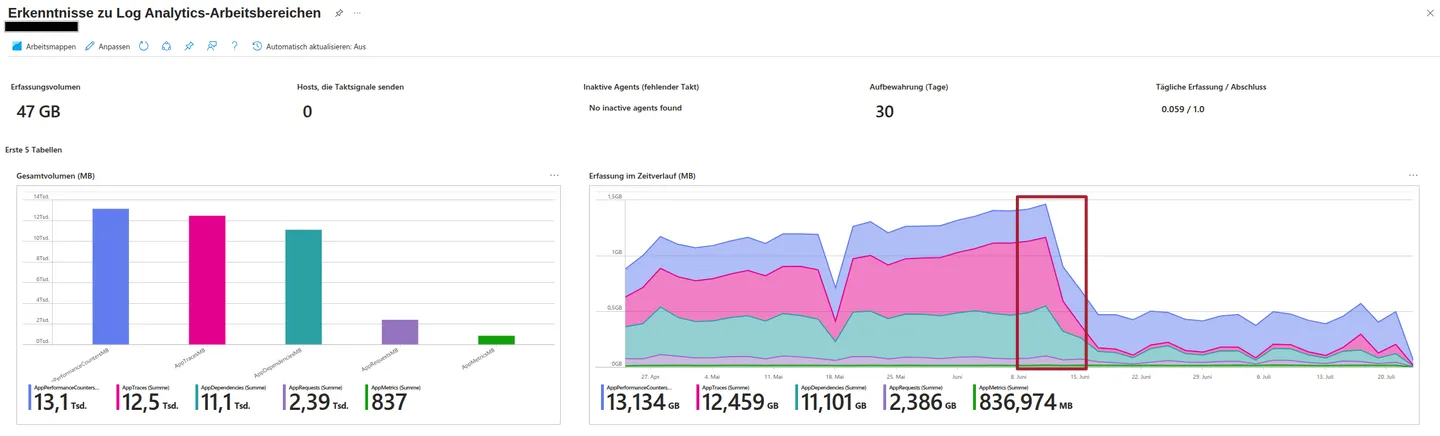 Figure: Timing of a suspected cost optimisation measure.
From 12 June, measures were taken to store less App Insights data. The Log Analytics daily cap may have been set to 1 GB/day to reduce data volume immediately.
Querying the Dependencies table over 90 days
// KQL query for the Dependencies table
dependencies
| where timestamp >= startofday(ago(90d))
| summarize sum(_BilledSize) by operation_Name
| render barchart
Figure: Extract of 1000 entries that are billed and incur costs.
| Endpoint | Bytes | GB |
|---|---|---|
| POST Container/GetContainerToken | 2292837247 | 2.14 |
| POST Api/GetCurrentToken | 1137856923 | 1.06 |
| GET User/GetByToken | 331878311 | 0.31 |
| POST /connect/token | 114822388 | 0.11 |
| GET Api/ValidateToken | 82888776 | 0.08 |
| GET User/GetByEmail | 35483689 | 0.03 |
| POST User/GetByToken | 34820436 | 0.03 |
| POST Tenant/GetRelations | 20524160 | 0.02 |
| … | … | … |
Figure: Grouped data extract of 1000 entries, with GB rounded to 2 decimal places.
Summary of the telemetry data
- Cost analysis of the API endpoints responsible for the highest data volumes and costs.
- Optimisation potential because frequent data collection for API endpoints such as
POST Container/GetContainerTokenis not always necessary and could be reduced. For development teams, however, it remains interesting and useful for analysing application behavior. - A period limited to 90 days to inspect current data and identify trends in which API endpoints are called particularly often.
- Billing transparency because the KQL analysis aggregates with the
_BilledSizefilter. This is important for cost control and forecasting.
This detailed data analysis can support dashboards for continuous monitoring. Alerts can be configured when individual API endpoints produce unusually high traffic in a short period and therefore incur costs. It can also prompt code reviews to improve expensive API endpoints.
QA environment
Log Analytics
- Resource:
dev-demo-analytics-log - Location: France Central
- Price per GB: EUR 2.358 (as of 23 July 2025)
App Insights
- Resource:
qa-demoapp1andqa-demoapp2 - Location: West Europe and Germany West Central
Visualisation over a 90-day period
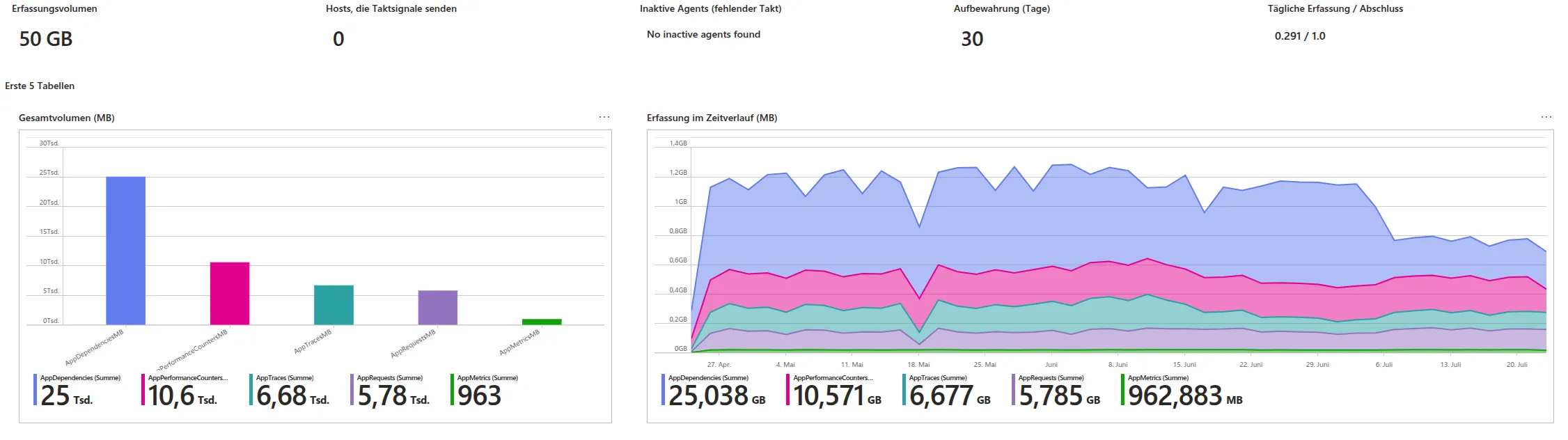 Figure: The last 90 days for the 5 most important App Insights tables in the QA environment.
Dashboard
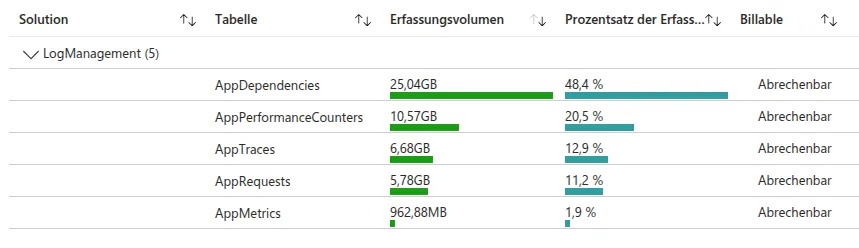 Figure: Dashboard of billable App Insights tables sorted by GB.
Data extracted from the dashboard
| Solution | Table | Ingestion volume | Percentage | Billable |
|---|---|---|---|---|
| LogManagement | AppDependencies | 25.04 GB | 48.4% | Billable |
| LogManagement | AppPerformanceCounters | 10.57 GB | 20.5% | Billable |
| LogManagement | AppTraces | 6.68 GB | 12.9% | Billable |
| LogManagement | AppRequests | 5.78 GB | 11.2% | Billable |
| LogManagement | AppMetrics | 962.88 MB | 1.9% | Billable |
Cost calculation (price: EUR 2.358 per GB, as of 23 July 2025):
| Table | Ingestion volume | Volume (GB) | Cost (EUR) |
|---|---|---|---|
| AppDependencies | 25.04 GB | 25.04 | 59.04 |
| AppPerformanceCounters | 10.57 GB | 10.57 | 24.92 |
| AppTraces | 6.68 GB | 6.68 | 15.75 |
| AppRequests | 5.78 GB | 5.78 | 13.63 |
| AppMetrics | 962.88 MB | 0.963 | 2.27 |
| Total | 49.03 | 115.61 |
Note: 962.88 MB = 0.963 GB (1 GB = 1024 MB).
Calculation: cost per table = volume (GB) multiplied by EUR 2.358.
Total cost = sum of all individual table costs.
Telemetry data over 90 days
| Table | Trend | Daily ingestion |
|---|---|---|
| AppTraces (1) | ||
| 2025-04-25 | Down | 19 MB |
| AppRequests (1) | ||
| 2025-04-25 | Down | 5 MB |
| AppDependencies (20) | ||
| 2025-05-06 | Down | 181 MB |
| 2025-05-13 | Down | 181 MB |
| 2025-07-07 | Down | 131 MB |
| 2025-07-08 | Down | 122 MB |
| 2025-07-09 | Down | 131 MB |
| 2025-07-10 | Down | 131 MB |
| 2025-07-11 | Down | 133 MB |
| 2025-07-12 | Down | 132 MB |
| 2025-07-13 | Down | 121 MB |
| 2025-07-14 | Down | 130 MB |
| 2025-07-15 | Down | 132 MB |
| 2025-07-16 | Down | 134 MB |
| 2025-07-17 | Down | 123 MB |
| 2025-07-18 | Down | 112 MB |
| 2025-07-19 | Down | 128 MB |
| 2025-07-20 | Down | 125 MB |
| 2025-07-21 | Down | 126 MB |
| 2025-07-22 | Down | 132 MB |
| 2025-07-23 | Down | 132 MB |
| 2025-07-24 | Down | 124 MB |
| AppPerformanceCounters (1) | ||
| 2025-07-24 | Down | 40 MB |
Summary of the 90-day telemetry data
- A general “Down” trend is visible from beginning to end, indicating an overall decline in daily data ingestion.
- Less activity or application usage.
- Cost optimisation measures such as enabled sampling or SDK configuration.
- AppDependencies is notably high and regularly shows large data volumes that incur costs.
- Other tables are unremarkable and store relatively little data.
Findings from the DEV and QA environments
Optimise data ingestion
- Filter at the source using Data Collection Rules and table transformations to collect only relevant metrics and logs from App Insights and Log Analytics, including only necessary columns where appropriate. This reduces data volume, minimises stored data and lowers costs.
- Recommended action: yes.
- Enable sampling for App Insights to prevent unnecessarily large amounts of telemetry data being collected: Requests, Dependencies, Traces, PerformanceCounters and Metrics.
- Recommended actions:
- Enable sampling.
- Advanced sampling:
- Enable adaptive sampling for spikes through the SDK, not in the portal.
- Rule out duplicate data collection in code as an active measure.
- Adjust the host.json file when using Azure Functions:
- logging.applicationInsights.samplingSettings
- logging.logLevel
- Use the SDK and disable automatic data collection:
- Rename the InstrumentationKey or do not set it as a variable.
- Install and configure the SDK and control collection of genuinely business-critical data. This has the highest savings potential.
- Recommended actions:
- In general, regularly check which applications or services store particularly large amounts of data and whether filtering or adjustments can reduce that volume further.
- Limit time intervals for different services such as dashboards, workbooks, Power BI reports, KQL queries in the Basic plan, DCRs and availability tests in Azure Monitor.
- No action required because there is no access to inspect these services, and no availability tests that could incur costs are active.
Log Analytics daily cap
Daily cap: This measure is currently active in DEV and QA at 1 GB/day.
Problem: As soon as Log Analytics reaches the storage limit of 1 GB/day, for example at 13:00, no further logs from any other services are stored. This includes services I currently cannot see due to permissions, such as Container Insights and Activity Logs. These data do not appear anywhere and are lost. All these services compete to store their data.
Consequence: Data loss can cause monitoring blind spots. Dashboard visualisations show data only up to a certain limit. Missing data in a measurement period can prevent alerts from firing correctly, even when the trend actually shows a critical increase and an alert would have been necessary.
Recommendation: Treat this only as a last option when data is sent to Log Analytics without control. A better option is enabling sampling, plus adaptive sampling through the SDK, in the individual services so that only a fraction of the data reaches Log Analytics. Where possible, use Data Collection Rules and table transformations as well, or instead, to filter data before it is stored in Log Analytics.
Data retention and recovery strategies
No change is currently necessary because the standard retention periods of 30 or 90 days are already configured for App Insights tables, and no longer retention period is required for compliance reasons.
Nevertheless, choosing the right table plan offers an opportunity to save costs:
- Recommended action:
- Identify tables that can move from “Analytics” to “Basic”. This offers moderate to high savings potential.
Table plan settings
The original table plan documentation describes the available plans.
The following table adds Azure Log Analytics prices for the France Central region.
| Features | Analytics | Basic |
|---|---|---|
| Best suited for | High-value data for continuous monitoring, real-time detection and performance analysis | Medium-importance data for troubleshooting and incident response |
| Supported table types | All table types | Azure tables supporting Basic logs and DCR-based custom tables |
| Ingestion cost | EUR 2.358 per GB | EUR 0.697 per GB |
| Interactive retention, maximum 2 years | EUR 0.103 per GB/month | No, fixed at 30 days |
| Long-term retention, up to 12 years | EUR 0.028 per GB/month | EUR 0.028 per GB/month |
| KQL query price | Included | Not included, EUR 0.00697 per GB of scanned data |
| Query capabilities | Full query capabilities | Full Kusto Query Language (KQL) on one table, extendable with data from an Analytics table using lookup |
| Alerts | Supported | Supported, simple log alerts |
| Insights (Workbooks) | Supported | No visualisations |
| Dashboards | Supported | Supported, query costs for dashboard refreshes are not included |
| Data export | EUR 0.140 per GB | EUR 0.140 per GB |
| Search jobs | EUR 0.00697 per GB of scanned data | EUR 0.00697 per GB of scanned data |
| KQL | Supported | Limited to a single table |
| Restore | EUR 0.140 per GB per day (minimum 2 TB, 12 hours) | EUR 0.140 per GB per day (minimum 2 TB, 12 hours) |
| Total retention period | Up to 12 years | Up to 12 years |
Summary of table plans
- Analytics: For critical logs that need long-term, repeated analysis through complex queries.
- Basic: For high log volumes with a short query window, meaning 30 days of interactive retention, and little or no need for cross-table analysis.
Identified App Insights tables
| Table | Plan | Retention | Switch to Basic possible | DCR |
|---|---|---|---|---|
| AppPerformanceCounters | Analytics | 90 days standard | No | Not present |
| AppTraces | Analytics | 90 days standard | Yes | Not present |
| AppDependencies | Analytics | 90 days standard | No | Not present |
| AppMetrics | Analytics | 90 days standard | No | Not present |
Important App Insights tables
| Table | Meaning | Stored information | Cost optimisation recommendation |
|---|---|---|---|
| PerformanceCounters | Application performance indicators | Performance metrics such as CPU, RAM, disk and network | Collect only relevant metrics, use sampling and reduce retention |
| Traces | Application log messages | Logs, debug information, warnings and errors | Adjust log levels, filter unnecessary logs and use sampling |
| Dependencies | Application dependencies on external services | Calls to external services, databases and APIs | Capture only critical dependencies, use sampling and filters |
| Metrics | Custom or standard metrics | Custom events and interactions | Capture only critical dependencies, use sampling and filters |
In summary:
These tables represent the different telemetry data App Insights collects to monitor and analyse application performance, reliability and usage in the DEV and QA environments.
Transformations with KQL
Moving individual table plans from “Analytics” to “Basic” can introduce additional costs for the data being analysed. It is therefore important to aggregate only the data necessary for each visualisation and analysis.
Cost management
- Maintain an ongoing view of both ingestion volume and the period covered by costs in Azure Cost Management to identify optimisation opportunities early.
- Configure budget limits and notifications to avoid cost overruns and react early.
Recommended cost optimisation actions
| Area | Measures | Goal |
|---|---|---|
| Data ingestion | DCR filters, reduced sampling rate, regular reviews, Insights | Minimise data ingestion |
| Data retention | Automatic deletion, archiving, exports, flexible retention | Reduce storage costs |
| Transformations | Selective collection, data filtering/aggregation | Lower costs, improve data quality |
| Cost management | Cost monitoring, budgets/alerts, commitment tiers, workspace strategy | Transparency, control and continuous optimisation |
Optimise data ingestion
Goal: Reduce data volume at the source.
Recommendations:
- Use Data Collection Rules and table transformations to filter relevant telemetry data.
- Enable sampling in App Insights, including adaptive sampling through the SDK.
- Avoid repeated data collection, for example duplicate SDK initialisation.
- Optimise LogLevel in
AppTraces: lessDebug, moreWarn/Error.
Analyse API endpoints and apply targeted filters
Goal: Reduce data costs by analysing high-frequency API endpoints.
Recommendations:
- Automate KQL analyses, grouping by
_BilledSize. - Review endpoints such as
POST /GetContainerToken. - Provide regular feedback to development teams for targeted optimisation.
Evaluate and change table plans
Goal: Reduce storage costs through appropriate table plans.
Recommendations:
- Move tables to the Basic plan.
- Lower costs: EUR 0.697/GB instead of EUR 2.358/GB.
- Keep the Analytics plan when cross-table queries and alerts are needed.
Daily caps only as a last resort
Goal: Avoid monitoring gaps.
Recommendations:
- A daily cap of 1 GB/day is currently active, but should not be a permanent solution.
- Risk: once the cap is reached, all further logs are discarded, which can cause blind spots.
- A better solution combines sampling, adaptive SDK sampling and DCRs.
Cost management and transparency
Goal: Identify and control costs early.
Recommendations:
- Set up Azure Cost Management alerts and budgets.
- Create dashboards to monitor costs and volume.
Further optimisations
- Disable the InstrumentationKey or fully configure the SDK.
- Adjust time intervals, for example for dashboards.
- Collect less data.
- Store only relevant data.
- Raise awareness within teams.
- Adjust host.json in Azure Functions:
logging.applicationInsights.samplingSettingslogging.logLevel
Conclusion
The cost optimisation analysis for Azure Log Analytics and Azure Application Insights in the DEV and QA environments showed that targeted measures can deliver substantial cost savings.
Implementing Data Collection Rules and table transformations, enabling sampling methods and evaluating table plans significantly reduced ingestion and storage costs, resulting in estimated cost savings of around 70% for the client.