Full-text search with Astro and Pagefind
Learn how we use Pagefind and Astro to deliver fast, static full-text search without expensive backend infrastructure.

Contents
- Backend search as a cost driver
- Static search with Pagefind and Astro
- An isolated search sandbox
- Benefits of this implementation
- Faster, safer and free
Backend search as a cost driver
Adding full-text search to an enterprise project often leads to complex systems such as Elasticsearch or expensive SaaS solutions such as Algolia. These approaches offer many features, but incur high costs and architectural overhead.
The result is unnecessary latency from API calls, complicated infrastructure and dependence on external servers. For content that rarely changes, this overhead is inefficient.
Static search with Pagefind and Astro
Rather than relying on a backend, we use a static approach for our website. We combine the Astro framework with Pagefind.
Pagefind was designed specifically for static websites. Indexing takes place entirely during the build. Later, the browser only loads small, optimized data fragments. No server is needed at runtime.
An isolated search sandbox
We built an isolated sandbox for search. This lets us develop and test the search function separately from the main content without putting the portal’s stability at risk.
The sandbox is interactive and lets you try different search terms. Its illustrative interface is retained in German.
Statischer Such-Workflow im Browser
Der Quellcode Ihrer Website.
Scannt statisches HTML nach dem Build.
Schnell, lokal und sicher.
dist/*.htmlLOCAL_ONLYINDEX BEREIT0 KB GELADENThe architecture connects static content with dynamic functionality. We can start searches directly from their context. For example, a trigger in the header component can launch a search with a predefined term such as
The technical workflow is straightforward and moves complexity into the build.
Here is how it is implemented:
1. Build integration
We add Pagefind directly to the CI/CD process. The command in package.json is:
{
  "scripts": {
    "build": "astro build && pagefind --site dist"
  }
}
2. Indexing after the build
After the build, Pagefind crawls the finished HTML files and creates the search index.
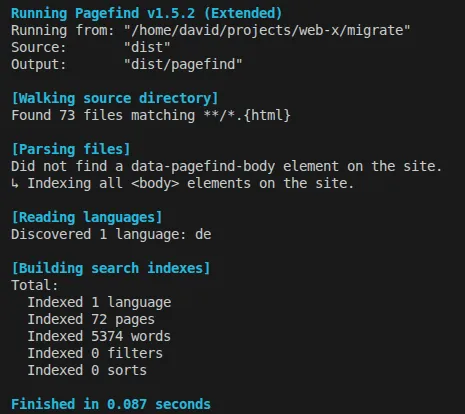 Figure: Pagefind indexing. It processes 72 pages in less than a tenth of a second. The original screenshot is retained.
Pagefind automatically generates all required index files in dist/_pagefind.
Manual indexing for local checks
To try search locally without running the entire CI process, you can run npx pagefind manually at any time:
npx pagefind --site distThis is particularly useful for quickly generating a new index after content changes and inspecting the results immediately in the browser.
3. Add search to the frontend
Although Pagefind offers a ready-made Standard UI, I use the newer Component UI on this site. It is now the developers’ primary recommendation because it supports declarative embedding and complete customization. The search function in my header is a direct example.
Declarative embedding with Component UI
In my header component, I embed search through Web Components. This cleanly separates the trigger from the search module:
<!-- Search Button Trigger -->
<pagefind-modal-trigger compact hide-shortcut></pagefind-modal-trigger>

<!-- Pagefind Search Modal -->
<pagefind-modal reset-on-close></pagefind-modal>
Traditional embedding with Standard UI
Alternatively, a JavaScript snippet can load search directly into an element. This is useful when decentralized control through components is not needed:
<link href="/_pagefind/pagefind-ui.css" rel="stylesheet" />
<script src="/_pagefind/pagefind-ui.js"></script>

<div id="search"></div>

<script>
  window.addEventListener('DOMContentLoaded', (event) => {
    new PagefindUI({
      element: '#search',
      showSubResults: true,
      translations: {
        placeholder: 'Search for a technology or project...',
      },
    });
  });
</script>
4. Filter relevant content
We use HTML attributes to keep navigation and legal notices out of the results:
<nav data-pagefind-ignore>
  <!-- These links are not indexed -->
</nav>

<main data-pagefind-body>
  <h1>Architecture deep dive</h1>
  <!-- Only this region is indexed -->
</main>
Benefits of this implementation
This approach delivers measurable benefits for this project:
- No licence fees: Pagefind is open source. There are no fees for external search engines or SaaS subscriptions.
- Minimal operating costs: I do not need expensive search instances or containers. Only minimal static storage costs, measured in cents, remain.
- Extreme scalability: Because the index consists of static files, search scales almost without limit through CDNs without overloading a backend.
- Maintenance-free: There are no database schemas, cluster scaling or backend security patches to manage.
- High speed: Search responds in milliseconds because it runs locally in the browser and only loads small index files.
Faster, safer and free
The combination of Astro and Pagefind is the ideal choice for my architecture:
- Global availability and scaling: The search index resides on the CDN. It scales automatically with traffic, without additional costs or server load.
- Extreme performance: Queries are answered in milliseconds.
- Zero euro licence fees: As an open-source solution, it eliminates fixed monthly search-service costs entirely.
- User experience: Search responds immediately. This improves usability and helps readers reach their destination faster.